Wir hatten schon einmal eine Frage zur Antwort auf oder-Fragen. Hier nun eine ähnliches Problem, nämlich die Antwort auf eine verneinte Frage:
Frage
Ich liege im Clinch mit Schülern und Kollegen betreffs der Antwort auf verneinte Fragen.
In Ihrer Deutschen Grammatik habe ich (meiner Überzeugung entsprechend) gefunden, dass auf verneinte Fragen die Antwort zur Bestätigung nein lautet, die Antwort zur Verneinung doch. Ich hatte auch keine andere Auskunft erwartet, stehe allerdings mit diesem Regelverständnis bei Schülern und Kollegen weitgehend allein. Allgemeiner Konsens scheint zu sein, dass man auf die verneinende Frage Hast du keinen Hunger? mit ja antwortet, wenn man tatsächlich keinen Hunger hat.
Antwort
Sehr geehrter Herr R.,
zu Ihrer Frage über die Antwortmöglichkeiten bei verneinten Fragen:
Unbestritten ist die Verwendung von doch wenn Widerspruch ausgedrückt werden soll.
Hast du keinen Hunger? – Doch (= Widerspruch: Ich habe Hunger)
Im Allgemeinen gilt, dass die bestätigende Antwort auf eine verneinte Frage nein ist:
Hast du keinen Hunger? – Nein (= Bestätigung: Ich haben keinen Hunger)
So steht es auch auf unseren Grammatikseiten und in anderen Grammatiken. In der Sprachrealität herrscht aber im letzteren Fall einige Verwirrung. Oft wird hier auch die Antwort ja verwendet:
Hast du keinen Hunger? – Ja (= Bestätigung: Ich haben keinen Hunger)
Hier könnten verschiedene Einflüsse eine Rolle spielen. Zum Beispiel:
Das Antwortmuster bei negativen Adjektiven, das sich vom Antwortmuster bei verneinten Sätzen unterscheidet:
Bist du unzufrieden? – Nein (= Widerspruch: Ich bin zufrieden) Bist du unzufrieden? – Ja (= Bestätigung: Ich bin nicht zufrieden)
Bist du nicht zufrieden? – Doch (= Widerspruch: Ich bin zufrieden) Bist du nicht zufrieden ? – Nein (= Bestätigung: Ich bin nicht zufrieden)
Das Antwortmuster bei Vergewisserungsfragen. Eine Vergewisserungsfrage ist keine eigentliche Frage, sondern eine Bitte um Bestätigung (nicht ist unbetont, gut ist betont):
Hab ich das nicht gùt gemacht? – Nein (= Widerspruch: Du hast das nicht gut gemacht) Hab ich das nicht gùt gemacht? – Ja (= Bestätigung: Du hast das gut gemacht)
Es gäbe auch noch andere Erklärungsmöglichkeiten. Klar ist in diesem Zusammenhang nur, dass im Deutschen einige Verwirrung herrscht, welche Antwort man als bestätigende Antwort auf eine verneinte Frage geben soll. Nach der Grammatik des Standarddeutschen (und auch meinem Sprachgefühl) sollte man nein verwenden. Da aber viele Leute – wie Ihre Umfrage zeigt – auch ja verwenden, empfiehlt es sich, bei wichtigen Problemen eine verneinte Fragestellung zu vermeiden. Wenn die Frage schon gestellt ist, sollte man bei der Antwort mehr als nur nein oder ja zu sagen:
Hast du keinen Hunger? – Nein, ich habe keinen Hunger
Debatte um Ersatzfreiheitsstrafe - Obdachlose hinter Gittern: Eine Nacht im Gefängnis kostet 195 Euro
Brandenburgs Linke drängt auf eine Reform der Ersatzfreiheitsstrafe, weil unter den JVA-Insassen fast nur arme Menschen sind. Im Landtag findet die Fraktion Sympathien, aber keine Mehrheit.
Justizvollzugsanstalt in Brandenburg/Havel: Dort suchte die Polizei kürzlich per Hubschrauber nach einem entwichenen Obdachlosen. Quelle: Foto: Bernd Settnik/DPA
Potsdam
Brandenburgs Justizministerin Susanne Hoffmann (CDU) hat Forderungen eine Absage erteilt, das System der Ersatzfreiheitsstrafen zu reformieren. Die Li...
I inherited a project coded in $programming_language when the original developer quit and no one else stepped forward. It is currently hosted on GitHub and has a GPL 3 license.
It's a tool I use every day and I don't want to see it die. I know very little $programming_language and very little GUI programming, so I can't maintain it myself.
How do I go about finding one or more programmers who actually have some time to help out?
I found two or three programmers in the past, but, despite the best intentions, no one has stayed long enough to get a lot done.
This is a question I hear asked quite a bit, so thank you for submitting it to The Queue. As programmers are both in intensely high demand and often have quite a few side projects themselves, getting them to participate in your project can be a challenge. The first suggestion I have for you is to set realistic expectations for participation. Unless you find another programmer who takes a deep interest in the project or desperately needs it for work, it's highly unlikely you'll be able to get someone to just step in as a maintainer. The time, dedication, and responsibility involved in being a maintainer should not be underestimated. That said, here are a few things you can do to ensure people who find your project and are interested in participating have a solid path to becoming regular contributors.
Introduction and messaging
It's critical that your project clearly outline:
what it does,
who it's for,
why it's different,
and when and where it should be used.
These items seem simple and, for someone who has been involved with the project for a while, forgetting that this information may not be obvious to others can be easy. Many projects, especially smaller ones, get overlooked as a result of this information being missing, impossible to find, or difficult to understand. You're using GitHub, so the README.md file is the place for this information. (Outside GitHub a README file serves the same basic purpose.) The information included should be concise, but lengthy enough to clearly articulate the information you feel is important about the project.
Contributing guidelines
You should also create a CONTRIBUTING file (or CONTRIBUTING.md file if you're using Markdown on GitHub) that contains information about actually participating in your project. This is the place for simple step-by-step instructions on cloning, detailed instructions on how the code should be built, any coding standards or formatting standards you may have, information on testing, the process for submitting patches, your pull request and review process, and any other information considered essential for contributing. GitHub puts it well: From a maintainer's point of view, the document succinctly communicates how best to collaborate. And for a contributor, one quick check of this file verifies their submission follows the maintainer's guidelines.
Easy and well-defined initial contributions
One of the most difficult decisions a new potential contributor likely will have is finding where to start their participation. Telling them to jump right into the issue tracker may be easy, but having a list of small, well-defined tasks can substantially reduce the friction in getting new contributions.
Have a call to action. Tasks such as minor UI issues, translations, and small simple fixes will encourage people to take the time to get familiar with your codebase to see whether participating is a good fit for them (and for you). Once someone has taken the time to delve into your code, taking the next step to submit a minor patch doesn't seem like such a large one. A few patches later and that person may be both willing and able to take on a larger task, such as a more substantial feature request. From there it's possible they will become a long term committer.
Code quality and documentation
Programmers tend to participate in projects that interest them for one reason or other. Another prerequisite for continued participation is working on a codebase that makes sense to them. Writing well-structured code that has quality documentation will help others get up to speed more rapidly and will ensure you don't lose too many contributors in the "getting familiar with your codebase" portion of the process.
Foster initial contributions
Especially for smaller projects, letting patches slip through the cracks can be easy. For new contributors, getting no response, even if it was due to a busy schedule and not poor code quality, is unlikely to lead to further participation. Additionally, although not all contributed code is going to be of acceptable quality, how you reject code in many ways sets the tone for the enter project. Having current contributors who are willing and able to identify and mentor potential contributors in a constructive way is critical here. Snarky hostile responses aren't going to result in higher quality code from a potential contributor, but rather in them contributing to a different project.
Look further than online
With fantastic tools such as GitHub available, it's easy to forget that potential contributors can be found elsewhere as well. Conferences, local user meet ups, and other meatspace options can be terrific resources here and should not be forgotten or overlooked.
The reality is that getting contributors for a new or small open source project isn't easy. Making sure you get the fundamentals correct is critical though. Having clear guidelines on how to participate, easy tasks to get started with, and a welcoming constructive feedback loop will foster the contributions you do get and will help ensure you get consistent sustainable contributors.
Syncthing is a P2P (peer to peer) network that allows you to keep your files synchronised.
Syncthing aims to replace services such as: Dropbox, Google Drive and OneDrive. By putting the user in control of their own data. Syncthing enables the user to set up multiple 'nodes' which can communicate with eachother.
A node can be, your personal computer, a work machine, a machine in another location or even a central server.
Syncthing will encrypt all data when it is being transported to your other nodes. Nodes don't just have to be on your local network, you can sync between nodes over the internet. Encrypted, of-course.
Use case
I use Syncthing as my storage solution. I have a 'central' Syncthing server which lives in my loft. I quoted 'central' as the loft server is just a node, there's nothing special about it other than having a backup cron job running on it.
With the multiple nodes set up, I can choose folders that can sync. I'm currently writing this blog post on my personal laptop, which is syncing to my blog server as I type (well, hit save).
You can then specify which nodes, the folder you created, to be shared with. So in my case, I am sharing my blog with my personal laptop and my 'central' server, just to backup my data.
I'm going to show you how to set up Syncthing in the context of my setup. So having that 'central' server. You could use a cheap Raspberry PI to set up your 'central' server.
My 'central' server is running Ubuntu Server, so the following instructions are tailored for Debian distros.
Firstly, you need to install the correct package locations in order to download Syncthing correctly.
The next thing you want to do is enable Syncthing as a system service. This will allow start-up on boot and continuous execution in the background of your server.
So this will start Syncthing on your Ubuntu Server. Problem is, Ubuntu Server is usually headless. So at the moment there is no way to access the Syncthing GUI to configure your folders and nodes.
The way we can change this to allow local access from another machine is to change the serve address.
When you ran the Syncthing command above, a syncthing folder was created under your /home/username/.config folder.
Inside that will be a config.xml file.
Open this with a text editor, something like Vim or Nano. It really doesn't matter.
Within config.xml there is a section that looks like this:
Under the address attribute, you need to update the ip address. 0.0.0.0 will allow all machines on your local network to be able to access the Syncthing GUI.
For Syncthing to work, you need to set up another Syncthing node. Simply follow the above steps again on another machine, or jump to the bottom of this page quickly and install Syncthing on Windows or Android
Accessing the Syncthing GUI
Now with all that running, you should be able to access the Syncthing GUI by navigating to:
http://{your_server_ip}:8384
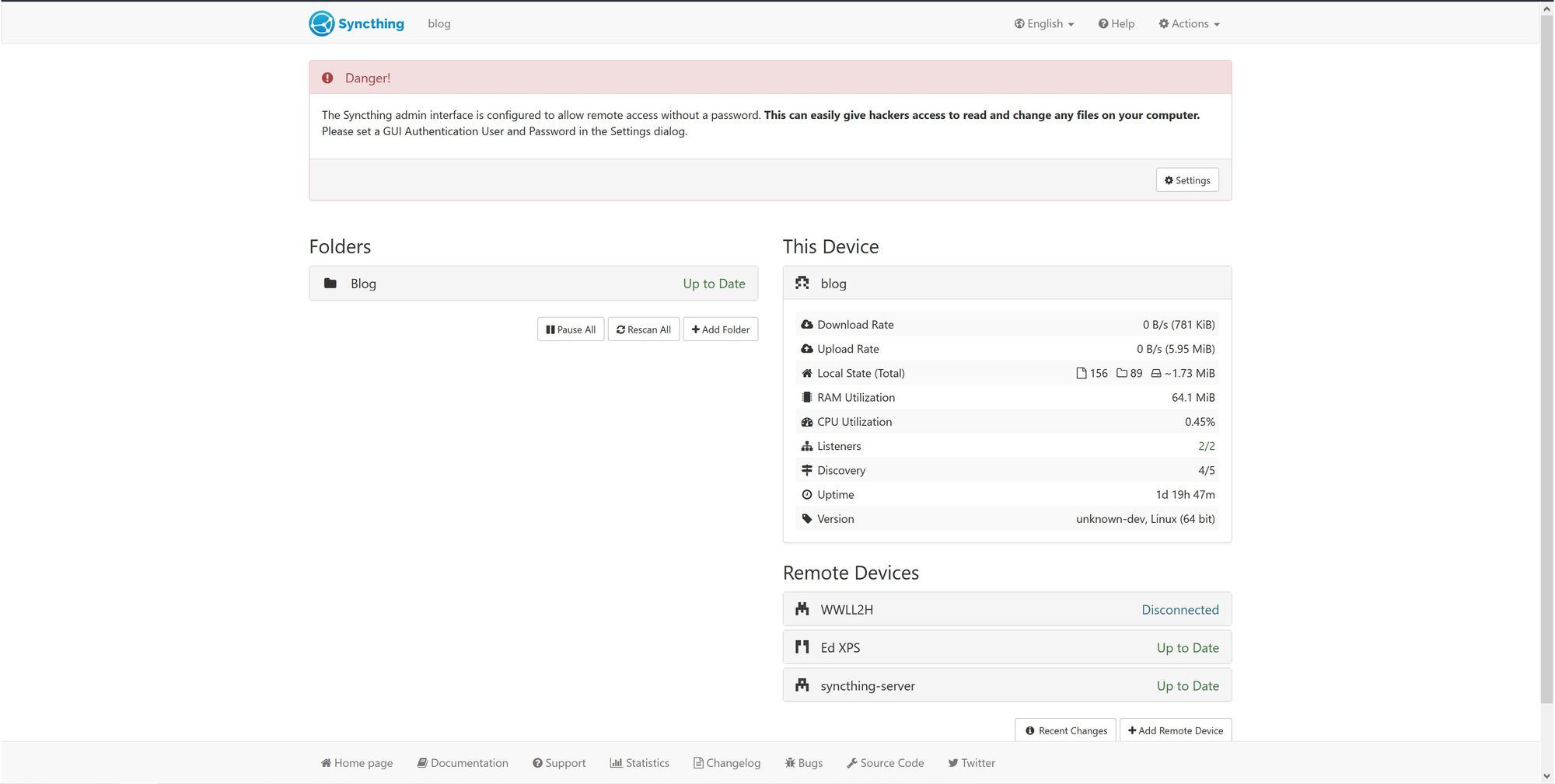
Once entering your ip-address or hostname, you should be presented with something that looks like this
Adding Devices (nodes)
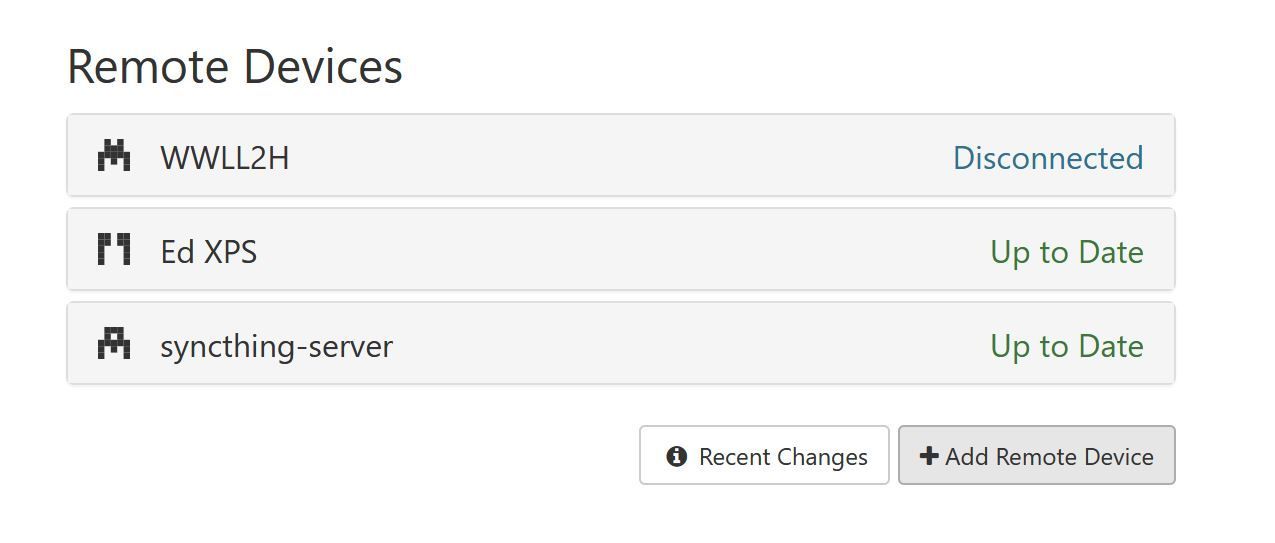
To add a new Device, select the Add Remote Device button, which will open up a new popup window.
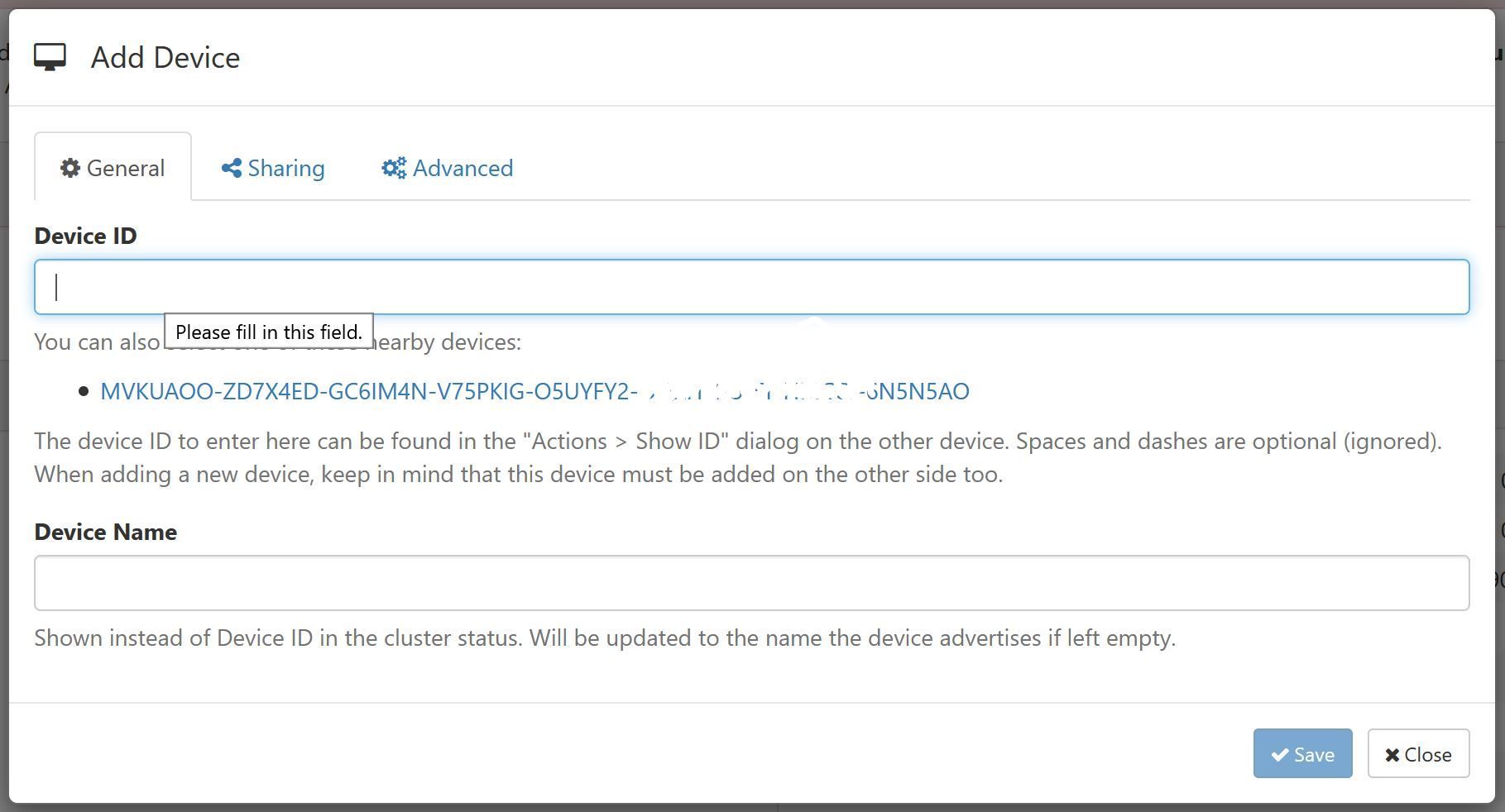
The Add Device window will pop up. You may notice that there is an existing ID which is available to click. Syncthing automatically polls your local network looking for existing nodes, depending on how your other nodes are set up, you may or may not see this.
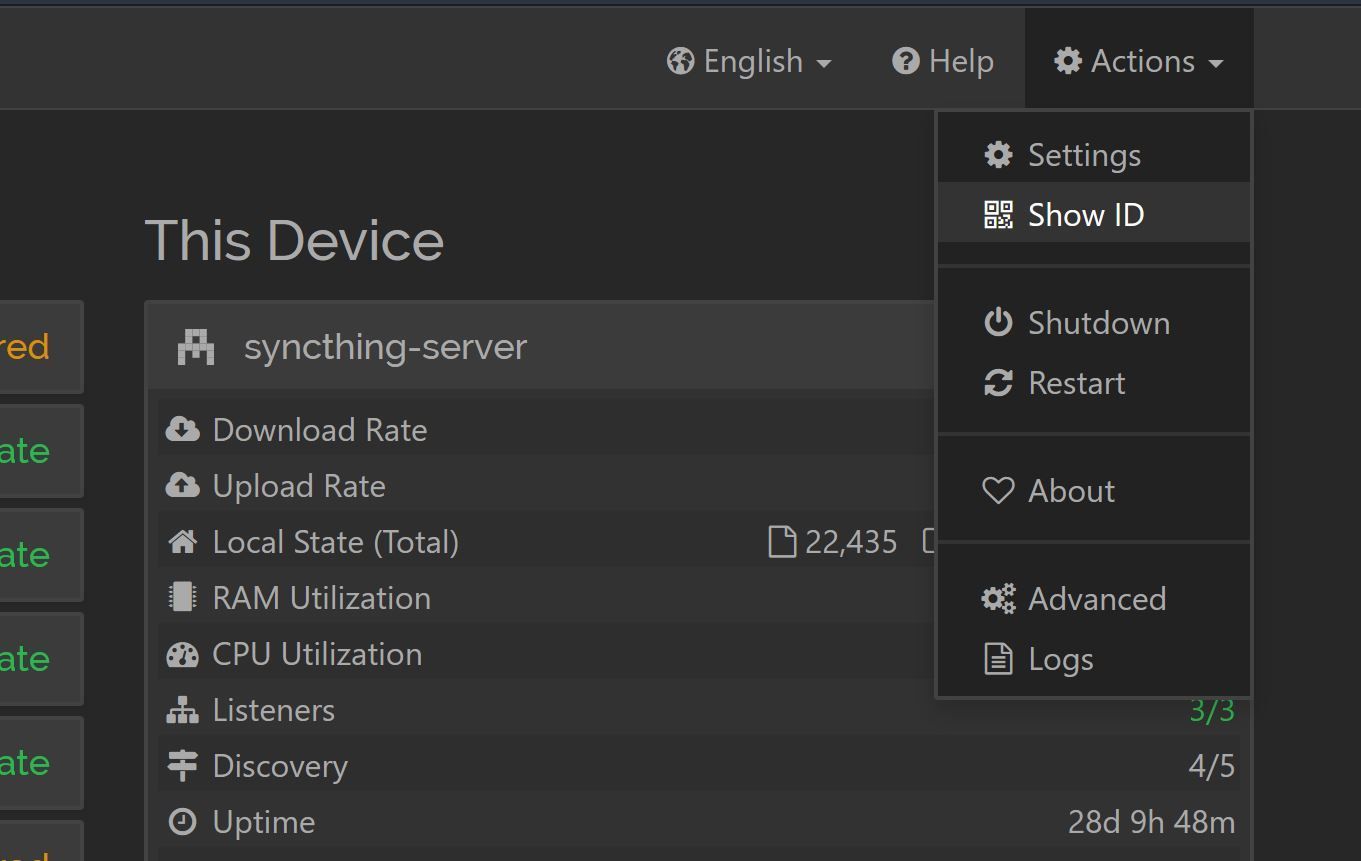
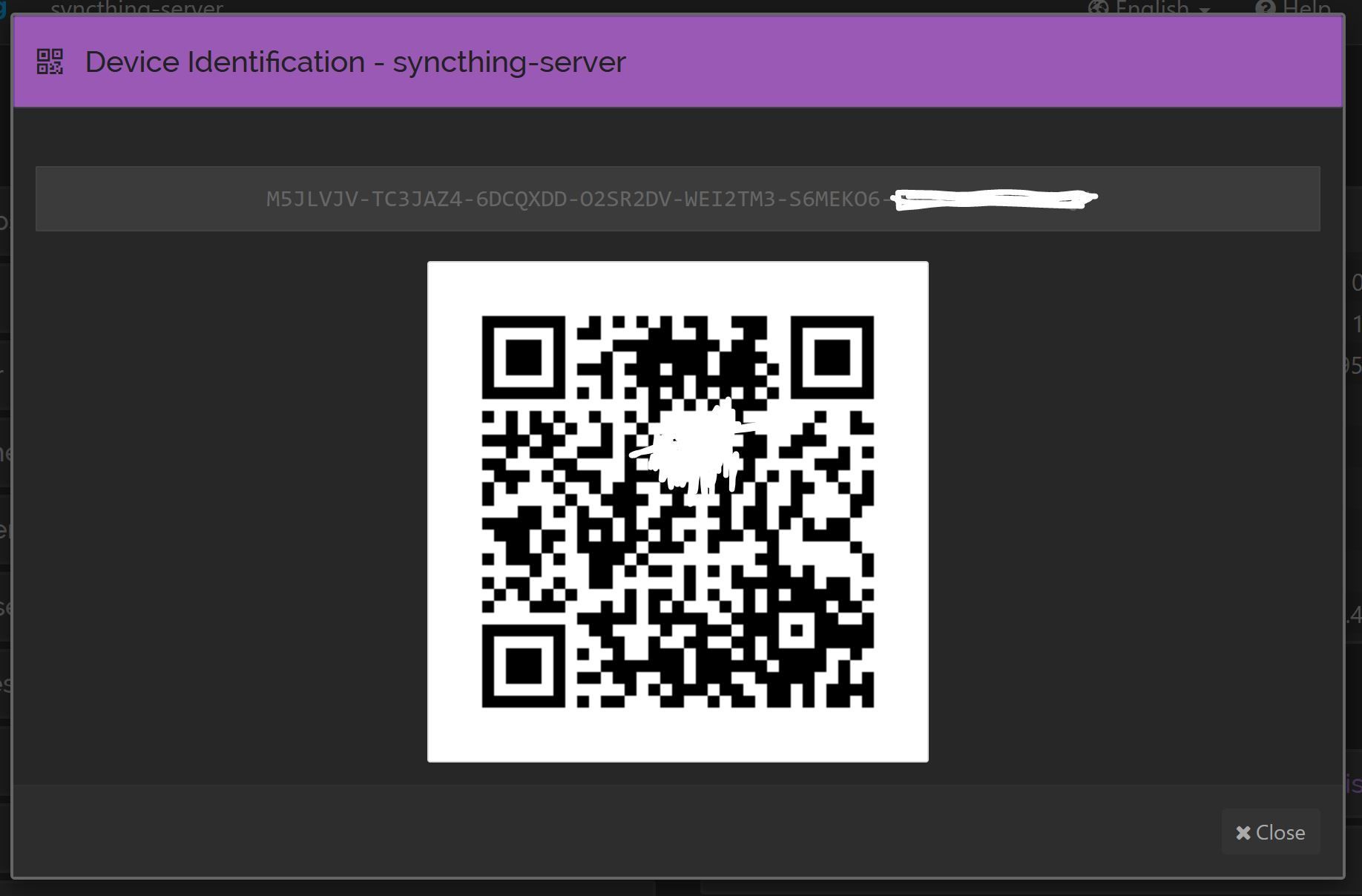
If you don't see the ID, simply navigate to your other Syncthing node (let's call it Syncthing B), select Actions > Show ID from the top right menu.
Here you will see the Syncthing B Syncthing ID. Copy this ID or use the QR code to scan the ID. And paste the ID into the Device ID field back on the Syncthing A node.
Complicated at first, but once you get the hang of Syncthing, it'll be easier.
Click Save on that window and it'll add Syncthing B as a new device.
Sharing Folders
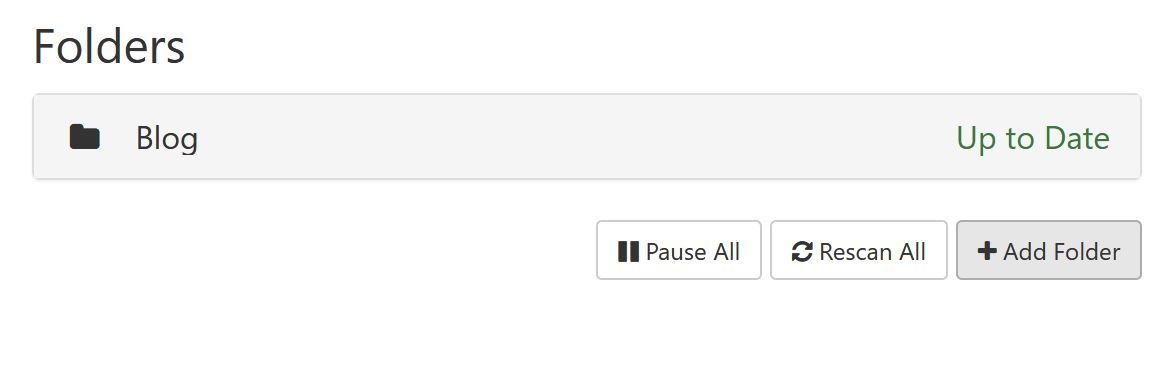
Now, on Syncthing A click the Add Folder button on the left hand side of the screen. This will pop up with a new window.
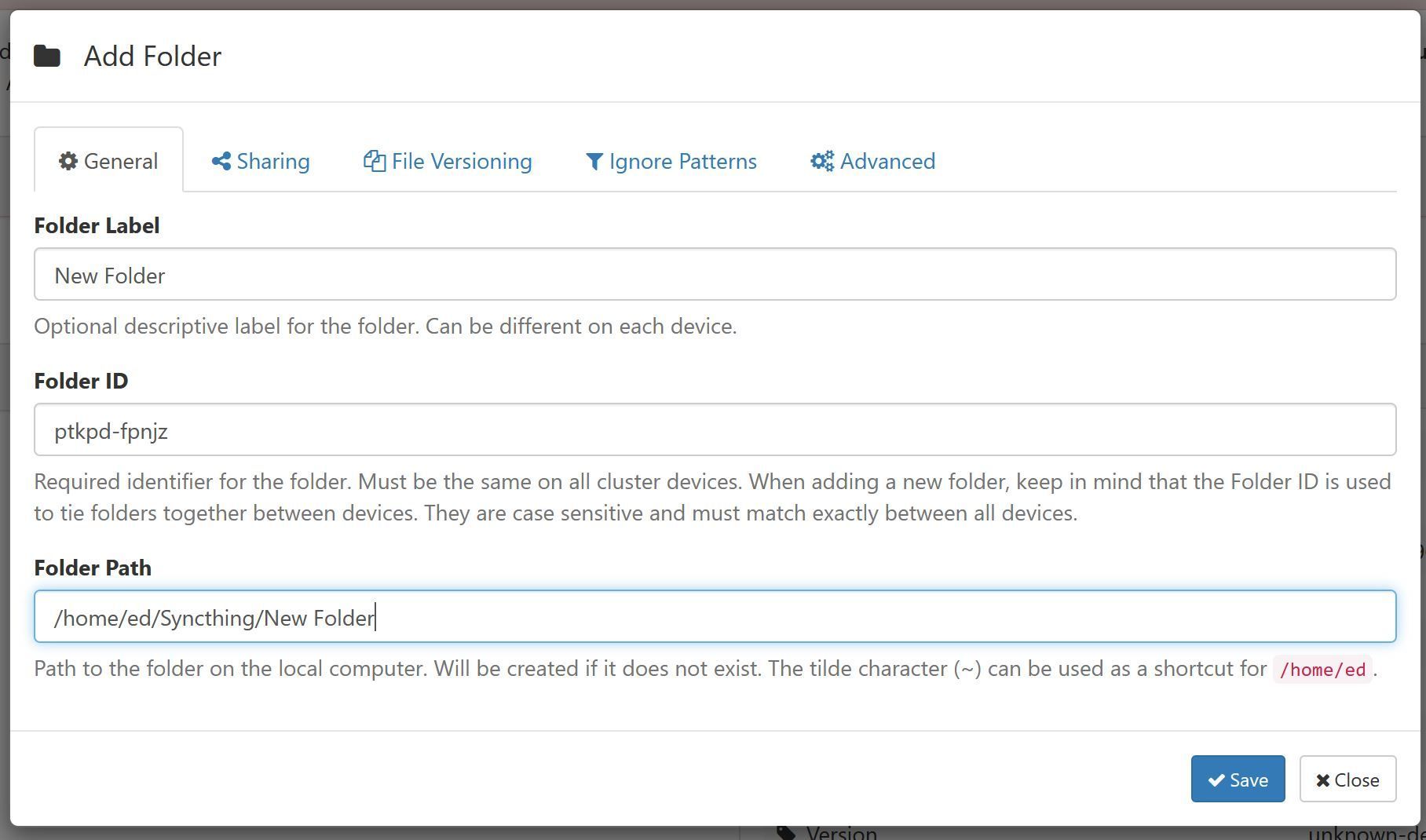
Give your new folder a name and change the path to be relative to the folder on your machine that you want to backup. I tend to keep all of my synced folders under /home/ed/Syncthing just so that I know where everything is.
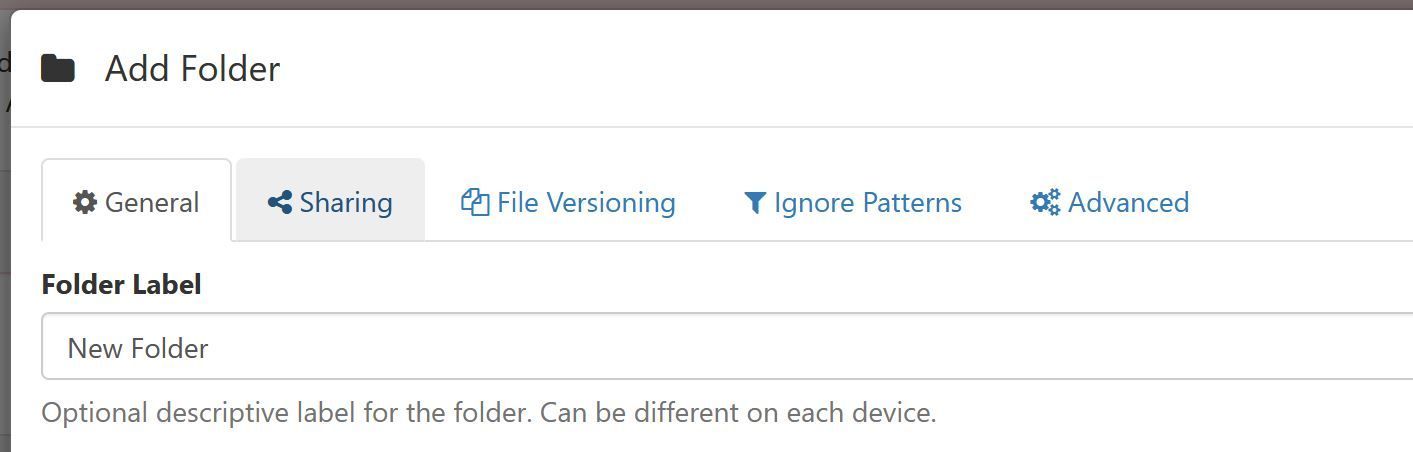
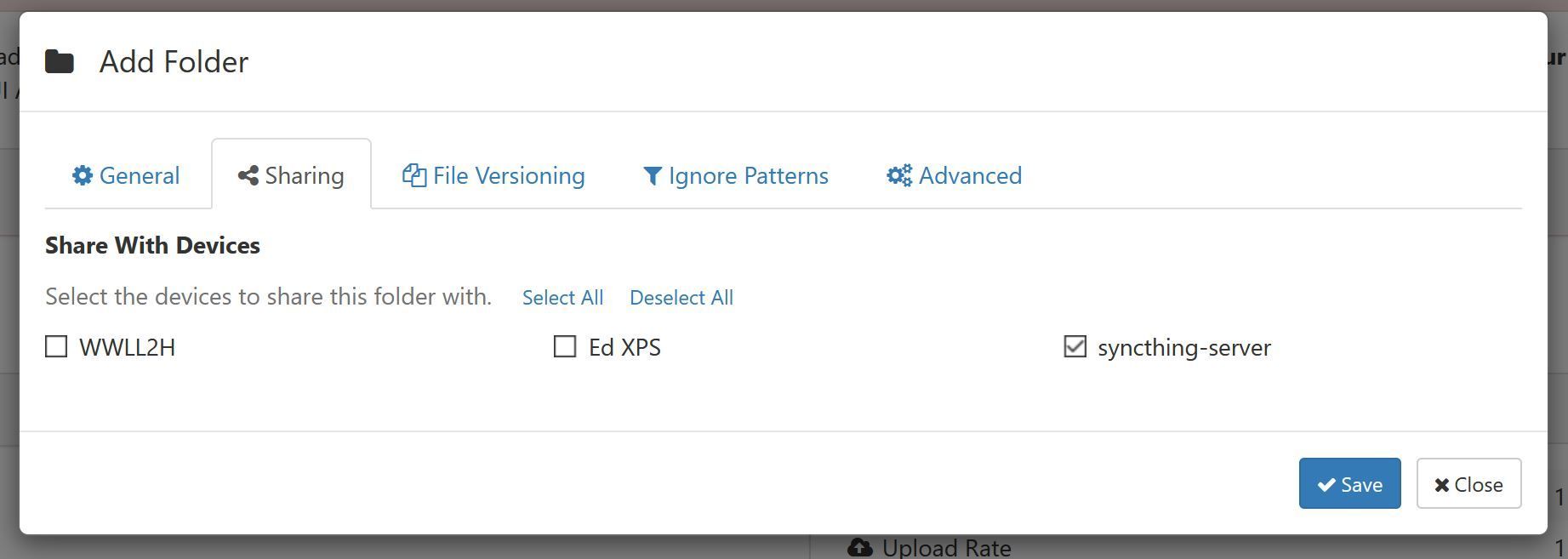
Navigate to the Sharing Tab
Here are the devices you have added. I have a couple more than you probably will just because this is my existing system. Simply select the device that you added and click Save
Accepting the new device
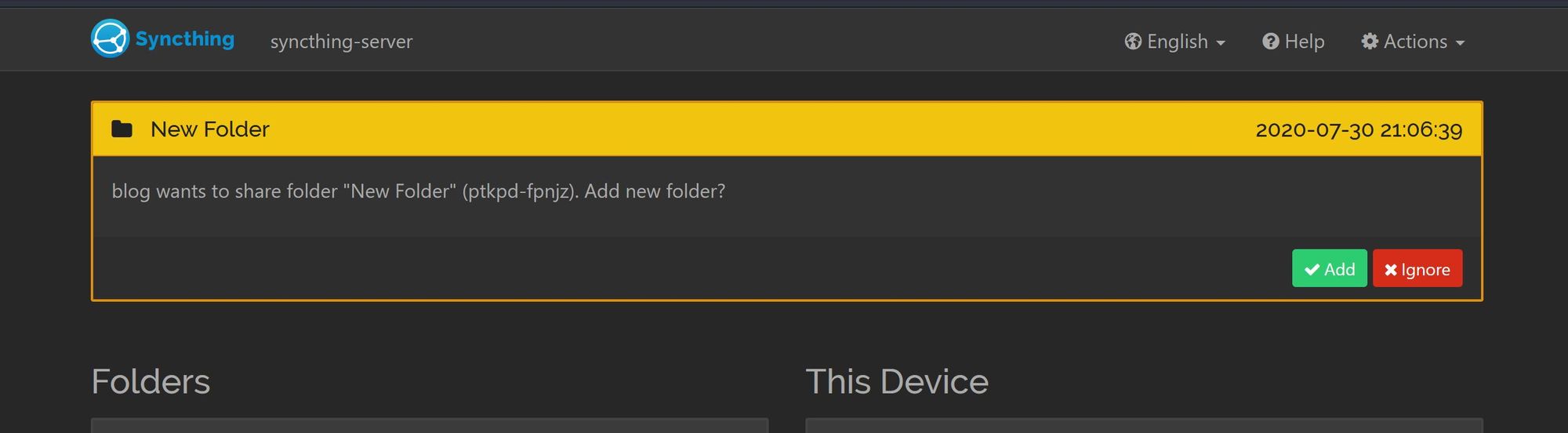
Next, on Syncthing B, there will be a new call-to-action at the top of the page. This is a request for you to allow Syncthing A to add Syncthing B as a device. Simply click Add.
Then, shortly after accepting the new device, you'll get another popup which is Syncthing A requesting to share the folder you have just create.
Click Add
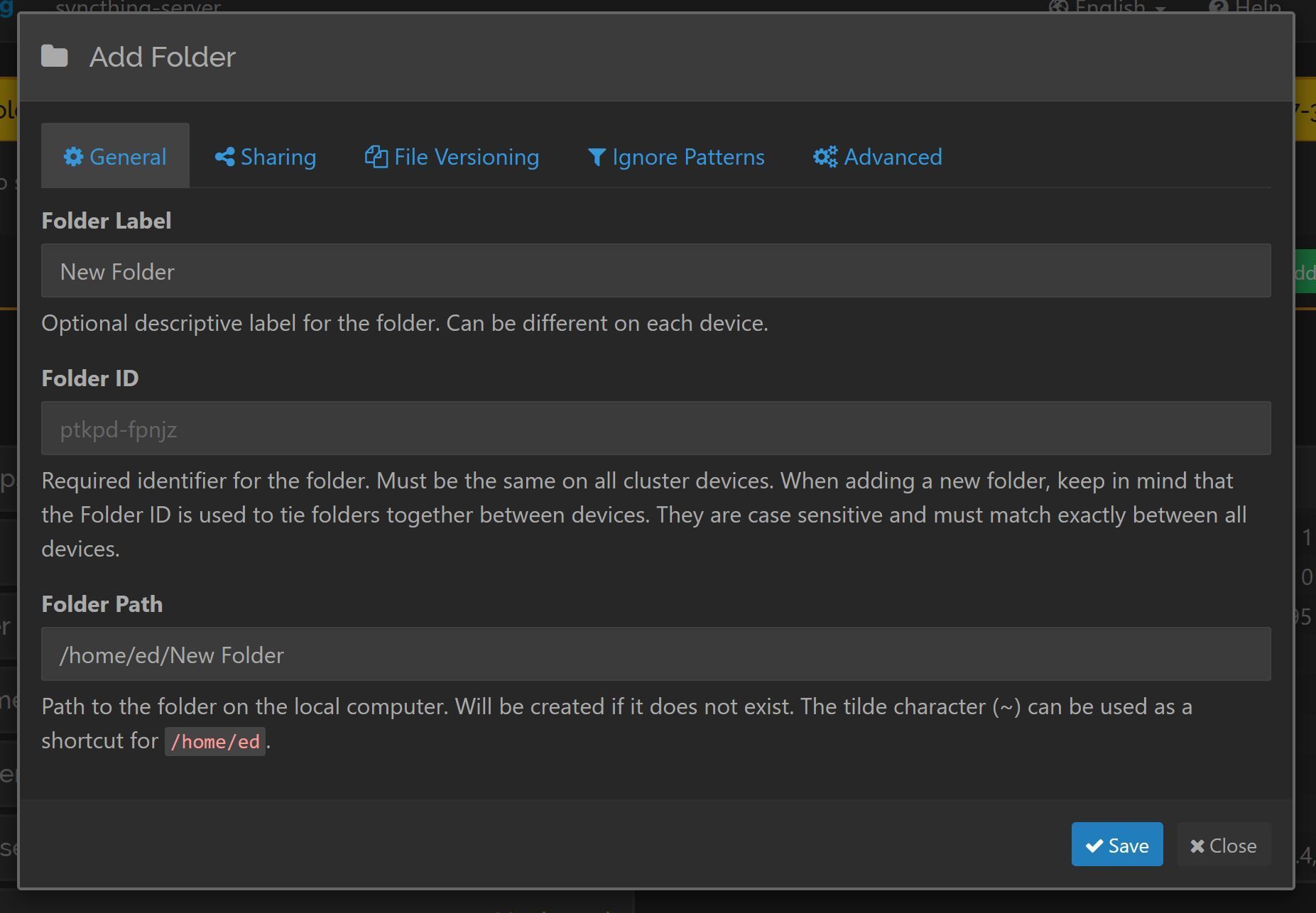
Finally, you now need to choose a location for this folder to sync to.
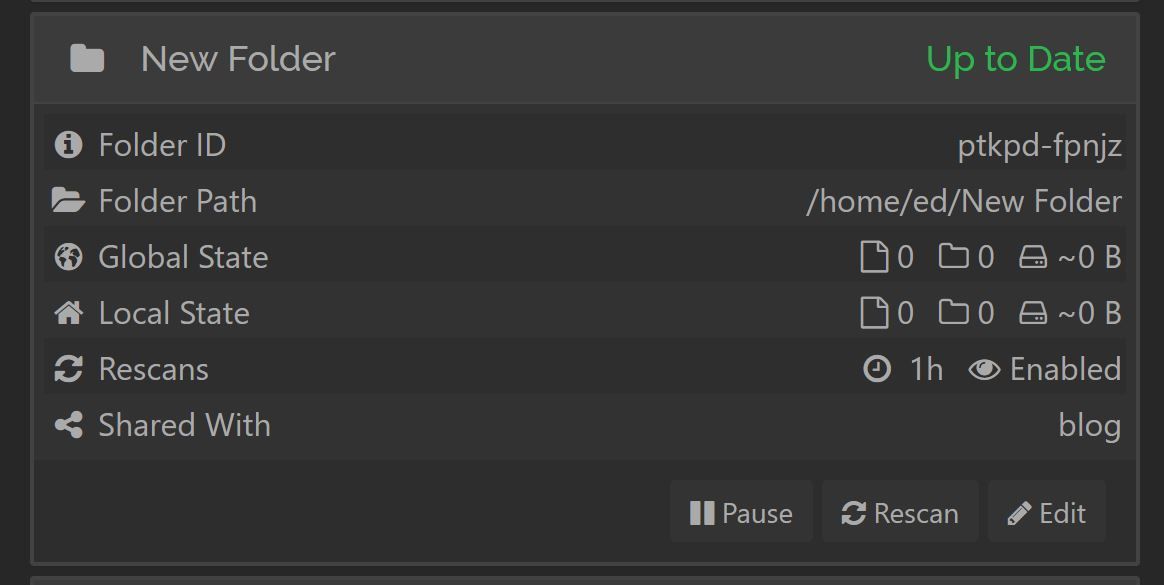
Click Save and that's it.
Testing
Feel free to test by adding a file to the Syncthing A folder and wait for the global state to change on Syncthing B
Setting up a node on another Linux machine is as simple as just copying the steps above. If the machine isn't headless, such as a desktop machine, you can ignore the part about changing the ip address in the config.xml
Setting up another node on a Windows machine
Setting up on Windows is relativley easy. You can either go the manual route of downloading the Syncthing exe. Or by opting for the simple solution which is installing SyncTrayzor which adds a system tray icon and runs Syncthing in the backgroud automatically.
Setting up another node on an Android device
Syncthing has apps in the Play Store and F-Droid which can be downloaded and installed.
Thanks
Let me know if this has helped in the comments below.
Also, feel free to check out my other blog posts here
This post contains affiliate links, meaning we may receive a small commission on purchases made through links in this post. At no extra cost to you 😊
We hate Ads! They don't respect your privacy.
Would you consider supporting us on buy me a coffee? Your support really helps to keep the costs down with running the blog
Subscribe to our free Monthly Newsletter, featuring our latest posts. Straight to your inbox. No spam ever (we hate it as much as you do).
Vor einigen Tagen tat ich etwas, das ist so ungewöhnlich, das es scheinbar noch fast niemand vor mir gemacht hat: Ich habe mir die Liste aller Bundesbehörden mit ihren Kontaktdaten auf der Plattform service.bund.de angesehen und mich über jede einzelne der dort gespeicherten Institutionen informiert.
Einträge auf service.bund.de
Das klingt vielleicht erstmal komisch — sich knapp 800 Stellen des Bundes manuell anzusehen. Ich entwickle momentan Software, um das Verhalten von Behörden teilautomatisiert auszuwerten. In dem Kontext ist es also verständlich, dass ich mich damit beschäftigen muss, was für Behörden es in Deutschland gibt und was deren Aufgaben sind.
Moooment, “Bundesservice Telekommunikation”?! Davon sollte ich, als Person, die sich wirklich viel mit Verwaltungsdigitalisierung beschäftigt, doch eigentlich schon einmal gehört haben? Habe ich aber nicht. 🤔
Beschreibung des Bundesservice Telekommunikation
Und auch die Beschreibung auf der Behörde liest sich ziemlich komisch. Aber so, als müsste man von denen schon mal gehört haben, wenn man was mit Digitalisierung in der Bundesverwaltung zutun hatte.
Also mal schnell googeln.
Oh. Nur Treffer auf der Website “service.bund.de” und bei FragDenStaat, die vor einigen Jahren die Behördenliste von service.bund.de für ihre eigene Behördendatenbank kopiert haben. FragDenStaat liefert dabei auch ein erstes Indiz, dass diese Behörde schon länger existieren muss.
Eine kurze Rückfrage beim FragDenStaat-Team bestätigt das: service.bund.de wurde das erste Mal 2011 gescraped und dabei auch bereits der “Bundesservice Telekommunikation” importiert.
Einfach mal anrufen
Adresse Screenshot von service.bund.de
Eine Internet-Recherche lieferte also keine Erklärung, was diese Behörde genau tut. Und was macht man in so einem Fall? Man ruft da einfach mal an. Und was geht ran? Ein Fax 📠 🤔.
Wenn die Faxnummer die Telefonnummer ist, dann ist doch bestimmt die Telefonnummer die Faxnummer? 💡
Es klingelt. Niemand hebt ab.
Ok, vielleicht mögen sie — als Bundesservice Telekommunikation — keine Telefone. Verstehe ich. Also einfach mal eine E-Mail schreiben.
Ihre E-Mails funktionieren leider auch nicht.
E-Mail Fehlermeldung
Das war der Punkt, an dem ich wirklich stutzig wurde.
Also habe ich das gemacht, was ich immer mache, wenn ich nicht mehr weiter weiß. Ich twittere:
Eigentlich hatte ich an der Stelle erwartet, dass sich innerhalb von 5 Minuten einer meiner Followers aus der Bundesverwaltung zu Wort meldet und das alles aufklärt.
Passierte aber nicht.
Allerdings ist jemand einfach mal bei der Büroadresse, die auf service.bund.de steht, vorbeigelaufen und hat die Schilder fotografiert.
Die Behörde existiert also schon mal und ist nicht nur ein Fake Eintrag in einer Datenbank.
Einfach mal nachfragen
Parallel zu meinem Tweet verschickte ich noch eine Anfrage nach dem Informationsfreiheitsgesetz an das Bundesverwaltungsamt. Die betreiben nämlich das Portal service.bund.de und ich dachte, die Kommunikation wie dieser Eintrag zustande kam, zwischen dem BVA und dem BST, könnte vielleicht spannend sein.
Völlig unverhofft traf bereits 8 Tage später eine Antwort auf FragDenStaat ein. Und kurz danach eine Nachricht, dass ich diese doch bitte wieder löschen soll.
Warum bloß?
Antwort vom 13. Dezember
Ok, eine E-Mail mit der Geheimschutzbeauftragten des BVA “Marga-Lena Dobner” in CC, in der ignoriert wird, dass es sich um eine IFG-Anfrage handelt, meine E-Mail also wie eine Bürgerinnenanfrage beantwortet wird. Und ich einfach mit “wenden sie sich doch an den Bundesservice Telekommunikation” weggeschickt werde (was bei einer IFG-Anfrage so nicht möglich ist).
Weil es mir schon häufiger passierte, dass meine IFG-Anfrage fälschlicherweise wie eine Bürgeranfrage beantwortet wurde und sich das in der Regel relativ schnell telefonisch klären ließ, habe ich einfach mal den zuständigen Mitarbeiter angerufen. Dieser wirkte von der Situation sehr gestresst — geradezu panisch — und verwies mich einfach nur an seine Vorgesetzte. Die Vorgesetzte meinte, dass da gerade alles schief gelaufen sei und dass Ich von ihnen noch eine richtige Antwort im Rahmen des Informationsfreiheitsgesetzes bekommen würde. Die Geheimschutzbeauftragte in CC der E-Mail gibt aber vermutlich schon einen guten Hinweis darauf, wie diese Antwort ausfallen wird.
Diese Antwort bekam ich am 10. Januar dann tatsächlich:
Allerdings wurde nun auch die Domain bst.bund.de registriert und der Bundesservice Telekommunikation ist jetzt unter der E-Mail-Adresse “poststelle@bst.bund.de” erreichbar.
Bereits im Dezember meldete sich außerdem ein Mitarbeiter der Bundestagsabgeordneten Heidi Reichinnek bei mir und bot an, dass sie vom parlamentarischen Fragerecht Gebrauch machen könnten, um Informationen zur Behörde zu bekommen. Das ist deswegen cool, weil die Bundesregierung darauf innerhalb von einer Woche antworten muss.
Eine einfache Frage, um mehr über den BST herauszufinden, wäre z.B. nach dem Budget der Behörde, dem Organigramm oder wie viele Menschen dort arbeiten, …. zu fragen.
Denn laut Bundesregierung hätte es in den letzten 5 Jahren kein Budget für den Bundesservice Telekommunikation gegeben.
Das ist natürlich keine zufriedenstellende Antwort. Deshalb fragte Heidi Reichinnek einfach nochmal nach. Diesmal war die Frage allerdings nicht auf einen Zeithorizont beschränkt. Und prompt kam auch hier wieder die Antwort, dass der Bundesservice über kein Budget verfügt.
Das ist sehr interessant. Eine Bundesstelle ohne Budget. Da fragt man sich natürlich: Wie konnten die überhaupt irgendwas bezahlen? Hoffen wir auf jeden Fall mal, dass ihnen nicht bald die Telekom den Telefonanschluss oder das Internet abstellt. Dann könnten sie ihre nagelneue E-Mail-Adresse ja gar nicht benutzen.
Auch interessant ist, wer die Anfrage der Bundesregierung beantwortet hat. Herr Staatssekretär Engelke war nämlich bis Ende 2021 unter anderem für die öffentliche Sicherheit, Bundespolizei, Radikalisierung und die Zentralabteilung im BMI verantwortlich. Seit Anfang 2022 ist er allerdings nur noch für die “Bad Bank” des BMI — die Heimatabteilung — zuständig.
Mir wurde aus mehreren Quellen berichtet, dass man zum BST nichts im Intranet des BMI finden kann. Deshalb würde ich ausschließen, dass Herr Engelke diese Anfrage im Rahmen seiner Verantwortlichkeiten über die Zentralabteilung — also die Verwaltung der Verwaltung — des BMI beantwortet hat, es also dort keinen Bundesservice Telekommunikation gibt. Bleibt also noch öffentliche Sicherheit — damit kennt er sich aus, er war nämlich mal beim Verfassungsschutz — und die Bundespolizei.
BSI Organigramm stand 2021
Nur zur Sicherheit habe ich auch nochmal per IFG beim BMI eine Liste aller dem BMI nachgeordneten Behörden angefragt. Und natürlich habe ich auch in jedem einzelnen Organigramm dieser Behörden nach dem Bundesservice Telekommunikation gesucht. Und bin nicht fündig geworden.
Zusammengefasst
Wir haben hier also eine Behörde gefunden, die es gibt. Die Büros und mittlerweile so eine E-Mail-Adresse hat — was aber vermutlich 10 Jahre dauerte, denn auch 2018 versuchte FragDenStaat sie einmal erfolglos zu kontaktieren. Eine Behörde, die irgendwas mit Kommunikation macht — so zumindest der Name. Die man aber telefonisch nicht erreichen kann.
Eine Behörde, die scheinbar dem Innenministerium nachgeordnet ist. Die allerdings in keinem öffentlichen Organigramm irgendeiner anderen Behörde auftaucht. Und für die ein Staatssekretär im BMI die parlamentarischen Anfragen beantwortet. Ein Staatssekretär, der sonst für den Verfassungsschutz und die Bundespolizei zuständig war.
Eine Behörde, über die man auf Twitter schreiben kann, sie sei eine Tarnorganisation eines Geheimdienstes. Und niemand widerspricht.
Was heißt das jetzt?
Erstmal nichts. Also doch, es ist alles sehr sehr komisch. Eine Behörde, für die sich keine Ansprechpartnerin, kein Budget, keine Website — ja bis vor kurzem nichtmal eine funktionierende E-Mail-Adresse auffinden ließ. Das ganze erinnert mich sehr an die getarnten Außenstellen des BND.
Obwohl der BND im Jahr 2013 verkündete, seine Außenstellen zu enttarnen, gibt es diese auch weiterhin. Darauf wies der damalige Bundestagsabgeordnete Ströbele bereits im Jahr 2014 hin. Es scheint so, als hätte der BND damals nur die Außenstellen enttarnt, bei denen sowieso schon bekannt war, dass diese zum BND gehörten. Und alle anderen — die blieben geheim.
Ein Geheimdienst bleibt ein Geheimdienst. Und die damals vom BND ausgerufene Transparenzoffensive waren nur leere Worte.
Jetzt wurde der BST allerdings auf service.bund.de als nachgeordnete Behörde des BMI gelistet. Der BND ist dem Bundeskanzlerinnenamt unterstellt. Das deutet für mich also eher darauf hin, dass der BST eine Tarnorganisation des Verfassungsschutzes, der ZITiS oder des Terrorabwehrzentrums— dessen offizielle Anschrift in unmittelbarer Nähe des BST liegt — sein könnte. Die sind nämlich alle dem BMI unterstellt. Und der Verfassungsschutz war ja sogar Engelke, der die parlamentarische Anfrage für das BMI beantwortete, direkt unterstellt.
Insgesamt glaube ich mittlerweile jedenfalls nicht mehr, dass es sich dabei um eine reguläre Behörde handeln könnte, das hätten wir schon irgendwie bemerkt.
Ich schreibe den Artikel heute mit all den Erkenntnissen, die ich im letzten Monat gesammelt habe. Ich möchte euch dazu ermutigen, auch am Thema zu recherchieren. Bestimmt haben ich und andere Menschen, die sich bisher mit dem Thema beschäftigt haben, irgendwas übersehen. Und vielleicht löst so ein Artikel als Treffer bei Google für die Stichwörter “Bundesservice Telekommunikation” ein bisschen mehr Druck bei den Behörden aus 😉.
Sobald es neue Erkenntnisse gibt, ergänze ich den Artikel.
Aktuell gibt es noch folgende offene IFG-Anfragen zum Themenkomplex
Wie einfach diese Recherche bis hierhin war, zeigt auch einmal wieder, warum es so wichtig ist, als Zivilgesellschaft Open Source Intelligence gegen den Staat zu betreiben. Also öffentliche Informationen von Behörden strukturiert auszuwerten.
Ich selbst arbeite momentan an einem Tool, um Organisationsstrukturen von Behörden maschinenlesbar zu machen (API) und dann verschiedenste öffentlich zugängliche Informationen mit Entitäten darin zu verknüpfen. Also z.B. IFG-Anfragen, Vergaben, Jobausschreibungen, … direkt mit dem jeweiligen Referat, aus dem diese stammen, zu verknüpfen. Damit hoffentlich bald eine Recherche wie “Welches Referat auf Bundesebene beschäftigt sich gerade mit Distributed Ledger Technologien?” oder “Welche Referate haben in den letzten Jahren an Gesetzesentwürfen zur Patientenakte zusammengearbeitet?” mit den richtigen Suchbegriffen nur noch Minuten statt Tage dauert.
Und vielleicht findet man dabei auch noch die ein oder andere Tarnbehörde eines Geheimdienstes.
Updates:
12–01–2021 19:15: Nach Rückfragen Hinweis auf den Eintrag auf x500.bund.de und in den offenen Daten hinzugefügt
Wenn ihr meine zivilgesellschaftliche Arbeit zu Themen wie z.B. Verwaltungsdigitalisierung, Sicherheitsforschung und OpenData unterstützen wollt, dann könnt ihr das via 💸Patreon💸 tun. Und wenn ihr bei meiner nächsten Recherche live dabei sein wollt, dann folgt mir auf Twitter.