When you click a link on Twitter, you go through a Twitter shortlink first and then to the place you want to go. When you click on a link that points to one of Twitter’s competitors, by complete coincidence I am sure, there’s a delay. For The Markup, Jon Keegan, Dan Phiffer and Joel Eastwood ran the tests. You can also try it with your own URLs.
<Cadey> There was an A/V glitch with the recording, my slides were intended to be black and white, but they somehow came out as purple and green. This couldn't be fixed even when trying several HDMI cables. If this becomes an issue I may re-record this talk in my home studio.
Good morning everyone! Say this happens to you: you've been coding nonstop on something you want to share with your friends and it works on your MacBook. You want it to stay up when your MacBook goes to sleep or you get on a plane or something, and all you have to do is the easy task of putting it into production. It's just simple, right?
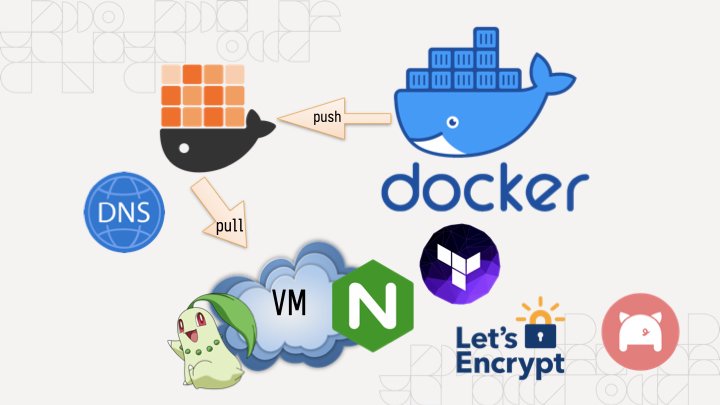
Just add a Dockerfile, they say! So you do that and then you have a Docker image that you can push to your target machine and then you find out that you can't just push it from machine to machine, you have to push it to a registry.
So you make an account on the Docker hub only to find out that their rate limits are very aggressive so you have to move to something like GHCR and aggressively cache all your images there so you don't run afoul of the comically small Docker Hub rate limits which will block your attempts to deploy it to your cloud provider of choice.
So you do that and you pull this on a VM running on someone else's computer, and then you need to figure out the other fun part:
You need to configure nginx. Of course it uses its own bespoke configuration language that no other program on the planet uses (this is an unfortunately common pattern in our industry) so it's even more googling for that. But then you realize you need to configure the real final boss of the internet:
DNS. It's never DNS until it's always DNS. So you install the artist formerly known as Terraform, lego, and provision your DNS and HTTPS certificates (because of course nginx doesn't just natively have this support in anno dominium two thousand and twenty three like any sensible HTTP reverse proxy should). And then you're finally done. It's taken you an hour to hack up the service and a whole 8 hours to research and implement everything to deploy it. This is madness. Why do we have to put up with this?
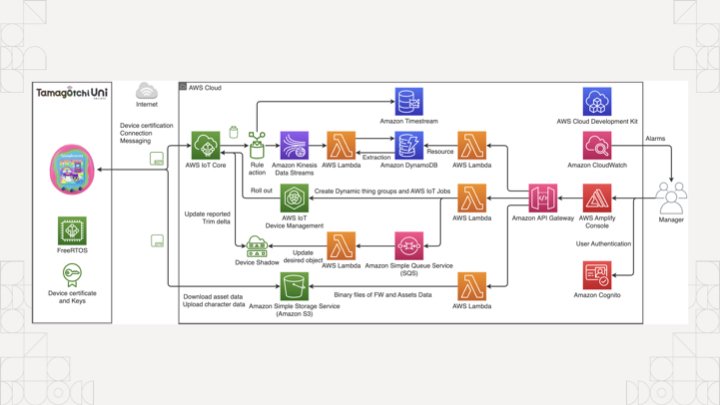
The koolaid runs deep in the cloud too, if you're not careful you'll end up accidentally making an entire event sourcing platform with an unrealistic amount of complexity to manage something as simple as a tamagochi. You're just trying to make an HTTP service show up on the internet, you don't need to know what an ALB, EKS, ECS, IAM, or PFA is.
Of course, complain about this online and a certain tangerine community funded by big YAML will decry that you should use Kubernetes to simplify all this down to "simple" and "easy to understand" things, conveniently ignoring that they use a string templating language for structured data.
There has got to be something simpler, right? What if you didn't have to deal with nearly any of that? What if you could just push and run your binary on a home server and then access it? No dealing with the cloud. No dealing with security groups or IAM or DNS or HTTPS or any of the slings and arrows of outrageous investment. What if you could just describe the state of the system you want instead of going three layers deep into a side of devops hell that you will never return from unscathed?
This is the real value of NixOS. Today I'm going to show you how to turn an arbitrary Go program into a NixOS service and then I'll expose it to the world thanks to Tailscale Funnel. This means you can link it to your group chat of friends and restore balance to the force. Or whatever it is you zoomers do in group chats.
All that said, let me introduce myself. I'm Xe Iaso, I write that one blog that you keep finding when you google Nix and NixOS stuff. I'm a writer, gamer, philosopher of chaos magick, and have a critical blogging addiction.
Today I'm going to cover a few core things so you can make your own NixOS modules: I'm going to cover what a NixOS module is and why you should care, the parts of one, how to make your own, and then I'm going to tempt the demo gods by doing a live deployment to a virtual machine on my MacBook.
Before I get started though, let's get some exercise in. Raise your hand if this is your first exposure to Nix and/or NixOS.
(About half the room raises their hands)
Alright, thanks.
Raise your hand if you've ever used it before.
(The other half of the room raises their hands)
That's about what I expected.
How about if you have it installed on a server at home?
(The same people raise their hands)
Okay, okay, I see.
How about if you're one of the lucky few where your employer uses it in production?
(Only a few of those people raise their hands)
Oh, wow, okay. That makes sense. You can lower your hands now.
Just so we're on the same page, Nix is a package manager that lets you declare all of the inputs for a program and get the same output from the build process.
One of the main ways that Nix stands out from the crowd is the idea that package builds are functions. They effectively take in inputs, use them against some instructions, and then either return a package or the build fails due to an error. Because there were no other options at the time, Nix uses its own programming language also named Nix to define packages.
Remember, Nix was the result of lamentations at the state of software and this was the result.
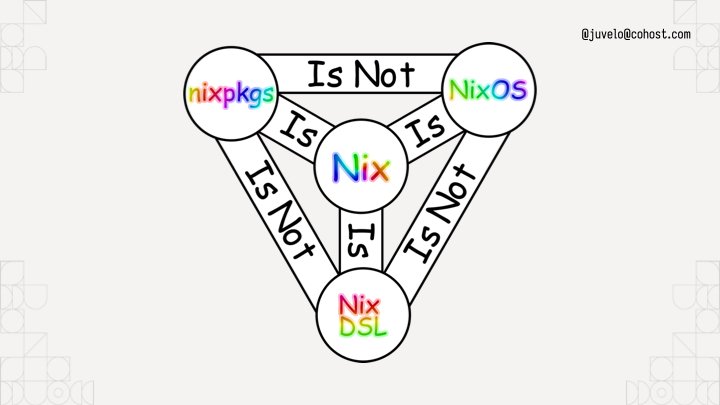
To help you understand, I've put up this helpful diagram. It uses rainbow comic sans so you know it's legit. Nixpkgs the standard library uses Nix the language, but it is not NixOS the operating system. I like to think about NixOS like this:
NixOS is the natural consequence of using Nix to build Linux systems. You can think about NixOS as a bunch of prebaked snippets of configuration that you can combine info a running system that does what you want. Each of those snippets is called a module. Nixpkgs (the standard library in Nix land) ships with a bunch of them that do things from compiling systemd to configuring Tailscale for you. Here's a simple NixOS module from my homelab:
A NixOS module is a function that takes the current state of the world and returns things to change in it. The module I'm showing here is from my homelab, specifically the part that enables the prometheus node exporter so that I can report when machines suddenly go offline or their hard drives are going bad. This is a very simple example. When you import it, it always takes effect. There's no flags to enable it or disable it. This is fine for my usecase however, because I want my homelab cluster to always be monitored. Things get a lot more fun when you add options into the mix:
{ lib, config, pkgs, ... }:
with lib;
let cfg = config.within.vim;
in {
  options.within.vim.enable = mkEnableOption "Enables Within's vim config";
  config = mkIf cfg.enable {
    home.packages = [ pkgs.vim ];
    home.file.".vimrc".source = ./vimrc;
  };
}
Compare it to this module, this is a dot file management module that sets up my vimrc on my machines. I have the option within.vim.enable, and if that is set to true, the vim configuration is dropped in place. If it's not set to true, it won't put the vim configuration in the system. NixOS modules have options and configuration outputs. Options let you customize the configuration to meet your spacebar heating needs.
To use this, you'd add the path to the file to an imports output of the module, then add a within.vim.enable = true statement inside your home-manager configuration.
The state of the world is the input, and any new changes are the outputs. This lets you build a Linux system exactly the way you want to. It's just a new and interesting way to write a function.
Above all else: you can configure programs like nginx directly in your NixOS configuration without having to learn how to write nginx config, saving you from having to configure every single program on your system in its own bespoke ways.
(Pause)
Of course, things become a lot more fun when you can build your own NixOS modules that have your own programs running on your own machines. Let's do that with an example program that shows quotes from the legendary British science fiction author Douglas Adams.
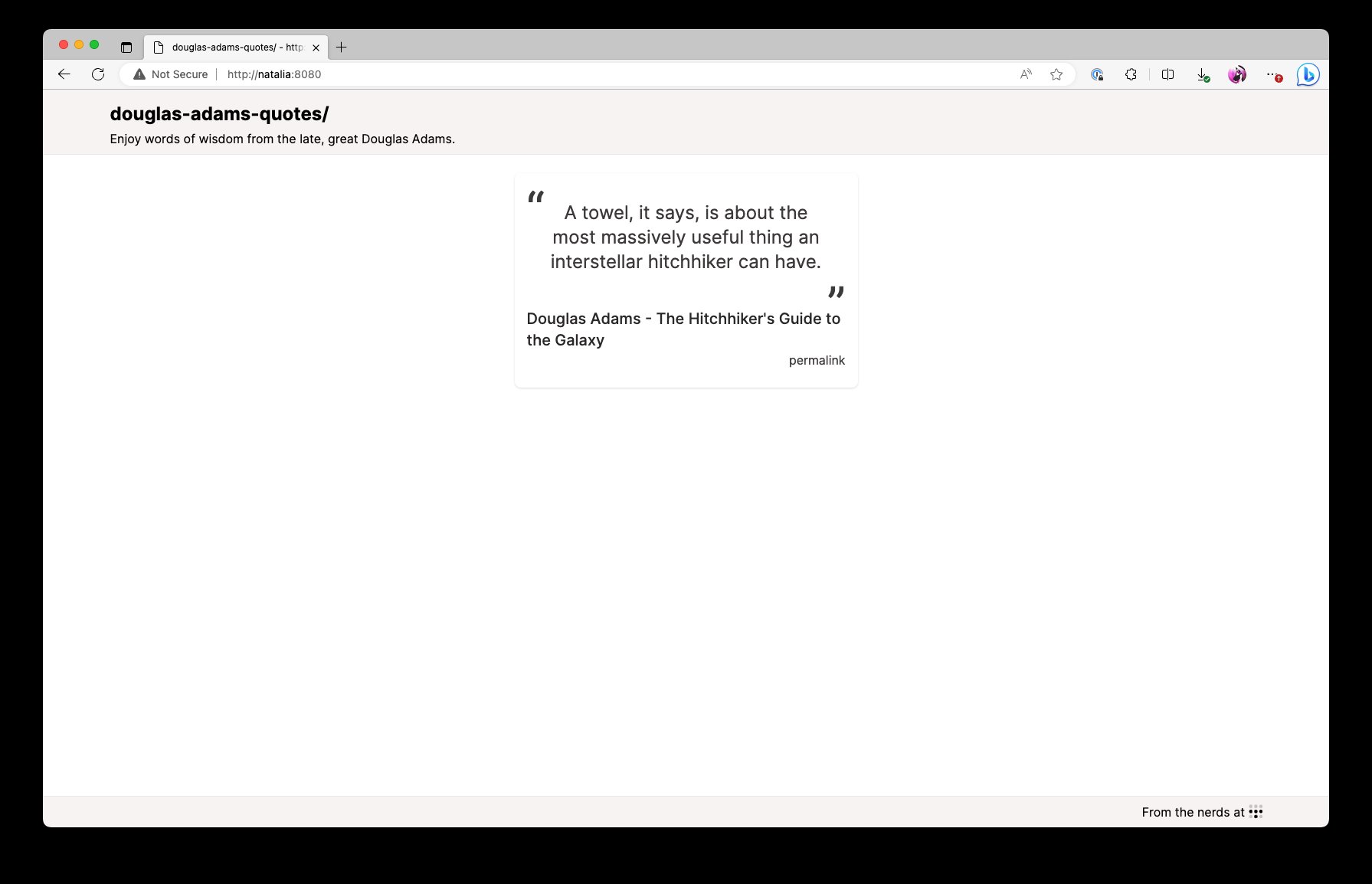
This is what the end result will look like. It'll be the quotes on a screen that refreshes every time you press F5. This will let you spread the undeniable wisdom of the late and great Douglas Adams, author of the five part trilogy The Hitchhiker's Guide to the Galaxy.
So overall, the infrastructure setup will look like this: my MacBook and the VM are both connected to each other with Tailscale. When I enable Tailscale Funnel, the VM is going to have its HTTPS port opened up to the public internet so that you can visit this service running on a VM, on my MacBook, on conference Wi-Fi. Let's hope the demo gods are in our favour!
By the way, Tailscale's gonna take care of the DNS and Let's Encrypt problems for us. No having to figure that out in the conference!
I've opened a VS Code session with an "empty" flake configuration. Nix flakes let you create a set of packages, development environments, NixOS modules, and even end to end integration tests. To start, this flake will import nixpkgs:
# Nixpkgs / NixOS version to use.
inputs.nixpkgs.url = "nixpkgs/nixos-unstable";
And then it declares a devShell for all of the developer dependencies:
devShell = forAllSystems (system:
  let pkgs = nixpkgsFor.${system};
  in with pkgs;
  mkShell {
    buildInputs =
      [ go_1_21 gotools go-tools gopls nixpkgs-fmt nodejs yarn ];
  });
This is relevant because I want you to imagine a world where your compilers aren't in your shell by default. This devShell configuration adds the packages relevant to the project to the development environment. This is a Go project with some CSS managed by Tailwind, so it's got the Go compiler, some Go development tools, npm, and yarn. A pretty normal set of things really.
To enter the development environment, run nix develop. I'm going to run yarn start:css in another shell to rebuild when any of the template files change.
Now that we have that, let's see how we would add a package to the flake. One of the flake output kinds is Nix packages, so we make an output named packages and paste in some boilerplate to get a Go package working:
The package would look something like this. This forAllSystems / nixpkgsFor hack is something you can work around with flake-utils, but for right now I'm doing everything manually. This is basically a bunch of predefined copies of nixpkgs for all the supported architectures, much like there's a devshell for every supported architecture. Either way, we get a Go module built into a package, and we define the dependency hash as null because this is only using the standard library. It's called default in the flake because it's best practice to name your package that.
Just to test it, you can run nix build to build the default package in that flake.nix file:
nix build
Perfect! It builds! The binary is in ./result/bin/ and we can run it wherever we want.
nixosModules.default = { config, lib, pkgs, ... }:
with lib;
let
    cfg = config.xe.services.douglas-adams-quotes;
in
{
    options.xe.services.douglas-adams-quotes = {
        enable = mkEnableOption "Enable the Douglas Adams quotes service";
        logLevel = mkOption {
            type = with types; enum [ "DEBUG" "INFO" "ERROR" ];
            example = "DEBUG";
            default = "INFO";
            description = "log level for this application";
        };
        port = mkOption {
            type = types.port;
            default = 8080;
            description = "port to listen on";
        };
        package = mkOption {
            type = types.package;
            default = self.packages.${pkgs.system}.default;
            description = "package to use for this service (defaults to the one in the flake)";
        };
    };
    config = mkIf cfg.enable {
        systemd.services.douglas-adams-quotes = {
            description = "Douglas Adams quotes";
            wantedBy = [ "multi-user.target" ];
            serviceConfig = {
            DynamicUser = "yes";
            ExecStart = "${cfg.package}/bin/douglas-adams-quotes --slog-level=${cfg.logLevel} --addr=:${toString cfg.port}";
            Restart = "on-failure";
            RestartSec = "5s";
            };
        };
    };
};
We defined the devShell to build the program development. We defined the package to build the software, and now we'll define the module to tell NixOS how to run the software. This is a basic NixOS module. It's defined inline to the flake for now, moving it to its own file is an exercise for the reader.
Like I said before, a NixOS module is a function that takes in the state of the world and returns new additions to the state of the world. This NixOS module provides some options under xe.services.douglas-adams-quotes and then if the module is enabled, it creates a new systemd service to run it in. We're in the future, so we can use fancy things like DynamicUser to avoid having to run this service as root.
options.xe.services.douglas-adams-quotes = {
    enable = mkEnableOption "Enable the Douglas Adams quotes service";
    logLevel = ...;
    port = ...;
    package = ...;
};
The real fun part comes when you define options for the service. Every one of these options correlates to CLI flags so you can change various options on the fly. It's good practice to map any non-secret configuration settings to options so that users can have easy escape hatches for changing things like the HTTP bind port or log level to get debug output. Secrets are a more complicated thing due to how Nix works, so we're not going to talk about those today.
So we have everything we need now. We have development environment configuration, a package build, and finally a NixOS module to get the service running. The last step is to push it into prod. I have a NixOS virtual machine set up for this on my MacBook, but you may want to run this somewhere else, such as in Hyper-V on your gaming tower. Or maybe the cloud, I won't judge!
Now we get to the fun part, enabling the NixOS module. I'm going to use the VS Code Tailscale extension to SSH in and open up the files in my VM, so lemme do that real quick.
Let's peer into my VM's deployment flake and see what we can do to deploy it. This is a brand new, never opened VM, the only thing I did was set up a flake in /etc/nixos/flake.nix that imports the autogenerated configuration from the installer. This allows us to import things like the Douglas Adams Quotes service into the VM.
Here's what the file looks like. I import nixos unstable, and then I create a nixos configuration for a machine named douglas-adams. This "modules" block has a list of NixOS module filenames or literal expressions. This lets you import NixOS modules from other flakes and define your own NixOS modules on the fly.
To make it import this, first we add a new input that points to the Douglas Adams quotes flake. This then gets threaded into the outputs function, we import the module, and finally enable it on the system.
(Pause)
That's it. That's how you enable the service on the VM. Now all that's left is SSHing in and running a nixos-rebuild to enable it.
I just right-click on the douglas-adams node, ssh in with Tailscale handling the auth, and then run the magic nixos-rebuild command: nixos-rebuild switch --flake /etc/nixos and hit enter.
And now the source code gets pulled, the package gets built, the service gets created and then we can see that the process is running. Let's prove that it's working:
[root@douglas-adams:/]# curl http://localhost:8080/quote.json | jq
{
    "quote":"The story so far: In the beginning the Universe was created. This has made a lot of people very angry and been widely regarded as a bad move.",
    "person":"Douglas Adams",
    "source":"The Restaurant at the End of the Universe",
    "id":2
}
Et voila. But, we aren't stopping there. I also enabled serving it with Tailscale Funnel so that you can see it on your phones:
tailscale serve https / http://localhost:8080
tailscale funnel 443 on
Get your phones out, I'm gonna be showing a QR Code:
Scan this QR code. You can trust me, right? It's not gonna be a Rick Roll. I'm not that mean. When you do, you'll connect to my VM on my laptop on the conference wifi, yet still exposed to the public internet.
(Pause for audience to discover that it does in fact work, applause)
In conclusion, NixOS modules aren't hard. It's just options to configure systemd or nginx or even Tailscale. It's a function that takes in the state of the world and returns new parts to add to the whole. This gives you a nearly infinite level of composition and logistical freedom to implement whatever you want. Every systemd option is exposed as a NixOS flag. Your programs can become services trivially. It's just that easy. I promise.
But, now you know how to make your own NixOS modules for fun and (hopefully) profit!
Before we get this talk wrapped up, I just want to thank everyone on this list for helping me make this talk shine. Thanks everyone!
(Pause for applause)
And with that, I've been Xe! Thank you so much for coming to this talk. I hope you've had a good conference and I'll be wandering around in case you have any questions. I've posted a summary of the code samples on my blog at xeiaso.net so you can look into my code some more.
Oh by the way, if you're looking, Tailscale is hiring. I know it's probably rare to see someone like this at a Linux conference but if you're a Windows expert please let me know. That role has been so hard to fill.
I try to answer every question I can, but if I don't get to you, please email dynamicuser at xeserv dot us and I'll reply to your questions as soon as I can.
Thanks again to the All Systems Go organizers for having me here and I hope you continue having a good day. Be well!
There was a question about encrypted secrets in NixOS. I suggest using agenix to have age-encrypted secrets in your NixOS configs. It has you encrypt things against SSH host public keys for your machines. It's a bit of a hack, but it works well enough that it's what I use in prod for my own stuff. This really needs to be solved upstream with proper handling of secret values at the Nix level.
<Aoi> Why do you need to use something like agenix at all?
<Mara> Every file in/nix/storeis world-readable. Depending on your threat model and if your NixOS configs are open source, this can be fine. If your threat model includes public NixOS configs, this becomes less fine; especially when CI is brought into the mix. You wouldn't want someone to figure out what your secrets are in your CI flow and then exfiltrateTailscale authkeysor something, that could be bad!
This talk was posted on M09 15 2023. Facts and circumstances may have changed since publication Please contact me before jumping to conclusions if something seems wrong or unclear.
Hi, this is Marten, software developer at Datawrapper. In this Weekly Chart I’ll be showcasing a little feature that we launched last week. So listen closely!
Last week I stumbled upon a fascinating piece in the New Yorker about a group of computer scientists and marine biologists attempting to decipher “Whale.” They believe that by training a Large Language Model on enough recorded whale sounds (sperm whale sounds, to be exact), they’ll be able to create a model that understands and produces the whales’ language — similar to how ChatGPT learned to “speak” proper English without anyone ever directly teaching it English grammar.
To attempt this goal, the scientists will need data. A lot of data. The team estimates that a successful model would need to be trained on some four billion sperm whale sounds or clicks — forty thousand times more than the current largest collection of about one hundred thousand clicks collected off the coast of Dominica!
Unfortunately, whales aren’t posting comments and memes all over the internet just yet, so the group of scientists have to resort to more old-school means of collecting the necessary data, by installing a network of underwater microphones and planting recording devices on the whales themselves.
Reading about this made me wonder if I could find a set of whale sound recordings already online. And it just so happens that I could! An extensive collection of whale sounds can be found in the Watkins Marine Mammal Sound Database maintained by the New Bedford Whaling Museum. The database contains about 2000 unique recordings of more than 60 species of marine mammals, recorded all over the world in a timeframe spanning from the 1940s to the 2000s.
Use the +/- buttons on the top right-hand side of the map to zoom in on individual markers. Clicking on a marker opens the tooltip, which allows you to play the sound files.
What I find fascinating about these sound recordings is their variety. They don’t all sound similar, but quite different from species to species. Interestingly, the sound that I most associated with whales — the very melodic “singing” of the humpback — isn’t all too common among marine mammals.
It seems I heard a lot more of these sort of clicks from sperm whales:
And then other mammals, like this bearded seal, sound straight from a science fiction movie:
And here’s another one, from the mythical-looking narwhal:
Now let’s take a look at how I created the map.
How I created this map
This data captured my imagination — so much so that it inspired me to add a brand-new feature for playing sound files in tooltips. That’s the nice thing about working as a developer at Datawrapper: if a feature is easy enough to implement and makes sense for the tool, you can just do it yourself. And I did!
The rest of the process went like this:
After obtaining permission from the New Bedford Whaling Museum to use their database for this blog post, I collected the links to the sound files and data like location and date of recording.
Each row in the resulting CSV represents a single date and location. As such, one single row may contain multiple sound recordings, represented as links to multiple sound files in columns named sound_0, sound_1, sound_2, etc.
I uploaded the CSV file to Datawrapper as a symbol map. Some recordings, like the ones taken at the New York Aquarium, did not contain coordinates. For these recordings I used the in-app geocoding feature to determine a latitude and longitude for their named location.
The final step was to customize the tooltips! Putting sound files in tooltips is now as simple as putting each file link into an HTML audio tag. This is what an individual sound embed looks like:
Different sites have different numbers of available recordings, so the brackets contain a bit of if-else logic to only display the <audio> tag if the respective sound column exists. Then I actually create the <audio> tag passing the link as an href attribute. I add the controls property to the tag so that audio controls from the browser show up, add a bit of styling, and voilà, I can play sounds in tooltips!
Some data points contain as many as 57 audio samples, but in the tooltips I only included a maximum of three. Check out the Watkins Marine Mammal Dataset if you’re still hungry for whale sounds afterwards!
And that’s it from me! I guess we won’t be speaking whale anytime soon. In the meantime, the thing we can look forward to is next week’s Weekly Chart, brought to you by Rose. Thanks for listening!
Als Alternative zum Branchenriesen Google Analytics bietet Matomo Website-Betreibern ein vielseitiges Tool zur Datenanalyse: Von detaillierten Besucher-Profilen bis hin zu fortgeschrittenen Metriken, wie der Verweildauer, Conversions oder dem Standort, lässt Matomo kaum Wünsche offen.
Allerdings birgt diese Funktionsvielfalt Probleme beim Datenschutz. Matomo preist sich als datenschutzfreundlichere Alternative zu Google Analytics. Eine Aussage, die zumindest im Kern stimmt. Und doch gilt es einiges dabei zu beachten. Einerseits ist wahrscheinlich nur wenigen Website-Betreibern bewusst, wie viele Daten der Dienst tatsächlich im Hintergrund mitschneidet. Und andererseits lässt sich der Datenhunger durch zahlreiche Einstellungen in Matomo konfigurieren.
Um zu verstehen, wie genau Matomo Daten sammelt und verarbeitet, haben wir das Programm zum Vergleich in drei Varianten konfiguriert:
Über das „Untersuchen“ einer Website lässt sich relativ einfach überprüfen, ob eine Website Cookies im Browser speichert (Screenshot: iRights.info)
Auch Matomo ist standardmäßig mit dem Tracking per Cookies ausgestattet. Für Menschen, die weniger Erfahrung im Online-Marketing oder Webanalyse haben, kann sich das etwas kompliziert anhören. Daher haben wir uns dafür entschieden, die unterschiedlichen Funktionalitäten von Matomo mithilfe der Benutzerprofile darzustellen. Hier werden sämtliche Daten zu einem einzelnen Nutzer zusammengefasst und können über einen Klick auf die Nutzer-ID eingesehen werden.
Blick hinter die Kulissen: So sieht das Benutzerprofil im Browser des Autors während seiner Recherchen aus (Screenshot: iRights.info)
Auf dem obigen Screenshot lässt sich schnell erkennen, dass Matomo neben den besuchten Seiten noch einige Daten mehr von jeder Besucherin abspeichert. So sind beispielsweise unter der ID der Standort (Deutschland), das Betriebssystem (Mac 10.15), der Browser (Chrome 114.0) und selbst die Display-Auflösung (1728×1117) zu sehen. Darunter werden die Besuche zusammengefasst. Hier kann beispielsweise eingesehen werden, dass ein Ziel „konvertiert“ ist. Bei einer solchen conversion kann es sich etwa um eine Kontaktaufnahme, ein Newsletter-Abo oder eine ähnliche Aktion handeln. Darunter ist der erste Besuch der Nutzerin zu sehen, der in diesem Fall am 11. Juli 2023 stattgefunden hat.
Neben diesen Daten kann der Webmaster außerdem die Historie der Nutzerin einsehen. Die Historie wird in verschiedene Besuche (auf Englisch: visits) eingeteilt. Standardmäßig wird eine besuchte Unterseite als neuer Besuch abgespeichert, wenn mindestens 30 Minuten zum vorherigen Besuch verstrichen sind.
Matomo liefert ebenfalls eine detaillierte Auflistung der besuchten Seiten und der verschiedenen Besuche (Screenshot: iRights.info)
In dem Beispiel können wir neben diesen besuchten Unterseiten und den Besuchen zudem das Datum (inklusive Uhrzeit des Besuchs) sowie die Dauer des Besuchs einsehen. Darüber hinaus sind ebenfalls alle besuchten Unterseiten und die geklickten Links zu externen Webseiten zu sehen.
Darüber hinaus kann jeder Nutzerin pro Besuch ein neuer Standort zugewiesen werden. So lässt sich beispielsweise über einen längeren Zeitraum nachverfolgen, ob sich Kund*innen auf Geschäftsreisen befinden oder aus anderen Gründen häufig ihren Standort wechseln. Um dies zu simulieren, verwendeten wir in unserem Test ein VPN (virtuelles privates Netzwerk), um Matomo eine andere IP-Adresse vorzutäuschen. Fälschlicherweise zeigte Matomo in beiden Fällen einen deutschen Standort an, obwohl wir bei unserem zweiten Besuch mit einer US-amerikanischen IP-Adresse auf die Website zugriffen.
Trotz der Verwendung eines VPNs hat Matomo bei uns leider keinen neuen Standort registriert (Screenshot: iRights.info)
Auch wenn sich diese Besucherprofile sehr gut für die Verdeutlichung der gesammelten Informationen eignen, sind sie in der Praxis in der Regel weniger relevant als die aggregierten Daten aller Nutzer*innen aus einem bestimmten Zeitraum. Mit diesen lassen sich bessere Entscheidungen treffen, da nicht mehr einzelne Besucher analysiert werden, sondern von allen Besuchern die durchschnittlichen Werte ermittelt werden.
Länder, aus denen iRights.info angesurft wird (Screenshot: iRights.info)
So können wir beispielsweise einsehen, dass 92,2 % der iRights.info-Besucher*innen aus Deutschland kommen, der Großteil der Nutzer Google Chrome verwendet und dass die meisten Besuche vor beziehungsweise nach der Mittagspause (um 11:00 und 13:00) stattfinden. Allerdings sei an dieser Stelle angemerkt, dass sich diese Informationen ebenfalls mit der zweiten Variante einsammeln lassen, auf die wir nun im folgenden Abschnitt einen genaueren Blick werfen.
Tagesverlauf der Besuche (Screenshot: iRights.info)
Variante 2: Mit gezügeltem Appetit – Tracking ohne Cookies
Standardmäßig läuft das Tracking in Matomo mit Cookies (siehe erster Abschnitt). Dieses lässt sich einfach in den Einstellungen im Menü Privatsphäre → Daten anonymisieren über den Punkt „Tracking ohne Cookies erzwingen“ abschalten.
Das „kekslose“ (cookie-freie) Tracking lässt sich in den Matomo-Einstellungen mit einem Klick deaktivieren (Screenshot: iRights.info)
Unserer Erwartung nach dürfte jetzt eigentlich nichts mehr in Matomo funktionieren. Schließlich muss man dem Tracking durch Cookies auf fast jeder Website zustimmen. Dann kann ein vernünftiges Tracking ohne Cookies doch nicht möglich sein. Oder?
Im Browser kann man nun selbst testen, dass Matomo keine Cookies mehr setzt (Screenshot: iRights.info)
Tatsächlich war in unserem Praxistest genau das Gegenteil der Fall, wir konnten in unserer Datengrundlage fast keine Unterschiede gegenüber dem Tracking mit Cookies feststellen. Sowohl die vollständigen Benutzerprofile als auch Conversions, Standorte, Browser und lokale Besuchszeiten konnten wir weiterhin auswerten. Warum ist das Tracking ohne Cookies also nicht von Anfang an eingestellt? Gibt es überhaupt einen Nachteil zur Analyse mit Cookies?
Die Antwort ist technischer Natur: Beim Tracken ohne Cookies setzt Matomo auf sogenanntes Browser Fingerprinting, um die Website-Zugriffe voneinander zu unterscheiden und einzelnen Nutzern zuzuordnen. Im Gegensatz zu anderen Marketing-Tools erstellt Matomo einen sehr minimalistischen digitalen Fingerabdruck, der „lediglich“ aus der einzigartigen Kombination des Betriebssystems, des Browsers, der installierten Browser-Plugins, der Browser-Sprachen und der IP-Adresse der Nutzerin generiert wird.
Aus diesem Grund können einzigartige Nutzer*innen maximal für 24 Stunden auf der Website wiedererkannt werden. Ganz im Gegenteil zum Tracking mit Cookies: Hier kann die Aktivität eines individuellen Benutzers in der standardmäßigen Einstellung satte 13 Monate lang analysiert werden.
Gerade für Webseiten, die öfters von den gleichen Besucher*innen angesteuert werden, kann das große Fragezeichen bei der Analyse hinterlassen. Ein – zugespitztes Beispiel – soll das verdeutlichen: Nehmen wir an, eine Website wird jeden Monat 10.000 Mal aufgerufen. Stammen diese 10.000 Aufrufe von unterschiedlichen Personen, die jeweils eine Seite ansurfen? Oder handelt es sich vielleicht um 2.000 Personen, die sich fünfmal im Monat jeweils eine Seite ansehen? Beide Schlussfolgerungen sind auf dieser Datengrundlage möglich.
Auch für viele Betreiber von Online-Shops dürften die Informationen zu wiederkehrenden Besucher*innen von Bedeutung sein. Angenommen eine Besucherin kommt über Google auf die Startseite, navigiert von dort zu einem Produkt und kauft dieses direkt. War das eine „kalte“ Kundin, die vorher noch nie Kontakt zu Ihrer Website hatte? Oder ist sie vielleicht über den Newsletter angemeldet und recherchiert bereits seit 2 Monaten nach dem richtigen Produkt im Shop?
Trotzdem sind das in der Regel fortgeschrittene Einsatzzwecke des Web-Trackings, die eher für die Minderheit der Website-Betreiber interessant sein dürften. Die meisten Firmenwebsites, Blogs, etc. dürfte die Datengrundlage des Cookie-losen Trackings mehr als ausreichen. Ob es die fortgeschrittenen Funktionen aus dem Tracking mit Cookies braucht, muss man allerdings im Einzelfall entscheiden.
Variante 3: Datensparsam nur mit https-Logs
Als dritte Variante unseres Praxistests entschieden wir uns für die datensparsamste Möglichkeit, um Matomo einzusetzen: die Verwendung von http-Logs. Grob zusammengefasst nutzt Matomo dafür Informationen, die aus technischen Gründen bei allen Servern anfallen. Diese Server-Logs können dann automatisiert oder manuell in Matomo importiert werden.
Allerdings gestaltet sich dieser Vorgang deutlich komplizierter als der Wechsel vom Cookie-basierten Tracking (Variante 1) auf das Tracking per Fingerprinting (Variante 2), als lediglich das Klicken eines Buttons nötig war. In der Knowledge Base von Matomo gibt es zwar einige Informationen zum Tracking mit Server-Logs, allerdings sucht man hier nach einer detaillierten Schritt-für-Schritt-Anleitung vergeblich. Deshalb orientierten wir uns an einer hilfreichen Anleitung von gaminghouse.community, wo die Einrichtung detailliert beschrieben wird. Hier ist allerdings deutlich mehr technisches Vorwissen gefragt und da tief ins System eingegriffen wird, sollte die Umstellung nur von einem erfahrenen Webmaster durchgeführt werden.
Beim Server-seitigen Tracking fiel uns sofort der deutliche Anstieg an Besucher*innen auf. Dieser war teilweise zwei bis viermal so hoch (verglichen mit Variante 1) und hielt über Wochen an. Das macht es sehr unwahrscheinlich, dass die Vervielfachung der Besucher*innen-Zahlen auf einen derart plötzlichen Popularitätsanstieg zurückzuführen ist. Deshalb müssen wir davon ausgehen, dass das Tracking per http-Logs andere Ergebnisse erzielt als das Tracking der ersten beiden Varianten. Unsere Ansicht nach ist das auf zwei Gründe zurückzuführen:
Weniger Daten: Beim Tracking mithilfe der Server-Logs besteht eine noch schlechtere Datengrundlage als beim Tracking mithilfe des Browser-Fingerprintings. Daher kann es sein, dass viele Seitenzugriffe, die eigentlich zu einer einzigen Besucherin gehören, mehreren zugeordnet werden. Außerdem könnten einzelne Zugriffe mehrfach gewertet werden.
Bot-Traffic:Laut dem Serveranbieter Cloudflare besteht 40 % des Internet-Traffics aus Bot-Traffic. Diese automatisierten Zugriffe, wie beispielsweise über das Crawling (etwa von Google), können beim Tracking per Server-Logs schlechter herausgefiltert werden und sind daher ein weiterer wahrscheinlicher Grund für hohe Abrufzahlen.
Nach dem Umstieg auf das Tracking per Server-Logs, wuchs die Besucher-Zahl ungefähr um den Faktor vier, die Anzahl der Seitenansichten verdreifachte sich (Screenshot: iRights.info)
Fazit
Eine wichtige Diskrepanz ist uns beim Durchprobieren der drei verschiedenen Technologien aufgefallen: Während sich die gesammelten Nutzungsdaten von Variante 1 bis 3 immer weiter verringern, verhält es sich mit Kontrolle für die Nutzer*innen genau anders herum.
So kann Matomo beim Tracking mit Cookies zwar die genauesten Daten sammeln. Allerdings können Nutzer*innen diese einfach löschen oder blockieren, was sich auch viele Tracking-Blocker wie etwa uBlock Origin zunutze machen.
Beim Tracking per Fingerprinting sieht es hingegen schon anders aus: Hier greifen zwar die meisten Blocker ebenfalls, allerdings sind sie weniger zuverlässig und verlassen sich in der Regel lediglich auf die Namensgebung von verschiedenen Dateien, wie zum Beispiel matomo.js oder matomo.php.
Das Tracking per Server-Logs sammelt zwar die wenigsten Daten. Allerdings können sich Nutzer*innen hier nicht gegen das Tracking zu wehren. Schließlich fallen ihre Daten an, sobald sie auf die Website zugreifen.
Wenig überraschend fällt auch das Fazit für Betreiber von Websites aus: Variante 3 mag die datensparsamste sein. Sie ist zugleich aber auch die unbrauchbarste für Webanalyse-Praxis, da zuviel unerwünschter Beifang (Bot-Traffic) mit ins Netz geht.
Hinweise: Auch iRights.info nutzt Matomo zur Analyse von Nutzungsdaten. Sofern nicht anders angegeben, beziehen sich die Screenshots in diesem Artikel auf Matomo und die Website iRights.info.
Hyprland is an open source Wayland compositor based on wlroots, a project I started back in 2017 to make it easier to build good Wayland compositors. It’s a project which is loved by its users for its emphasis on customization and “eye candy” – beautiful graphics and animations, each configuration tailored to the unique look and feel imagined by the user who creates it. It’s a very exciting project!
Unfortunately, the effect is spoilt by an incredibly toxic and hateful community. I cannot recommend Hyprland to anyone who is not prepared to steer well clear of its community spaces. Imagine a high school boys' locker room come to life on Discord and GitHub and you’ll get an idea of what it’s like.
I became aware of the issues with Hyprland’s community after details of numerous hateful incidents on their Discord came to my attention by way of the grapevine. Most of them stem from the community’s tolerance of hate: community members are allowed to express hateful views with impunity, up to and including astonishing views such as endorsements of eugenics and calls for hate-motivated violence. Such comments are treated as another act in the one big inside joke that is the Hyprland community – the community prefers not to take itself “too seriously”. Hate is moderated only if it is “disruptive” (e.g. presents as spam), but hate presented with a veneer of decorum (or sarcasm) is tolerated, and when challenged, it’s laughed off as a joke.
In one particular incident, the moderators of the Discord server engaged in a harassment campaign against a transgender user, including using their moderator privileges to edit the pronouns in their username from “they/she” to “who/cares”. These roles should be held by trusted community leaders, and it’s from their behavior that the community’s culture and norms stem – they set an example for the community and define what behaviors are acceptable or expected. The problem comes from the top down.
Someone recently pitched a code of conduct – something that this project sorely needs – in a GitHub issue. This thread does not have much overt hate, but it does clearly show how callous and just plain mean the community is, including its leadership (Vaxerski is the original author of Hyprland). Everything is a joke and anyone who wants to be “serious” about anything is mercilessly bullied and made fun of. Quoting this discussion:
I think [a Code of Conduct] is pretty discriminatory towards people that prefer a close, hostile, homogeneous, exclusive, and unhealthy community.
First of all, why would I pledge to uphold any values? Seems like just inconveniencing myself. […] If I’d want to moderate, I’d spend 90% of the time reading kids arguing about bullshit instead of coding.
If you don’t know how to behave without a wall of text explaining how to behave online then you shouldn’t be online.
I am not someone who believes all projects need a code of conduct, if there exists a reasonable standard of conduct in its absence – and that means having a community that does not bully and harass others for expressing differing points of view, let alone for simply having a marginalized identity.
I would have preferred to address these matters in private, so I reached out to Vaxry in February. He responded with a lack of critical awareness over how toxicity presents in his community. However, following my email, he put out a poll for the Discord community to see if the community members experienced harassment in the community – apparently 40% of respondents reported such experiences. Vaxry et al implemented new moderation policies as a result. But these changes did not seem to work: the problems are still present, and the community is still a toxic place that facilitates bullying and hate, including from the community leaders.
Following my email conversation with Vaxry, he appeared on a podcast to discuss toxicity in the Hyprland community. This quote from the interview clearly illustrates the attitude of the leadership:
[A trans person] joined the Discord server and made a big deal out of their pronouns [..] because they put their pronouns in their nickname and made a big deal out of them because people were referring to them as “he” [misgendering them], which, on the Internet, let’s be real, is the default. And so, one of the moderators changed the pronouns in their nickname to “who/cares”. […] Let’s be real, this isn’t like, calling someone the N-word or something.
Later he describes a more moderated community (the /r/unixporn discord server) as having an environment in which everyone is going to “lick your butthole just to be nice”. He compared himself to Terry Davis, the late operating system developer whose struggles with mental illness were broadcast for the world to see, citing a video in which he answers a phone call and refers to the person on the phone by the N-word “ten times” – Vaxry compares this to his approach to answering “stupid questions”.
It really disappoints me to see such an exciting project brought low by a horribly mismanaged community of hate and bullying. Part of what makes open source software great is that it’s great for everyone. It’s unfortunate that someone can discover this cool project, install it and play with it and get excited about it, then join the community to find themselves at the wrong end of this behavior. No one deserves that.
I empathise with Vaxry. I remember being young, smart, productive… and mean. I did some cool stuff, but I deeply regret the way I treated people. It wasn’t really my fault – I was a product of my environment – but it was my responsibility. Today, I’m proud to have built many welcoming communities, where people are rewarded for their involvement, rather than coming away from their experience hurt. What motivates us to build and give away free software if not bringing joy to ourselves and others? Can we be proud of a community which brings more suffering into the world?
My advice to the leadership begins with taking a serious look in the mirror. This project needs a “come to Jesus” moment. Ask yourself what kind of community you can be proud of – can you be proud of a community that people walk away from feeling dejected and hurt? Yours is not a community that brings people joy. What are you going to do about it?
A good start will be to consider the code of conduct proposal seriously, but a change of attitude is also required. My inbox is open to any of the leaders in this project (or any other project facing similar problems) if you want to talk. I’m happy to chat with you in good faith and help you understand what’s needed and why it’s important.
To members of the Hyprland community, I want each of you to personally step up to make the community better. If you see hate and bullying, don’t stay silent. This is a community which proclaims to value radical free speech: test it by using your speech to argue against hate. Participate in the community as you think it should be, not as it necessarily is, and change will follow. If you are sensitive to hate, or a member of a marginalized group, however, I would just advise steering clear of Hyprland until the community improves.
If the leadership fails to account for these problems, it will be up to the community to take their activity elsewhere. You could set up adjacent communities which are less toxic, or fork the software, or simply choose to use something else.
To the victims of harassment, I offer my sincere condolences. I know how hard it is to be the subject of this kind of bullying. You don’t deserve to be treated like this. There are many places in the free software community where you are welcome and celebrated – Hyprland is not the norm. If you need support, I’m always available to listen to your struggles.
To everyone else: please share this post throughout the Hyprland community and adjacent communities. This is a serious problem and it’s not going to change unless its clearly brought to light. The Hyprland maintainers need to be made aware that the broader open source community does not appreciate this kind of behavior.
I sincerely hope that this project improves its community. A serious attitude shift is needed from the top-down, and I hope for the sake of Vaxry, the other leaders, and the community as a whole, that such change comes sooner rather than later. When Vaxry is older and wiser, I want him to look back on the project and community that he’s built with pride and joy, not with regret and shame.
I was also privately provided some of the enusing discussion from the Hyprland Discord. Consider that this lacks context and apply your grain of salt accordingly.
I apologise to Vaxry for interrupting their rest, and wish them a speedy recovery.
Here is a plain text log which includes some additional discussion.