geschätzte Lesezeit: 3 min

What Is Zend Framework?

Zend Framework, which was formerly led and managed by Rogue Wave Software, is now called the Laminas Project, and is managed by the Linux Foundation. The most important thing to know about this product transition is that Zend Framework has not gone away. However, to receive security updates, bug fixes, and new features for your Zend Framework code, you need to migrate it to the Laminas-branded packages.

What Is Laminas?

Laminas is the continuation of Zend Framework. This PHP framework that you know and love is still being used by leading organizations to support diverse solutions in areas such as eCommerce, content-management, healthcare, entertainment, and messaging. The community is still actively contributing to and improving it. Laminas is simply the next step in the evolution of Zend Framework.

What Has Changed?

Today, only the naming and governance of the framework has changed. The Laminas code base:

  • Will run just like your Zend Framework code because the base is the same: it will just be using the code under new namespaces.
  • Is now under an open governance model managed by the Linux Foundation.
  • Will soon be under a technical charter with the Linux Foundation.

Why the Name Change?

To help flag this historical change in the technology’s life and protect Zend’s trademarks, the framework and its subprojects all needed new names: 

  • Zend Framework is now called Laminas.
  • Apigility is now called Laminas API Tools.
  • Expressive is now called Mezzio, which is a variation of the Italian word for middle.

Where Are the New Laminas Repositories?

To ensure seamless integrations between all Laminas packages and existing Zend Framework projects — including third-party libraries with Zend Framework code — the project's Technical Steering Committee migrated existing packages to new GitHub repositories, as shown in the following table:

Original Project Original GitHub Organization Original PHP Namespace New Project Name New GitHub Organization New PHP Namespace
Zend Framework (Components) zendframework Zend Laminas (Components) laminas Laminas
Zend Framework MVC zendframework Zend Laminas (MVC) laminas Laminas
Apigility zfcampus ZF/ZF\Apigility Laminas API Tools laminas-api-tools Laminas\ApiTools
Expressive zendframework Zend\Expressive Mezzio mezzio Mezzio

There are a few outliers. Previously, both zf-development-mode and zf-composer-autoloading lived under zfcampus, and thus Apigility. However, they are now distributed as Laminas components.

In all cases, the original repository was marked as "Archived" on GitHub, which makes the repository read-only and prevents opening new issues, pull requests, and comments. Additionally, the related packages were marked "Abandoned" on Packagist, with a recommendation of using the equivalent Laminas package.

Migration Help for Upgrading to Laminas

Anyone can still install all existing Zend Framework, Apigility, and Expressive packages. However, these versions will no longer be maintained by the community. 

To ensure your code has the latest security updates, bug fixes, and new features, you need to migrate to Laminas-branded packages. For guidance, please refer to the Laminas Project Migration Guide.

You can also engage Zend for help with your upgrades and for enterprise support.

The Latest on API Tools (Apigility) and Mezzio (Expressive)

Laminas API Tools (formerly Apigility) is built on the MVC platform. Because Mezzio (formerly Expressive) middleware provides greater flexibility and performance for APIs compared with MVC architectures, we are encouraging people to adopt Mezzio for their API needs. 

While the API tooling for Mezzio is not yet complete, it will be one of the next big projects delivered by the Laminas community. Because the migration path from the MVC-based Apigility to middleware is not yet clear, and because those architectures are so different, we do not plan on making the new offering a "version 2" of the original. However, we will be providing ongoing maintenance and security fixes for the Laminas API Tools for the foreseeable future.

How Is Zend Contributing to Laminas?

Zend Framework started as a component framework, so people could pick the components that they want to use. And Laminas, which is the third iteration of Zend Framework, is continuing that goal. Zend is excited to create components for Laminas that bridge open source and commercial software. 

The current list of components that Zend will be proposing to the Linux Foundation to add to Laminas is still in development. However, our team can reveal that we’re building some cool components around asynchronous PHP as well as microservices enablement and enterprise integrations. 

Zend is also continuing to provide enterprise support and services for Zend Framework. Additionally, Zend just launched a new standalone enterprise support service for Laminas.

LEARN ABOUT LAMINAS ENTERPRISE SUPPORT
 

Related Content

Want to learn more about the Laminas project? This webinar gives a good overview.

Note: This post includes information from blogs originally published on April 17, 2019, October 24, 2019, and December 3, 2019.

geschätzte Lesezeit: 13 min

Baerbock vor UNO: Friedensrede für mehr Krieg

Außenministerin Baerbock vor den UN. Bild: UN Photo/Evan Schneider

Die deutsche Außenministerin hat in ihrer Rede vor den Vereinten Nationen eine Lehrstunde über die "wertebasierte" grüne Außenpolitik abgeliefert

Vor ein paar Tagen kam in einer U-Bahn-Station in Kiew ein kleines Mädchen zur Welt. Ich habe gehört, es heißt Mia. Ihre Familie musste Schutz suchen – wie Millionen anderer Menschen überall in der Ukraine. Schutz vor Bomben und Raketen, vor Panzern und Granaten. Sie leben in Angst, sie leben in Schmerz. Sie sind gezwungen, sich von ihren Liebsten zu trennen. Weil Russland einen Angriffskrieg gegen die Ukraine begonnen hat.

So beginnt die deutsche Außenministerin Annalena Baerbock ihre von der deutschen Presse als "emotional" bewertete Rede vor der Vollversammlung der Vereinten Nationen [1].

Sie hätte natürlich auch damit beginnen können, dass eine kleine Mariam in Sanaa unter dem Hagel saudi-arabischer Bomben zur Welt kommt – Bomben, die Deutschland geliefert hat.

Oder dass eine kleine Mira in Nordsyrien vom Nato-Land Türkei (ebenfalls mit deutschen Waffen) bedroht wird.

Leid und Elend gibt es nämlich wirklich mehr als genug auf diesem Globus; vieles davon unmittelbar verursacht durch Kriege, bei denen Staaten der Nato und ihre guten Bündnispartner mitschießen und bei denen deutsche Waffen im Spiel sind.

Wenn es denn, wie mit dem Schicksal von "Mia" suggeriert, um die miese Lage kleiner Menschenkinder (Mädchen natürlich!) ginge, könnte unsere vom Kriegselend so aufgewühlte deutsche Außenministerin sicherlich an der ein oder anderen Stelle mäßigend einwirken – auch ganz ohne UNO. Darum geht es also nicht.

Annalena Baerbocks Aufregung über das vom Krieg verursachte Elend transportiert tatsächlich ganz gezielt eine Anklage gegen einen bestimmten Staat, Russland. Dessen Krieg ist unerträglich und das von ihm verursachte Elend prangert sie an.

Selektives Geschichtsverständnis

"Ich stehe hier vor Ihnen als Außenministerin meines Landes, aber auch als Deutsche, die das unglaubliche Privileg hatte, in Europa in Frieden und Sicherheit aufzuwachsen." Annalena Baerbock spricht nicht nur als Außenministerin" – wer sonst darf eigentlich in diesem Gremium reden, fragt man sich – sondern als "Deutsche, die das unglaubliche Privileg hatte, in Europa in Frieden und Sicherheit aufzuwachsen".

Als Deutsche, die sich genügend für "Nazi-Deutschland" entschuldigt hat, hat sie offenbar ebenso das Privileg zur selektiven Geschichtswahrnehmung [2].

Baerbock ist 1980 geboren, war also mündige 19, als die rot-grüne Bundesregierung unter Gerhard Schröder und Joseph Fischer Serbien mitbombardiert hat – ein Krieg mitten in Europa, völkerrechtswidrig, weil ohne Plazet der Vereinten Nationen; ein Krieg, der die Grenzen in Europa neu gezogen hat und die "Nachkriegsordnung" in Schutt und Asche gelegt hat.

Aber hier geht es um die Konstruktion einer Anklage gegen Russland – und dafür muss man das ein oder andere vergessen bzw. ordentlich schwarz-weiß-malen:

Die Grundsätze der Vereinten Nationen bilden den Rahmen für unseren Frieden: für eine Ordnung auf der Grundlage von gemeinsamen Regeln, dem Völkerrecht, Zusammenarbeit und friedlicher Konfliktbeilegung. Russland hat diese Ordnung brutal angegriffen. Und deshalb geht es in diesem Krieg nicht nur um die Ukraine, nicht nur um Europa, sondern um uns alle.

Annalena Baerbock

Richterin über das Wohlverhalten von Staaten

Die Völkerrechtlerin Baerbock erinnert daran, dass die Grundsätze der Vereinten Nationen den "Rahmen" "für unseren Frieden" bilden. Natürlich kann man von examinierten und zertifizierten Akademikern nicht verlangen, dass sie einen logischen Schluss ziehen könnten.

Wenn so viel von "Völkerrecht", "Zusammenarbeit" und "friedlicher Konfliktbeilegung" die Rede ist, dann wird es sich wohl um eine Welt harter Interessensgegensätze handeln; nicht um den immer beschworenen "allseitigen Nutzen" und das "win-win", sondern um eine Welt, in der es – auf der Basis der "gemeinsamen Regeln" – zu ökonomischen Gewinnern und Verlierern kommt, und in der es eine geostrategische Konkurrenz um Nutzen und Schaden aus dieser Welt gibt [3].

Vor der "Geißel des Kriegs" muss offenbar deshalb so viel geschützt werden, weil Krieg in dieser Welt für alle Staaten durchaus eine Option darstellt und sie sich deshalb auch bereits für den Krieg rüsten, wenn sie noch ganz "friedlich" miteinander handeln. Mit anderen Worten: die Vereinten Nationen gibt es gerade deshalb, weil die Nationen dieser Welt sich überhaupt nicht friedlich und kooperativ gegenüberstehen – und sich deshalb always and everywhere in die Quere kommen und ständig etwas auszuhandeln haben.

Aber das will Frau Baerbock als engagierte Kämpferin für "den Frieden" natürlich alles gar nicht wissen. Man könnte geradezu Kaiser Wilhelm II. paraphrasieren: Wir kennen keine Interessen (und ihre Gegensätze) mehr! Wir kennen nur noch einen, der gegen diese "regelbasierte Ordnung" verstößt: "Russland hat diese Ordnung brutal angegriffen."

Die deutsche Außenministerin schwingt sich hier aus der Rolle einer Vertreterin der deutschen Nation auf in die einer über allen stehenden Richterin. Sie argumentiert nicht mit den ökonomischen, politischen und militärischen Interessen, die Deutschland an einer Westorientierung der Ukraine hat und die sich mit den russischen Interessen an einer neutralen und entmilitarisierten Ukraine nicht vertragen – nein, in diese materialistischen Niederungen begibt sie sich erst gar nicht. Sie ruft Russland vom Standpunkt der "Ordnung" zur Raison, deren Hüterin sie – Annalena Baerbock – offenbar höchstpersönlich ist. Für "uns alle" natürlich.

Angriff auf das globale Gewaltmonopol

Russlands Krieg bedeutet ein neues Zeitalter. Wir stehen an einem Scheideweg. Die Gewissheiten von gestern gelten nicht mehr. Heute sind wir mit einer neuen Realität konfrontiert, die sich niemand von uns ausgesucht hat. Es ist eine Realität, die uns Präsident Putin aufgezwungen hat.

Die Behauptung von der "neuen Realität", die mit diesem Krieg im Jahr 2022 in die Welt kommen soll, ist natürlich eine geistige Zumutung angesichts der Kriege, die allein seit 1990 stattgefunden haben und stattfinden: zwei US-Kriege gegen den Irak, die jeweils mit einer inzwischen nachgewiesen falschen Begründung legitimiert wurden und mehr als eine Million Tote zur Folge hatten; die wochenlange Bombardierung Serbiens durch die Nato zugunsten der Kosovo-Separatisten (begründet damit, dass ein angeblich drohender Genozid, der sich dann als Vorwand herausstellte, das Völkerrecht außer Kraft setzte); der jahrzehntelange "Krieg gegen den Terror" mit mehr als einer Million Toten; der Krieg gegen Gadafis Libyen, die Kriegsdrohung gegen den Iran, der Krieg Saudi-Arabiens gegen den Jemen, die Kriege der Türkei in Nordsyrien und dem Nordirak.

Sinn macht diese Behauptung nur in einer Hinsicht: Es ist in der Tat eine neue Realität, dass Russland einen Krieg führt. Russland verstößt damit gegen die US-definierte "Realität", dass sich der Westen das Recht auf Kriegsführung ganz exklusiv angemaßt hatte. Was "Präsident Putin uns aufgezwungen hat", ist der Sache nach eine Infragestellung des Welt-Gewaltmonopols", das die USA seit Auflösung der Sowjetunion in Form ihrer damals ausgerufenen "Neuen Weltordnung" praktiziert haben und das nun dadurch in Frage gestellt ist, dass man Putin nicht dazu zwingen konnte, sich eine weitere Etappe der Nato-Osterweiterung gefallen zu lassen.

Alles Weitere an dieser "neuen Realität" ist allerdings nicht Putin zuzuschreiben. Was die Nato aus diesem neuen Störfall ihrer Weltordnung macht, was insbesondere Deutschland an Schlüssen zieht und in Sachen Aufrüstung und Energie-Politik – Stichwort: "Zeitenwende" – praktisch auf den Weg bringt, das ist keineswegs die Leistung des russischen Präsidenten, sondern geht auf das Konto seiner Kontrahenten.

Es ist sicher keine geringe Funktion dieser Rede, genau das vergessen zu machen und allen Gehirnen einzutrichtern, wer Verantwortung für die "die neue Realität" trägt – sprich: all das, was jetzt noch kommen wird (nach westlicher Vorstellung lieber ein Weltkrieg als eine neutrale Ukraine!).

Russlands Krieg ist nicht gerechtfertigt

Russlands Krieg ist ein Angriffskrieg. Und seine Grundlage sind infame Lügen, die Außenminister Lawrow heute im UN-Menschenrechtsrat erneut wiederholt hat. Sie sagen, Sie handeln aus Selbstverteidigung. Aber die ganze Welt hat gesehen, wie Sie über Monate zur Vorbereitung dieses Angriffs Ihre Truppen zusammengezogen haben.

Die deutsche Außenministerin stuft Russlands Krieg als "Angriffskrieg" ein. Sie weiß sehr genau, dass nur so eine Verurteilung eines Kriegs nach der UN-Charta möglich ist. Die vom russischen Außenminister vorgetragene Begründung, der Krieg diene der russischen "Selbstverteidigung" (was ihn als Krieg rechtfertigen würde) weist sie ohne großes Federlesen oder weitere Beweisanstrengungen als "infame Lüge" zurück. Damit macht sie diplomatisch unmissverständlich klar, dass Deutschland nicht bereit ist, die Einwände Russlands gegen die Expansion der Nato seit 1990 auch nur zu würdigen, geschweige denn, den mehrfach vorgetragenen russischen Sicherheitsinteressen entgegenzukommen – und sei es nur, um eine weitere Eskalation in der Ukraine oder Europa zu vermeiden.

Mit der Art und Weise, wie Baerbock Lawrows Stellungnahme als "infame Lügen" aburteilt, demonstriert sie zugleich, dass sie aus der Position der Stärke redet. Sie muss nicht überzeugen, sie muss nicht argumentieren, Beweise erbringen oder ähnliches; die ganze Überzeugungskraft ihrer Argumente bezieht sie daraus, dass sie hier für "den Westen" und damit das größte Militärbündnis der Weltgeschichte spricht, weshalb sie (zu Recht) darauf zählt, dass ihre Lügen Geltung beanspruchen können.

Russische Panzer schaffen keinen Frieden

Sie sagen, Russland schickt Friedenstruppen. Aber Ihre Panzer bringen kein Wasser, Ihre Panzer bringen keine Babynahrung, Ihre Panzer bringen keinen Frieden. Ihre Panzer bringen Tod und Zerstörung. Und in Wahrheit missbrauchen Sie Ihre Macht als ständiges Mitglied des Sicherheitsrats. Herr Lawrow, Sie können sich selbst täuschen. Aber uns täuschen Sie nicht. Unsere Völker werden Sie nicht täuschen – und auch Ihr eigenes Volk werden Sie nicht täuschen.

Hut ab. Russische Panzer bringen also kein Wasser. Keine Babynahrung. Keinen Frieden. Das ist übel, wirklich übel. Und sehr im Unterschied zu deutschen Panzern vermutlich. Dass deutsche Panzer Frieden bringen, ist ja quasi per Definition so. (Und in der Tat: Ebenso wie der Krieg im Frieden vorbereitet wird, so wird auch der Frieden durch die Ergebnisse des Kriegsverlaufes herbeigeführt. In diesem, ganz und gar tödlichen Sinne, stiften deutsche Panzer tatsächlich weltweit Frieden.)

Aber dass sie Wasser und Babynahrung bringen, ist selbst für gestandene Analytiker und Dialektiker wirklich neu. Und natürlich hoch erfreulich – weiter so! Und: Herr Lawrow, Ihre Legitimationen werden nicht geglaubt – im Unterschied zu unseren!

Tote Flüchtlinge und gute Flüchtlinge

Uns kommen Gerüchte zu Ohren – auch hier in diesem Raum –, dass Menschen afrikanischer Herkunft, die aus der Ukraine fliehen, an den EU-Grenzen diskriminiert werden. Ich war heute Vormittag in Polen. Und mein polnischer und mein französischer Kollege und ich haben sehr deutlich gemacht: Jedem Geflüchteten muss unabhängig von seiner Nationalität, Herkunft oder Hautfarbe Schutz gewährt werden.

Ja, so kann man das auch sagen. Dass die EU seit Jahren Tausende von Flüchtenden an ihren Grenzen sterben lässt; dass noch vor kurzem die Polen ihre Grenze mit Stacheldraht und Sondertruppen gegen die "Flüchtlingswaffe aus Belarus" "verteidigt" haben und dabei "Frauen und Kinder" an Hunger und Kälte umkommen ließen und zurzeit an die tausend Flüchtende vor allem arabischer Herkunft in Gefängnissen festhalten [4] – all das vergisst Frau Baerbock.

Angesichts dessen, dass die neuen Flüchtenden die Opfer des (Haupt-)Feindes sind, ist ohne weiteres klar, dass sie aufgenommen werden. Polen, das bis gestern angeblich noch "voll" war und heute angibt, jeden Tag 50.000 Ukrainer aufnehmen zu können, wird nicht einer "infamen Lüge" bezichtigt, sondern gelobt – und gleichzeitig dazu ermahnt, der Glaubwürdigkeit halber jetzt aber auch mal einen Afrikaner oder Araber heil über die Grenze zulassen.

Sich bekennen ist Pflicht

Jede und jeder einzelne von uns muss jetzt eine dezidierte und verantwortungsvolle Entscheidung treffen und Partei ergreifen.

Dass jeder einzelne von uns "eine dezidierte und verantwortungsvolle Entscheidung treffen und Partei ergreifen" muss, heißt natürlich: Da gibt es gar nichts zu entscheiden, sondern alles ist längst klar! Nachfragen, Güterabwägungen treffen, gar abweichende Meinungen vertreten im Land der Meinungsfreiheit – das war gestern. Das war nämlich, bevor "Putin" uns diese "neue Realität" beschert hat – siehe oben!

Man sollte festhalten: Wenn deutsche Medienmacher diese Rede der deutschen Außenministerin mehrheitlich gut finden, wenn Annalena Baerbock als die "positive Überraschung dieser Regierung" gefeiert wird (Die Welt), dann ist das eine Auskunft über den Zustand der deutschen Gesellschaft.

Diese Gesellschaft ist sich – mit Baerbock – einfach sicher, über die besten Werte dieser Welt zu verfügen. Demnach sieht es zurzeit so aus, dass auf dem Globus Demokratien gegen autoritäre Regime kämpfen, Freiheit gegen Unterdrückung. Das macht nicht nur jede Frage danach überflüssig, was Herr Müller in Essen in seinem Niedriglohn-Job von der "lupenreinen" deutschen Demokratie eigentlich hat oder was Frau Orlowa im autoritären Putin-Russland eigentlich fehlt (außer "lupenreiner Demokratie" natürlich).

Das ersetzt nicht nur alles Nachdenken über Interessen und Gegensätze in wie zwischen den Nationen. Das versetzt vor allem in den Zustand einer moralischen Selbstgerechtigkeit, die es dem Rest der Welt wieder einmal zeigen muss – was die Grünen in ihrem Wahlkampf ja unmissverständlich klar gemacht haben [5], soll also hinterher keiner sagen, man habe nichts wissen können.

Frieden schaffen mit deutschen Waffen

Vom Standpunkt dieser gefestigten deutschen Kriegsmoral aus kommt es natürlich nicht infrage, auch nur festzuhalten, dass die Nato in den letzten Jahrzehnten Russland durch die Aufnahme von 14 Staaten und das Vorrücken um 1.000 km nach Osten so sehr in die Enge getrieben hat, dass dessen Führung nun eine letzte "rote Linie" überschritten sieht [6]. Ebenso wenig sind da Kompromisse möglich, z.B. eine "neutrale Ukraine" – was übrigens dem lauthals bedauerten "Leiden der Ukrainer:innen" schnell ein Ende bereiten würde.

Stattdessen lautet die Vorgabe der Außenministerin:

Wir haben uns dafür entschieden, die Ukraine militärisch zu unterstützen – damit sie sich im Einklang mit Artikel 51 unserer Charta gegen den Aggressor verteidigen kann. Deutschland ist sich seiner historischen Verantwortung in vollem Umfang bewusst. Deshalb bekennen wir uns heute und für alle Zukunft zur Diplomatie und werden immer nach friedlichen Lösungen suchen. Aber wenn unsere friedliche Ordnung angegriffen wird, müssen wir dieser neuen Realität ins Gesicht sehen. Wir müssen verantwortungsvoll handeln. Und deshalb müssen wir heute vereint für den Frieden eintreten!

Doch dieses Eintreten für den Frieden mündet in noch mehr Krieg: "Waffenlieferungen in Kriegsgebiete" – bisher untersagt in Deutschland – müssen ab jetzt und in diesem Fall unbedingt sein. Die Außenministerin erinnert an unsere "historische Verantwortung", die ja bekanntermaßen darin besteht, dass Nazi-Deutschland die Ukrainer:innen fast ausgerottet hatte.

Der Schluss daraus: Weil Putin "unsere friedliche Ordnung" angegriffen hat, müssen eben diese Ukrainer:innen dringend zu einem Guerilla-Krieg gegen die russischen Invasoren ermutigt werden – für den Frieden natürlich!

Kein böses Wort übrigens gegen einen ukrainischen Präsidenten, der alle Männer zwischen 18 und 60, die vor dieser Hölle weglaufen wollen, festhält und zwingt, ihr Leben zu opfern für seine Machterhaltung. Kein böses Wort gegen polnische und rumänische Grenzer, die die ukrainischen Männer gewaltsam in "ihr Vaterland" zurücktreiben.

Nebenbei bemerkt: Praktisch schicken die westlichen Friedensbewahrer inzwischen freiwillige Fremdenlegionäre und US-Veteranen an die Front und es ist auch schon von Kampfflugzeugen die Rede. Es kommt also voran mit dem Kampf der Demokratien.

Kampf auf Leben und Tod

Aber jetzt geht es um die Gegenwart. Es geht um Familien, die in U-Bahn-Stationen Schutz suchen, weil ihre Häuser bombardiert werden. Es geht um Leben und Tod der ukrainischen Bevölkerung. Die Sicherheit Europas steht auf dem Spiel. Die Charta der Vereinten Nationen steht auf dem Spiel. Fast jedes Land, das hier vertreten ist, hat einen größeren, einen mächtigeren Nachbarn. Es geht hier um uns alle, meine Damen und Herren.

Das Leben der ukrainischen Bevölkerung wäre ganz schnell gerettet, wenn die Nato auf eine mögliche Mitgliedschaft des Landes verzichten würde. Gehört zur "Sicherheit Europas" eigentlich nicht auch die Russlands? "Die Charta der Vereinten Nationen steht auf dem Spiel" – wegen eines Kriegs? Dann dürfte es sie schon lange nicht mehr geben. Und wer schützt eigentlich vor dem "mächtigsten" Militärbündnis der Welt?

Logik und Wahrheit? Hier geht es um Höheres. Und hier spricht die Außenministerin des Landes, das gerade beschlossen hat, den drittgrößten Militäretat der Welt auf den Weg zu bringen.

Bischof Desmond Tutu sagte einst: "Wer sich in Situationen der Ungerechtigkeit neutral verhält, stellt sich auf die Seite des Unterdrückers." Heute müssen wir uns alle entscheiden. Zwischen Frieden und Aggression. Zwischen Gerechtigkeit und dem Willen des Stärksten. Zwischen Handeln und Wegsehen.

Auch ohne den historischen Kontext genauer zu kennen, in dem Desmond Tutu seine Aussage gemacht hat, ist doch anzunehmen, dass es ihm um die soziale Frage im südafrikanischen Apartheits-Staat gegangen ist. Aber das Zitat eines Friedensnobelpreisträgers ist natürlich immer schön und was nicht passt, wird passend gemacht. Also wird es kurzerhand auf die Ebene der Staatenkonkurrenz übertragen.


URL dieses Artikels:
https://www.heise.de/-6543949

Links in diesem Artikel:
[1] https://kiew.diplo.de/ua-de/-/2514782
[2] https://www.klemm-oelschlaeger.de/epages/79140548.sf/de_DE/?ObjectPath=/Shops/79140548/Products/978-3-86281-173-1
[3] https://www.magazin-auswege.de/2019/12/warum-gibt-es-dauernd-kriege/
[4] https://www.jungewelt.de/artikel/422046.html
[5] https://www.heise.de/tp/features/Die-Gruenen-sind-eine-prima-Partei-und-retten-die-Welt-Vielleicht-6206887.html
[6] https://youtu.be/pSDahNORmMU

geschätzte Lesezeit: 4 min

Wir stellen unsere Artikel und Faktenchecks kostenlos für alle zur Verfügung und schalten keine Werbung.
Spende uns bitte etwas für unsere Arbeit oder Kauf in unserem Shop ein

folgen uns schon bei Youtube. Verpasse unsere künftigen Livestreams nicht, und hilf uns das Abo-Ziel zu erreichen:


380

Zum Lesen der einzelnen Kapitel auf die Kapitel in dem Inhaltsverzeichnis hier rechts klicken!

Vorwort

Diese Recherche widmen wir Ingo Hasselbach, einst der „Führer von Berlin“ unser direkter Gegner Ende der 80er und Anfang der 90er Jahre, seit den neunziger Jahren aber mehr als glaubhaft aus der neonazistischen Szene ausgestiegen. Gerade solche Menschen müssen wir sprechen lassen, nichts entlarvt diese Szene mehr als Aussteiger.

Ingo würde gerne unsere Recherche mit einigen Worten einleiten:

In der Nacht auf den 23. November 1992 wurde ein Haus in Mölln von Neonazis angezündet. Im Haus kamen die beiden Mädchen Yeliz Arslan und Ayşe Yılmaz sowie ihre Großmutter Bahide Arslan in den Flammen um. Die Täter kamen aus der Neonaziszene. Ich habe mich immer verantwortlich gefühlt, weil ich hier das erste Mal konkret gesehen habe, wo geistige Brandstiftung hinführt.

Ich habe gelernt was Hass und die Worte Ausländer raus anrichten können und welchen Preis die Familie Arslan in Mölln für diesen blinden Hass rechter Fanatiker zahlen musste. Die heutige Neonaziszene ist nicht mehr vergleichbar mit der Szene, wie ich sie gekannt habe.

Wir haben damals, nach einem kurzen Ausflug in die legale rechte Parteiarbeit eine gewaltbereite Truppe aufgebaut, deren Hauptziel es war Verunsicherung und Angst zu schüren.

Wir schufen Strukturen, deren Einfluss bis in die Gegenwart reicht. Die rechte Szene ist mehr denn je in der Gesellschaft angekommen, die AfD ist der legale politische Arm, selbst die härtesten aktiven Neonazis empfehlen die AfD bei der Wahl.

Deshalb ist die Aufklärungsarbeit, die mit solchen Recherchen hier geleistet wichtig und richtig. Nur wenn wir die Dinge ansprechen, thematisieren, aufklären und dagegen angehen haben wir eine Chance, dieser Ideologie etwas starkes entgegenzusetzen. Das schulden wir auch all den unzähligen Opfern der rechten Szene! – Text Ingo Hasselbach –

Zusammen mit Kriminaloberrat Bernd Wagner gründete Ingo Hasselbach EXIT-Deutschland.

EXIT hilft Aussteigewilligen aus der rechtsextremen Szene und Familien, die ihre Angehörigen aus der rechtsradikalen Bewegung lösen wollen.

Wer aussteigen möchte, der kann hier den Kontakt zu EXIT suchen.

Wir bedanken uns außerdem bei Andreas Kemper für die Überlassung von Texten und Material. Außerdem dem Apabiz, der Vereinigung der Verfolgten des Naziregimes – Bund der Antifaschistinnen und Antifaschisten, dem AntifaInfoblatt, sowie Democ, dem Internationalen Recherche-Team Foia Research. Und vielen weiteren Antifaschistinnen und Antifaschisten.

Vorwort

Die AfD hat sich in den wenigen Jahren seit ihrer Gründung extrem stark radikalisiert. Aber sie kam nicht aus dem Nichts. In diesem Artikel werden wir so ausführlich wie nie zuvor die Hintergründe, Netzwerke und Geldgeber der in großen Teilen rechtsextremen Partei darlegen. Es soll demnächst darüber entschieden werden, ob die Partei als Gesamtes vom Verfassungsschutz beobachtet werden soll. Wer daran Zweifel hat, ob das richtig ist, dem empfehlen wir diese extrem ausführliche Lektüre.

Wir haben alle Informationen zu den rechtsextremen Netzwerken im In- und Ausland, rechtsextremen Organisationen, Holocaustleugnern und mehr rund um die AfD. Dieser Artikel ist extrem lang, weil ihr hier sehr sehr viele Informationen findet, das meiste davon würde die AfD gerne geheim halten. Der Artikel ist so lang, dass unser Quellenverzeichnis in einem extra Artikel vermerkt werden musste, nämlich hier.

Hier erfahrt ihr, wie die AfD sich entwickelt und radikalisiert hat. Und wie der faschistische Weg weiter gehen wird. Und warum diese der parlamentarischer Arm vieler derjenigen ist, die unseren Staat und die Demokratie stürzen möchten.

Inhaltsverzeichnis

  •     Vorbemerkungen
  •     Netzwerke und Strukturen der achtziger und neunziger Jahre
  •     Chronologie: Phase 1 – Auf Tauchstation gehen
  •     Chronologie: Phase 2 – Erste Häutung und Konsolidierung
  •     Chronologie: Phase 3 – Zweite Häutung und Radikalisierung
    • 17.1.2017: Dresdner Sammlungsrede „Ich weise Euch den Weg”
    • 17.6.2018: Rede in Mödlareuth „Die Zeit des Redens ist vorbei”
    • 23.6.2018: Rede auf dem Kyffhäuser Treffen „Die Zeit des Wolfes ist gekommen”
    • 1.9.2018: Schulterschluss mit gewaltbereiten Rechtsextremisten und Neonazis
    • 9.9.2018: Neonazi Köckert adaptiert Höckes Rede in Köthen „Lasst uns Wölfe sein und sie zerfetzen”
    • 2.6.2019: Mord an Dr. Walter Lübcke durch Neonazi Stephan E.
  •     Chronologie: Phase 4 – Die AfD Thüringen unter Höcke wird zum Verdachtsfall erklärt
  •     Chronologie: Phase 5 – Radikalisierung ab 2019
  •     Chronologie: Phase 6 – Zusammenarbeit mit Neonazis (Freie Sachsen)
  •     Radikalisierung des Denkens und der Sprache (Die Bewegungspartei nimmt Fahrt auf)
  •     Der Rückgriff Höckes (AfD) auf den Nationalsozialismus in seinen Reden – und seine Wirkung
  •     Verbindungen Inland
  •     Verbindungen Ausland

Vor fast neun Jahren wurde die Partei „Alternative für Deutschland” (AfD) gegründet. Kaum eine andere Partei hat dabei eine solche „Wandlung” mitgemacht, wie die AfD – außer in den 20er-Jahren des letzten Jahrhunderts die NSDAP.

Aber noch wäre es zu früh, der Partei in Gänze nationalsozialistisches Gedankengut zu unterstellen, auch wenn Teile der AfD eine erschreckende Nähe zu Neonazis, Reichsbürgern oder Rechtsextremen wie der Identitären Bewegung oder neonazistischen Burschenschaften, Holocaustleugnern und Antisemiten aufweisen.

Diese Übersicht soll die Entwicklung der AfD aufzeigen und in ihren historischen Kontext seit der Wiedervereinigung stellen. Wie konnte sich eine eurokritische Professorenpartei, bestehend aus angesehenen, kompetenten Leuten aus Wirtschaft und Universitätsbetrieb, so wandeln, zum Prüf- und Verdachtsfall durch den Verfassungsschutz werden und sich von Mal zu Mal immer mehr radikalisieren?

geschätzte Lesezeit: 24 min

F-Droid is a popular alternative app repository for Android, especially known for its main repository dedicated to free and open-source software. F-Droid is often recommended among security and privacy enthusiasts, but how does it stack up against Play Store in practice? This write-up will attempt to emphasize major security issues with F-Droid that you should consider.

Before we start, a few things to keep in mind:

  • The main goal of this write-up was to inform users so they can make responsible choices, not to trash someone else’s work. I have respect for any work done in the name of good intentions. Likewise, please don’t misinterpret the intentions of this article.
  • You have your own reasons for using open-source or free/libre/whatever software which won’t be discussed here. A development model shouldn’t be an excuse for bad practices and shouldn’t lure you into believing that it can provide strong guarantees it cannot.
  • A lot of information in this article is sourced from official and trusted sources, but you’re welcome to do your own research.
  • These analyses do not account for threat models and personal preferences. As the author of this article, I’m only interested in facts and not ideologies.

This is not an in-depth security review, nor is it exhaustive.

1. The trusted party problem

To understand why this is a problem, you’ll have to understand a bit about F-Droid’s architecture, the things it does very differently from other app repositories, and the Android platform security model.

Unlike other repositories, F-Droid signs all the apps in the main repository with its own signing keys (unique per app) at the exception of the very few reproducible builds. A signature is a mathematical scheme that guarantees the authenticity of the applications you download. Upon the installation of an app, Android pins the signature across the entire OS (including user profiles): that’s what we call a trust-on-first-use model since all subsequent updates of the app must have the corresponding signature to be installed.

Normally, the developer is supposed to sign their own app prior to its upload on a distribution channel, whether that is a website or a traditional repository (or both). You don’t have to trust the source (usually recommended by the developer) except for the first installation: future updates will have their authenticity cryptographically guaranteed. The issue with F-Droid is that all apps are signed by the same party (F-Droid) which is also not the developer. You’re now adding another party you’ll have to trust since you still have to trust the developer anyway, which isn’t ideal: the fewer parties, the better.

On the other hand, Play Store now manages the app signing keys too, as Play App Signing is required for app bundles which are required for new apps since August 2021. These signing keys can be uploaded or automatically generated, and are securely stored by Google Cloud Key Management Service. It should be noted that the developer still has to sign the app with an upload key so that Google can verify its authenticity before signing it with the app signing key. For apps created before August 2021 that may have not opted in Play App Signing yet, the developer still manages the private key and is responsible for its security, as a compromised private key can allow a third party to sign and distribute malicious code.

F-Droid requires that the source code of the app is exempt from any proprietary library or ad service, according to their inclusion policy. Usually, that means that some developers will have to maintain a slightly different version of their codebase that should comply with F-Droid’s requirements. Besides, their “quality control” offers close to no guarantees as having access to the source code doesn’t mean it can be easily proofread. Saying Play Store is filled with malicious apps is beyond the point: the false sense of security is a real issue. Users should not think of the F-Droid main repository as free of malicious apps, yet unfortunately many are inclined to believe this.

But… can’t I just trust F-Droid and be done with it?

You don’t have to take my word for it: they openly admit themselves it’s a very basic process relying on badness enumeration (this doesn’t work by the way) which consists in a few scripts scanning the code for proprietary blobs and known trackers. You are therefore not exempted from trusting upstream developers and it goes for any repository.

A tempting idea would be to compare F-Droid to the desktop Linux model where users trust their distribution maintainers out-of-the-box (this can be sane if you’re already trusting the OS anyway), but the desktop platform is intrinsically chaotic and heterogeneous for better and for worse. It really shouldn’t be compared to the Android platform in any way.

How can you be sure that the app repository can be held to account for the code it delivers?

F-Droid’s answer, interesting yet largely unused, is build reproducibility. While deterministic builds are a neat idea in theory, it requires the developer to make their toolchain match with what F-Droid provides. It’s additional work on both ends sometimes resulting in apps severely lagging behind in updates, so reproducible builds are not as common as we would have wanted. It should be noted that reproducible builds in the main repository can be exclusively developer-signed.

Google’s approach is code transparency for app bundles, which is a simple idea addressing some of the concerns with Play App Signing. A JSON Web Token (JWT) signed by a key private to the developer is included in the app bundle before its upload to Play Store. This token contains a list of DEX files and native .so libraries and their hashes, allowing end-users to verify that the running code was built and signed by the app developer. Code transparency has known limitations, however: not all resources can be verified, and this verification can only be done manually since it’s not part of the Android platform itself (so requiring a code transparency file cannot be enforced by the OS right now). Despite its incompleteness, code transparency is still helpful, easy to implement, and thus something we should see more often as time goes by.

What about other app repositories such as Amazon?

To my current knowledge, the Amazon Appstore has always been wrapping APKs with their own code (including their own trackers), and this means they were effectively resigning submitted APKs.

If you understood correctly the information above, Google can’t do this for apps that haven’t opted in Play App Signing. As for apps concerned by Play App Signing, while Google could technically introduce their own code like Amazon, they wouldn’t do that without telling about it since this will be easily noticeable by the developer and more globally researchers. They have other means on the Android app development platform to do so. Believing they won’t do that based on this principle is not a strong guarantee, however: hence the above paragraph about code transparency for app bundles.

Huawei AppGallery seems to have a similar approach to Google, where submitted apps could be developer-signed, but newer apps will be resigned by Huawei.

Since you’re adding one more party to the mix, that party is now responsible for delivering proper builds of the app: it’s a common thing among traditional Linux distributions and their packaging system. They have to catch up with upstream on a regular basis, but very few do it well (Arch Linux comes to my mind). Others, like Debian, prefer making extensive downstream changes and delivering security fixes for a subset of vulnerabilities assigned to a CVE (yeah, it’s as bad as it sounds, but that’s another topic).

Not only does F-Droid require specific changes for the app to comply with its inclusion policy, which often leads to more maintenance work, it also has a rather strange way of triggering new builds. Part of its build process seems to be automated, which is the least you could expect. Now here’s the thing: app signing keys are on an air-gapped system (meaning it’s disconnected from any network), which forces an irregular update cycle where a human has to manually trigger the signing process. It is far from an ideal situation, and you may argue it’s the least to be expected since by entrusting all the signing keys to one party, you could also introduce a single point of failure. Should their system be compromised, it could lead to serious security issues affecting plenty of users.

This is one of the main reasons why Signal refused to support the inclusion of a third-party build in the F-Droid official repository. While this GitHub issue is quite old, many points still hold true today.

Considering all this, and the fact that their build process is often broken using outdated tools, you have to expect far slower updates compared to a traditional distribution system. Slow updates mean that you will be exposed to security vulnerabilities more often than you should’ve been. It would be unwise to have a full browser updated through the F-Droid official repository, for instance. F-Droid third-party repositories somewhat mitigate the issue of slow updates since they can be managed directly by the developer. It isn’t ideal either as you will see below.

3. Low target API level (SDK) for client & apps

SDK stands for Software Development Kit and is the collection of software to build apps for a given platform. On Android, a higher SDK level means you’ll be able to make use of modern API levels of which each iteration brings security and privacy improvements. For instance, API level 31 makes use of all these improvements on Android 12.

As you may already know, Android has a strong sandboxing model where each application is sandboxed. You could say that an app compiled with the highest API level benefits from all the latest improvements brought to the app sandbox; as opposed to outdated apps compiled with older API levels, which have a weaker sandbox.

# b/35917228 - /proc/misc access
# This will go away in a future Android release
allow untrusted_app_25 proc_misc:file r_file_perms;
# Access to /proc/tty/drivers, to allow apps to determine if they
# are running in an emulated environment.
# b/33214085 b/33814662 b/33791054 b/33211769
# https://github.com/strazzere/anti-emulator/blob/master/AntiEmulator/src/diff/strazzere/anti/emulator/FindEmulator.java
# This will go away in a future Android release
allow untrusted_app_25 proc_tty_drivers:file r_file_perms;

This is a mere sample of the SELinux exceptions that have to be made on older API levels so that you can understand why it matters.

It turns out the official F-Droid client doesn’t care much about this since it lags behind quite a bit, targeting the API level 25 (Android 7.1) of which some SELinux exceptions were shown above. As a workaround, some users recommended third-party clients such as Foxy Droid or Aurora Droid. While these clients might be technically better, they’re poorly maintained for some, and they also introduce yet another party to the mix. Droid-ify seems to be a better option that the official client in most aspects.

Furthermore, F-Droid doesn’t enforce a minimum target SDK for the official repository. Play Store does that quite aggressively for new apps and app updates:

  • Since August 2021, Play Store requires new apps to target at least API level 30.
  • Since November 2021, existing apps must at least target API level 30 for updates to be submitted.

While it may seem bothersome, it’s a necessity to keep the app ecosystem modern and healthy. Here, F-Droid sends the wrong message to developers (and even users) because they should care about it, and this is why many of us think it may be even harmful to the FOSS ecosystem. Backward compatibility is often the enemy of security, and while there’s a middle-ground for convenience and obsolescence, it shouldn’t be exaggerated. As a result of this philosophy, the main repository of F-Droid is filled with obsolete apps from another era, just for these apps to be able to run on the more than ten years old Android 4.0 Ice Cream Sandwich. Let’s not make the same mistake as the desktop platforms: instead, complain to your vendors for selling devices with no decent OS/firmware support.

4. General lack of good practices

The F-Droid client allows multiple repositories to coexist within the same app. Many of the issues highlighted above were focused on the main official repository which most of the F-Droid users will use anyway. However, having other repositories in a single app also violates the security model of Android which was not designed for this at all. The OS expects you to trust an app repository as a single source of apps, yet F-Droid isn’t that by design as it mixes several repositories in one single app. This is important because the OS management APIs and features (such as UserManager) are not meant for this and see F-Droid as a single source, so you’re trusting the app client to not mess up far more than you should. It is also worth noting the repository metadata format isn’t properly signed by lacking whole-file signing and key rotation.

As a matter of fact, the new unattended update API added in API level 31 (Android 12) that allows seamless app updates for app repositories without privileged access to the system (such an approach is not compatible with the security model) won’t work with F-Droid. It should be mentioned that the aforementioned third-party client Droid-ify is trying to figure out a way to make it work, although the underlying issues about the F-Droid infrastructure largely remain. Indeed, this secure API allowing for unprivileged unattended updates not only requires for the app repository client to target API level 31, but the apps to be updated also have to at least target API level 29.

Their client also lacks TLS certificate pinning, unlike Play Store which does that for all connections to Google. Certificate pinning is a way for apps to increase the security of their connection to services by providing a set of public key hashes of known-good certificates for these services instead of trusting pre-installed CAs. This can avoid some cases where an interception (man-in-the-middle attack) could be possible and lead to various security issues considering you’re trusting the app to deliver you other apps.

It is an important security feature that is also straightforward to implement using the declarative network security configuration available since Android 7.0 (API level 24). See how GrapheneOS pins both root and CA certificates in their app repository client:

<!-- res/xml/network_security_config.xml -->
<network-security-config>
    <base-config cleartextTrafficPermitted="false"/>
    <domain-config>
        <domain includeSubdomains="true">apps.grapheneos.org</domain>
        <pin-set>
            <!-- ISRG Root X1 -->
            <pin digest="SHA-256">C5+lpZ7tcVwmwQIMcRtPbsQtWLABXhQzejna0wHFr8M=</pin>
            <!-- ISRG Root X2 -->
            <pin digest="SHA-256">diGVwiVYbubAI3RW4hB9xU8e/CH2GnkuvVFZE8zmgzI=</pin>
            <!-- Let's Encrypt R3 -->
            <pin digest="SHA-256">jQJTbIh0grw0/1TkHSumWb+Fs0Ggogr621gT3PvPKG0=</pin>
            <!-- Let's Encrypt E1 -->
            <pin digest="SHA-256">J2/oqMTsdhFWW/n85tys6b4yDBtb6idZayIEBx7QTxA=</pin>
            ...
        </pin-set>
    </domain-config>
</network-security-config>

To be fair, they’ve thought several times about adding certificate pinning to their client at least for the default repositories. Relics of preliminary work can even be found in their current codebase, but it’s unfortunate that they haven’t been able to find any working implementation so far. Given the overly complex nature of F-Droid, that’s largely understandable.

F-Droid also has a problem regarding the adoption of new signature schemes as they held out on the v1 signature scheme (which was horrible and deprecated since 2017) until they were forced by Android 11 requirements to support the newer v2/v3 schemes. Quite frankly, this is straight-up bad, and signing APKs with GPG is no better considering how bad PGP and its reference implementation GPG are (even Debian is trying to move away from it). Ideally, F-Droid should fully move on to newer signature schemes, and should completely phase out the legacy signature schemes which are still being used for some apps and metadata.

5. Confusing UX

It is worth mentioning that their website has (for some reason) always been hosting an outdated APK of F-Droid, and this is still the case today, leading to many users wondering why they can’t install F-Droid on their secondary user profile (due to the downgrade prevention enforced by Android). “Stability” seems to be the main reason mentioned on their part, which doesn’t make sense: either your version isn’t ready to be published in a stable channel, or it is and new users should be able to access it easily.

F-Droid should enforce the approach of prefixing the package name of their alternate builds with org.f-droid for instance (or add a .fdroid suffix as some already have). Building and signing while reusing the package name (application ID) is bad practice as it causes signature verification errors when some users try to update/install these apps from other sources, even directly from the developer. That is again due to the security model of Android which enforces a signature check when installing app updates (or installing them again in a secondary user profile). Note that this is going to be an issue with Play App Signing as well, and developers are encouraged to follow this approach should they intend to distribute their apps through different distribution channels.

This results in a confusing user experience where it’s hard to keep track of who signs each app, and from which repository the app should be downloaded or updated.

6. Misleading permissions approach

F-Droid shows a list of the low-level permissions for each app: these low-level permissions are usually grouped in the standard high-level permissions (Location, Microphone, Camera, etc.) and special toggles (nearby Wi-Fi networks, Bluetooth devices, etc.) that are explicitly based on a type of sensitive data. While showing a list of low-level permissions could be useful information for a developer, it’s often a misleading and inaccurate approach for the end-user. Apps have to request the standard permissions at runtime and do not get them simply by being installed, so knowing all the “under the hood” permissions is not useful and makes the permission model unnecessarily confusing.

For example, the low-level permission RECEIVE_BOOT_COMPLETED is referred to in F-Droid as the run at startup description, when in fact this permission is not needed to start at boot and just refers to a specific time broadcasted by the system once it finishes booting, and is not about background usage (though power usage may be a valid concern).

Allows the app to have itself started as soon as the system has finished booting. This can make it take longer to start the phone and allow the app to slow down the overall phone by always running.

In modern Android, the background restriction toggle is what really provides the ability for apps to run in the background. Some low-level permissions don’t even have a security/privacy impact and shouldn’t be misinterpreted as having one. Anyhow, you can be sure that each dangerous low-level permission has a high-level representation that is disabled by default and needs to be granted dynamically to the app.

Play Store for instance conveys the permissions in a way less misleading way: the main low-level permissions are first grouped in their high-level user-facing toggles, and the rest is shown under “Other”. This permission list can only be accessed by taping “About this app” then “App permissions - See more” at the bottom of the page. Play Store will tell the app may request access to the following permissions: this kind of wording is more important than it seems.

Moreover, Play Store restricts the use of highly invasive permissions such as MANAGE_EXTERNAL_STORAGE which allows apps to opt out of scoped storage if they can’t work with more privacy friendly approaches (like a file explorer). Apps that can’t justify their use of this permission (which again has to be granted dynamically) may be removed from Play Store. This is where an app repository can actually be useful in their review process to protect end-users from installing poorly made apps that might compromise their privacy. Not that it matters much if these apps target very old API levels that are inclined to require invasive permissions in the first place…

Conclusion: what should you do?

F-Droid weakens the security model of Android substantially for all of the reasons above. While they could easily make some improvements, I don’t think F-Droid is in an ideal situation to solve all of these issues because some of them are inherent flaws in their architecture. I’d also argue that their core philosophy is not aligned with some security principles expressed in this article. In any case, I can only wish for them to improve since they’re one of the most popular alternatives to commercial app repositories, and are therefore trusted by a large userbase.

F-Droid is not the only way to get and support open-source apps. Sure, it can help you in finding one that you wouldn’t have known existed otherwise. Many developers also publish their FOSS apps on the Play Store or their website directly. Most of the time, releases are available on GitHub, which is great since each GitHub releases page has an Atom feed. If downloading APKs from regular websites, you can use apksigner to validate the authenticity by comparing the certificate fingerprint against the fingerprint from another source (it wouldn’t matter otherwise).

This is how you may proceed to get the app certificate:

apksigner verify --print-certs --verbose myCoolApp.apk

Also, as written above: the OS pins the app signature (for all profiles) upon installation, and enforces signature check for app updates. In practice, this means the source doesn’t matter as much after the initial installation.

For most people, I’d recommend just using Play Store for top-notch security as it does additional checks. Play Store isn’t quite flawless, but emphasises the adoption of modern security standards which in turn encourages better privacy practices; as strange as it may sound, Google is not always doing bad things in that regard.

Note: this article obviously can’t address all the flaws related to Play Store itself. Again, the main topic of this article is about F-Droid and should not be seen as an exhaustive comparaison between different app repositories.

Should I really care?

It’s up to your threat model, and of course your personal preferences. Most likely, your phone won’t turn into a nuclear weapon if you install F-Droid on it - and this is far from the point that this article is trying to make. Still, I believe the information presented will be valuable for anyone who values a practical approach to privacy (rather than an ideological one). Such an approach is partially described below.

But there is more malware in Play Store! How can you say that it’s more secure?

As explained above, it doesn’t matter as you shouldn’t really rely on any quality control to be the sole guarantee that a software is free of malicious or exploitable code. Play Store and even the Apple App Store may have a considerable amount of malware because a full reverse-engineering of any uploaded app isn’t feasible realistically. However, they fulfill their role quite well, and that is all that is expected of them.

Aren’t open-source apps more secure? Doesn’t it make F-Droid safer?

You can still find and get your open-source apps elsewhere. And no, open-source apps aren’t necessarily more private or secure. Instead, you should rely on the strong security and privacy guarantees provided by a modern operating system with a robust sandboxing/permission model, namely modern Android, GrapheneOS and iOS. Pay close attention to the permissions you grant, and avoid legacy apps as they could require invasive permissions to run.

When it comes to trackers (this really comes up a lot), you shouldn’t believe in the flawed idea that you can enumerate all of them. The enumerating badness approach is known to be flawed in the security field, and the same applies to privacy. You shouldn’t believe that a random script can detect every single line of code that can be used for data exfiltration. Data exfiltration can be properly prevented in the first place by the permission model, which again denies access to sensitive data by default: this is a simple, yet rigorous and effective approach.

No app should be unnecessarily entrusted with any kind of permission. It is only if you deem it necessary that you should allow access to a type of data, and this access should be as fine-grained as possible. That’s the way the Android platform works (regular apps run in the explicit untrusted_app domain) and continues evolving. Contrary to some popular beliefs, usability and most productivity tasks can still be achieved in a secure and private way.

Isn’t Google evil? Isn’t Play Store spyware?

Some people tend to exaggerate the importance of Google in their threat model, at the cost of pragmatism and security/privacy good practices. Play Store isn’t spyware and can run unprivileged like it does on GrapheneOS (including with unattended updates support). For instance, unprivileged apps have always had the ability to query installed packages on a given user profile. On the vast majority of devices though, Google Play is a privileged app and a core part of the OS that provides low-level system modules. In that case, the trust issues involved with Play App Signing could be considered less important since Google Play is already trusted as a privileged component.

Play Store evidently has some privacy issues given it’s a proprietary service which requires an account (this cannot be circumvented), and Google services have a history of nagging users to enable privacy-invasive features. Again, some of these privacy issues can be mitigated by setting up the Play services compatibility layer from GrapheneOS which runs Play services and Play Store in the regular app sandbox (the untrusted_app domain). This solution could very well be ported to other Android-based operating systems. If you want to go further, consider using a properly configured account with the least amount of personally indentifiable information possible (note that the phone number requirement appears to be region-dependent).

If you don’t have Play services installed, you can use a third-party Play Store client called Aurora Store. Aurora Store has some issues of its own, and some of them overlap in fact with F-Droid. Aurora Store somehow still requires the legacy storage permission, has yet to implement certificate pinning, has been known to sometimes retrieve wrong versions of apps, and distributed account tokens over cleartext HTTP until fairly recently; not that it matters much since tokens were designed to be shared between users, which is already concerning. I’d recommend against using the shared “anonymous” accounts feature: you should make your own throwaway account with minimal information.

You should also keep an eye on the great work GrapheneOS does on their future app repository. It will be a simple, secure, modern app repository for a curated list of high-quality apps, some of which will have their own builds (for instance, Signal still uses their original 1024-bits RSA key that has never been rotated since then). Inspired by this work, a GrapheneOS community member is developing a more generic app repository called Accrescent. Hopefully, we’ll see well-made alternatives like these flourish.

Thanks to the GrapheneOS community for proofreading this article. Bear in mind that these are not official recommendations from the GrapheneOS project.

geschätzte Lesezeit: 35 min

Table of Contents

1 Intro

The D-Link DNS-320L is a simple 2-bay SATA NAS device which can run multiple versions of Linux. This post provides information on how to run the newest (at the point of writing) mainline kernel on it without patching as well as how to build a simple initramfs using buildroot. This is a bit different than other projects building Linux which usually focus on using debian packages.

2 Hardware

There exist at least four versions of the hardware, I own two of them and the ones that I own can be distinguished by using the following features:

Version P/N on bottom label HW version on bottom label U-Boot banner Other distinguishing marks Notes
DNS-320L A1         Referenced here
DNS-320L A2         Referenced here
DNS-320L A3 ENS320LM…..A3E H/W Ver.: A3 U-Boot 1.1.4 (Aug 22 2012 - 17:06:54) Marvell version: 3.6.0.DNS-320L.01 Text "TWO BAY NETWORK ATTACHED STORAGE" on top plastic cover Only 100 Mbit link working?
DNS-320L A4 ENS320LM…..A4E H/W Ver.: A4 U-Boot 1.1.4 (Apr 17 2014 - 17:31:34) Marvell version: 3.6.0.DNS-320L.01    

In the A3 version I have only the 100 Mbit Ethernet link is working contrary to the NAS being advertised as supporting 1000 Mbps Ethernet. This is broken both in the stock firmware and in the kernel that I have built so I suspect it's some hardware problem. Is this a bug on this board revision or is my particular NAS damaged I do not know.

There are differences between the A3 and A4 versions in the type of memory chips and used Ethernet transformer. Other than that I have not noticed any differences.

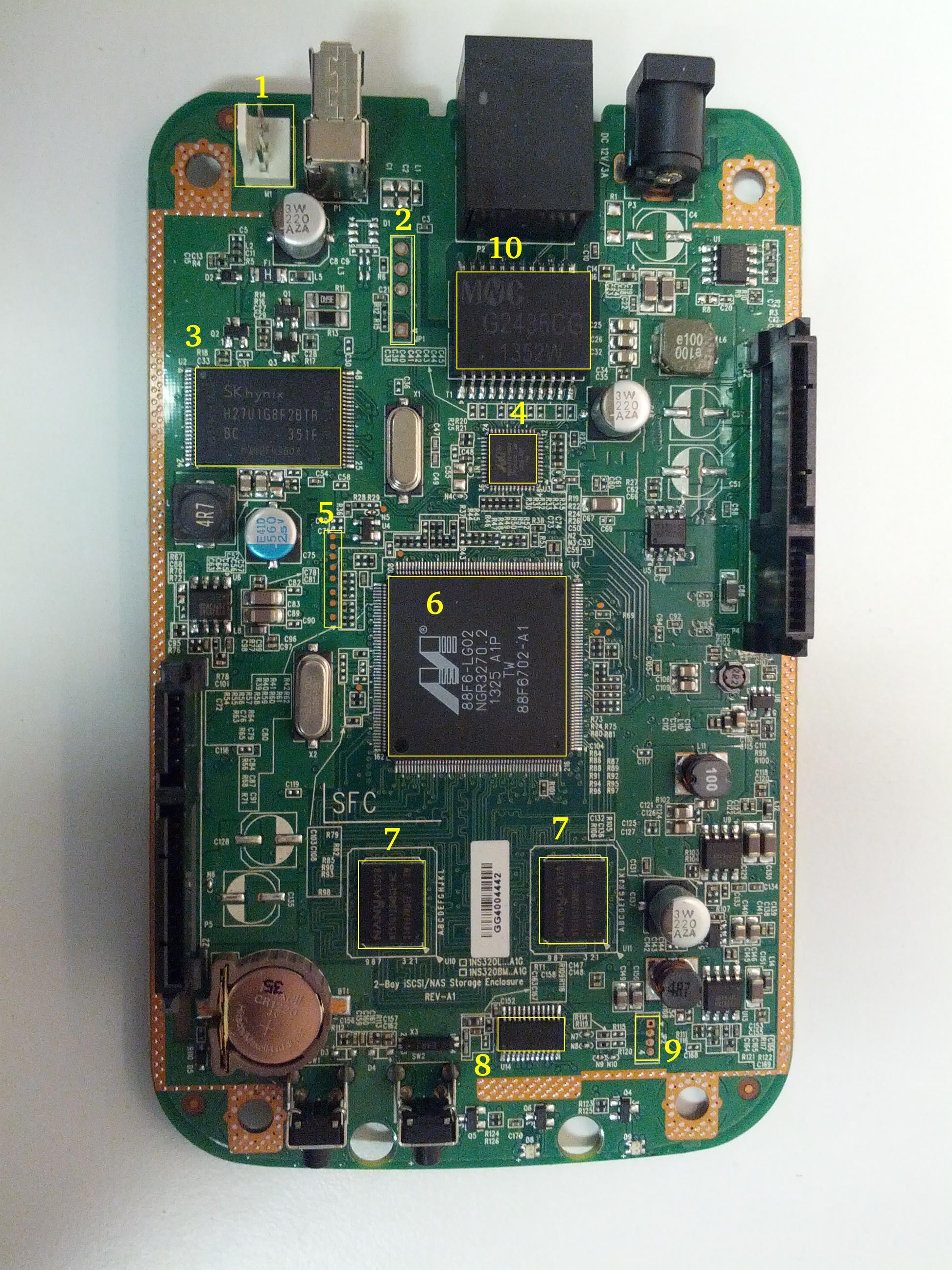
The system is based on a Marvell Kirkwood 1GHz SOC, other chips include an Ethernet controller, flash, RAM as well as an MCU which is a systems management controller similar to what you would have in a laptop or PC. The NAS has it's page on both deviwiki and new wikidevi where detailed information about the chips on the board can be found. The main board looks like this:

thumb-board1.jpg

Number Label Chip type on A3 board Chip type on A4 board Description
1 M1 Fan: AVC DS04010B12U   The fan connector
2 JP1     The serial console
3 U2 Hynix H27U1G8F2BTR   NAND flash
4 U3 Marvell 88E1318R   Ethernet chip
5       Testpads (likely JTAG)
6 U7 Marvell 88F6702   The CPU
7 U10,U11 Nanya NT5TU128M8GE-AC Hynix H5PS1G83KFR RAM chips
8 U14 Weltrend WT69P3   The system management MCU
9 JP2     WT69P3 programming bus?
10 T1 MNC G2436CG MNC G2497CG Ethernet transformer (datasheet)
         

In order to access the unpopulated pads on the board I soldered two pin connectors, because the JP2 pitch was smaller than the standard 2.54mm pinheads I had I used some wire to route it to where it can be accessed:

thumb-connectors.jpg

The board contains four LEDs with the following purpose:

Label Color Description
D6 Blue Power-on and booting indicator LED
D7 Red "USB" LED
D8 Red SATA1 port activity LED
D9 Red SATA2 port activity LED

2.0.1 Weltrend WT69P3

The WT69P3 is a systems management MCU which controls the power to the board, provides an RTC for time keeping and controls the fan. The MCU is connected via a RS232 link with the main CPU and in the original firmare a daemon in the system communicates with it. The communications protocol has been reverse-engineered and there exist at least two independent open-source implementations of the manamgement daemon - https://www.aboehler.at/hg/dns320l-daemon and https://github.com/martignlo/DNS-320L.

2.0.2 JP2 connector

This connector seems to terminate an I2C bus. Both lines have pullups to +3.3 V and the Weltrend chip's ISP protocol is I2C according to information from the manufacturer. Unfortunately the programmer software published uses a custom WLINK-I2C adapter with a WT6563 microcontroller. Unfortunately I was not able to find any place selling this programmer online. The assumption was that this is the ISP interface for the Weltrend WT69P3 MCU.

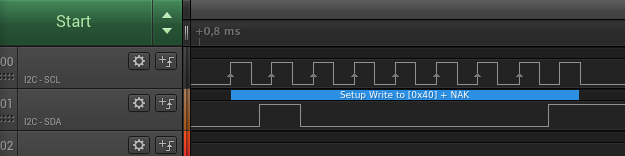
When I connected a Saleae logic analyzer to the bus I noticed something interesting however. When the system boots it tries to initiate a write to address 0x40.

[WT69P3-boot.png]

In order to investigate this I used an Arduino board and the builtin Wire library to make an I2C slave respond to the address where the MCU is writing. The code for the sketch used is below:

#include <Wire.h>
void setup()
{  Wire.begin(0x20);  Wire.onReceive(receiveCmd);  Wire.onRequest(sendResponse);  Serial.begin(9600);
}
void loop()
{  delay(100);
}
void receiveCmd(int howMany)
{  while(Wire.available()>0) // loop through all but the last  {    char c = Wire.read(); // receive byte as a character    Serial.print("CMD: ");    Serial.println(c, HEX);         // print the character  }
}
void sendResponse() {  Wire.write(0xAA);
}

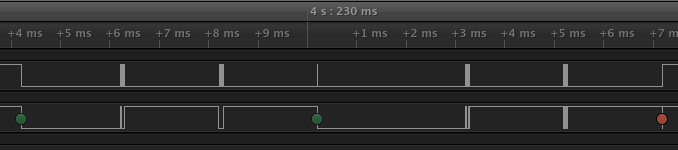
The wiring is documented in the Wire library reference page. Now things have started to look more interesting:

[WT69P3-i2c-write.png]

When we decode the traffic we see that the MCU is first writing byte 0x00 to address 0x40 and then reading a byte from address 0x41:

Time [s], Analyzer Name, Decoded Protocol Result
4.226217250000000,I2C,Setup Write to [0x40] + ACK
4.228212250000000,I2C,0x00 + ACK
4.233196500000000,I2C,Setup Read to [0x41] + ACK
4.235190500000000,I2C,0xAA + NAK

As I was expecting the second read to be some kind of status register I tried to send all 256 different responses to see what would happen. Some bytes sent back have triggered interesting behaviour:

Response byte Boot message LEDs
0x01 Module 0 is TDM  
0x02 Module 0 is AUDIO D7 and D9 LEDs light up
0x03 Module 0 is RGMII  
0x04 Module 0 is GMII  
0x05 Module 0 is TS  
0x06 Module 0 is MII  
0x07 Module 0 is TDM  
0x09 Error!, MV88F6282 doesn't support LCD module when booting from NAND!  

Later I noticed an "iprobe" command in the U-Boot help. It detected 3 addresses on the bus:

Marvell>> iprobe
Valid chip addresses: 13 20 64

This bus layout seems to be confirmed when we scan the bus with buspirate:

I2C>(1)
Searching I2C address space. Found devices at:
0x02(0x01 W) 0x26(0x13 W) 0x27(0x13 R) 0x40(0x20 W) 0x41(0x20 R) 0xC9(0x64 R) 

What is interesting apart from the 0x13, 0x20 (our fake Arduino slave) and 0x64 we also get write address 0x02. Interestingly, when the device is not booting (when LED6 is not blinking) the 0x64 is not present:

I2C>(1)
Searching I2C address space. Found devices at:
0x02(0x01 W) 0x26(0x13 W) 0x27(0x13 R) 0x40(0x20 W) 0x41(0x20 R) 

The "Boot message" documents additional messages that are printed by U-Boot when we respond to a read from 0x20 with a particular byte, for example for response 0x04:

 ** MARVELL BOARD: DB-88F6702A-BP LE 
U-Boot 1.1.4 (Aug 22 2012 - 17:06:54) Marvell version: 3.6.0.DNS-320L.01
U-Boot code: 00600000 -> 0067FFF0  BSS: -> 006CFB00
Soc: 88F6702 A1 CPU running @ 1000Mhz L2 running @ 500Mhz
SysClock = 400Mhz , TClock = 166Mhz 
DRAM (DDR2) CAS Latency = 5 tRP = 5 tRAS = 18 tRCD=6
DRAM CS[0] base 0x00000000   size 256MB DRAM Total size 256MB  16bit width
Addresses 8M - 0M are saved for the U-Boot usage.
Mem malloc Initialization (8M - 7M): Done
NAND:128 MB
Flash:  0 kB
CPU : Marvell Feroceon (Rev 1)
Streaming disabled Write allocate disabled
Module 0 is GMII
USB 0: host mode

It looks like the 0x20 address is some kind of peripheral type detection mechanism and the u-boot code is shared between different devices. I have found references to the "Boot message" strings from the table in various places on the internet, for example here, here and here always in connection to some hardware using the Kirkwood chipset.

3 Bootloader

The board uses the U-Boot bootloader like other Kirkwood-based devices. The boot process can be escaped in the usual way for U-Boot - by pressing SPACE and then 1. When we do this we are greeted with the U-Boot prompt and can poke around various commands. Below you can see exploration results of the information seen by the bootloader:

Marvell>> printenv
bootargs=root=/dev/ram console=ttyS0,115200 :::DB88FXX81:egiga0:none
baudrate=115200
loads_echo=0
ipaddr=2.66.66.201
serverip=2.66.66.32
rootpath=/srv/ubuntu
netmask=255.255.255.0
run_diag=yes
console=console=ttyS0,115200 mtdparts=nand_mtd:0xc0000@0(uboot)ro,0x7f00000@0x100000(root)
MALLOC_len=1
ethprime=egiga0
bootargs_root=root=/dev/nfs rw
bootargs_end=:::DB88FXX81:eth0:none
image_name=uImage
standalone=fsload 0x2000000 $(image_name);setenv bootargs $(console) root=/dev/mtdblock0 rw ip=$(ipaddr):$(serverip)$(bootargs_end) $(mvPhoneConfig); bootm 0x2000000;
ethaddr=00:50:43:00:02:02
ethmtu=1500
mvPhoneConfig=mv_phone_config=dev[0]:fxs,dev[1]:fxo
mvNetConfig=mv_net_config=(00:11:88:0f:62:81,0:1:2:3),mtu=1500
usb0Mode=host
yuk_ethaddr=00:00:00:EE:51:81
nandEcc=1bit
netretry=no
rcvrip=169.254.100.100
loadaddr=0x02000000
autoload=no
image_multi=yes
ethact=egiga0
bootcmd=nand read.e 0xa00000 0x100000 0x300000;nand read.e 0xf00000 0x600000 0x300000;bootm 0xa00000 0xf00000
stdin=serial
stdout=serial
stderr=serial
mainlineLinux=no
enaMonExt=no
enaCpuStream=no
enaWrAllo=no
pexMode=RC
disL2Cache=no
setL2CacheWT=yes
disL2Prefetch=yes
enaICPref=yes
enaDCPref=yes
sata_dma_mode=yes
netbsd_en=no
vxworks_en=no
bootdelay=1
disaMvPnp=no
enaAutoRecovery=yes
pcieTune=no
Marvell>> version
U-Boot 1.1.4 (Aug 22 2012 - 17:06:54) Marvell version: 3.6.0.DNS-320L.01
Marvell>> usb start
(Re)start USB...
USB:   scanning bus for devices... 2 USB Device(s) found
Waiting for storage device(s) to settle before scanning...
1 Storage Device(s) found
Marvell>> usb tree
Device Tree:  1  Hub (480MBit/s, 0mA)  |  Marvell EHCI   |  +-2  Mass Storage (480MBit/s, 200mA)       Kingston DT 100 G2 XXXXXXXXXXXXXXXXXXXX     Marvell>> usb storage  Device 0: Vendor: Kingston Prod.: DT 100 G2        Rev: PMAP            Type: Removable Hard Disk            Capacity: 3736.9 MB = 3.6 GB (7653312 x 512)
Marvell>> Temp
Unknown command 'Temp' - try 'help'
Marvell>> temp
Tj temp is 0
Marvell>> sp
Bus: 0 Device: 0 Func: 0 Vendor ID: 11ab Device ID: 6702
-------------------------------------------------------------------
Class: Memory controller
PCI_BAR0 (Mem-64bit) base: 0f1000000    size: 1048576 bytes
PCI_BAR1 (Mem-64bit) base: 000000000            size: 268435456 bytes
Marvell>> sg
PHY 0 :
---------
Auto negotiation: Enabled
Speed: 100 Mbps
Duplex: Half
Link: up
PHY 1 :
---------
Auto negotiation: Enabled
Speed: Uknown
Duplex: Full
Link: up
Marvell>> nand info
Device 0: NAND 128MB 3,3V 8-bit, sector size 128 KB
Marvell>> map
CPU Interface
-------------
SDRAM_CS0 ....base 00000000, size 256MB SDRAM_CS1 ....disable
SDRAM_CS2 ....disable
SDRAM_CS3 ....disable
PEX0_MEM ....base 90000000, size 128MB PEX0_IO ....base f0000000, size  16MB PEX1_MEM ....no such
PEX1_IO ....no such
INTER_REGS ....base f1000000, size   1MB NFLASH_CS ....base f9000000, size   8MB SPI_CS ....base f8000000, size  16MB BOOT_ROM_CS ....no such
DEV_BOOTCS ....no such
CRYPT_ENG ....base fb000000, size  64KB 
AHB To MBUS Bridge:
-------------------
win0 - PEX0_MEM base 90000000, ....size 128MB win1 - disable
win2 - PEX0_IO base f0000000, ....size  16MB win3 - disable
win4 - NFLASH_CS base f9000000, ....size   8MB win5 - SPI_CS base f8000000, ....size  16MB win6 - disable
win7 - CRYPT_ENG base fb000000, ....size  64KB win8 - INTER_REGS base f1000000, ....size   1MB 
PEX0:
-----
Pex Bars 
Internal Regs Bar0.... base f1000000, size   1MB DRAM Bar1............. base 00000000, size 256MB Devices Bar2.......... disable
Pex Decode Windows
win0 - SDRAM_CS0 base 00000000, ....size 256MB win1 - disable
win2 - disable
win3 - disable
win4 - disable
win5 - disable
default win - target unknown Expansion ROM - NFLASH_CS 
USB:
----
Device 0:
win0 - SDRAM_CS0 base 00000000, size 256MB win1 - PEX0_MEM base 90000000, size 128MB win2 - disable
win3 - disable
ETH 0:
----
win0 - SDRAM_CS0 base 00000000, ....size 256MB win1 - NFLASH_CS base f9000000, ....size   8MB win2 - SPI_CS base f8000000, ....size  16MB win3 - PEX0_IO base f0000000, ....size  16MB win4 - disable
win5 - disable
XOR 0:
----
win0 - NFLASH_CS base f9000000, size   8MB win1 - PEX0_MEM base 90000000, size 128MB win2 - SDRAM_CS0 base 0, size 256MB win3 - SPI_CS base f8000000, size  16MB win4 - CRYPT_ENG base fb000000, size  64KB win5 - disable
win6 - disable
win7 - disable
XOR 1:
----
win0 - NFLASH_CS base f9000000, size   8MB win1 - PEX0_MEM base 90000000, size 128MB win2 - SDRAM_CS0 base 0, size 256MB win3 - SPI_CS base f8000000, size  16MB win4 - CRYPT_ENG base fb000000, size  64KB win5 - disable
win6 - disable
win7 - disable
SATA 0:
----
win0 - SDRAM_CS0 base 00000000, ....size 256MB win1 - SDRAM_CS1 base 10000000, ....size 256MB win2 - SDRAM_CS2 base 20000000, ....size 256MB win3 - SDRAM_CS3 base 30000000, ....size 256MB 
SATA 1:
----
win0 - SDRAM_CS0 base 00000000, ....size 256MB win1 - SDRAM_CS1 base 10000000, ....size 256MB win2 - SDRAM_CS2 base 20000000, ....size 256MB win3 - SDRAM_CS3 base 30000000, ....size 256MB 
AUDIO:
----
win0 - SDRAM_CS0 base 00000000, ....size 256MB win1 - SDRAM_CS1 base 10000000, ....size 256MB Marvell>> dclk
TCLK 166Mhz, SYSCLK 400Mhz (UART baudrate 115200)
Marvell>> ide reset
Reset IDE: Marvell Serial ATA Adapter
Integrated Sata device found
[0 0 0]: Enable DMA mode (6)  Device 0 @ 0 0:
Model: HITACHI HUA722010ALA330                  Firm: JP4ONA01 Ser#: XXXXXX            Type: Hard Disk            Supports 48-bit addressing            Capacity: 953869.7 MB = 931.5 GB (1953525168 x 512)
[0 1 0]: Enable DMA mode (6)  Device 1 @ 0 1:
Model: ST31000524AS                             Firm: JC4A     Ser#:             XXXXXXXXXX            Type: Hard Disk            Supports 48-bit addressing            Capacity: 953869.7 MB = 931.5 GB (1953525168 x 512)

Some of these variables are documented, some seem to be Marvell or Kirkwood specific cruft. The bootloader version is ancient, according to github, version 1.1.4 was released in 2005.

4 Original firmware

The original firmware resides on the NAND flash and an example of the entire boot console log is provided below:

 ** MARVELL BOARD: DB-88F6702A-BP LE 
U-Boot 1.1.4 (Aug 22 2012 - 17:06:54) Marvell version: 3.6.0.DNS-320L.01
U-Boot code: 00600000 -> 0067FFF0  BSS: -> 006CFB00
Soc: 88F6702 A1 CPU running @ 1000Mhz L2 running @ 500Mhz
SysClock = 400Mhz , TClock = 166Mhz 
DRAM (DDR2) CAS Latency = 5 tRP = 5 tRAS = 18 tRCD=6
DRAM CS[0] base 0x00000000   size 256MB DRAM Total size 256MB  16bit width
Addresses 8M - 0M are saved for the U-Boot usage.
Mem malloc Initialization (8M - 7M): Done
NAND:128 MB
Flash:  0 kB
CPU : Marvell Feroceon (Rev 1)
Streaming disabled Write allocate disabled
USB 0: host mode
PEX 0: interface detected no Link.
Net:   egiga0 [PRIME]
Hit any key to stop autoboot:  0 
NAND read: device 0 offset 0x100000, size 0x300000
load addr ....  =a00000
 3145728 bytes read: OK
NAND read: device 0 offset 0x600000, size 0x300000
load addr ....  =f00000
 3145728 bytes read: OK
## Booting image at 00a00000 ...   Image Name:   Linux-2.6.31.8   Created:      2012-08-22   8:55:08 UTC   Image Type:   ARM Linux Kernel Image (uncompressed)   Data Size:    2630552 Bytes =  2.5 MB   Load Address: 00008000   Entry Point:  00008000   Verifying Checksum ... OK
OK
## Loading Ramdisk Image at 00f00000 ...   Image Name:   Ramdisk   Created:      2014-12-26   3:00:57 UTC   Image Type:   ARM Linux RAMDisk Image (gzip compressed)   Data Size:    1743894 Bytes =  1.7 MB   Load Address: 00e00000   Entry Point:  00e00000   Verifying Checksum ... OK
Starting kernel ...
Uncompressing Linux......................................................................................................................................................................... done, booting the kernel.
Linux version 2.6.31.8 (jack@swtest6) (gcc version 4.3.2 (sdk3.3-ct-ng-1.4.1) ) #1 Wed Aug 22 16:55:05 CST 2012
CPU: Feroceon 88FR131 [56251311] revision 1 (ARMv5TE), cr=00053977
CPU: VIVT data cache, VIVT instruction cache
Machine: Feroceon-KW
Using UBoot passing parameters structure
Memory policy: ECC disabled, Data cache writeback
Built 1 zonelists in Zone order, mobility grouping off.  Total pages: 65024
Kernel command line: root=/dev/ram console=ttyS0,115200 :::DB88FXX81:egiga0:none
PID hash table entries: 1024 (order: 10, 4096 bytes)
Dentry cache hash table entries: 32768 (order: 5, 131072 bytes)
Inode-cache hash table entries: 16384 (order: 4, 65536 bytes)
Memory: 256MB = 256MB total
Memory: 246272KB available (4960K code, 334K data, 136K init, 0K highmem)
Hierarchical RCU implementation.
NR_IRQS:128
Console: colour dummy device 80x30
Calibrating delay loop... 999.42 BogoMIPS (lpj=4997120)
Mount-cache hash table entries: 512
CPU: Testing write buffer coherency: ok
NET: Registered protocol family 16
Feroceon L2: Enabling L2
Feroceon L2: Cache support initialised.
CPU Interface
-------------
SDRAM_CS0 ....base 00000000, size 256MB SDRAM_CS1 ....disable
SDRAM_CS2 ....disable
SDRAM_CS3 ....disable
PEX0_MEM ....base e0000000, size 128MB PEX0_IO ....base f2000000, size   1MB PEX1_MEM ....no such
PEX1_IO ....no such
INTER_REGS ....base f1000000, size   1MB NFLASH_CS ....base fa000000, size   2MB SPI_CS ....base f4000000, size  16MB BOOT_ROM_CS ....no such
DEV_BOOTCS ....no such
CRYPT_ENG ....base f0000000, size   2MB   Marvell Development Board (LSP Version KW_LSP_5.1.3_patch29)-- DB-88F6702A-BP  Soc: 88F6702 A1 LE
 Detected Tclk 166666667 and SysClk 400000000 MV Buttons Device Load
Marvell USB EHCI Host controller #0: c8040740
PEX0 interface detected no Link.
PCI: bus0: Fast back to back transfers enabled
mvPexLocalBusNumSet: ERR. Invalid PEX interface 1
bio: create slab  at 0
SCSI subsystem initialized
usbcore: registered new interface driver usbfs
usbcore: registered new interface driver hub
usbcore: registered new device driver usb
NET: Registered protocol family 2
IP route cache hash table entries: 2048 (order: 1, 8192 bytes)
TCP established hash table entries: 8192 (order: 4, 65536 bytes)
TCP bind hash table entries: 8192 (order: 3, 32768 bytes)
TCP: Hash tables configured (established 8192 bind 8192)
TCP reno registered
NET: Registered protocol family 1
Trying to unpack rootfs image as initramfs...
rootfs image is not initramfs (no cpio magic); looks like an initrd
Freeing initrd memory: 1700K
RTC has been updated!!!
rtc mv_rtc: rtc core: registered kw-rtc as rtc0
RTC registered
cpufreq: Init kirkwood cpufreq driver
XOR registered 4 channels
XOR 2nd invalidate WA enabled
cesadev_init(c000ed5c)
mvCesaInit: sessions=640, queue=64, pSram=f0000000
MV Buttons Driver Load
VFS: Disk quotas dquot_6.5.2
Dquot-cache hash table entries: 1024 (order 0, 4096 bytes)
squashfs: version 4.0 (2009/01/31) Phillip Lougher
Installing knfsd (copyright (C) 1996 okir@monad.swb.de).
NTFS driver 2.1.29 [Flags: R/O].
JFFS2 version 2.2. (NAND) © 2001-2006 Red Hat, Inc.
fuse init (API version 7.12)
msgmni has been set to 484
alg: No test for cipher_null (cipher_null-generic)
alg: No test for ecb(cipher_null) (ecb-cipher_null)
alg: No test for digest_null (digest_null-generic)
alg: No test for compress_null (compress_null-generic)
alg: No test for lzma (lzma-generic)
alg: No test for stdrng (krng)
alg: No test for hmac(digest_null) (hmac(digest_null-generic))
Block layer SCSI generic (bsg) driver version 0.4 loaded (major 253)
io scheduler noop registered
io scheduler anticipatory registered (default)
Initializing ths8200_init
Initializing dove_adi9889_init
Serial: 8250/16550 driver, 4 ports, IRQ sharing disabled
serial8250.0: ttyS0 at MMIO 0xf1012000 (irq = 33) is a 16550A
console [ttyS0] enabled
serial8250.1: ttyS1 at MMIO 0xf1012100 (irq = 34) is a 16550A
brd: module loaded
loop: module loaded
Integrated Sata device found
IRQ 21/mvSata: IRQF_DISABLED is not guaranteed on shared IRQs
scsi0 : Marvell SCSI to SATA adapter
scsi1 : Marvell SCSI to SATA adapter
Loading Marvell Ethernet Driver:  o Cached descriptors in DRAM  o DRAM SW cache-coherency  o 2 Giga ports supported  o Single RX Queue support - ETH_DEF_RXQ=0  o Single TX Queue support - ETH_DEF_TXQ=0  o TCP segmentation offload (TSO) supported  o Large Receive offload (LRO) supported  o Receive checksum offload supported  o Transmit checksum offload supported  o Network Fast Processing (Routing) supported - (Disabled)  o Driver ERROR statistics enabled  o Proc tool API enabled  o SKB Reuse supported - (Disabled)  o SKB Recycle supported - (Disabled)  o Rx descripors: q0=128  o Tx descripors: q0=532  o Loading network interface(s):     o register under mv88fx_eth platform     o egiga0, ifindex = 2, GbE port = 0
Warning: Giga 1 is Powered Off
mvFpRuleDb (c0edc000): 2048 entries, 8192 bytes
Counter=0, opIdx=6, overhead=16
Counter=1, opIdx=2, overhead=0
Counter=2, opIdx=1, overhead=18
Counter=3, opIdx=2, overhead=0
NAND device: Manufacturer ID: 0xad, Chip ID: 0xf1 (Hynix NAND 128MiB 3,3V 8-bit)
Scanning device for bad blocks
Using static partition definition
Creating 7 MTD partitions on "nand_mtd":
0x000000000000-0x000000100000 : "u-boot"
0x000000100000-0x000000600000 : "uImage"
0x000000600000-0x000000b00000 : "ramdisk"
0x000000b00000-0x000006f00000 : "image"
0x000006f00000-0x000007900000 : "rescue firmware"
0x000007900000-0x000007e00000 : "config"
0x000007e00000-0x000008000000 : "my-dlink"
ehci_hcd: USB 2.0 'Enhanced' Host Controller (EHCI) Driver
ehci_marvell ehci_marvell.70059: Marvell Orion EHCI
ehci_marvell ehci_marvell.70059: new USB bus registered, assigned bus number 1
ehci_marvell ehci_marvell.70059: irq 19, io base 0xf1050100
ehci_marvell ehci_marvell.70059: USB 2.0 started, EHCI 1.00
usb usb1: configuration #1 chosen from 1 choice
hub 1-0:1.0: USB hub found
hub 1-0:1.0: 1 port detected
ohci_hcd: USB 1.1 'Open' Host Controller (OHCI) Driver
uhci_hcd: USB Universal Host Controller Interface driver
Initializing USB Mass Storage driver...
usbcore: registered new interface driver usb-storage
USB Mass Storage support registered.
mice: PS/2 mouse device common for all mice
i2c /dev entries driver
md: linear personality registered for level -1
md: raid0 personality registered for level 0
md: raid1 personality registered for level 1
device-mapper: ioctl: 4.15.0-ioctl (2009-04-01) initialised: dm-devel@redhat.com
usbcore: registered new interface driver usbhid
usbhid: v2.6:USB HID core driver
TCP cubic registered
NET: Registered protocol family 17
RPC: Registered udp transport module.
RPC: Registered tcp transport module.
rtc mv_rtc: setting system clock to 2000-01-01 00:00:00 UTC (946684800)
md: Waiting for all devices to be available before autodetect
md: If you don't use raid, use raid=noautodetect
md: Autodetecting RAID arrays.
md: Scanned 0 and added 0 devices.
md: autorun ...
md: ... autorun DONE.
RAMDISK: gzip image found at block 0
VFS: Mounted root (ext2 filesystem) on device 1:0.
Freeing init memory: 136K
init started: BusyBox v1.20.2 (2013-11-27 15:54:37 CST)
starting pid 536, tty '': '/etc/rc.sh' Mounting /etc/fstab
umount: can't umount /proc: Invalid argument
umount: can't umount /usr/local/modules: Invalid argument
sh: can't open '/usr/sbin/pre_usb.sh'
first good block is 0
image len = 39137280 , image checksum = beaa9c0
umount: can't umount /usr/local/tmp: Invalid argument
dump image checksum=beaa9c0
mount cmd:busybox mount -t squashfs -o loop /usr/local/tmp/image.cfs /usr/local/modules
ln: /lib/./libnss_dns-2.8.so: File exists
ln: /lib/./libnss_dns.so.2: File exists
ln: /usr/sbin/./system_init: File exists
hardware init
GbE port 0: TxEnable WA - Enabled, deep=1, tx_en_bk=1
mtd check v1.02.08062012
config mtd type is JFFS2
/usr/local/config free size is 4767744 copy config files
cp: can't stat '/usr/local/config/user.log.old': No such file or directory
usbcore: registered new interface driver usblp set loopback interface
old firmware ver:20141226
new firmware ver:20141226
first good block is 0
mac1 = 70:62:B8:2A:52:73
lan0:ifconfig egiga0 hw ether 70:62:B8:2A:52:73
egiga0: mac address changed
egiga0: started
Support Mydlink
NET: Registered protocol family 10
lo: Disabled Privacy Extensions
ADDRCONF(NETDEV_UP): egiga0: link is not ready
IPv6 over IPv4 tunneling driver
sit0: Disabled Privacy Extensions
ip6tnl0: Disabled Privacy Extensions
IPv4 over IPv4 tunneling driver
tunl0: Disabled Privacy Extensions
net.ipv6.conf.default.accept_dad = 2
net.ipv6.conf.egiga0.accept_dad = 2
net.ipv6.conf.default.dad_transmits = 1
net.ipv6.conf.egiga0.dad_transmits = 1
net.ipv6.conf.default.forwarding = 0
net.ipv6.conf.default.accept_redirects = 1 execute rc.init.sh
awk: /var/run/udhcpc0.pid: No such file or directory
udhcpc (v1.20.2) started
Sending discover...
Sending discover...
Sending discover...
init egiga0
No lease, forking to background
killall: crond: no process killed set Time Zone ****
Fri Dec 31 22:00:51 GMT 1999 get Time from rtc and set it into system ****
rtc: RTC time = 2020/3/2 Mon 10:16:15
Mon Mar  2 10:16:15 GMT 2020 Do not adjust RTC time ***
Module IPC SERVER Version:(1.00.20090706)
ads=0
created mail daemon thread 0
ifconfig: egiga1: error fetching interface information: Device not found
Starting system message bus
Command: wget -T5 -t3 -q http://cfaj.freeshell.org/ipaddr.cgi -O /tmp/exip.0
Command: wget -T5 -t3 -q http://icanhazip.com/ -O /tmp/exip.1
Command: wget -T5 -t3 -q http://ifconfig.me/ip -O /tmp/exip.2
Command: wget -T5 -t3 -q http://whatismyip.org/ -O /tmp/exip.3
Command: wget -T5 -t3 -q http://ifconfig.me/ip -O /tmp/exip.4
Command: wget -T5 -t3 -q http://checkip.dyndns.com:8245/ -O /tmp/exip.5
config egiga0 169.254.173.176
RTNETLINK answers: File exists
call load_module network
Up_Send_Ctl : Can not find specified command "SysIP1"
Command line is not complete. Try option "help"
zcip: script /usr/share/udhcpc/zcip.script config failed, exitcode=1
Stop NFS Deamon....
Stop NFS mountd....
Unload Driver....
Stop Portmap.
No NFS information .
Stop NFS Server OVER.
Start config the NFS needed file....
Config Over.
No NFS information .
Start portmap....
Load Driver .
Start NFS Deamon .
svc: failed to register lockdv1 RPC service (errno 97).
NFSD: Using /var/lib/nfs/v4recovery as the NFSv4 state recovury0di�e{u�_k�owSf:�unicne*�o*gind recovery directory /var/lib/nfs/v4recovery
NFSD: starting 90-second grace period
Start NFS Server OVER .
cp: can't stat '/usr/local/config/Mydlink_Status.xml': No such file or directory
mcu version 1.02
system daemon v1.03.20130707
chk_io v1.03.20130502
mfg_start version 1.00(2014-12-26)
Mon Mar  2 10:16:42 2020
usb_dir []
cp: can't stat '/usr/local/config/mydlink_time.xml': No such file or directory
2020-03-02 10:16:39: (../../src/log.c.166) server started killall: chk_hotplug: no process killed
sh: you need to specify whom to kill
killall: dcp: no process killed
2020-03-02 10:16:42: (../../src/log.c.166) server started kinmyno��signalc: no process killed
usb_dir [/]
filename_mfg mfg_DNS_320L
check //mfg_DNS_320L file
opeo*��/mfw_Vn[�3::m�vime>gainme�jkillall: upnpc-ddns: no process killed
killall: tsa: no process killed
opt.local stop�ok.
o|w/oo{un���izu6ok��Jkillall: smbd: no process killed
Please press Enter to activate this console. LED_POWER_ON

5 Building mainline Linux kernel

I managed to build the mainline kernel 5.5.7 using a slightly modified device tree from github using Ubuntu 18.04 LTS:

➜  linux-5.5.7 lsb_release -a
No LSB modules are available.
Distributor ID: Ubuntu
Description:    Ubuntu 18.04.4 LTS
Release:        18.04
Codename:       bionic

The GCC version used was 7.5.0:

➜  linux-5.5.7 arm-linux-gnueabi-gcc -v
Using built-in specs.
COLLECT_GCC=arm-linux-gnueabi-gcc
COLLECT_LTO_WRAPPER=/usr/lib/gcc-cross/arm-linux-gnueabi/7/lto-wrapper
Target: arm-linux-gnueabi
Configured with: ../src/configure -v --with-pkgversion='Ubuntu/Linaro 7.5.0-3ubuntu1~18.04' --with-bugurl=file:///usr/share/doc/gcc-7/README.Bugs --enable-languages=c,ada,c++,go,d,fortran,objc,obj-c++ --prefix=/usr --with-gcc-major-version-only --program-suffix=-7 --enable-shared --enable-linker-build-id --libexecdir=/usr/lib --without-included-gettext --enable-threads=posix --libdir=/usr/lib --enable-nls --with-sysroot=/ --enable-clocale=gnu --enable-libstdcxx-debug --enable-libstdcxx-time=yes --with-default-libstdcxx-abi=new --enable-gnu-unique-object --disable-libitm --disable-libquadmath --disable-libquadmath-support --enable-plugin --with-system-zlib --with-target-system-zlib --enable-multiarch --enable-multilib --disable-sjlj-exceptions --with-arch=armv5t --with-float=soft --disable-werror --enable-multilib --enable-checking=release --build=x86_64-linux-gnu --host=x86_64-linux-gnu --target=arm-linux-gnueabi --program-prefix=arm-linux-gnueabi- --includedir=/usr/arm-linux-gnueabi/include
Thread model: posix
gcc version 7.5.0 (Ubuntu/Linaro 7.5.0-3ubuntu1~18.04) 

In order to install this compiler you should run the command:

➜  linux-5.5.7 sudo apt install -y gcc-arm-linux-gnueabi

Now we can setup an alias which will be useful for building all other software. The alias should use the prefix for the compiler we just installed:

➜  linux-5.5.7 alias cross-make='make ARCH=arm CROSS_COMPILE=arm-linux-gnueabi-'

First we need to create a default config for the mvebuv5 target. Why mvebu? mv means Marvell, EBU is Engineering Business Unit and v5 is the ARM architecture version. Therefore:

➜  linux-5.5.7 cross-make mvebu_v5_defconfig  HOSTCC  scripts/basic/fixdep  HOSTCC  scripts/kconfig/conf.o  HOSTCC  scripts/kconfig/confdata.o  HOSTCC  scripts/kconfig/expr.o  LEX     scripts/kconfig/lexer.lex.c  YACC    scripts/kconfig/parser.tab.[ch]  HOSTCC  scripts/kconfig/lexer.lex.o  HOSTCC  scripts/kconfig/parser.tab.o  HOSTCC  scripts/kconfig/preprocess.o  HOSTCC  scripts/kconfig/symbol.o  HOSTCC  scripts/kconfig/util.o  HOSTLD  scripts/kconfig/conf
#
# configuration written to .config
#

Now we need to copy in the Device Tree (.dts) file from the github repo to our Linux source directory:

➜ ~ git clone https://github.com/scus1/dns320l
Cloning into 'dns320l'...
remote: Enumerating objects: 327, done.
remote: Total 327 (delta 0), reused 0 (delta 0), pack-reused 327
Receiving objects: 100% (327/327), 82.17 KiB | 203.00 KiB/s, done.
Resolving deltas: 100% (154/154), done.
➜ ~ cp dns320l/kernel/dts/kirkwood-dns320l.dts linux-5.5.7/arch/arm/boot/dts 

At this point we can build the U-boot kernel image (uImage) and the DTB which is a compiled version of the Device Tree:

➜  linux-5.5.7 cross-make -j16 LOADADDR=0x8000 uImage kirkwood-dns320l.dtb  [...]  CALL    scripts/atomic/check-atomics.sh  CALL    scripts/checksyscalls.sh  CHK     include/generated/compile.h  Kernel: arch/arm/boot/Image is ready  Kernel: arch/arm/boot/zImage is ready  UIMAGE  arch/arm/boot/uImage
Image Name:   Linux-5.5.7
Created:      Sat Apr  4 21:49:09 2020
Image Type:   ARM Linux Kernel Image (uncompressed)
Data Size:    4550496 Bytes = 4443.84 KiB = 4.34 MiB
Load Address: 00008000
Entry Point:  00008000  Kernel: arch/arm/boot/uImage is ready
➜  linux-5.5.7 

The kernel image and DTB files need to be joined together for the kernel to notice the DTB blob. Then a new uImage needs to built from the joined file:

➜  linux-5.5.7 cat arch/arm/boot/zImage arch/arm/boot/dts/kirkwood-dns320l.dtb > arch/arm/boot/zImage-dtb ➜  linux-5.5.7 bash ./scripts/mkuboot.sh -A arm -O linux -C none  -T kernel -a 0x8000 -e 0x8000 -n 'Linux-5.5.7' -d arch/arm/boot/zImage-dtb arch/arm/boot/uImage
Image Name:   Linux-5.5.7
Created:      Sat Apr  4 21:51:29 2020
Image Type:   ARM Linux Kernel Image (uncompressed)
Data Size:    4561674 Bytes = 4454.76 KiB = 4.35 MiB
Load Address: 00008000
Entry Point:  00008000
➜  linux-5.5.7 

Now the kernel can be booted with PXE for example:

## Booting image at 00a00000 ...   Image Name:   Linux-5.5.7   Created:      2020-04-04  19:51:29 UTC   Image Type:   ARM Linux Kernel Image (uncompressed)   Data Size:    4561674 Bytes =  4.4 MB   Load Address: 00008000   Entry Point:  00008000   Verifying Checksum ... OK
OK
Starting kernel ...
Booting Linux on physical CPU 0x0
Linux version 5.5.7 (enki@newton) (gcc version 7.5.0 (Ubuntu/Linaro 7.5.0-3ubuntu1~18.04)) #1 PREEMPT Sat Apr 4 21:47:13 CEST 2020
CPU: Feroceon 88FR131 [56251311] revision 1 (ARMv5TE), cr=0005397f
CPU: VIVT data cache, VIVT instruction cache
OF: fdt: Machine model: D-Link DNS-320L
Memory policy: Data cache writeback
Built 1 zonelists, mobility grouping on.  Total pages: 65024
Kernel command line: root=/dev/ram console=ttyS0,115200 :::DB88FXX81:egiga0:none
Dentry cache hash table entries: 32768 (order: 5, 131072 bytes, linear)
Inode-cache hash table entries: 16384 (order: 4, 65536 bytes, linear)
mem auto-init: stack:off, heap alloc:off, heap free:off
Memory: 250112K/262144K available (6669K kernel code, 286K rwdata, 1676K rodata, 200K init, 657K bss, 12032K reserved, 0K cma-reserved, 0K highmem)
SLUB: HWalign=32, Order=0-3, MinObjects=0, CPUs=1, Nodes=1
rcu: Preemptible hierarchical RCU implementation.
        Tasks RCU enabled.
rcu: RCU calculated value of scheduler-enlistment delay is 10 jiffies.
NR_IRQS: 16, nr_irqs: 16, preallocated irqs: 16
random: get_random_bytes called from start_kernel+0x278/0x410 with crng_init=0
clocksource: orion_clocksource: mask: 0xffffffff max_cycles: 0xffffffff, max_idle_ns: 11467562657 ns
sched_clock: 32 bits at 166MHz, resolution 6ns, wraps every 12884901885ns
Switching to timer-based delay loop, resolution 6ns
Console: colour dummy device 80x30
Calibrating delay loop (skipped), value calculated using timer frequency.. 333.33 BogoMIPS (lpj=1666666)
pid_max: default: 32768 minimum: 301
Mount-cache hash table entries: 1024 (order: 0, 4096 bytes, linear)
Mountpoint-cache hash table entries: 1024 (order: 0, 4096 bytes, linear)
CPU: Testing write buffer coherency: ok
Setting up static identity map for 0x81e0 - 0x8238
mvebu-soc-id: MVEBU SoC ID=0x6702, Rev=0x3
rcu: Hierarchical SRCU implementation.
devtmpfs: initialized
clocksource: jiffies: mask: 0xffffffff max_cycles: 0xffffffff, max_idle_ns: 19112604462750000 ns
futex hash table entries: 256 (order: -1, 3072 bytes, linear)
pinctrl core: initialized pinctrl subsystem
thermal_sys: Registered thermal governor 'step_wise'
NET: Registered protocol family 16
DMA: preallocated 256 KiB pool for atomic coherent allocations
cpuidle: using governor menu
Feroceon L2: Enabling L2
Feroceon L2: Cache support initialised.
vgaarb: loaded
SCSI subsystem initialized
usbcore: registered new interface driver usbfs
usbcore: registered new interface driver hub
usbcore: registered new device driver usb
Advanced Linux Sound Architecture Driver Initialized.
clocksource: Switched to clocksource orion_clocksource
NET: Registered protocol family 2
tcp_listen_portaddr_hash hash table entries: 512 (order: 0, 4096 bytes, linear)
TCP established hash table entries: 2048 (order: 1, 8192 bytes, linear)
TCP bind hash table entries: 2048 (order: 1, 8192 bytes, linear)
TCP: Hash tables configured (established 2048 bind 2048)
UDP hash table entries: 256 (order: 0, 4096 bytes, linear)
UDP-Lite hash table entries: 256 (order: 0, 4096 bytes, linear)
NET: Registered protocol family 1
RPC: Registered named UNIX socket transport module.
RPC: Registered udp transport module.
RPC: Registered tcp transport module.
RPC: Registered tcp NFSv4.1 backchannel transport module.
PCI: CLS 0 bytes, default 32
Initialise system trusted keyrings
workingset: timestamp_bits=30 max_order=16 bucket_order=0
jffs2: version 2.2. (NAND) © 2001-2006 Red Hat, Inc.
Key type asymmetric registered
Asymmetric key parser 'x509' registered
io scheduler mq-deadline registered
io scheduler kyber registered
kirkwood-pinctrl f1010000.pin-controller: registered pinctrl driver
mvebu-gpio f1010140.gpio: IRQ index 3 not found
mv_xor f1060800.xor: Marvell shared XOR driver
mv_xor f1060800.xor: Marvell XOR (Registers Mode): ( xor cpy intr )
mv_xor f1060900.xor: Marvell shared XOR driver
mv_xor f1060900.xor: Marvell XOR (Registers Mode): ( xor cpy intr )
Serial: 8250/16550 driver, 2 ports, IRQ sharing disabled
printk: console [ttyS0] disabled
f1012000.serial: ttyS0 at MMIO 0xf1012000 (irq = 25, base_baud = 10416666) is a 16550A
printk: console [ttyS0] enabled
f1012100.serial: ttyS1 at MMIO 0xf1012100 (irq = 26, base_baud = 10416666) is a 16550A
loop: module loaded
sata_mv f1080000.sata: slots 32 ports 2
scsi host0: sata_mv
scsi host1: sata_mv
ata1: SATA max UDMA/133 irq 33
ata2: SATA max UDMA/133 irq 33
nand: device found, Manufacturer ID: 0xad, Chip ID: 0xf1
nand: Hynix H27U1G8F2BTR-BC
nand: 128 MiB, SLC, erase size: 128 KiB, page size: 2048, OOB size: 64
Scanning device for bad blocks
7 fixed-partitions partitions found on MTD device orion_nand
Creating 7 MTD partitions on "orion_nand":
0x000000000000-0x000000100000 : "u-boot"
0x000000100000-0x000000600000 : "uImage"
0x000000600000-0x000000b00000 : "ramdisk"
0x000000b00000-0x000006f00000 : "image"
0x000006f00000-0x000007900000 : "mini firmware"
0x000007900000-0x000007e00000 : "config"
0x000007e00000-0x000008000000 : "my-dlink"
libphy: Fixed MDIO Bus: probed
libphy: orion_mdio_bus: probed
mv643xx_eth: MV-643xx 10/100/1000 ethernet driver version 1.4
mv643xx_eth_port mv643xx_eth_port.0 eth0: port 0 with MAC address 00:50:43:00:02:02
libertas_sdio: Libertas SDIO driver
libertas_sdio: Copyright Pierre Ossman
ehci_hcd: USB 2.0 'Enhanced' Host Controller (EHCI) Driver
ehci-pci: EHCI PCI platform driver
ehci-orion: EHCI orion driver
orion-ehci f1050000.ehci: EHCI Host Controller
orion-ehci f1050000.ehci: new USB bus registered, assigned bus number 1
orion-ehci f1050000.ehci: irq 30, io mem 0xf1050000
orion-ehci f1050000.ehci: USB 2.0 started, EHCI 1.00
hub 1-0:1.0: USB hub found
hub 1-0:1.0: 1 port detected
usbcore: registered new interface driver usb-storage
usbcore: registered new interface driver ums-datafab
usbcore: registered new interface driver ums-freecom
usbcore: registered new interface driver ums-jumpshot
usbcore: registered new interface driver ums-sddr09
usbcore: registered new interface driver ums-sddr55
ata1: SATA link down (SStatus 0 SControl F300)
ata2: SATA link down (SStatus 0 SControl F300)
rtc-mv f1010300.rtc: internal RTC not ticking
i2c /dev entries driver
watchdog: f1020300.watchdog-timer: driver supplied timeout (4294967295) out of range
watchdog: f1020300.watchdog-timer: falling back to default timeout (25)
orion_wdt: Initial timeout 25 sec
marvell-cesa f1030000.crypto: CESA device successfully registered
usbcore: registered new interface driver usbhid
usbhid: USB HID core driver
oprofile: no performance counters
oprofile: using timer interrupt.
NET: Registered protocol family 17
lib80211: common routines for IEEE802.11 drivers
Loading compiled-in X.509 certificates
input: gpio-keys as /devices/platform/gpio-keys/input/input0
hctosys: unable to open rtc device (rtc0)
cfg80211: Loading compiled-in X.509 certificates for regulatory database
cfg80211: Loaded X.509 cert 'sforshee: 00b28ddf47aef9cea7'
platform regulatory.0: Direct firmware load for regulatory.db failed with error -2
cfg80211: failed to load regulatory.db
ALSA device list:  No soundcards found.
VFS: Cannot open root device "ram" or unknown-block(1,0): error -6
[...]

Additional kernel options can now be added depending on your needs. I have provided the config I was using here.

6 Building a rootfs

For the rootfs I wanted to use buildroot as I've found it's build system to be the easiest to understand. First we download buildroot-2020.02:

➜  ~ tar xvf buildroot-2020.02.tar.bz2
[...]
buildroot-2020.02/docs/manual/manual.html
buildroot-2020.02/.br2-external.in.openssl
buildroot-2020.02/.br2-external.in.toolchains
➜  ~

Then we need to copy in the packages for the DNS320L mcu communications daemon:

(default) ➜  buildroot-2020.02 cp -r buildroot-dns320l/package/* package
(default) ➜  buildroot-2020.02 patch -p1 < buildroot-dns320l/add-to-config.patch patching file package/Config.in
(default) ➜  buildroot-2020.02 

We can now build whatever options we want, the config I used can be downloaded here. The target architecture should be "ARM little-endian" and the target architecture variant is arm926t. After building buildroot

(default) ➜  buildroot-2020.02 make -j16
[...]
ln -snf /home/enki/Pobrane/buildroot-2020.02/output/host/arm-buildroot-linux-gnueabi/sysroot /home/enki/Pobrane/buildroot-2020.02/output/staging
(default) ➜  buildroot-2020.02 ls -l output/images/rootfs.cpio.uboot -rw-r--r-- 1 enki enki 20115884 kwi  5 19:08 output/images/rootfs.cpio.uboot

The initramfs image is inside the output/images/ directory and can be directly booted with the kernel built before.

7 Bootloader setup

For my own firmware I made the choice to not remove the original firmware from NAND just in case. I opted to boot my FW from an external USB stick plugged into the back USB port as I won't use it anyway. In order to configure the NAS for USB booting you need to perform the following steps:

First, interrupt the autoboot sequence by pressing SPACE and 1. After that perform the u-boot shell commands to save the existing boot configuration:

USB 0: host mode
PEX 0: interface detected no Link.
Net:   egiga0 [PRIME]
Hit any key to stop autoboot:  0 Marvell>> Marvell>> setenv bootcmd_stock $(bootcmd)
Marvell>> printenv bootcmd_stock
bootcmd_stock=nand read.e 0xa00000 0x100000 0x300000;nand read.e 0xf00000 0x600000 0x300000;bootm 0xa00000 0xf00000

As you can see the original boot configuration has been saved to the 'bootcmdstock' variable and can be restored later if required. Now create a new variable with commands used to launch the kernel and initramfs from the USB stick and set 'bootcmd' to run them:

Marvell>> setenv bootcmd_usb usb start\;fatload usb 0 0xa00000 /slots/A/kernel\;fatload usb 0 0xf00000 /slots/A/initramfs\;bootm 0xa00000 0xf00000
Marvell>> printenv bootcmd_usb
bootcmd_usb=usb start;fatload usb 0 0xa00000 /slots/A/kernel;fatload usb 0 0xf00000 /slots/A/initramfs;bootm 0xa00000 0xf00000
Marvell>> Marvell>> setenv bootcmd run bootcmd_usb
Marvell>> printenv bootcmd
bootcmd=run bootcmd_usb
Marvell>> 

The last setenv command sets the boootcmd to run the contents of the bootcmdusb variable which contains commands to load the kernel and initramfs from the usb stick and execute the kernel entry point. Now if you would want to restore the NAS to boot the original firmware you just need to setenv bootcmd to contain the 'run bootcmdstock' string. The last step is to save the u-boot configuration:

Marvell>> saveenv
Saving Environment to NAND...
Erasing Nand...Writing to Nand... done
Marvell>> 

8 References

This is a list of references I used when working on the NAS. A lot has been done already by others: