geschätzte Lesezeit: 9 min

In March, we published a blog called “YubiKeys, passkeys and the future of modern authentication” which took a look at the evolution of authentication from when we first introduced the YubiKey back in 2008, to where the industry is heading with the adoption and adaptation of WebAuthn/FIDO authentication.

In recent months, there have been several news cycles about “passkeys.” This has caused some excitement, as well as some confusion, about what we as an industry and as a driver of authentication standards are doing to move beyond passwords. 

Since then, we have received questions from our customers and partners for additional clarity around passkeys, which we highlight in this webinar and below in this post.

We are delighted that the FIDO Alliance and W3C WebAuthn standards we worked hard to create and enhance are being embraced deeply by device, operating system, and browser vendors and will be offered as a built-in authentication feature for everyone. The security tradeoffs they will be making in their implementations will allow consumer friendly, lower assurance use and recovery options that are far better than passwords alone, and are reasonable for non-critical services. Users who want to use high assurance, hardware-bound (non-copyable) credentials, like those in YubiKeys, can do so via the same WebAuthn functionality adopted by websites, and services can choose to require high assurance, verifiably hardware bound credentials for enterprise, sensitive, or high risk users, or for all users of a service. It all works with the same standards!

With that, let’s jump in to help answer the most popular questions we have heard, from Yubico’s perspective. This FAQ will continue to evolve and be updated.* Keep checking back for the latest answers around any passkey questions you may have.

What is a passkey?

Passkeys are like passwords, but better. They’re better because they aren’t created insecurely by humans, and because they use public key cryptography to create much more secure experiences.

But passkeys aren’t a new thing. It’s just a new name starting to be used for WebAuthn/FIDO2 credentials that enable fully passwordless experiences. These types of credentials are also called discoverable credentials, or sometimes resident credentials.

We like the new term and will use it, because it helps people understand they’re a password replacement with a simple term. “Passkey” is much more understandable by most people than “discoverable WebAuthn/FIDO credential.”

The first public mention of the term passkey to a wide audience was last year by Apple at a WWDC2021 talk where they introduced a “Passkeys in iCloud Keychain” technology preview to developers.

Passkeys refer only to WebAuthn/FIDO credentials, and not to the many other keys and protocols, such as PIV, OTP, or OpenPGP Card, available in the YubiKey 5 Series.
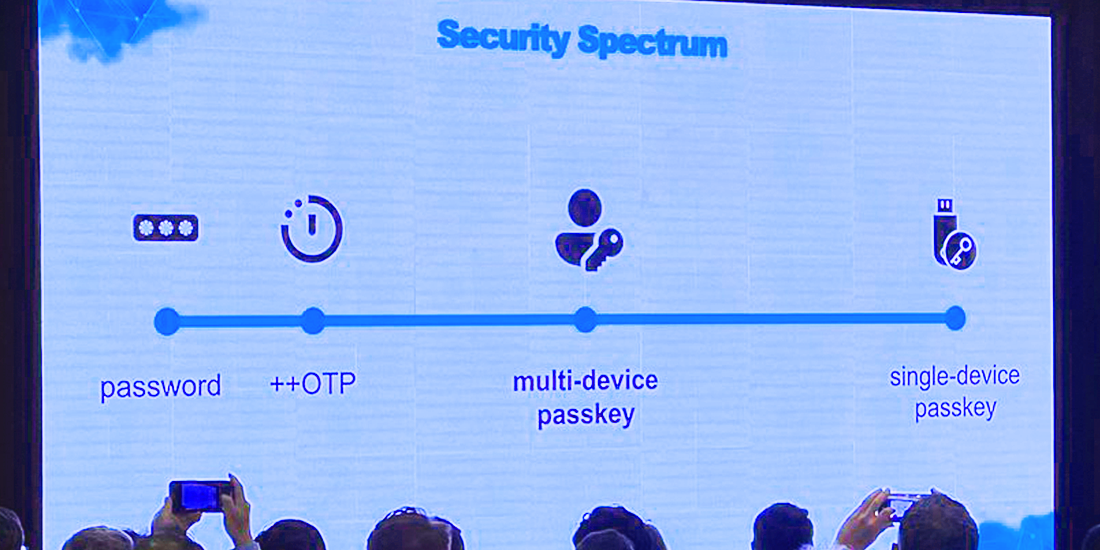
image

 (image courtesy of @vibronet via Identiverse)

Is ‘passkey’ the new name for FIDO and WebAuthn credentials?  

Passkey is a term that the industry is rallying around for FIDO credentials that can fully replace, rather than only augment, passwords. These are called resident or discoverable credentials in the specs. We think “passkey” is a better term than “discoverable webauthn/fido credential,” because it evokes its ability to replace passwords in an accessible way.

Passkeys in YubiKeys have been supported since discoverable credentials were added in the WebAuthn/FIDO standards around 2018. However, it’s important to note that passkeys in YubiKeys are not copyable, meaning the passkey is bound to the YubiKey.

See below question: “How are passkeys different from YubiKeys?” for additional information.  

Why is the term passkey in the news a lot recently?

Some Platform/OS vendors started shipping support for fully passwordless experiences using external authenticators like YubiKeys, and also using the security focused hardware built into their devices such as TPMs, as early as 2019.

Work is still ongoing on different platforms and browser combinations to complete robust passwordless experiences with both internal and external authenticators. Platform vendors have started publicly signaling their intent to complete that work, and have reaffirmed their ongoing commitment to standards bodies such as the W3C and FIDO.

Expect to see a lot more about passkeys from platform vendors such as Apple, Google, and Microsoft, as well as from external authenticator vendors such as Yubico, in the news once the implementations ship and evolve over the next year or so.

At the highest level, there are two new things coming in order to increase service and consumer adoption of WebAuthn/FIDO:

  1. Android and iOS phones that have passkeys on them can be used, mainly via bluetooth and the internet, to log into other devices such as laptops.

    This is exciting, and has always been part of Yubico’s vision for the protocols we’ve worked to create and proliferate.

    Yubico helped create the original bluetooth FIDO transport and even built a proof of concept bluetooth YubiKey. That helped us collectively learn how unreliable some bluetooth implementations and features can be in the wild. This new “phone as security key” functionality uses what was learned from that protocol, and uses internet connectivity to mostly avoid bluetooth except for proving proximity. (If you’re feeling curious, the protocol is called caBLEv2, and is soon to be renamed to the “hybrid” transport because it supports multiple proximity options and multiple reliable transport options)

  1. Platform FIDO credentials will soon by default be automatically copied to other devices logged into the same platform provider’s password manager service, in the same way that passwords are today.

    This was done to help ease recovery from the loss of a device, but comes with security tradeoffs. Those tradeoffs may be OK for consumers in some environments, but are unlikely to meet the needs of enterprises with security or compliance needs.

How these new things work are still in beta and subject to change, but you can expect to see a lot more about them as implementations near completion. You can also read more in our previous blog post on this topic. 

We’ll make sure to continue to publish and update our take on these features as they ship, and will also provide detailed developer guidance to help navigate the protocol and code changes that will be needed to take full advantage of the flexibility afforded by these changes, while ensuring appropriate security for the applications that depend on them.

How are passkeys different from YubiKeys?

They’re the same, and they’re different.

They’re the same because YubiKeys have had the ability to create these passwordless enabled FIDO2 credentials (passkeys) since the YubiKey 5 Series became available in mid-2018. Currently, YubiKeys can store a maximum of 25 passkeys. We are evaluating increasing this in the future because of the likely increase in fully passwordless experiences across the web that require them.

They’re different because Platform created passkeys will be copyable by default using the credentials for the underlying cloud account (plus maybe an additional password manager sync passphrase), whereas passkeys in YubiKeys are bound to the YubiKey’s physical hardware where they can’t be copied.

We like the term passkey and plan to use it. Because many things are being talked about at the same time, we will try to use terminology consistently to make the differences or similarities clear depending on the situation. This is still a work in progress across the industry, and we will adapt as things change.

Here are a couple of examples that may help for now:

  1. Copyable passkeys are often called “multi-device,” “syncable,” “backup enabled,” “shareable,” or similar terms. Some of these terms are easily confused with the WebAuthn/FIDO concept of an authentication device’s “attachment” which can have the values “platform” or “cross-platform.” We prefer to use “copyable” because it clearly describes what can be done with the credential, but does not imply any goodness or badness and does not use overloaded or confusing terms. Non-copyable passkeys are sometimes called “single-device passkeys.”
  2. We prefer to use “hardware bound” because it describes the location of the credential clearly without implying the credential can only be used with one device, as opposed to from the one authenticator to which it is bound with any device/platform.

What are the security tradeoffs between copyable and hardware bound passkeys?

Hardware bound passkeys, such as the ones that are on YubiKeys, are the gold standard for modern, phishing-resistant authentication and security. They are very easy to reason about and build systems around: no device, no access. However, for consumers registering credentials to many sites, managing multiple authenticators so you have an up to date backup can present challenges.

Copyable passkeys can make it easier to recover in the event of a lost device if the user can obtain another device that works with the cloud syncing service they used, and can recover their account. Using that copyable credential proves that there was access to a device which was logged into the user’s cloud account. This can be a useful additional signal, but does not provide the same level of security as a hardware bound passkey.

We’ll expand more on this in future content for different audiences as implementations ship.

  • We hope that a consumer focused push about passkeys will entice more services to enable support for WebAuthn/FIDO.
  • Copyable passkeys offer roughly the same security as “Sign-in with Google/Apple,” plus an additional key sync password.
  • Today, banks, enterprises, and those wanting or needing high security do not rely solely on the security of cloud accounts provided by Sign-in with Google/Apple via federated login protocols like SAML, OpenID Connect, or OAuth. Even if copyable passkeys are used to provide that association instead, the security provided will still be insufficient for high security needs.
  • The multitude of high security use cases faced by many organizations need more protocols than just FIDO. These organizations need the security guarantees and cryptographic attestations provided by hardware backed credentials to know their systems are safe, and to be able to prove it.
  • Attestation is also the only way to achieve high confidence that a given credential is hardware bound.
  • Services should continue to request, store, and use attestation information to make risk decisions based on the type of credential that is used. Our detailed guidance on attestation is provided in more detail on our developer site. 
  • More use of WebAuthn/FIDO hopefully means that eventually fewer people will use, and fewer services will have to deal with creating and securing dangerous username and password-based systems.

We are happy that the standards we co-created and have worked on improving for years are seeing even wider adoption, and are hopeful that these motions will continue to reduce harm and advance our mission to make the internet safer for all.

———

We know that there are already more questions to answer, and invite you to view our webinar: “Passkeys and the future of modern authentication: Q&A with Yubico’s CTO.” During the webinar, we dive even deeper into the topic to help bring clarity, eliminate confusion and answer any specific questions that you may have.

Additionally, read the report conducted by Enterprise Strategy Group (ESG): Devising Your Enterprise Authentication Strategy with Passkeys

* This post was last updated on November 29, 2022.
geschätzte Lesezeit: 9 min

A brief history on authentication

A lot has happened in the world of authentication and security since we first introduced the YubiKey back in 2008. In this blog, we’ll review where we are in the world of open authentication standards, discuss the addition of the ‘passkey’ term, and share what the future holds for modern WebAuthn/FIDO authentication. 

Creating a global standard

To bring advanced security to every person and every site, Yubico created Universal Second Factor (U2F) with Google in 2012, and moved it to the FIDO Alliance in 2013 to deliver a global standard that makes the internet safer for all. This standard brought the security of public/private key cryptography in hardware to the masses, and showed it requires little more than a USB device and port, or NFC for mobile, and a website to support it.

We continued to innovate and work with our peers in standards bodies to expand U2F into FIDO2/CTAP2 and W3C WebAuthn. These evolutionary standards support all existing U2F devices, and additionally add the option to support device PIN, biometrics, and authentication technology built into devices like phones and computers, and locally discoverable credentials to enable experiences without usernames or passwords at all.

Where are we now?

Through this work on standards and with platforms, we achieved universal support on all major desktop and mobile platforms – plus or minus a few corner cases that are currently being addressed – to create a solution that delivers phishing-resistant authentication everywhere: WebAuthn/FIDO.

Alternative multi-factor authentication (MFA) solutions like SMS, mobile push notifications, and one-time passwords (OTP) have exploitable technical flaws, or make it trivial for “man-in-the-middle” phishing attacks to trick people. This is exactly what attackers are doing today as MFA mechanisms beyond usernames and passwords become more prevalent.

Industry data says the biggest threats aren’t weaker MFA options, but instead the fact that many organizations and individuals aren’t turning on MFA at all. For example, Twitter says only 2.5% of  user accounts on their platform use MFA, and even for enterprises, Microsoft Azure says only 25% of their customers use any kind of MFA. While not all MFA is created equal, everyone should at least use some sort of MFA, and strong, unique passwords created by password managers for every site and application.

The future of modern authentication

We’ve spent years working with the FIDO Alliance, the World Wide Web Consortium (W3C), and platform vendors to further enhance the experiences that are possible with WebAuthn/FIDO and we’re excited about what the future has in store. We will highlight three of these innovations and additions today:

Terminology changes

There are some terms that are changing, and these will hopefully be easier to understand for users and developers alike.

Security Keys

The phrase “Security Key” has already become the standard way to describe an external FIDO-enabled hardware device, such as a YubiKey, that contains WebAuthn/FIDO credentials. However, “WebAuthn/FIDO credential” doesn’t exactly roll off the tongue, and is almost impenetrable for non-experts.

Passkeys

“Passwords” is already a universally understood term. Because these WebAuthn/FIDO credentials can replace passwords, the industry has introduced the term “passkeys,” which was publicly referenced last year in Apple’s ‘passkeys in iCloud Keychain’ presentation and in a recent WIRED article. For the remainder of this post, we’ll use passkeys to refer to any WebAuthn/FIDO credentials, regardless of if they’re on a Security Key, bound to your device’s hardware, or even just stored in files on your device which are copied around by a cloud provider.

As this naming has begun to proliferate, we have received many inquiries from our customers and partners on defining passkeys, how these work as additional authentication options, and what expanding WebAuthn/FIDO authentication options may look like, and we cover this evolving story below.

Bluetooth improvements, and phones as Security Keys

Yubico built a prototype bluetooth authenticator and worked with others to create the first FIDO bluetooth transport. Our ultimate decision was not to ship a production bluetooth YubiKey, and that was based on what we learned during this effort:

  • Bluetooth pairing has bad security and usability properties
  • Batteries must be charged regularly and carefully to maintain their capacity, or be replaceable, which compromises a device’s robustness and requires replacements to be available exactly at the moment of need
  • The bluetooth protocol and hardware implementations are complex, and must be kept up to date to address vulnerabilities that are discovered
  • The state of bluetooth hardware, drivers, and OS support is inconsistent, and is unreliable

Our conclusion was that the only devices that make sense to use as bluetooth Security Keys are phones. Phones in particular seem suitable because they:

  • almost all have cameras that can be used to ease bluetooth pairing
  • are mostly charged carefully and regularly by their owners
  • already have mechanisms to update their software and firmware regularly
  • are likely to be with the owner much of the time

Phones as authenticators was part of our original vision, and we have been working towards this for a long time. How do we enable biometrics built into phones to be used to authenticate on other devices the same way we enabled them to be used for logging in on the same device with FIDO2? After many years of work in the standards bodies and by the platforms, we think this is almost ready. Camera-assisted bluetooth pairing is now being enabled by major browsers and OSs, the platform bluetooth quirks have been mostly fixed or worked around from years of testing, upgrades, and bug fixes, and the bluetooth+network transport is now well tested.

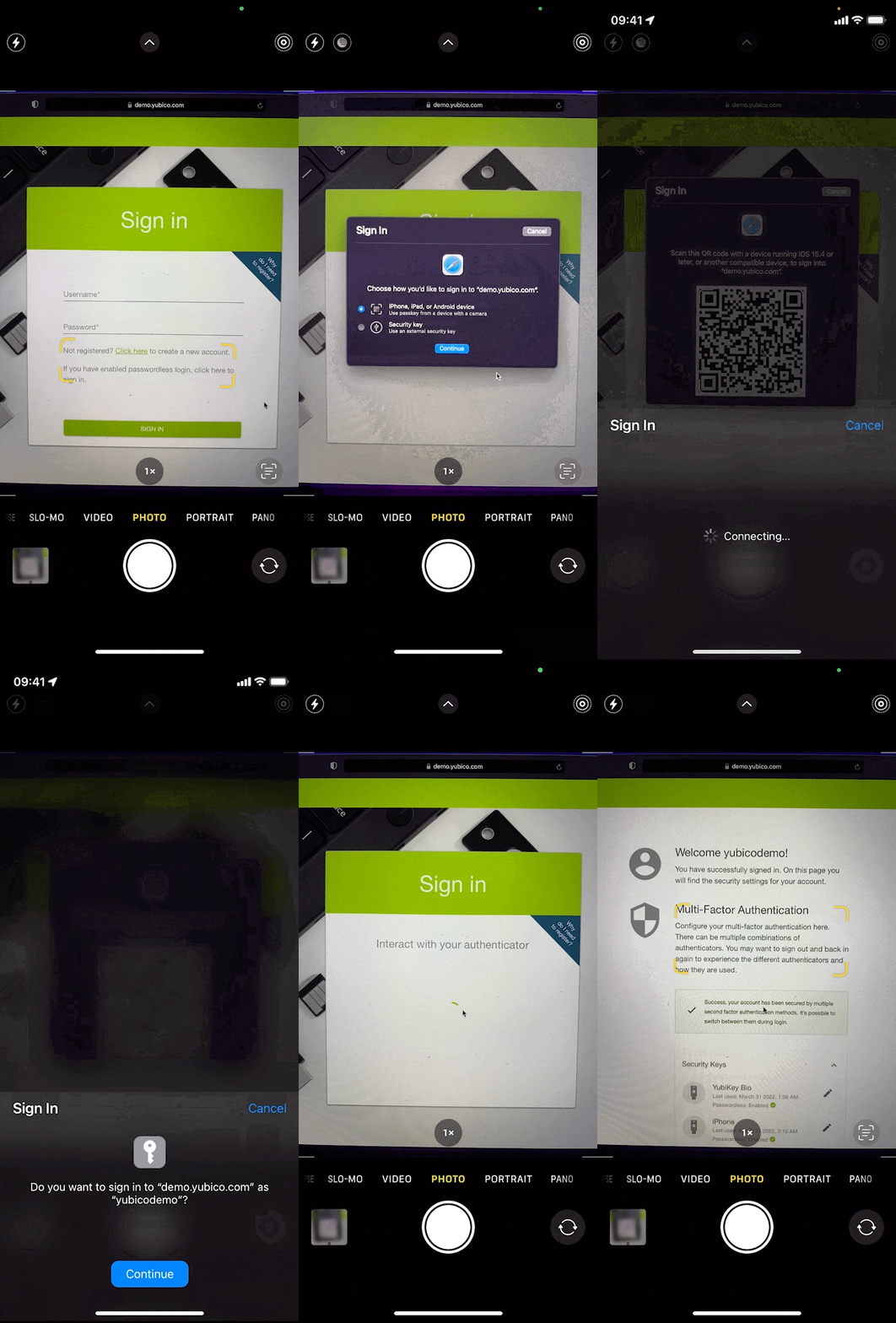
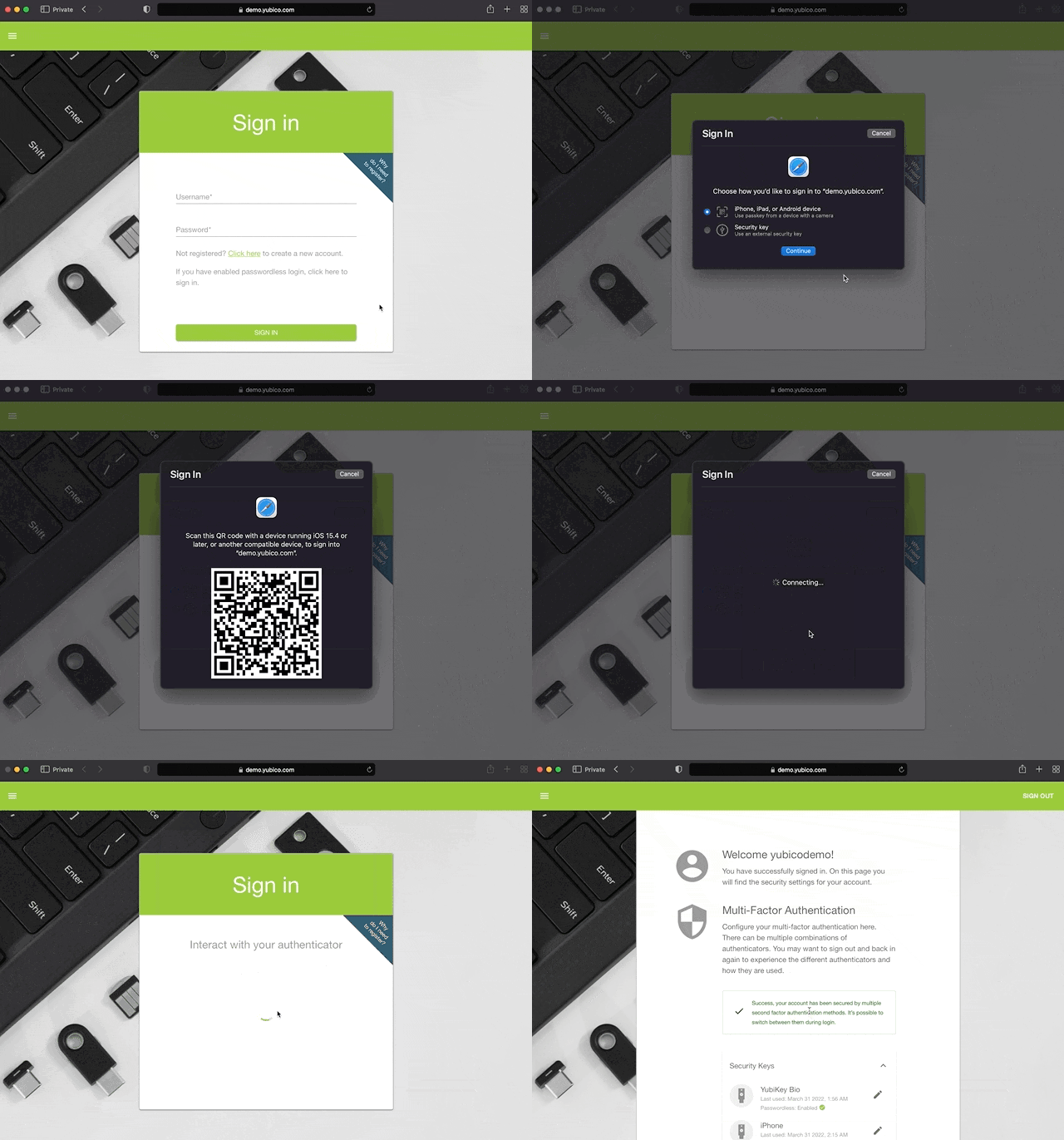
Here’s what this looks like today on macOS/iOS when enabled (subject to change):

This is exciting, but phones are fragile, expensive, replaced often, and are sometimes prohibited by policy or law from being used. That means the most challenging part of using Security Keys – re-registering them everywhere when they’re lost, or transitioning to a new one – are much more frequent for phones.

Because of this, we recommend a phone be configured as one of several authenticators added to your accounts.

Copyable, multi-device passkeys

To date, credentials created by Security Keys and Platform Authenticators have been single-device, i.e. bound to the hardware they are created on. These are single-device passkeys. They have good security properties and are easy to understand and build trustworthy systems around: no device, no access.

What if we added a credential that can be copied by not binding them to the hardware they were created on? These copyable “multi-device passkeys” are in beta on platforms today.

Copyable credentials can help solve some of the challenges exacerbated by using phones as Security Keys by enabling more seamless device transition and device loss/destruction recovery. However, this comes at the cost of reduced security.

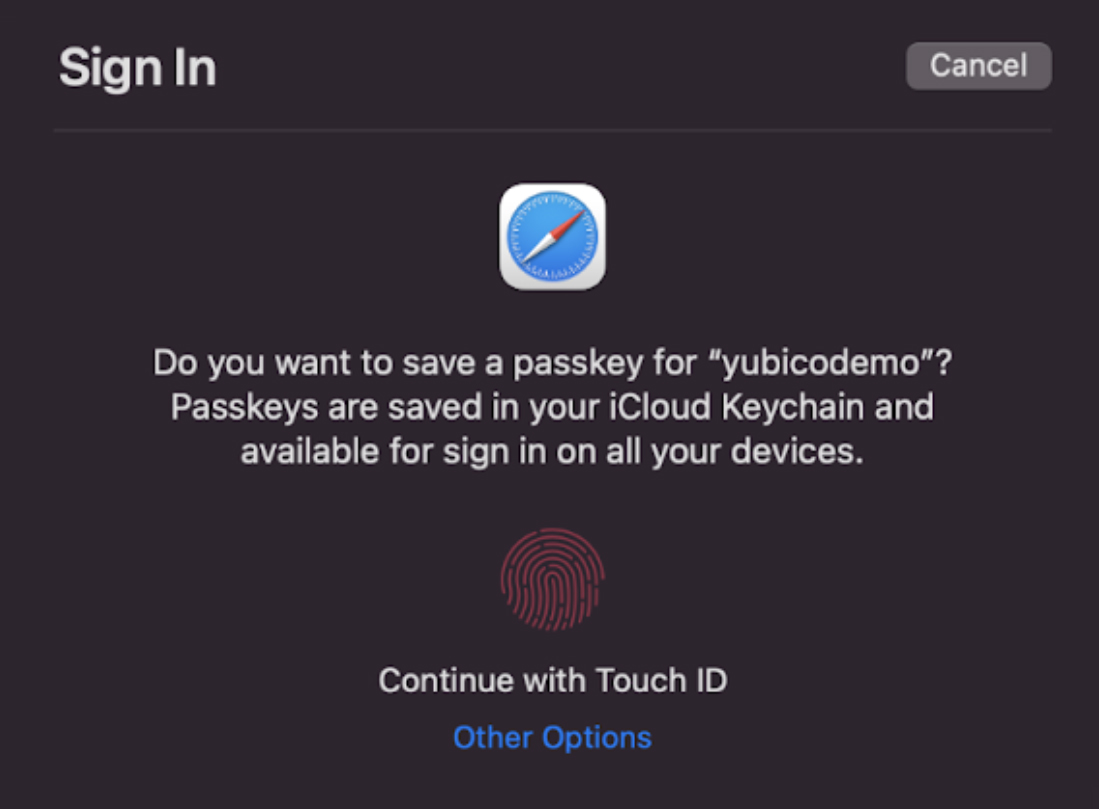
Platforms will accomplish this by using the built-in password manager to copy multi-device passkeys to other devices with the same platform password manager and cloud account:

That means unless phishing resistant authentication is used to protect the account that syncs passkeys, people can still be tricked. Fortunately, phishing this type of sync mechanism must target robust account systems run by platform vendors, and can often optionally be configured in a way that people might notice something is unusual. Unfortunately, people are used to computers being unusual, and very few of these account systems can be configured to use phishing resistant authentication. We hope this situation improves in the future with more providers offering systems that allow only phishing-resistant authentication, like Google’s Advanced Protection Program.

Ultimately, for those who would otherwise use only a password, multi-device passkeys are easy to use, and are a step in the right direction that can reduce overall harm caused by using passwords alone. Because attackers already copy and misuse server or user credentials, websites can also choose to assign different levels of trust to copyable credentials versus those that are hardware bound, as appropriate to their needs.

More authentication options for different needs

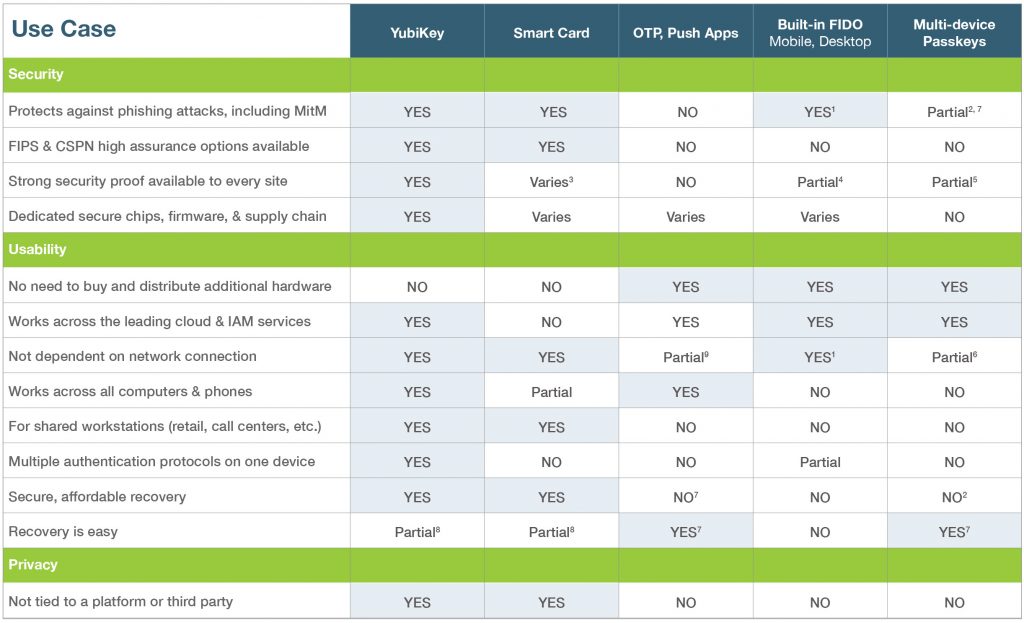
We know that not everyone can use the most advanced security in all scenarios, because the world is full of complex technology, and evolving threats. Here’s our take on the tradeoffs as of today:

The YubiKey was created to make stronger authentication available and easy to use for all. That’s why it can act as a WebAuthn/FIDO authenticator, a Smart Card, an OTP device, and much more, all in one device. It’s a robust, affordable “key to many locks” that stays with you as your technology and threats change.

Internet crime is on pace to enable the largest transfer of wealth in human history, so if you’re not yet ready for a YubiKey, please do use more than just a password.

Conclusion

We hope these additional options will help more sites adopt WebAuthn/FIDO. That will benefit everyone regardless of if they’re using copyable, multi-device passkeys, or stronger solutions like YubiKeys, where passkeys are bound to the YubiKey hardware.

More options and more widespread support ultimately allows consumers or enterprises to choose which authentication methods best suit their needs. If you’d like to talk to our sales and solutions teams about what a solution involving YubiKeys might look like for your specific needs, please let us know.

Overall, we’re excited to see the standards we’ve collectively crafted reach so many, and continue to protect against modern threats. Now go turn on MFA everywhere you can!

Footnotes:

1 For logins from the same device. On some phones, early support is available to log in on other devices that support bluetooth, but it also requires an active internet connection from both devices in some current implementations.

2 On the sites where they are used, but the methods for copying them to other devices can be subject to phishing. See 7.

3 Some smartcards, like the OpenPGP Card and PIV implementations in YubiKeys, support attestation. However, smartcard attestation is mostly limited to enterprise use cases and not available to all sites.

4 Support for attestation varies, and some cover a wide range of implementations with varying security properties.

5 If attested, it’s unclear what can be attested about copyable data such as multi-device passkeys.

6 A network connection, a shared password manager implementation, and cloud account are required to sync credentials. See also 1 about using phones with other devices.

7 Systems that allow credentials to be copied can be phished unless YubiKeys or other phishing resistant technologies are the only way to access the copying mechanism.

8 Multiple registered YubiKeys allow easy and secure self recovery. It’s easier to do this with SSO or social login than with many sites.

9 Push apps need network connectivity. OTP apps require validation to be available on the system or app being accessed; typically this means an online network connection to an OTP validation service like YubiCloud, or sacrificing security by copying the shared OTP secret to more places.

geschätzte Lesezeit: 5 min

Zur Beurteilung einer Wärmepumpe rücken neben dem Aspekt der Effizienz aktuell die Umwelteigenschaften des verwendeten Kältemittels zunehmend in den Fokus. Das hat gute Gründe, denn viele synthetische Kältemittel enthalten gesundheitsschädliche Einzelkomponentengase der Stoffgruppe der Per- und Polyfluorierten Alkylverbindungen (PFAS).

Die PFAS gelten als giftig und sollen daher europaweit verboten werden. Als nur sehr schlecht abbaubare „ewige Chemikalien“ reichern sie sich in der Umwelt und schlussendlich im menschlichen Körper an. Sie können die Leber schädigen und Schilddrüsenerkrankungen, Fettleibigkeit, Fruchtbarkeitsstörungen sowie Krebs auslösen.

Propan bzw. R290 ist ein wahrer „Saubermann“ unter den Kältemitteln. Es ist umweltfreundlich und besitzt mit seinem niedrigen GWP-Wert von 3 ein sehr geringes Treibhauspotential. Es enthält weder PFAS noch andere schädliche Chemikalien.
© WOLF GmbH Propan bzw. R290 ist ein wahrer „Saubermann“ unter den Kältemitteln. Es ist umweltfreundlich und besitzt mit seinem niedrigen GWP-Wert von 3 ein sehr geringes Treibhauspotential. Es enthält weder PFAS noch andere schädliche Chemikalien.

Propan als natürliches Kältemittel

Dagegen ist das natürliche Kältemittel Propan bzw. R290 ein wahrer „Saubermann“. Es handelt sich um einen natürlichen, nahezu unbegrenzt verfügbaren Kohlenwasserstoff (also um eine natürliche „Chemikalie“) mit hervorragenden kältetechnischen Eigenschaften. Es ist nicht ozonschädlich und besitzt mit seinem niedrigen GWP (Global Warming Potential) -Wert von 3 einen nur sehr geringen Treibhauseffekt. Den meisten Menschen ist Propan eher ein Begriff als Brennstoff für den Campingkocher.

Die thermodynamischen Vorteile von Wärmepumpen mit R290 als Kältemittel sind eindeutig:

  • Vorlauftemperaturen von bis zu 70 °C auch bei tiefen Außentemperaturen
  • Hoher COP (Coefficient of Performance = Leistungszahl) von 4,65 bei A2/W35 nach EN14511
  • Hoher EER (Energy Efficiency Ratio = Kälteleistungszahl) von 5,92 bei A35/W18 nach EN14511 - Dieser Wert ist besonders interessant, wenn die Wärmepumpe sowohl zum Heizen als auch zum Kühlen eingesetzt wird.

Vergleichswert COP

Bei vergleichbaren R410A-Wärmepumpen liegt der COP um 0,2 bis 0,4 niedriger. Auch die mit diesem Kältemittel erreichbaren Vorlauftemperaturen liegen unter denen von R290.

Beim Umgang mit Propan ist jedoch zu beachten, dass R290 brennbar ist. Daher ist es gemäß DIN EN 378 (Kälteanlagen und Wärmepumpen – sicherheitstechnische und umweltrelevante Anforderungen) der Sicherheitsgruppe 3 zugeordnet. Aufgrund der hohen Sicherheitsanforderungen, insbesondere an die Dichtheit der Anlage, liegen daher die Kältemittelverluste von R290-Anlagen und -Geräten bei null.

Bei der WOLF Wärmepumpe CHA-Monoblock wurde das Thema Sicherheit umgesetzt, indem der kältetechnische Teil komplett in einem hermetisch dichten Kreislauf in der Außeneinheit untergebracht ist. Die Wärmeübertragung in das Gebäude hinein erfolgt über das Medium Wasser. Das heißt, für die Montage wird kein Kälteschein benötigt. Mögliche Leckagen des sowieso in der Natur vorkommenden Kältemittels verursachen kein Umweltrisiko und auch keinerlei Gesundheitsrisiko für die Monteure. Sie müssen nicht in den bereits im Werk befüllten Kältekreislauf eingreifen. Präzise Vorgaben bei der Aufstellung sorgen darüber hinaus für ein Höchstmaß an Sicherheit.

F-Gas-Verordnung spricht für Propan

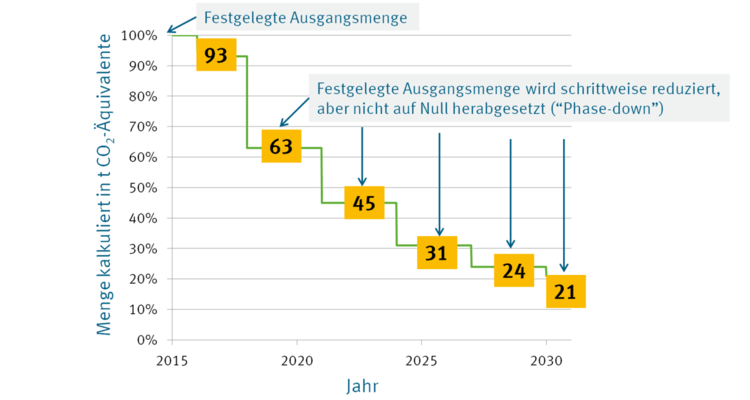
Ein weiterer, beim Thema Kältemittel oft nicht ausreichend beachteter Aspekt, der für das natürliche Kältemittel Propan spricht, ist die seit 1. Januar 2015 gültige F-Gase-Verordnung, die Propan ausdrücklich vom Verbot klimaschädlicher und ozonabbauender Kältemittel ausnimmt. Die Verordnung regelt in einem genauen Stufenplan, wann welche umweltschädlichen Kältemittel verboten werden. Die meisten der bisher in Wärmepumpen eingesetzten Kältemittel sind inzwischen als klimaschädigend eingestuft. Mit der F-Gase-Verordnung werden die bisher verwendeten Kältemittel auf der Basis teilhalogenierter Fluorkohlenwasserstoffe (HFKW) in einem Stufenplan drastisch verknappt.

Ziel ist, das CO2-Äquivalent bis zum Jahr 2030 auf 21 Prozent zu senken (Bezugsmenge ist der EU-weite Jahresdurchschnitt von 2009 bis 2012). Hinzu kommen zusätzliche Verbote, in bestimmten Einsatzgebieten weiterhin HFKW-Kältemittel zu verwenden. Fachleute gehen davon aus, dass diese schrittweise Mengenreduktion, der sogenannte F-Gase Phase-Down und die damit zusammenhängende Verknappung an Kältemitteln mit hohem GWP zu enormen Preissteigerungen und technischen Verwerfungen am Kältemarkt führen wird. Von der Teuerung sind insbesondere Geräte und Anlagen betroffen, die regelmäßig gewartet werden müssen. 

Bis zum Jahr 2030 stehen dem Markt nur noch 21 Prozent der Ausgangsmenge von 2015 in CO2-Äquivalent zur Verfügung. Hinzu kommen zusätzliche Verbote, in bestimmten Einsatzgebieten weiterhin HFKW-Kältemittel zu verwenden.
© WOLF GmbH Bis zum Jahr 2030 stehen dem Markt nur noch 21 Prozent der Ausgangsmenge von 2015 in CO2-Äquivalent zur Verfügung. Hinzu kommen zusätzliche Verbote, in bestimmten Einsatzgebieten weiterhin HFKW-Kältemittel zu verwenden.
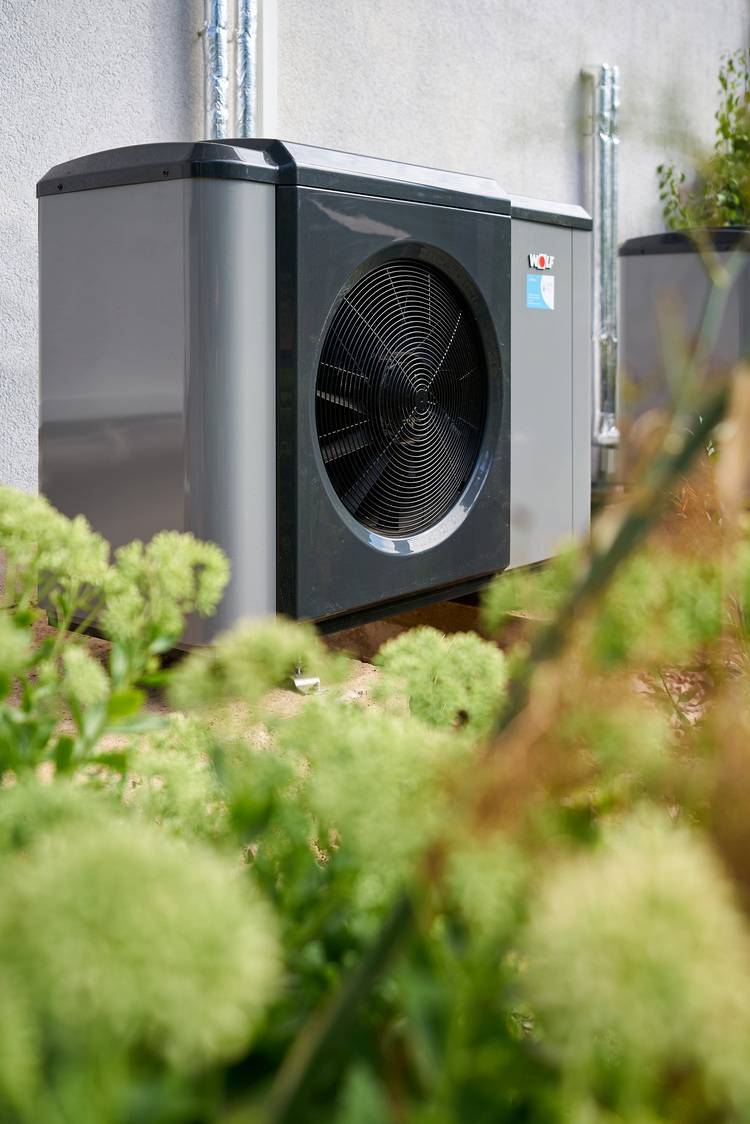
Bei der WOLF Wärmepumpe CHA-Monoblock wurde das Thema Sicherheit umgesetzt, indem der kältetechnische Teil komplett in einem hermetisch dichten Kreislauf in der Außeneinheit untergebracht ist.
© WOLF GmbH Bei der WOLF Wärmepumpe CHA-Monoblock wurde das Thema Sicherheit umgesetzt, indem der kältetechnische Teil komplett in einem hermetisch dichten Kreislauf in der Außeneinheit untergebracht ist.

Global Warming Potential GWP als Schlüsselgröße

Entscheidend für die Wahl eines Kältemittels ist seit 2015 der sogenannte GWP-Wert, also das Treibhauspotenzial (Global Warming Potential) eines Kältemittels. Der GWP-Wert definiert die mittlere Erwärmungswirkung einer chemischen Verbindung bzw. eines Kältemittels auf die Erdatmosphäre über einen Zeitraum von 100 Jahren im Vergleich zur gleichen Menge an Kohlenstoffdioxid (CO2).

Er entspricht also dem CO2-Äquivalent eines chemischen Stoffes. Das Kältemittel Propan hat einen GWP-Wert von 3 und damit einen nur sehr geringen Treibhauseffekt.

Der ODP-Wert, das Ozonabbaupotenzial (Ozone Depletion Potential) eines Kältemittels ist ein weiterer Kennwert, der die Eigenschaften einer chemischen Verbindung beschreibt. Der dimensionslose ODP-Wert beschreibt den relativen Effekt des Abbaus der Ozonschicht, der durch einen Stoff ausgelöst werden kann. Referenzwert für den ODP-Wert 1 ist die Substanz Trichlorfluormethan, besser bekannt unter der Kältemittelbezeichnung R11. Werte über 1 sind also stärker ozonabbauend, Werte unter 1 weniger ozonabbauend als R11.

Natürliche Kältemittel sind zukunftsfähig

Bislang reicht das Zeitfenster des F-Gase Phase-down bis zum Jahr 2030. Aufgrund der aktuellen Klimadiskussion ist jedoch damit zu rechnen, dass der Ausstieg aus den synthetischen Kältemitteln nach 2030 fortgesetzt wird.

Nüchtern betrachtet haben Kältemittel mit höherem GWP dann kaum mehr eine Chance auf Akzeptanz. Hinzu kommt, dass Kältemittel mit einem höheren GWP-Wert durch die Verknappung zunehmend teurer werden. Das bedeutet, für heute preisgünstige Wärmepumpen mit Hoch-GWP-Kältemitteln können hohe Folgekosten durch Wartung und Entsorgung entstehen.

Wer dagegen heute eine mit dem Kältemittel Propan betriebene Wärmepumpe kauft, kann sicher sein, dass über die veranschlagte Lebenszeit des Gerätes keine zusätzlichen Kosten durch die Verknappung von Kältemitteln entstehen.

Letztendlich gibt es mit Blick auf Umweltverträglichkeit, Effizienz und Verfügbarkeit mittelfristigkeine nennenswerte Alternative zu den natürlichen Kältemitteln. Das Kältemittel R290 ist heute sicher beherrschbar, preisgünstig und effizient im Betrieb.

Martin Bauer ist Produktmanager Wärmepumpe bei Wolf.

Weiterführender Artikel vom Umweltbundesamt zu der Stoffgruppe PFAS finden Sie hier: www.umweltbundesamt.at/umweltthemen/stoffradar/pfas.

Martin Bauer ist WOLF Produktmanager für Wärmepumpen.

Die WOLF Group zählt zu den führenden Anbietern von Heizungs- und Lüftungssystemen. Mit circa 2.100 Mitarbeitern, neun Tochterfirmen und 60 Vertriebspartnern in mehr als 50 Ländern ist WOLF international aufgestellt. Der Experte für gesundes Raumklima bietet zukunftsfähige Produkte wie Wärmepumpen oder Lüftungsanlagen für Ein- und Mehrfamilienhäuser, Bürogebäude sowie das industrielle Umfeld. Das Unternehmen unterstreicht diesen Anspruch mit der klaren Aussage: „WOLF – Voll auf mich eingestellt.“ Weitere Informationen unter www.wolf.eu.

Lesen Sie auch

geschätzte Lesezeit: 14 min

A while back, I was scrolling through Twitter and came across this post:

bring back RSS Tweet

I was confused—RSS hasn't disappeared. I use it every single day. It's an integral part of my workflow that helps me stay up to date with news, come up with new ideas for content, gather sources to cite in my posts, and keep my inbox clean. But the 300+ likes on this post and a subsequent Twitter search for "bring back RSS" that resulted in dozens of Tweets showed me that RSS is underutilized.

If you think RSS died when Google Reader shut down—or if you're unaware, or only vaguely aware, of how to use RSS feeds—this guide is for you.

What is RSS?

An RSS (Really Simple Syndication) feed is an online file that contains details about every piece of content a site has published. Each time a site publishes a new piece of content, details about that content—including the full-text of the content or a summary, publication date, author, link, etc.—are automatically generated in the file and displayed in reverse chronological order.

Since it's updated with details about every piece of content a site publishes, you can use RSS feeds for things like keeping up to date with every new article your favorite blog publishes or automatically generating email newsletters or social media posts to promote your new content.

RSS feeds are typically coded in XML format and look like this:

example RSS feed in XML format

If you're used to looking at code all day, you might be able to make sense of this as easily as you can read formatted content on a website. But for the rest of us, this looks like a lot of nonsense. So to turn an RSS feed into something readable, you need an RSS reader.

An RSS reader is an app that parses the XML code of an RSS feed and renders it to look more like what you'd see on a website. For example, here's the same RSS feed pictured above in Feedly (free plan available), a popular RSS reader:

RSS feed in Feedly

Ten years ago, when RSS was more popular, nearly every website had an RSS icon that linked to its RSS feed, making it easy for people to subscribe via their preferred reader. Today, that's rarely the case, but the absence of an RSS icon on a site doesn't mean you can't get that site's content via RSS: Read our tutorial on how to find the RSS feed for almost any website for more details. With the right RSS reader app, you can get an RSS feed from just about any blog, podcast, social media account, or email newsletter you want to follow.

But RSS works the other way around, too. It doesn't only pull content into an RSS reader; you can use it to push content to sites and apps as well.

I use Feedly as my RSS reader—so I'll use that in most of the examples below—but there are plenty of other great RSS reader apps to consider if you're getting started with RSS. Or if you want to move forward with Feedly, check out our tutorial on how to add an RSS feed to Feedly.

How to use RSS feeds

Following your favorite blogs is the simplest way to get started with RSS, but it's just one of the many benefits RSS offers. Here are eight ways to use RSS feeds to consolidate the information you care about and automate your work.

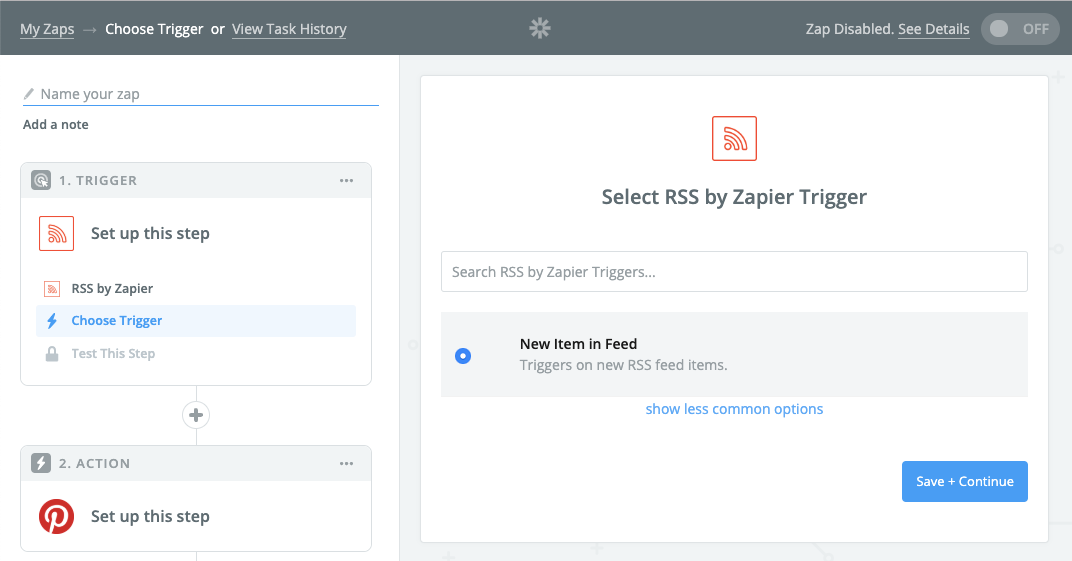
You'll need a Zapier account to use the workflows in this piece. If you don't have an account yet, it's free to get started.

Keep track of new blog posts, podcasts, and YouTube channel uploads

I read a lot of blogs. As a writer, staying up to date on what blogs—in both the industry I work in and those I write about—are publishing is a great way to learn new things, come up with new ideas for topics to write about, and find studies that are worth linking to in the posts I write.

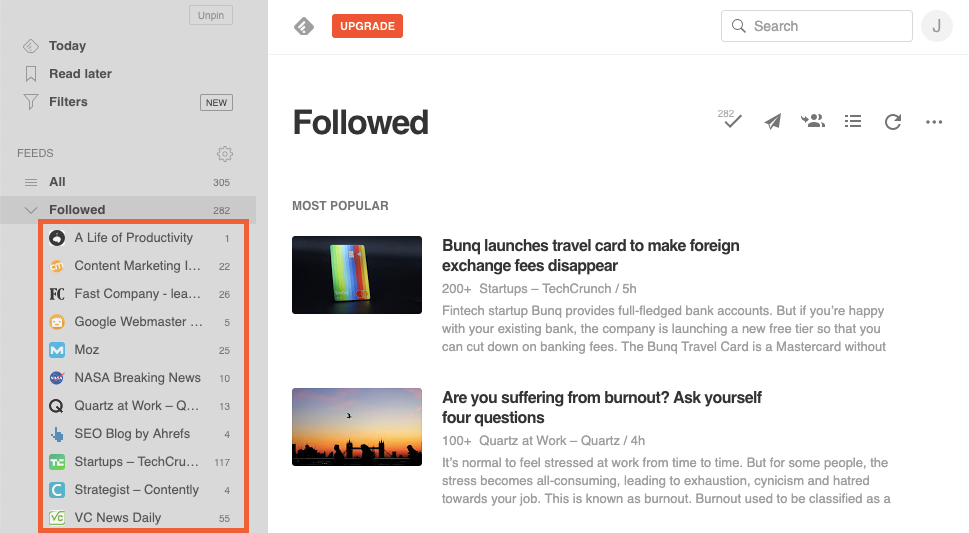
Subscribing to the blogs I follow in an RSS reader delivers each of those benefits. Rather than having to visit each publication's blog individually to see if new content has been published, I see all of the new content from all of the blogs I'm interested in within a single interface in Feedly.

When I log in to Feedly, I see a list of all of the sites I follow that have published new content since the last time I reviewed each feed, along with a count of the number of pieces of new content that have been published since my last review.

Feedly new content

I can click any feed to see the content I haven't reviewed, click through and read any specific piece of content I'm interested in, and then click a Mark All As Read button to clear all of the new articles from Feedly so that the next time I log in, I only see content I haven't viewed before.

But you can use RSS for more than following blogs. You can also use it to see new podcast episodes and new videos posted to your favorite YouTube channels—all from within your RSS reader.

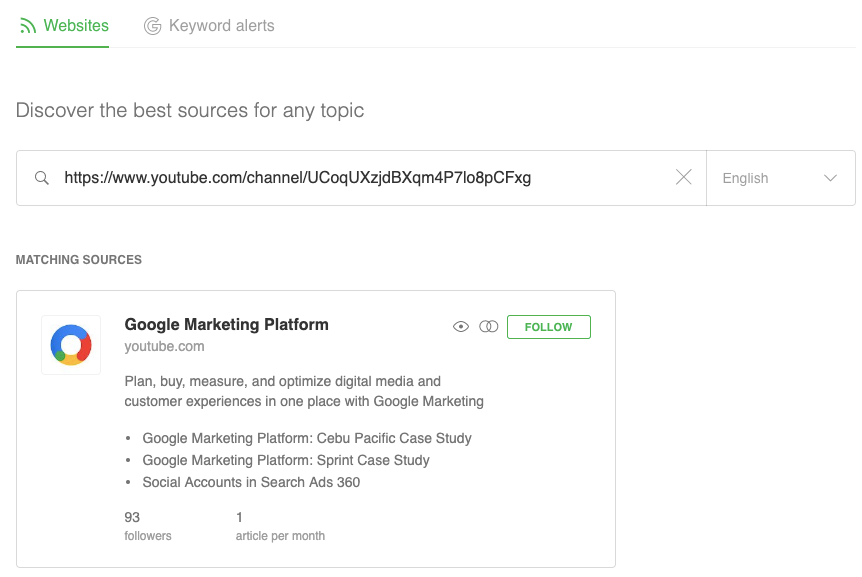
A lot of times, subscribing to an RSS feed for any type of content is as simple as pasting the URL of the page (a blog homepage, podcast episodes list, YouTube channel homepage, etc.) that you want to follow into your RSS reader. If an RSS feed exists for that page, you can subscribe to it immediately.

subscribe to YouTube channel via RSS

You can also use Zapier to create custom RSS feeds so you can collect all your reading material in one place. Here are a few things to try:

Looking for step-by-step instructions? Here's how to make an RSS feed from tagged Pocket items.

But if no RSS feed exists, you're not necessarily out of luck. Instead, you can use RSS.app (free) to create an RSS feed for that page that you can then follow in your RSS reader. (You can also check out our guide to finding RSS feeds for almost any site.)

Either pasting the URL in an RSS reader or using RSS.app generally works, but occasionally, you may run across a site that won't cooperate. In that case, there's another option: You can subscribe to the publisher's newsletter via RSS using the instructions below.

Receive and view email newsletters in your RSS reader

The jury may still be out on whether inbox zero is good or bad for productivity, but for me, it's the only way to manage email. And because I'm an inbox zero fanatic, I unsubscribe immediately from every email newsletter I receive. I can't stand to have an email newsletter clogging up my inbox and harassing me until I have time to look at it.

But there are some newsletters I want to read because the publishers only deliver new content via those newsletters. There's no corresponding blog post, podcast, or YouTube channel to follow in Feedly; the only way to get the content is to subscribe to the newsletter.

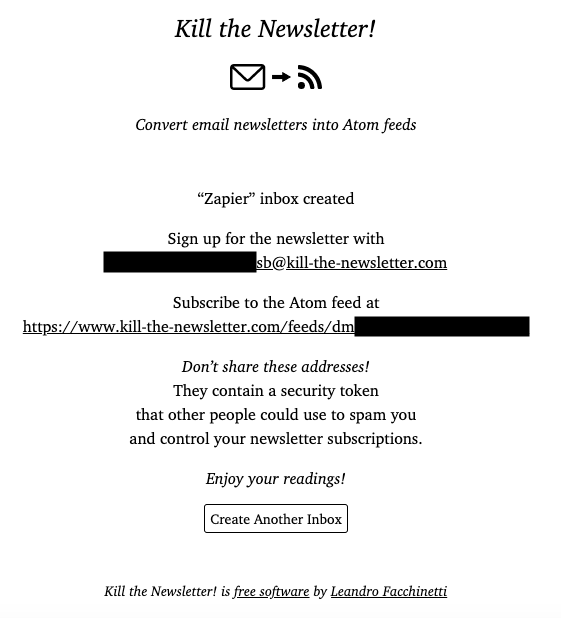
The solution to this issue: Kill the Newsletter (free).

Kill the Newsletter generates an email address that you can use to subscribe to newsletters you want to receive. Any newsletters that are sent to that email address are converted into an XML feed. To see those newsletters, just add the provided feed link to your RSS reader.

Kill the Newsletter

After that, you'll be able to view the newsletters you want to read alongside the other content you follow in your RSS reader, and you don't have to worry about newsletters clogging up your email inbox.

View social media posts from important accounts

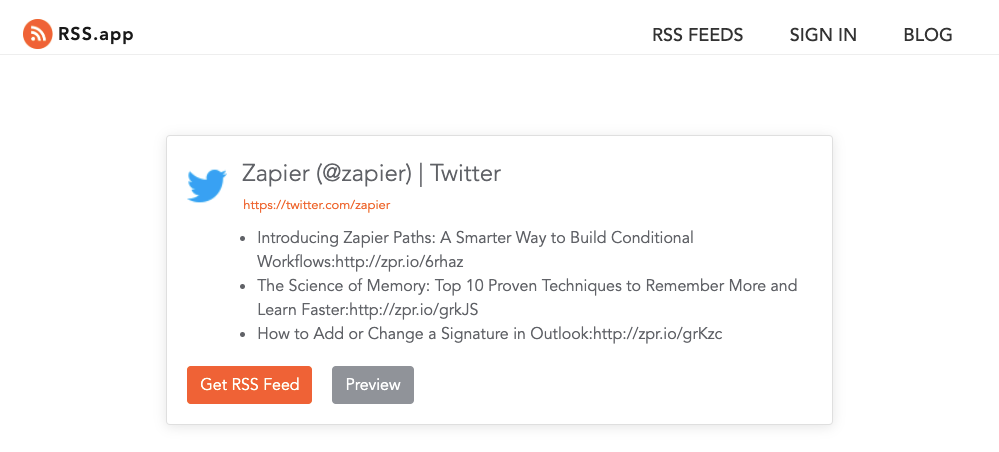
If you're tired of only seeing the posts social media algorithms think you want to see and, instead, want to see everything that a company/person posts, you can create an RSS feed for that account in RSS.app and then subscribe to it in your RSS reader.

For example, if I want to see Zapier's Twitter updates in Feedly, I can paste the URL of Zapier's Twitter page into RSS.app, generate an RSS feed and URL, and subscribe to that URL in Feedly to see all of Zapier's Twitter updates alongside the other sources I follow.

Twitter account RSS feed

You can make as many feeds as you want using this method, but they'll only work for one account at a time.

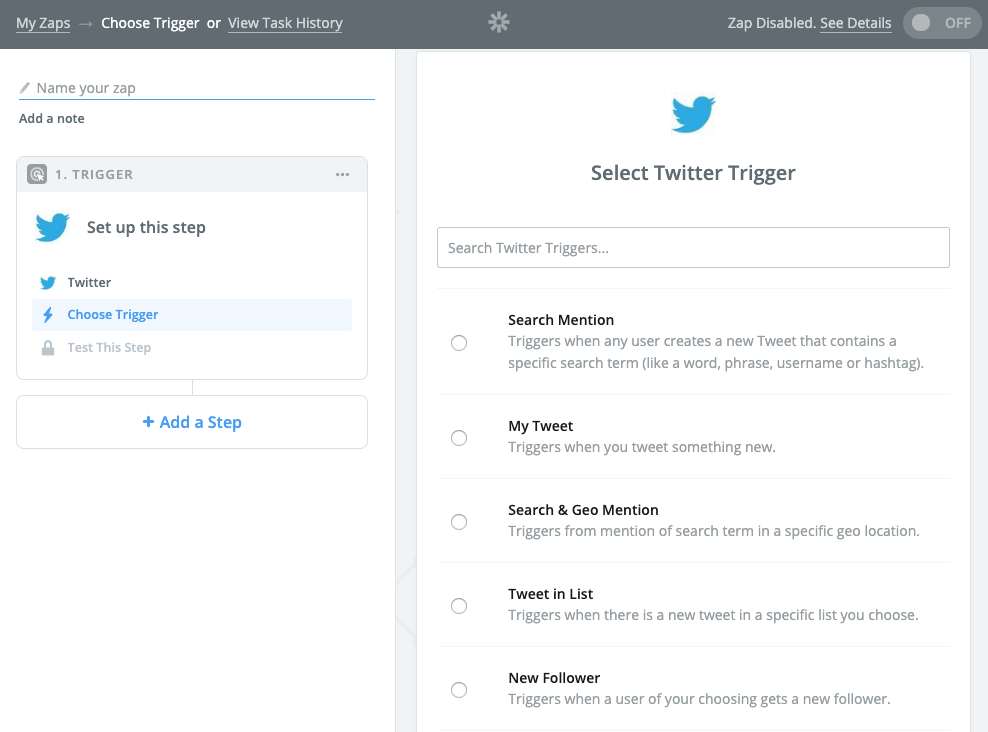
Another option is to create a more advanced social media RSS feed using Zapier. For example, by pairing Twitter with RSS by Zapier, you can create an RSS feed that displays all of the Tweets from a list you've created on Twitter.

create Twitter RSS feed

Here are a few more examples of pre-built social media + RSS by Zapier integrations you can use:

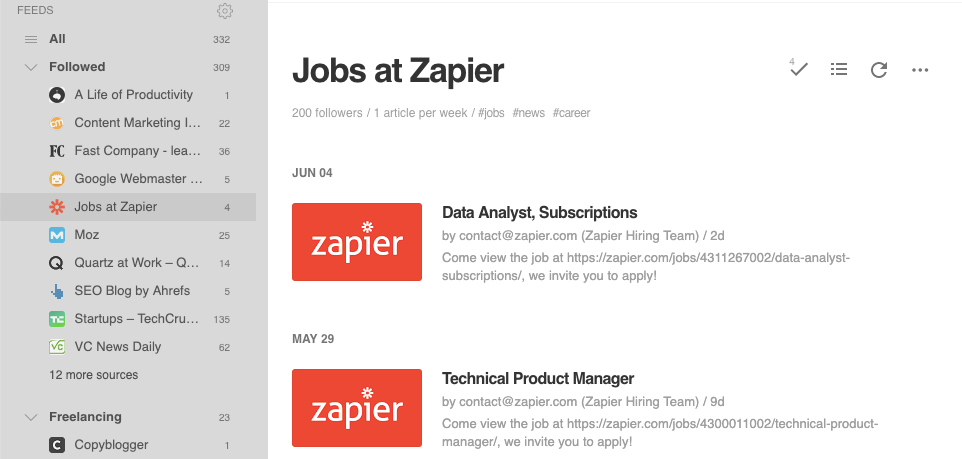
Discover newly posted job openings

RSS for new job openings

Some employers post their open roles on Glassdoor, some post on Indeed, some use niche sites, and some only post jobs to their websites. This makes looking for a new job a long process of navigating to multiple websites to look for new postings you might want to apply to.

RSS makes this easier as well.

Some job search sites, like We Work Remotely, offer RSS feeds for each of their categories of jobs that you can subscribe to for updates.

Others, like Indeed and Glassdoor, let you subscribe to job alerts via email—but you don't necessarily have to use your personal email address. Instead, sign up for alerts using a Kill the Newsletter email address to get those email alerts in your RSS reader.

You can often subscribe to many websites' career pages, too, by pasting the URL of the page into your RSS reader or using RSS.app to create a feed.

Zapier job openings RSS feed

You can create a feed for each of the sources you look at frequently to see new jobs that have been posted in your RSS reader. Or, if you want all new jobs in a single feed, you can create an RSS superfeed using Zapier that combines multiple feeds together and delivers new job posts to you in one big feed.

Take this even farther with our tutorial on how to automatically track job listings from multiple sources, like email, social media, team chat apps, and website.

Create email newsletters automatically

RSS is a great way to keep track of the content your favorite publishers are posting, but it also works well from the other side of the fence, too. If you're a publisher, you can use an RSS feed for your blog, podcast, YouTube channel, social media profile, etc. to build your email newsletters automatically.

For example, if your email newsletter is a list of your most recently published posts with titles, links, and brief descriptions, you can push those details via RSS to your email newsletter tool so you don't have to copy and paste those details in manually. Then, you go in, add a subject line, select a list, and click Send to streamline your newsletter creation process.

Many email newsletter apps—including MailerLite and Mailchimp—offer RSS-to-email features by default. But even if your preferred email newsletter app doesn't offer this feature, you can build a Zap (automated workflow by Zapier) that connects your email tool to RSS by Zapier to automate the process.

Here's an example Zap for SendGrid:

Create social media posts automatically

create social media posts via RSS

Another way publishers can automate some of their work is by using RSS feed updates to automatically post new content to their social media profiles.

With RSS by Zapier, you can connect your RSS feed to your social media profiles to automatically publish posts for your new content on your business or personal social media profiles:

Maybe you frequently share industry articles with your coworkers or manage a social media account where you want to share interesting content from elsewhere. Try these workflows, which will automatically share what you're reading without needing to copy and paste.

Add a digest step—available on our paid plans—to create and send out a digest of your favorite articles at a predetermined time. 

Monitor brand mentions in a feed

get Google Alerts via RSS

You could pay a monthly subscription fee for a brand monitoring tool to track mentions of your brand across the web, or you can do the same thing using RSS feeds and a reader for free.

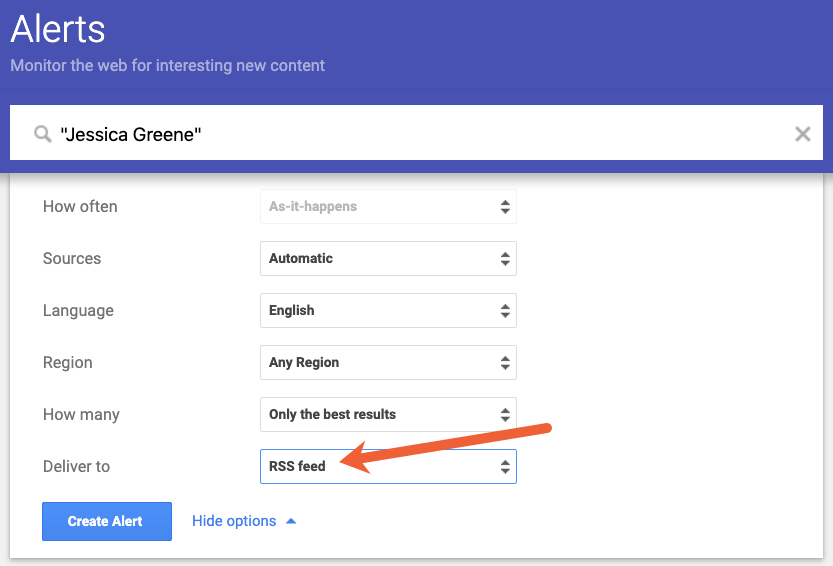
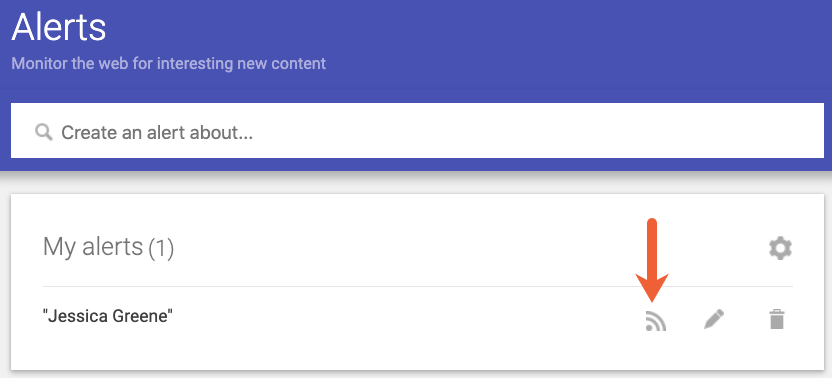
If you have Google Alerts set up for your name/your brand's name, you can have those alerts delivered to an RSS feed instead of your email account. When setting up your alert, select RSS feed in the Deliver to field. Once the alert is set up, you can grab the link you need to subscribe to the feed in your RSS reader.

Google Alerts RSS feed link

Then, you can use Zapier to monitor brand mentions on several social media sites:

If you want a single source where you can see everything your competitors are doing, an RSS reader is a great option.

Using the methods described above, you can subscribe to your competitors' blogs and email newsletters, see all of their social media posts, and even get Google Alerts for online mentions of their brands—and see each of these pieces of data inside of your RSS reader.

Do something with what you've read

Sometimes we read for pleasure, and other times we pick up useful insights we may want to try later, like a new recipe or a productivity tip suggested in an article. Try these Zaps to turn those updates into tasks to accomplish later. 

New to Zapier? It's a tool that helps anyone connect apps and automate workflows—without any complicated code. Sign up for free.

The benefit of using RSS feeds

RSS started to fall out of favor as social media became more common. But following brands and authors on social media isn't the best way to keep up with their new content. For one, some brands post every fifteen minutes of every day with links to new and old content alike. There's no guarantee that you'll happen to notice new content in your feed among all of the clutter.

Second, social media sites rarely show you everything posted by the accounts you follow. Instead, they use algorithms that decide what you want to see and surface that content first. If what you want to see is everything, you're usually out of luck.

RSS feeds, on the other hand, deliver all of the content the sites you follow have published—all in reverse chronological order. There's no algorithm deciding what you do/don't want to see, there's no old content thrown into the list, and there are no repeats of content.

If you mostly want to see content lots of people liked or interacted with, social media is the way to go. But if what you want to see is all of the most recent content from the sites and people you care about, RSS beats social media every time.

This article was originally published in June 2019. It was updated in January 2021 by Zapier staff writer Krystina Martinez.

geschätzte Lesezeit: 1 min
[
   {
      "videoID":"ifI_fwg55k8",
      "hash":"5f6b9697b907622242a43ac766a0735840efe62a93249dd00e4cd2bd3e29c6c2",
      "segments":[
         {
            "category":"intro",
            "segment":[
               0,
               2.811777
            ],
            "UUID":"1db91efbce60d754d1cc86687202701741c8f31ee239f75d88979e29ecd9be03",
            "videoDuration":1163
         },
         {
            "category":"intro",
            "segment":[
               24.182026,
               39.86125
            ],
            "UUID":"966d6ee4f37811e790bc902eff1650c912e6e148e85a150730c15a22bffa8878",
            "videoDuration":1163
         }
      ]
   },
   {
      "videoID":"rPA_nqPHjXo",
      "hash":"5f6b2a774993bd13c38ea79d53d341f9246e1fc564d2e33c08014262690746de",
      "segments":[
         {
            "category":"outro",
            "segment":[
               0,
               145
            ],
            "UUID":"5d5184386913bd10021f5bccff54c26441cc88479caf33c087710b12fcc887a7",
            "videoDuration":1828
         },
         {
            "category":"outro",
            "segment":[
               1705.593,
               1827.661
            ],
            "UUID":"1829807614e13b0cb81e8aa9ac9ed23892ce66dd300c64c40e2b4f77f5a14070",
            "videoDuration":1828
         }
      ]
   },
   {
      "videoID":"6qc2GsH_ii4",
      "hash":"5f6b3279fbf3a40cd1eefe71aa9e1812a3957b44d0d88f6f23b8bb7d8db857a0",
      "segments":[
         {
            "category":"intro",
            "segment":[
               0,
               27.439728
            ],
            "UUID":"9ee28368f6f450d14fd9cede79dcf6b6ceff04ddb7eb48ca6f12120e19304139",
            "videoDuration":1790
         }
      ]
   },
   {
      "videoID":"dQw4w9WgXcQ",
      "hash":"5f6b0b4e201f2a7e66927abb5cadeec81624dcc8efe6644b78aa182213f653a2",
      "segments":[
      ]
   },
   {
      "videoID":"auBq3fZ-WAM",
      "hash":"5f6b5627fa138974690be4333b8f53fb3e76e2dc70dd661e9d82c7c5854aaceb",
      "segments":[
         {
            "category":"intro",
            "segment":[
               0,
               6.9
            ],
            "UUID":"e0a750b81efc389b2a69f8a4a62926f4f8d2cb7acc37aff110b5b43370706b11",
            "videoDuration":0
         }
      ]
   },
   {
      "videoID":"YRQuvRjXXPc",
      "hash":"5f6b3d10cc6f79f099014ac4dc4aad4a43f648f25397a1a481ccae9a37cca644",
      "segments":[
         {
            "category":"intro",
            "segment":[
               0,
               12
            ],
            "UUID":"7b590105e87bfcecfb3c9524c7ec889bde92a1486b7fafd08309531bec408460",
            "videoDuration":0
         }
      ]
   },
   {
      "videoID":"5GKIUKsrnKo",
      "hash":"5f6bbb7cc756d761ab675469743142c0b27d0e1b2436309410201cc3c86ba2c9",
      "segments":[
         {
            "category":"intro",
            "segment":[
               0,
               4.177
            ],
            "UUID":"975f0840028e7ce21e9608a9dcc2a2a529a079b68eca636da87259d7e3cba80a",
            "videoDuration":0
         },
         {
            "category":"sponsor",
            "segment":[
               80.93964,
               145.15292
            ],
            "UUID":"6bb6d1cbf85c7fa65ad5c08acdceb6c4ebb7720f2f794e51e38caf20fad83853",
            "videoDuration":0
         }
      ]
   },
   {
      "videoID":"aQp-iM0bCs4",
      "hash":"5f6bcdd946838ebf572b0526cb29dc557918674e7ff650e33d8a78893f4aabb2",
      "segments":[
         {
            "category":"sponsor",
            "segment":[
               0,
               31.861
            ],
            "UUID":"b772d4b75ca73ce63940fa982d051c031964160941efd93bd6ed1bbe9327a46e",
            "videoDuration":361
         }
      ]
   },
   {
      "videoID":"thODYqd9G9U",
      "hash":"5f6bb87827fd5c93e44650defe57247c5965fac3c2d26068c3aae770436b83a7",
      "segments":[
         {
            "category":"sponsor",
            "segment":[
               0.332106,
               22.484015
            ],
            "UUID":"5f498eade41a1fbb46aee46d94fdc6fff5ad3b1d9f5046720c75ad6a28bdfd8b",
            "videoDuration":0
         }
      ]
   },
   {
      "videoID":"5t6saOlOTZE",
      "hash":"5f6bb71ba929d4395f0c25f964f010e103de517f3adb269b22d0cb939bd06550",
      "segments":[
         {
            "category":"sponsor",
            "segment":[
               171.933,
               255.06
            ],
            "UUID":"33ef5c921624914930ffb0b37e1182abe938f2ff44a7fdeeafd7e8e5ba6f608b",
            "videoDuration":0
         },
         {
            "category":"selfpromo",
            "segment":[
               438.051,
               476.568
            ],
            "UUID":"e0f8c2416494211200774f74dea45e0dcad62eead20217a7582fbb3ece395f3d",
            "videoDuration":0
         }
      ]
   },
   {
      "videoID":"HXzMwe8PZBA",
      "hash":"5f6b33fd117ef95e62f7fe07c9fa1a7667147994081a70cb933941a8622d589f",
      "segments":[
         {
            "category":"outro",
            "segment":[
               449.84006,
               459.581
            ],
            "UUID":"cbd9fd2701548277e43cbb83fc839b5679a525a30ee794282958ef3036a8741e",
            "videoDuration":460
         }
      ]
   }
]