Table of Contents
- 1. Intro
- 2. Hardware
- 3. Bootloader
- 4. Original firmware
- 5. Building mainline Linux kernel
- 6. Building a rootfs
- 7. Bootloader setup
- 8. References
1 Intro
The D-Link DNS-320L is a simple 2-bay SATA NAS device which can run multiple versions of Linux. This post provides information on how to run the newest (at the point of writing) mainline kernel on it without patching as well as how to build a simple initramfs using buildroot. This is a bit different than other projects building Linux which usually focus on using debian packages.
2 Hardware
There exist at least four versions of the hardware, I own two of them and the ones that I own can be distinguished by using the following features:
| Version | P/N on bottom label | HW version on bottom label | U-Boot banner | Other distinguishing marks | Notes |
|---|---|---|---|---|---|
| DNS-320L A1 | Referenced here | ||||
| DNS-320L A2 | Referenced here | ||||
| DNS-320L A3 | ENS320LM…..A3E | H/W Ver.: A3 | U-Boot 1.1.4 (Aug 22 2012 - 17:06:54) Marvell version: 3.6.0.DNS-320L.01 | Text "TWO BAY NETWORK ATTACHED STORAGE" on top plastic cover | Only 100 Mbit link working? |
| DNS-320L A4 | ENS320LM…..A4E | H/W Ver.: A4 | U-Boot 1.1.4 (Apr 17 2014 - 17:31:34) Marvell version: 3.6.0.DNS-320L.01 |
In the A3 version I have only the 100 Mbit Ethernet link is working contrary to the NAS being advertised as supporting 1000 Mbps Ethernet. This is broken both in the stock firmware and in the kernel that I have built so I suspect it's some hardware problem. Is this a bug on this board revision or is my particular NAS damaged I do not know.
There are differences between the A3 and A4 versions in the type of memory chips and used Ethernet transformer. Other than that I have not noticed any differences.
The system is based on a Marvell Kirkwood 1GHz SOC, other chips include an Ethernet controller, flash, RAM as well as an MCU which is a systems management controller similar to what you would have in a laptop or PC. The NAS has it's page on both deviwiki and new wikidevi where detailed information about the chips on the board can be found. The main board looks like this:
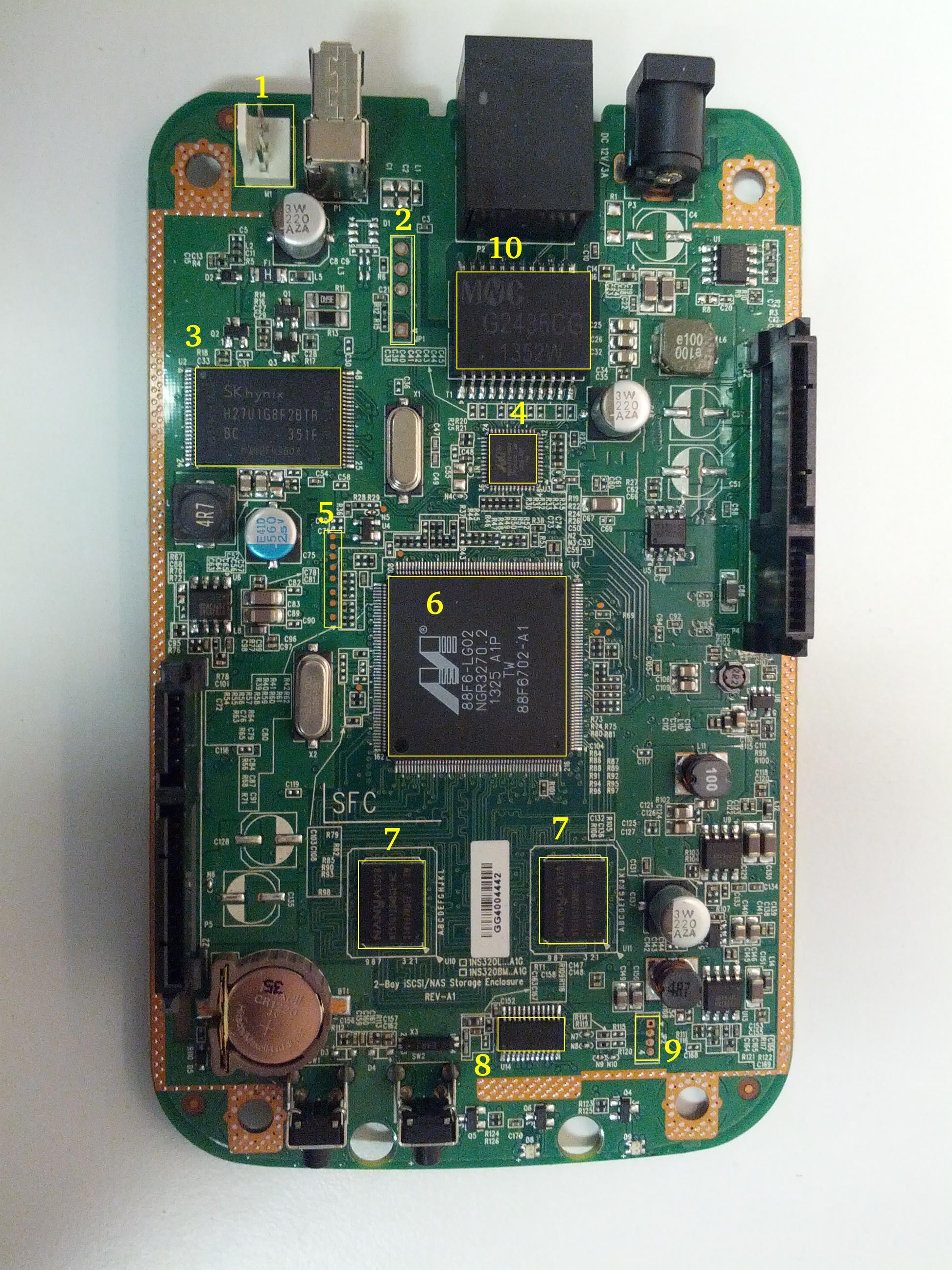
| Number | Label | Chip type on A3 board | Chip type on A4 board | Description |
|---|---|---|---|---|
| 1 | M1 | Fan: AVC DS04010B12U | The fan connector | |
| 2 | JP1 | The serial console | ||
| 3 | U2 | Hynix H27U1G8F2BTR | NAND flash | |
| 4 | U3 | Marvell 88E1318R | Ethernet chip | |
| 5 | Testpads (likely JTAG) | |||
| 6 | U7 | Marvell 88F6702 | The CPU | |
| 7 | U10,U11 | Nanya NT5TU128M8GE-AC | Hynix H5PS1G83KFR | RAM chips |
| 8 | U14 | Weltrend WT69P3 | The system management MCU | |
| 9 | JP2 | WT69P3 programming bus? | ||
| 10 | T1 | MNC G2436CG | MNC G2497CG | Ethernet transformer (datasheet) |
In order to access the unpopulated pads on the board I soldered two pin connectors, because the JP2 pitch was smaller than the standard 2.54mm pinheads I had I used some wire to route it to where it can be accessed:

The board contains four LEDs with the following purpose:
| Label | Color | Description |
|---|---|---|
| D6 | Blue | Power-on and booting indicator LED |
| D7 | Red | "USB" LED |
| D8 | Red | SATA1 port activity LED |
| D9 | Red | SATA2 port activity LED |
2.0.1 Weltrend WT69P3
The WT69P3 is a systems management MCU which controls the power to the board, provides an RTC for time keeping and controls the fan. The MCU is connected via a RS232 link with the main CPU and in the original firmare a daemon in the system communicates with it. The communications protocol has been reverse-engineered and there exist at least two independent open-source implementations of the manamgement daemon - https://www.aboehler.at/hg/dns320l-daemon and https://github.com/martignlo/DNS-320L.
2.0.2 JP2 connector
This connector seems to terminate an I2C bus. Both lines have pullups to +3.3 V and the Weltrend chip's ISP protocol is I2C according to information from the manufacturer. Unfortunately the programmer software published uses a custom WLINK-I2C adapter with a WT6563 microcontroller. Unfortunately I was not able to find any place selling this programmer online. The assumption was that this is the ISP interface for the Weltrend WT69P3 MCU.
When I connected a Saleae logic analyzer to the bus I noticed something interesting however. When the system boots it tries to initiate a write to address 0x40.
[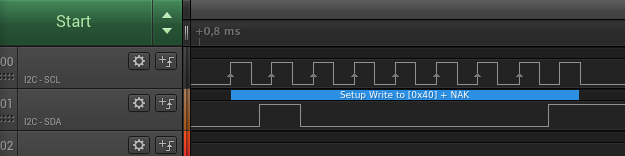 ]
]
In order to investigate this I used an Arduino board and the builtin Wire library to make an I2C slave respond to the address where the MCU is writing. The code for the sketch used is below:
#include <Wire.h>
void setup()
{  Wire.begin(0x20);  Wire.onReceive(receiveCmd);  Wire.onRequest(sendResponse);  Serial.begin(9600);
}
void loop()
{  delay(100);
}
void receiveCmd(int howMany)
{  while(Wire.available()>0) // loop through all but the last  {    char c = Wire.read(); // receive byte as a character    Serial.print("CMD: ");    Serial.println(c, HEX);         // print the character  }
}
void sendResponse() {  Wire.write(0xAA);
}
The wiring is documented in the Wire library reference page. Now things have started to look more interesting:
[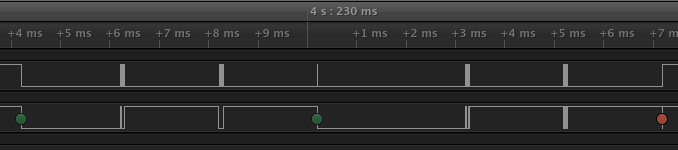 ]
]
When we decode the traffic we see that the MCU is first writing byte 0x00 to address 0x40 and then reading a byte from address 0x41:
Time [s], Analyzer Name, Decoded Protocol Result
4.226217250000000,I2C,Setup Write to [0x40] + ACK
4.228212250000000,I2C,0x00 + ACK
4.233196500000000,I2C,Setup Read to [0x41] + ACK
4.235190500000000,I2C,0xAA + NAK
As I was expecting the second read to be some kind of status register I tried to send all 256 different responses to see what would happen. Some bytes sent back have triggered interesting behaviour:
| Response byte | Boot message | LEDs |
|---|---|---|
| 0x01 | Module 0 is TDM | |
| 0x02 | Module 0 is AUDIO | D7 and D9 LEDs light up |
| 0x03 | Module 0 is RGMII | |
| 0x04 | Module 0 is GMII | |
| 0x05 | Module 0 is TS | |
| 0x06 | Module 0 is MII | |
| 0x07 | Module 0 is TDM | |
| 0x09 | Error!, MV88F6282 doesn't support LCD module when booting from NAND! |
Later I noticed an "iprobe" command in the U-Boot help. It detected 3 addresses on the bus:
Marvell>> iprobe
Valid chip addresses: 13 20 64
This bus layout seems to be confirmed when we scan the bus with buspirate:
I2C>(1)
Searching I2C address space. Found devices at:
0x02(0x01 W) 0x26(0x13 W) 0x27(0x13 R) 0x40(0x20 W) 0x41(0x20 R) 0xC9(0x64 R)
What is interesting apart from the 0x13, 0x20 (our fake Arduino slave) and 0x64 we also get write address 0x02. Interestingly, when the device is not booting (when LED6 is not blinking) the 0x64 is not present:
I2C>(1)
Searching I2C address space. Found devices at:
0x02(0x01 W) 0x26(0x13 W) 0x27(0x13 R) 0x40(0x20 W) 0x41(0x20 R)
The "Boot message" documents additional messages that are printed by U-Boot when we respond to a read from 0x20 with a particular byte, for example for response 0x04:
 ** MARVELL BOARD: DB-88F6702A-BP LE
U-Boot 1.1.4 (Aug 22 2012 - 17:06:54) Marvell version: 3.6.0.DNS-320L.01
U-Boot code: 00600000 -> 0067FFF0  BSS: -> 006CFB00
Soc: 88F6702 A1 CPU running @ 1000Mhz L2 running @ 500Mhz
SysClock = 400Mhz , TClock = 166Mhz
DRAM (DDR2) CAS Latency = 5 tRP = 5 tRAS = 18 tRCD=6
DRAM CS[0] base 0x00000000   size 256MB DRAM Total size 256MB  16bit width
Addresses 8M - 0M are saved for the U-Boot usage.
Mem malloc Initialization (8M - 7M): Done
NAND:128 MB
Flash:  0 kB
CPU : Marvell Feroceon (Rev 1)
Streaming disabled Write allocate disabled
Module 0 is GMII
USB 0: host mode
It looks like the 0x20 address is some kind of peripheral type detection mechanism and the u-boot code is shared between different devices. I have found references to the "Boot message" strings from the table in various places on the internet, for example here, here and here always in connection to some hardware using the Kirkwood chipset.
3 Bootloader
The board uses the U-Boot bootloader like other Kirkwood-based devices. The boot process can be escaped in the usual way for U-Boot - by pressing SPACE and then 1. When we do this we are greeted with the U-Boot prompt and can poke around various commands. Below you can see exploration results of the information seen by the bootloader:
Marvell>> printenv
bootargs=root=/dev/ram console=ttyS0,115200 :::DB88FXX81:egiga0:none
baudrate=115200
loads_echo=0
ipaddr=2.66.66.201
serverip=2.66.66.32
rootpath=/srv/ubuntu
netmask=255.255.255.0
run_diag=yes
console=console=ttyS0,115200 mtdparts=nand_mtd:0xc0000@0(uboot)ro,0x7f00000@0x100000(root)
MALLOC_len=1
ethprime=egiga0
bootargs_root=root=/dev/nfs rw
bootargs_end=:::DB88FXX81:eth0:none
image_name=uImage
standalone=fsload 0x2000000 $(image_name);setenv bootargs $(console) root=/dev/mtdblock0 rw ip=$(ipaddr):$(serverip)$(bootargs_end) $(mvPhoneConfig); bootm 0x2000000;
ethaddr=00:50:43:00:02:02
ethmtu=1500
mvPhoneConfig=mv_phone_config=dev[0]:fxs,dev[1]:fxo
mvNetConfig=mv_net_config=(00:11:88:0f:62:81,0:1:2:3),mtu=1500
usb0Mode=host
yuk_ethaddr=00:00:00:EE:51:81
nandEcc=1bit
netretry=no
rcvrip=169.254.100.100
loadaddr=0x02000000
autoload=no
image_multi=yes
ethact=egiga0
bootcmd=nand read.e 0xa00000 0x100000 0x300000;nand read.e 0xf00000 0x600000 0x300000;bootm 0xa00000 0xf00000
stdin=serial
stdout=serial
stderr=serial
mainlineLinux=no
enaMonExt=no
enaCpuStream=no
enaWrAllo=no
pexMode=RC
disL2Cache=no
setL2CacheWT=yes
disL2Prefetch=yes
enaICPref=yes
enaDCPref=yes
sata_dma_mode=yes
netbsd_en=no
vxworks_en=no
bootdelay=1
disaMvPnp=no
enaAutoRecovery=yes
pcieTune=no
Marvell>> version
U-Boot 1.1.4 (Aug 22 2012 - 17:06:54) Marvell version: 3.6.0.DNS-320L.01
Marvell>> usb start
(Re)start USB...
USB:   scanning bus for devices... 2 USB Device(s) found
Waiting for storage device(s) to settle before scanning...
1 Storage Device(s) found
Marvell>> usb tree
Device Tree:  1  Hub (480MBit/s, 0mA)  |  Marvell EHCI   |  +-2  Mass Storage (480MBit/s, 200mA)       Kingston DT 100 G2 XXXXXXXXXXXXXXXXXXXX     Marvell>> usb storage  Device 0: Vendor: Kingston Prod.: DT 100 G2        Rev: PMAP            Type: Removable Hard Disk            Capacity: 3736.9 MB = 3.6 GB (7653312 x 512)
Marvell>> Temp
Unknown command 'Temp' - try 'help'
Marvell>> temp
Tj temp is 0
Marvell>> sp
Bus: 0 Device: 0 Func: 0 Vendor ID: 11ab Device ID: 6702
-------------------------------------------------------------------
Class: Memory controller
PCI_BAR0 (Mem-64bit) base: 0f1000000    size: 1048576 bytes
PCI_BAR1 (Mem-64bit) base: 000000000            size: 268435456 bytes
Marvell>> sg
PHY 0 :
---------
Auto negotiation: Enabled
Speed: 100 Mbps
Duplex: Half
Link: up
PHY 1 :
---------
Auto negotiation: Enabled
Speed: Uknown
Duplex: Full
Link: up
Marvell>> nand info
Device 0: NAND 128MB 3,3V 8-bit, sector size 128 KB
Marvell>> map
CPU Interface
-------------
SDRAM_CS0 ....base 00000000, size 256MB SDRAM_CS1 ....disable
SDRAM_CS2 ....disable
SDRAM_CS3 ....disable
PEX0_MEM ....base 90000000, size 128MB PEX0_IO ....base f0000000, size  16MB PEX1_MEM ....no such
PEX1_IO ....no such
INTER_REGS ....base f1000000, size   1MB NFLASH_CS ....base f9000000, size   8MB SPI_CS ....base f8000000, size  16MB BOOT_ROM_CS ....no such
DEV_BOOTCS ....no such
CRYPT_ENG ....base fb000000, size  64KB
AHB To MBUS Bridge:
-------------------
win0 - PEX0_MEM base 90000000, ....size 128MB win1 - disable
win2 - PEX0_IO base f0000000, ....size  16MB win3 - disable
win4 - NFLASH_CS base f9000000, ....size   8MB win5 - SPI_CS base f8000000, ....size  16MB win6 - disable
win7 - CRYPT_ENG base fb000000, ....size  64KB win8 - INTER_REGS base f1000000, ....size   1MB
PEX0:
-----
Pex Bars
Internal Regs Bar0.... base f1000000, size   1MB DRAM Bar1............. base 00000000, size 256MB Devices Bar2.......... disable
Pex Decode Windows
win0 - SDRAM_CS0 base 00000000, ....size 256MB win1 - disable
win2 - disable
win3 - disable
win4 - disable
win5 - disable
default win - target unknown Expansion ROM - NFLASH_CS
USB:
----
Device 0:
win0 - SDRAM_CS0 base 00000000, size 256MB win1 - PEX0_MEM base 90000000, size 128MB win2 - disable
win3 - disable
ETH 0:
----
win0 - SDRAM_CS0 base 00000000, ....size 256MB win1 - NFLASH_CS base f9000000, ....size   8MB win2 - SPI_CS base f8000000, ....size  16MB win3 - PEX0_IO base f0000000, ....size  16MB win4 - disable
win5 - disable
XOR 0:
----
win0 - NFLASH_CS base f9000000, size   8MB win1 - PEX0_MEM base 90000000, size 128MB win2 - SDRAM_CS0 base 0, size 256MB win3 - SPI_CS base f8000000, size  16MB win4 - CRYPT_ENG base fb000000, size  64KB win5 - disable
win6 - disable
win7 - disable
XOR 1:
----
win0 - NFLASH_CS base f9000000, size   8MB win1 - PEX0_MEM base 90000000, size 128MB win2 - SDRAM_CS0 base 0, size 256MB win3 - SPI_CS base f8000000, size  16MB win4 - CRYPT_ENG base fb000000, size  64KB win5 - disable
win6 - disable
win7 - disable
SATA 0:
----
win0 - SDRAM_CS0 base 00000000, ....size 256MB win1 - SDRAM_CS1 base 10000000, ....size 256MB win2 - SDRAM_CS2 base 20000000, ....size 256MB win3 - SDRAM_CS3 base 30000000, ....size 256MB
SATA 1:
----
win0 - SDRAM_CS0 base 00000000, ....size 256MB win1 - SDRAM_CS1 base 10000000, ....size 256MB win2 - SDRAM_CS2 base 20000000, ....size 256MB win3 - SDRAM_CS3 base 30000000, ....size 256MB
AUDIO:
----
win0 - SDRAM_CS0 base 00000000, ....size 256MB win1 - SDRAM_CS1 base 10000000, ....size 256MB Marvell>> dclk
TCLK 166Mhz, SYSCLK 400Mhz (UART baudrate 115200)
Marvell>> ide reset
Reset IDE: Marvell Serial ATA Adapter
Integrated Sata device found
[0 0 0]: Enable DMA mode (6)  Device 0 @ 0 0:
Model: HITACHI HUA722010ALA330                  Firm: JP4ONA01 Ser#: XXXXXX            Type: Hard Disk            Supports 48-bit addressing            Capacity: 953869.7 MB = 931.5 GB (1953525168 x 512)
[0 1 0]: Enable DMA mode (6)  Device 1 @ 0 1:
Model: ST31000524AS                             Firm: JC4A     Ser#:             XXXXXXXXXX            Type: Hard Disk            Supports 48-bit addressing            Capacity: 953869.7 MB = 931.5 GB (1953525168 x 512)
Some of these variables are documented, some seem to be Marvell or Kirkwood specific cruft. The bootloader version is ancient, according to github, version 1.1.4 was released in 2005.
4 Original firmware
The original firmware resides on the NAND flash and an example of the entire boot console log is provided below:
 ** MARVELL BOARD: DB-88F6702A-BP LE
U-Boot 1.1.4 (Aug 22 2012 - 17:06:54) Marvell version: 3.6.0.DNS-320L.01
U-Boot code: 00600000 -> 0067FFF0  BSS: -> 006CFB00
Soc: 88F6702 A1 CPU running @ 1000Mhz L2 running @ 500Mhz
SysClock = 400Mhz , TClock = 166Mhz
DRAM (DDR2) CAS Latency = 5 tRP = 5 tRAS = 18 tRCD=6
DRAM CS[0] base 0x00000000   size 256MB DRAM Total size 256MB  16bit width
Addresses 8M - 0M are saved for the U-Boot usage.
Mem malloc Initialization (8M - 7M): Done
NAND:128 MB
Flash:  0 kB
CPU : Marvell Feroceon (Rev 1)
Streaming disabled Write allocate disabled
USB 0: host mode
PEX 0: interface detected no Link.
Net:   egiga0 [PRIME]
Hit any key to stop autoboot:  0
NAND read: device 0 offset 0x100000, size 0x300000
load addr ....  =a00000
 3145728 bytes read: OK
NAND read: device 0 offset 0x600000, size 0x300000
load addr ....  =f00000
 3145728 bytes read: OK
## Booting image at 00a00000 ...   Image Name:   Linux-2.6.31.8   Created:      2012-08-22   8:55:08 UTC   Image Type:   ARM Linux Kernel Image (uncompressed)   Data Size:    2630552 Bytes =  2.5 MB   Load Address: 00008000   Entry Point:  00008000   Verifying Checksum ... OK
OK
## Loading Ramdisk Image at 00f00000 ...   Image Name:   Ramdisk   Created:      2014-12-26   3:00:57 UTC   Image Type:   ARM Linux RAMDisk Image (gzip compressed)   Data Size:    1743894 Bytes =  1.7 MB   Load Address: 00e00000   Entry Point:  00e00000   Verifying Checksum ... OK
Starting kernel ...
Uncompressing Linux......................................................................................................................................................................... done, booting the kernel.
Linux version 2.6.31.8 (jack@swtest6) (gcc version 4.3.2 (sdk3.3-ct-ng-1.4.1) ) #1 Wed Aug 22 16:55:05 CST 2012
CPU: Feroceon 88FR131 [56251311] revision 1 (ARMv5TE), cr=00053977
CPU: VIVT data cache, VIVT instruction cache
Machine: Feroceon-KW
Using UBoot passing parameters structure
Memory policy: ECC disabled, Data cache writeback
Built 1 zonelists in Zone order, mobility grouping off.  Total pages: 65024
Kernel command line: root=/dev/ram console=ttyS0,115200 :::DB88FXX81:egiga0:none
PID hash table entries: 1024 (order: 10, 4096 bytes)
Dentry cache hash table entries: 32768 (order: 5, 131072 bytes)
Inode-cache hash table entries: 16384 (order: 4, 65536 bytes)
Memory: 256MB = 256MB total
Memory: 246272KB available (4960K code, 334K data, 136K init, 0K highmem)
Hierarchical RCU implementation.
NR_IRQS:128
Console: colour dummy device 80x30
Calibrating delay loop... 999.42 BogoMIPS (lpj=4997120)
Mount-cache hash table entries: 512
CPU: Testing write buffer coherency: ok
NET: Registered protocol family 16
Feroceon L2: Enabling L2
Feroceon L2: Cache support initialised.
CPU Interface
-------------
SDRAM_CS0 ....base 00000000, size 256MB SDRAM_CS1 ....disable
SDRAM_CS2 ....disable
SDRAM_CS3 ....disable
PEX0_MEM ....base e0000000, size 128MB PEX0_IO ....base f2000000, size   1MB PEX1_MEM ....no such
PEX1_IO ....no such
INTER_REGS ....base f1000000, size   1MB NFLASH_CS ....base fa000000, size   2MB SPI_CS ....base f4000000, size  16MB BOOT_ROM_CS ....no such
DEV_BOOTCS ....no such
CRYPT_ENG ....base f0000000, size   2MB   Marvell Development Board (LSP Version KW_LSP_5.1.3_patch29)-- DB-88F6702A-BP  Soc: 88F6702 A1 LE
 Detected Tclk 166666667 and SysClk 400000000 MV Buttons Device Load
Marvell USB EHCI Host controller #0: c8040740
PEX0 interface detected no Link.
PCI: bus0: Fast back to back transfers enabled
mvPexLocalBusNumSet: ERR. Invalid PEX interface 1
bio: create slab  at 0
SCSI subsystem initialized
usbcore: registered new interface driver usbfs
usbcore: registered new interface driver hub
usbcore: registered new device driver usb
NET: Registered protocol family 2
IP route cache hash table entries: 2048 (order: 1, 8192 bytes)
TCP established hash table entries: 8192 (order: 4, 65536 bytes)
TCP bind hash table entries: 8192 (order: 3, 32768 bytes)
TCP: Hash tables configured (established 8192 bind 8192)
TCP reno registered
NET: Registered protocol family 1
Trying to unpack rootfs image as initramfs...
rootfs image is not initramfs (no cpio magic); looks like an initrd
Freeing initrd memory: 1700K
RTC has been updated!!!
rtc mv_rtc: rtc core: registered kw-rtc as rtc0
RTC registered
cpufreq: Init kirkwood cpufreq driver
XOR registered 4 channels
XOR 2nd invalidate WA enabled
cesadev_init(c000ed5c)
mvCesaInit: sessions=640, queue=64, pSram=f0000000
MV Buttons Driver Load
VFS: Disk quotas dquot_6.5.2
Dquot-cache hash table entries: 1024 (order 0, 4096 bytes)
squashfs: version 4.0 (2009/01/31) Phillip Lougher
Installing knfsd (copyright (C) 1996 okir@monad.swb.de).
NTFS driver 2.1.29 [Flags: R/O].
JFFS2 version 2.2. (NAND) © 2001-2006 Red Hat, Inc.
fuse init (API version 7.12)
msgmni has been set to 484
alg: No test for cipher_null (cipher_null-generic)
alg: No test for ecb(cipher_null) (ecb-cipher_null)
alg: No test for digest_null (digest_null-generic)
alg: No test for compress_null (compress_null-generic)
alg: No test for lzma (lzma-generic)
alg: No test for stdrng (krng)
alg: No test for hmac(digest_null) (hmac(digest_null-generic))
Block layer SCSI generic (bsg) driver version 0.4 loaded (major 253)
io scheduler noop registered
io scheduler anticipatory registered (default)
Initializing ths8200_init
Initializing dove_adi9889_init
Serial: 8250/16550 driver, 4 ports, IRQ sharing disabled
serial8250.0: ttyS0 at MMIO 0xf1012000 (irq = 33) is a 16550A
console [ttyS0] enabled
serial8250.1: ttyS1 at MMIO 0xf1012100 (irq = 34) is a 16550A
brd: module loaded
loop: module loaded
Integrated Sata device found
IRQ 21/mvSata: IRQF_DISABLED is not guaranteed on shared IRQs
scsi0 : Marvell SCSI to SATA adapter
scsi1 : Marvell SCSI to SATA adapter
Loading Marvell Ethernet Driver:  o Cached descriptors in DRAM  o DRAM SW cache-coherency  o 2 Giga ports supported  o Single RX Queue support - ETH_DEF_RXQ=0  o Single TX Queue support - ETH_DEF_TXQ=0  o TCP segmentation offload (TSO) supported  o Large Receive offload (LRO) supported  o Receive checksum offload supported  o Transmit checksum offload supported  o Network Fast Processing (Routing) supported - (Disabled)  o Driver ERROR statistics enabled  o Proc tool API enabled  o SKB Reuse supported - (Disabled)  o SKB Recycle supported - (Disabled)  o Rx descripors: q0=128  o Tx descripors: q0=532  o Loading network interface(s):     o register under mv88fx_eth platform     o egiga0, ifindex = 2, GbE port = 0
Warning: Giga 1 is Powered Off
mvFpRuleDb (c0edc000): 2048 entries, 8192 bytes
Counter=0, opIdx=6, overhead=16
Counter=1, opIdx=2, overhead=0
Counter=2, opIdx=1, overhead=18
Counter=3, opIdx=2, overhead=0
NAND device: Manufacturer ID: 0xad, Chip ID: 0xf1 (Hynix NAND 128MiB 3,3V 8-bit)
Scanning device for bad blocks
Using static partition definition
Creating 7 MTD partitions on "nand_mtd":
0x000000000000-0x000000100000 : "u-boot"
0x000000100000-0x000000600000 : "uImage"
0x000000600000-0x000000b00000 : "ramdisk"
0x000000b00000-0x000006f00000 : "image"
0x000006f00000-0x000007900000 : "rescue firmware"
0x000007900000-0x000007e00000 : "config"
0x000007e00000-0x000008000000 : "my-dlink"
ehci_hcd: USB 2.0 'Enhanced' Host Controller (EHCI) Driver
ehci_marvell ehci_marvell.70059: Marvell Orion EHCI
ehci_marvell ehci_marvell.70059: new USB bus registered, assigned bus number 1
ehci_marvell ehci_marvell.70059: irq 19, io base 0xf1050100
ehci_marvell ehci_marvell.70059: USB 2.0 started, EHCI 1.00
usb usb1: configuration #1 chosen from 1 choice
hub 1-0:1.0: USB hub found
hub 1-0:1.0: 1 port detected
ohci_hcd: USB 1.1 'Open' Host Controller (OHCI) Driver
uhci_hcd: USB Universal Host Controller Interface driver
Initializing USB Mass Storage driver...
usbcore: registered new interface driver usb-storage
USB Mass Storage support registered.
mice: PS/2 mouse device common for all mice
i2c /dev entries driver
md: linear personality registered for level -1
md: raid0 personality registered for level 0
md: raid1 personality registered for level 1
device-mapper: ioctl: 4.15.0-ioctl (2009-04-01) initialised: dm-devel@redhat.com
usbcore: registered new interface driver usbhid
usbhid: v2.6:USB HID core driver
TCP cubic registered
NET: Registered protocol family 17
RPC: Registered udp transport module.
RPC: Registered tcp transport module.
rtc mv_rtc: setting system clock to 2000-01-01 00:00:00 UTC (946684800)
md: Waiting for all devices to be available before autodetect
md: If you don't use raid, use raid=noautodetect
md: Autodetecting RAID arrays.
md: Scanned 0 and added 0 devices.
md: autorun ...
md: ... autorun DONE.
RAMDISK: gzip image found at block 0
VFS: Mounted root (ext2 filesystem) on device 1:0.
Freeing init memory: 136K
init started: BusyBox v1.20.2 (2013-11-27 15:54:37 CST)
starting pid 536, tty '': '/etc/rc.sh' Mounting /etc/fstab
umount: can't umount /proc: Invalid argument
umount: can't umount /usr/local/modules: Invalid argument
sh: can't open '/usr/sbin/pre_usb.sh'
first good block is 0
image len = 39137280 , image checksum = beaa9c0
umount: can't umount /usr/local/tmp: Invalid argument
dump image checksum=beaa9c0
mount cmd:busybox mount -t squashfs -o loop /usr/local/tmp/image.cfs /usr/local/modules
ln: /lib/./libnss_dns-2.8.so: File exists
ln: /lib/./libnss_dns.so.2: File exists
ln: /usr/sbin/./system_init: File exists
hardware init
GbE port 0: TxEnable WA - Enabled, deep=1, tx_en_bk=1
mtd check v1.02.08062012
config mtd type is JFFS2
/usr/local/config free size is 4767744 copy config files
cp: can't stat '/usr/local/config/user.log.old': No such file or directory
usbcore: registered new interface driver usblp set loopback interface
old firmware ver:20141226
new firmware ver:20141226
first good block is 0
mac1 = 70:62:B8:2A:52:73
lan0:ifconfig egiga0 hw ether 70:62:B8:2A:52:73
egiga0: mac address changed
egiga0: started
Support Mydlink
NET: Registered protocol family 10
lo: Disabled Privacy Extensions
ADDRCONF(NETDEV_UP): egiga0: link is not ready
IPv6 over IPv4 tunneling driver
sit0: Disabled Privacy Extensions
ip6tnl0: Disabled Privacy Extensions
IPv4 over IPv4 tunneling driver
tunl0: Disabled Privacy Extensions
net.ipv6.conf.default.accept_dad = 2
net.ipv6.conf.egiga0.accept_dad = 2
net.ipv6.conf.default.dad_transmits = 1
net.ipv6.conf.egiga0.dad_transmits = 1
net.ipv6.conf.default.forwarding = 0
net.ipv6.conf.default.accept_redirects = 1 execute rc.init.sh
awk: /var/run/udhcpc0.pid: No such file or directory
udhcpc (v1.20.2) started
Sending discover...
Sending discover...
Sending discover...
init egiga0
No lease, forking to background
killall: crond: no process killed set Time Zone ****
Fri Dec 31 22:00:51 GMT 1999 get Time from rtc and set it into system ****
rtc: RTC time = 2020/3/2 Mon 10:16:15
Mon Mar  2 10:16:15 GMT 2020 Do not adjust RTC time ***
Module IPC SERVER Version:(1.00.20090706)
ads=0
created mail daemon thread 0
ifconfig: egiga1: error fetching interface information: Device not found
Starting system message bus
Command: wget -T5 -t3 -q http://cfaj.freeshell.org/ipaddr.cgi -O /tmp/exip.0
Command: wget -T5 -t3 -q http://icanhazip.com/ -O /tmp/exip.1
Command: wget -T5 -t3 -q http://ifconfig.me/ip -O /tmp/exip.2
Command: wget -T5 -t3 -q http://whatismyip.org/ -O /tmp/exip.3
Command: wget -T5 -t3 -q http://ifconfig.me/ip -O /tmp/exip.4
Command: wget -T5 -t3 -q http://checkip.dyndns.com:8245/ -O /tmp/exip.5
config egiga0 169.254.173.176
RTNETLINK answers: File exists
call load_module network
Up_Send_Ctl : Can not find specified command "SysIP1"
Command line is not complete. Try option "help"
zcip: script /usr/share/udhcpc/zcip.script config failed, exitcode=1
Stop NFS Deamon....
Stop NFS mountd....
Unload Driver....
Stop Portmap.
No NFS information .
Stop NFS Server OVER.
Start config the NFS needed file....
Config Over.
No NFS information .
Start portmap....
Load Driver .
Start NFS Deamon .
svc: failed to register lockdv1 RPC service (errno 97).
NFSD: Using /var/lib/nfs/v4recovery as the NFSv4 state recovury0di�e{u�_k�owSf:�unicne*�o*gind recovery directory /var/lib/nfs/v4recovery
NFSD: starting 90-second grace period
Start NFS Server OVER .
cp: can't stat '/usr/local/config/Mydlink_Status.xml': No such file or directory
mcu version 1.02
system daemon v1.03.20130707
chk_io v1.03.20130502
mfg_start version 1.00(2014-12-26)
Mon Mar  2 10:16:42 2020
usb_dir []
cp: can't stat '/usr/local/config/mydlink_time.xml': No such file or directory
2020-03-02 10:16:39: (../../src/log.c.166) server started killall: chk_hotplug: no process killed
sh: you need to specify whom to kill
killall: dcp: no process killed
2020-03-02 10:16:42: (../../src/log.c.166) server started kinmyno��signalc: no process killed
usb_dir [/]
filename_mfg mfg_DNS_320L
check //mfg_DNS_320L file
opeo*��/mfw_Vn[�3::m�vime>gainme�jkillall: upnpc-ddns: no process killed
killall: tsa: no process killed
opt.local stop�ok.
o|w/oo{un���izu6ok��Jkillall: smbd: no process killed
Please press Enter to activate this console. LED_POWER_ON
5 Building mainline Linux kernel
I managed to build the mainline kernel 5.5.7 using a slightly modified device tree from github using Ubuntu 18.04 LTS:
➜  linux-5.5.7 lsb_release -a
No LSB modules are available.
Distributor ID: Ubuntu
Description:    Ubuntu 18.04.4 LTS
Release:        18.04
Codename:       bionic
The GCC version used was 7.5.0:
➜  linux-5.5.7 arm-linux-gnueabi-gcc -v
Using built-in specs.
COLLECT_GCC=arm-linux-gnueabi-gcc
COLLECT_LTO_WRAPPER=/usr/lib/gcc-cross/arm-linux-gnueabi/7/lto-wrapper
Target: arm-linux-gnueabi
Configured with: ../src/configure -v --with-pkgversion='Ubuntu/Linaro 7.5.0-3ubuntu1~18.04' --with-bugurl=file:///usr/share/doc/gcc-7/README.Bugs --enable-languages=c,ada,c++,go,d,fortran,objc,obj-c++ --prefix=/usr --with-gcc-major-version-only --program-suffix=-7 --enable-shared --enable-linker-build-id --libexecdir=/usr/lib --without-included-gettext --enable-threads=posix --libdir=/usr/lib --enable-nls --with-sysroot=/ --enable-clocale=gnu --enable-libstdcxx-debug --enable-libstdcxx-time=yes --with-default-libstdcxx-abi=new --enable-gnu-unique-object --disable-libitm --disable-libquadmath --disable-libquadmath-support --enable-plugin --with-system-zlib --with-target-system-zlib --enable-multiarch --enable-multilib --disable-sjlj-exceptions --with-arch=armv5t --with-float=soft --disable-werror --enable-multilib --enable-checking=release --build=x86_64-linux-gnu --host=x86_64-linux-gnu --target=arm-linux-gnueabi --program-prefix=arm-linux-gnueabi- --includedir=/usr/arm-linux-gnueabi/include
Thread model: posix
gcc version 7.5.0 (Ubuntu/Linaro 7.5.0-3ubuntu1~18.04)
In order to install this compiler you should run the command:
➜ linux-5.5.7 sudo apt install -y gcc-arm-linux-gnueabi
Now we can setup an alias which will be useful for building all other software. The alias should use the prefix for the compiler we just installed:
➜ linux-5.5.7 alias cross-make='make ARCH=arm CROSS_COMPILE=arm-linux-gnueabi-'
First we need to create a default config for the mvebuv5 target. Why mvebu? mv means Marvell, EBU is Engineering Business Unit and v5 is the ARM architecture version. Therefore:
➜  linux-5.5.7 cross-make mvebu_v5_defconfig  HOSTCC  scripts/basic/fixdep  HOSTCC  scripts/kconfig/conf.o  HOSTCC  scripts/kconfig/confdata.o  HOSTCC  scripts/kconfig/expr.o  LEX     scripts/kconfig/lexer.lex.c  YACC    scripts/kconfig/parser.tab.[ch]  HOSTCC  scripts/kconfig/lexer.lex.o  HOSTCC  scripts/kconfig/parser.tab.o  HOSTCC  scripts/kconfig/preprocess.o  HOSTCC  scripts/kconfig/symbol.o  HOSTCC  scripts/kconfig/util.o  HOSTLD  scripts/kconfig/conf
#
# configuration written to .config
#
Now we need to copy in the Device Tree (.dts) file from the github repo to our Linux source directory:
➜ ~ git clone https://github.com/scus1/dns320l
Cloning into 'dns320l'...
remote: Enumerating objects: 327, done.
remote: Total 327 (delta 0), reused 0 (delta 0), pack-reused 327
Receiving objects: 100% (327/327), 82.17 KiB | 203.00 KiB/s, done.
Resolving deltas: 100% (154/154), done.
➜ ~ cp dns320l/kernel/dts/kirkwood-dns320l.dts linux-5.5.7/arch/arm/boot/dts
At this point we can build the U-boot kernel image (uImage) and the DTB which is a compiled version of the Device Tree:
➜  linux-5.5.7 cross-make -j16 LOADADDR=0x8000 uImage kirkwood-dns320l.dtb  [...]  CALL    scripts/atomic/check-atomics.sh  CALL    scripts/checksyscalls.sh  CHK     include/generated/compile.h  Kernel: arch/arm/boot/Image is ready  Kernel: arch/arm/boot/zImage is ready  UIMAGE  arch/arm/boot/uImage
Image Name:   Linux-5.5.7
Created:      Sat Apr  4 21:49:09 2020
Image Type:   ARM Linux Kernel Image (uncompressed)
Data Size:    4550496 Bytes = 4443.84 KiB = 4.34 MiB
Load Address: 00008000
Entry Point:  00008000  Kernel: arch/arm/boot/uImage is ready
➜  linux-5.5.7
The kernel image and DTB files need to be joined together for the kernel to notice the DTB blob. Then a new uImage needs to built from the joined file:
➜  linux-5.5.7 cat arch/arm/boot/zImage arch/arm/boot/dts/kirkwood-dns320l.dtb > arch/arm/boot/zImage-dtb ➜  linux-5.5.7 bash ./scripts/mkuboot.sh -A arm -O linux -C none  -T kernel -a 0x8000 -e 0x8000 -n 'Linux-5.5.7' -d arch/arm/boot/zImage-dtb arch/arm/boot/uImage
Image Name:   Linux-5.5.7
Created:      Sat Apr  4 21:51:29 2020
Image Type:   ARM Linux Kernel Image (uncompressed)
Data Size:    4561674 Bytes = 4454.76 KiB = 4.35 MiB
Load Address: 00008000
Entry Point:  00008000
➜  linux-5.5.7
Now the kernel can be booted with PXE for example:
## Booting image at 00a00000 ...   Image Name:   Linux-5.5.7   Created:      2020-04-04  19:51:29 UTC   Image Type:   ARM Linux Kernel Image (uncompressed)   Data Size:    4561674 Bytes =  4.4 MB   Load Address: 00008000   Entry Point:  00008000   Verifying Checksum ... OK
OK
Starting kernel ...
Booting Linux on physical CPU 0x0
Linux version 5.5.7 (enki@newton) (gcc version 7.5.0 (Ubuntu/Linaro 7.5.0-3ubuntu1~18.04)) #1 PREEMPT Sat Apr 4 21:47:13 CEST 2020
CPU: Feroceon 88FR131 [56251311] revision 1 (ARMv5TE), cr=0005397f
CPU: VIVT data cache, VIVT instruction cache
OF: fdt: Machine model: D-Link DNS-320L
Memory policy: Data cache writeback
Built 1 zonelists, mobility grouping on.  Total pages: 65024
Kernel command line: root=/dev/ram console=ttyS0,115200 :::DB88FXX81:egiga0:none
Dentry cache hash table entries: 32768 (order: 5, 131072 bytes, linear)
Inode-cache hash table entries: 16384 (order: 4, 65536 bytes, linear)
mem auto-init: stack:off, heap alloc:off, heap free:off
Memory: 250112K/262144K available (6669K kernel code, 286K rwdata, 1676K rodata, 200K init, 657K bss, 12032K reserved, 0K cma-reserved, 0K highmem)
SLUB: HWalign=32, Order=0-3, MinObjects=0, CPUs=1, Nodes=1
rcu: Preemptible hierarchical RCU implementation.
        Tasks RCU enabled.
rcu: RCU calculated value of scheduler-enlistment delay is 10 jiffies.
NR_IRQS: 16, nr_irqs: 16, preallocated irqs: 16
random: get_random_bytes called from start_kernel+0x278/0x410 with crng_init=0
clocksource: orion_clocksource: mask: 0xffffffff max_cycles: 0xffffffff, max_idle_ns: 11467562657 ns
sched_clock: 32 bits at 166MHz, resolution 6ns, wraps every 12884901885ns
Switching to timer-based delay loop, resolution 6ns
Console: colour dummy device 80x30
Calibrating delay loop (skipped), value calculated using timer frequency.. 333.33 BogoMIPS (lpj=1666666)
pid_max: default: 32768 minimum: 301
Mount-cache hash table entries: 1024 (order: 0, 4096 bytes, linear)
Mountpoint-cache hash table entries: 1024 (order: 0, 4096 bytes, linear)
CPU: Testing write buffer coherency: ok
Setting up static identity map for 0x81e0 - 0x8238
mvebu-soc-id: MVEBU SoC ID=0x6702, Rev=0x3
rcu: Hierarchical SRCU implementation.
devtmpfs: initialized
clocksource: jiffies: mask: 0xffffffff max_cycles: 0xffffffff, max_idle_ns: 19112604462750000 ns
futex hash table entries: 256 (order: -1, 3072 bytes, linear)
pinctrl core: initialized pinctrl subsystem
thermal_sys: Registered thermal governor 'step_wise'
NET: Registered protocol family 16
DMA: preallocated 256 KiB pool for atomic coherent allocations
cpuidle: using governor menu
Feroceon L2: Enabling L2
Feroceon L2: Cache support initialised.
vgaarb: loaded
SCSI subsystem initialized
usbcore: registered new interface driver usbfs
usbcore: registered new interface driver hub
usbcore: registered new device driver usb
Advanced Linux Sound Architecture Driver Initialized.
clocksource: Switched to clocksource orion_clocksource
NET: Registered protocol family 2
tcp_listen_portaddr_hash hash table entries: 512 (order: 0, 4096 bytes, linear)
TCP established hash table entries: 2048 (order: 1, 8192 bytes, linear)
TCP bind hash table entries: 2048 (order: 1, 8192 bytes, linear)
TCP: Hash tables configured (established 2048 bind 2048)
UDP hash table entries: 256 (order: 0, 4096 bytes, linear)
UDP-Lite hash table entries: 256 (order: 0, 4096 bytes, linear)
NET: Registered protocol family 1
RPC: Registered named UNIX socket transport module.
RPC: Registered udp transport module.
RPC: Registered tcp transport module.
RPC: Registered tcp NFSv4.1 backchannel transport module.
PCI: CLS 0 bytes, default 32
Initialise system trusted keyrings
workingset: timestamp_bits=30 max_order=16 bucket_order=0
jffs2: version 2.2. (NAND) © 2001-2006 Red Hat, Inc.
Key type asymmetric registered
Asymmetric key parser 'x509' registered
io scheduler mq-deadline registered
io scheduler kyber registered
kirkwood-pinctrl f1010000.pin-controller: registered pinctrl driver
mvebu-gpio f1010140.gpio: IRQ index 3 not found
mv_xor f1060800.xor: Marvell shared XOR driver
mv_xor f1060800.xor: Marvell XOR (Registers Mode): ( xor cpy intr )
mv_xor f1060900.xor: Marvell shared XOR driver
mv_xor f1060900.xor: Marvell XOR (Registers Mode): ( xor cpy intr )
Serial: 8250/16550 driver, 2 ports, IRQ sharing disabled
printk: console [ttyS0] disabled
f1012000.serial: ttyS0 at MMIO 0xf1012000 (irq = 25, base_baud = 10416666) is a 16550A
printk: console [ttyS0] enabled
f1012100.serial: ttyS1 at MMIO 0xf1012100 (irq = 26, base_baud = 10416666) is a 16550A
loop: module loaded
sata_mv f1080000.sata: slots 32 ports 2
scsi host0: sata_mv
scsi host1: sata_mv
ata1: SATA max UDMA/133 irq 33
ata2: SATA max UDMA/133 irq 33
nand: device found, Manufacturer ID: 0xad, Chip ID: 0xf1
nand: Hynix H27U1G8F2BTR-BC
nand: 128 MiB, SLC, erase size: 128 KiB, page size: 2048, OOB size: 64
Scanning device for bad blocks
7 fixed-partitions partitions found on MTD device orion_nand
Creating 7 MTD partitions on "orion_nand":
0x000000000000-0x000000100000 : "u-boot"
0x000000100000-0x000000600000 : "uImage"
0x000000600000-0x000000b00000 : "ramdisk"
0x000000b00000-0x000006f00000 : "image"
0x000006f00000-0x000007900000 : "mini firmware"
0x000007900000-0x000007e00000 : "config"
0x000007e00000-0x000008000000 : "my-dlink"
libphy: Fixed MDIO Bus: probed
libphy: orion_mdio_bus: probed
mv643xx_eth: MV-643xx 10/100/1000 ethernet driver version 1.4
mv643xx_eth_port mv643xx_eth_port.0 eth0: port 0 with MAC address 00:50:43:00:02:02
libertas_sdio: Libertas SDIO driver
libertas_sdio: Copyright Pierre Ossman
ehci_hcd: USB 2.0 'Enhanced' Host Controller (EHCI) Driver
ehci-pci: EHCI PCI platform driver
ehci-orion: EHCI orion driver
orion-ehci f1050000.ehci: EHCI Host Controller
orion-ehci f1050000.ehci: new USB bus registered, assigned bus number 1
orion-ehci f1050000.ehci: irq 30, io mem 0xf1050000
orion-ehci f1050000.ehci: USB 2.0 started, EHCI 1.00
hub 1-0:1.0: USB hub found
hub 1-0:1.0: 1 port detected
usbcore: registered new interface driver usb-storage
usbcore: registered new interface driver ums-datafab
usbcore: registered new interface driver ums-freecom
usbcore: registered new interface driver ums-jumpshot
usbcore: registered new interface driver ums-sddr09
usbcore: registered new interface driver ums-sddr55
ata1: SATA link down (SStatus 0 SControl F300)
ata2: SATA link down (SStatus 0 SControl F300)
rtc-mv f1010300.rtc: internal RTC not ticking
i2c /dev entries driver
watchdog: f1020300.watchdog-timer: driver supplied timeout (4294967295) out of range
watchdog: f1020300.watchdog-timer: falling back to default timeout (25)
orion_wdt: Initial timeout 25 sec
marvell-cesa f1030000.crypto: CESA device successfully registered
usbcore: registered new interface driver usbhid
usbhid: USB HID core driver
oprofile: no performance counters
oprofile: using timer interrupt.
NET: Registered protocol family 17
lib80211: common routines for IEEE802.11 drivers
Loading compiled-in X.509 certificates
input: gpio-keys as /devices/platform/gpio-keys/input/input0
hctosys: unable to open rtc device (rtc0)
cfg80211: Loading compiled-in X.509 certificates for regulatory database
cfg80211: Loaded X.509 cert 'sforshee: 00b28ddf47aef9cea7'
platform regulatory.0: Direct firmware load for regulatory.db failed with error -2
cfg80211: failed to load regulatory.db
ALSA device list:  No soundcards found.
VFS: Cannot open root device "ram" or unknown-block(1,0): error -6
[...]
Additional kernel options can now be added depending on your needs. I have provided the config I was using here.
6 Building a rootfs
For the rootfs I wanted to use buildroot as I've found it's build system to be the easiest to understand. First we download buildroot-2020.02:
➜  ~ tar xvf buildroot-2020.02.tar.bz2
[...]
buildroot-2020.02/docs/manual/manual.html
buildroot-2020.02/.br2-external.in.openssl
buildroot-2020.02/.br2-external.in.toolchains
➜  ~
Then we need to copy in the packages for the DNS320L mcu communications daemon:
(default) ➜  buildroot-2020.02 cp -r buildroot-dns320l/package/* package
(default) ➜  buildroot-2020.02 patch -p1 < buildroot-dns320l/add-to-config.patch patching file package/Config.in
(default) ➜  buildroot-2020.02
We can now build whatever options we want, the config I used can be downloaded here. The target architecture should be "ARM little-endian" and the target architecture variant is arm926t. After building buildroot
(default) ➜  buildroot-2020.02 make -j16
[...]
ln -snf /home/enki/Pobrane/buildroot-2020.02/output/host/arm-buildroot-linux-gnueabi/sysroot /home/enki/Pobrane/buildroot-2020.02/output/staging
(default) ➜  buildroot-2020.02 ls -l output/images/rootfs.cpio.uboot -rw-r--r-- 1 enki enki 20115884 kwi  5 19:08 output/images/rootfs.cpio.uboot
The initramfs image is inside the output/images/ directory and can be directly booted with the kernel built before.
7 Bootloader setup
For my own firmware I made the choice to not remove the original firmware from NAND just in case. I opted to boot my FW from an external USB stick plugged into the back USB port as I won't use it anyway. In order to configure the NAS for USB booting you need to perform the following steps:
First, interrupt the autoboot sequence by pressing SPACE and 1. After that perform the u-boot shell commands to save the existing boot configuration:
USB 0: host mode
PEX 0: interface detected no Link.
Net:   egiga0 [PRIME]
Hit any key to stop autoboot:  0 Marvell>> Marvell>> setenv bootcmd_stock $(bootcmd)
Marvell>> printenv bootcmd_stock
bootcmd_stock=nand read.e 0xa00000 0x100000 0x300000;nand read.e 0xf00000 0x600000 0x300000;bootm 0xa00000 0xf00000
As you can see the original boot configuration has been saved to the 'bootcmdstock' variable and can be restored later if required. Now create a new variable with commands used to launch the kernel and initramfs from the USB stick and set 'bootcmd' to run them:
Marvell>> setenv bootcmd_usb usb start\;fatload usb 0 0xa00000 /slots/A/kernel\;fatload usb 0 0xf00000 /slots/A/initramfs\;bootm 0xa00000 0xf00000
Marvell>> printenv bootcmd_usb
bootcmd_usb=usb start;fatload usb 0 0xa00000 /slots/A/kernel;fatload usb 0 0xf00000 /slots/A/initramfs;bootm 0xa00000 0xf00000
Marvell>> Marvell>> setenv bootcmd run bootcmd_usb
Marvell>> printenv bootcmd
bootcmd=run bootcmd_usb
Marvell>>
The last setenv command sets the boootcmd to run the contents of the bootcmdusb variable which contains commands to load the kernel and initramfs from the usb stick and execute the kernel entry point. Now if you would want to restore the NAS to boot the original firmware you just need to setenv bootcmd to contain the 'run bootcmdstock' string. The last step is to save the u-boot configuration:
Marvell>> saveenv
Saving Environment to NAND...
Erasing Nand...Writing to Nand... done
Marvell>>
8 References
This is a list of references I used when working on the NAS. A lot has been done already by others:
- https://jamie.lentin.co.uk/devices/dlink-dns325/
- https://github.com/lentinj/kwuartboot
- https://github.com/martignlo/DNS-320L
- https://www.aboehler.at/doku/doku.php/projects:dns320l
- http://dns323.kood.org/dns-320
- https://github.com/scus1/dns320l
- https://github.com/avoidik/board_dns320 - some instructions on building U-Boot
- https://github.com/zkrx/u-boot-syno/blob/master/u-boot-mv-3.4.4/net/rcvr.h - information about the Distress Beacon Protocol
- https://sourceforge.net/projects/alt-f/
- http://www.natisbad.org/NAS/refs/Marvell/ - some datasheets
- https://www.mmnt.net/db/0/0/93.80.89.69/s/nas/ - some datasheets
- https://groups.google.com/forum/#!msg/alt-f/uhxqZ0N-H28/XNzot2oKEQAJ - extracting U-Boot and other parts from the original D-Link firmware
- https://forum.doozan.com/read.php?3,7852,7852 - UART Booting HowTo for Selected Kirkwood Devices
- http://www.ejiuniu.com/Products-show.asp?id=138 - some specs for the WT69P3 MCU