
sokai forked sokai/hass-pfsense from travisghansen/hass-pfsense
Minimalistic graph card for Home Assistant Lovelace UI
JavaScript 2.1k 2 issues need help Updated Dec 7
August 14th, 2021, Update #1: Release 2021.8.0 has introduced a new feature for sensors called long-term statistics. A new sub-section called Long-term statistics was added to the HASS database section that describes its relation to the states table and how to implement it. The same release also introduced the Statistics Graph Card, which provide a nice way of visualizing long-term statistics.
Home Assistant (HASS) is a free and open-source software (FOSS) that provides a feature-rich environment for managing, controlling, and automating smart home devices, such as light bulbs, blinders, and LED strips. In addition, it provides a highly customizable system for collecting and organizing a multitude of data (e.g., on/off device states, local temperature, GPS tracking, exchange rates), as provided by more than a thousand integrations with Internet of things (IoT) devices (e.g., Sonoff, Wyze, Z-Wave), local sensors (e.g., micro-controllers or single-board computers connected to sensor modules), and cloud-based services (e.g., weather and financial web APIs).
More often than not, people use HASS to view or modify the current state and value of integrated devices and sensors via manual triggers (e.g., pressing a button to turn off the AC) or automations (e.g., if the temperature is lower than 14°C, then turn on the heat). However, the HASS utility integrations offer users the possibility to go beyond with the help of built-in mathematical and statistical tools. More specifically, such analytical tools allow users to summarize past states and measurements to answer questions such as:
Unfortunately, according to the HASS website, the Statistics and related utilities are currently used by less than 5% of the HASS userbase. I feel there is much to be explored and gained from the application of dynamic statistical inferences in home automation systems. To mention a few reasons, sensors are susceptible to measurement error and many user-defined events (e.g., Carlos is at home) are multidimensional and frequently determined by more factors than integrated within a home automation system (e.g., my cellphone connected to my home’s private network is not a sufficient condition to tell that I’m at home but it does inform about the likelihood that I am at home). This creates uncertainty about the current and future states of things but fortunately, this uncertainty can be quantified and taken into account by various statistical tools that have long been developed.
Furthermore, the fact that HASS integrations are written in the Python programming language makes HASS a prime candidate for exploring the use of statistical inference in home automation systems because many mathematical and statistical packages are already available in Python and are widely used and well-maintained (e.g., numpy and scipy). Therefore, porting new and more sophisticated analytical tools to HASS should be fairly straightforward. (More on this in the Development section).
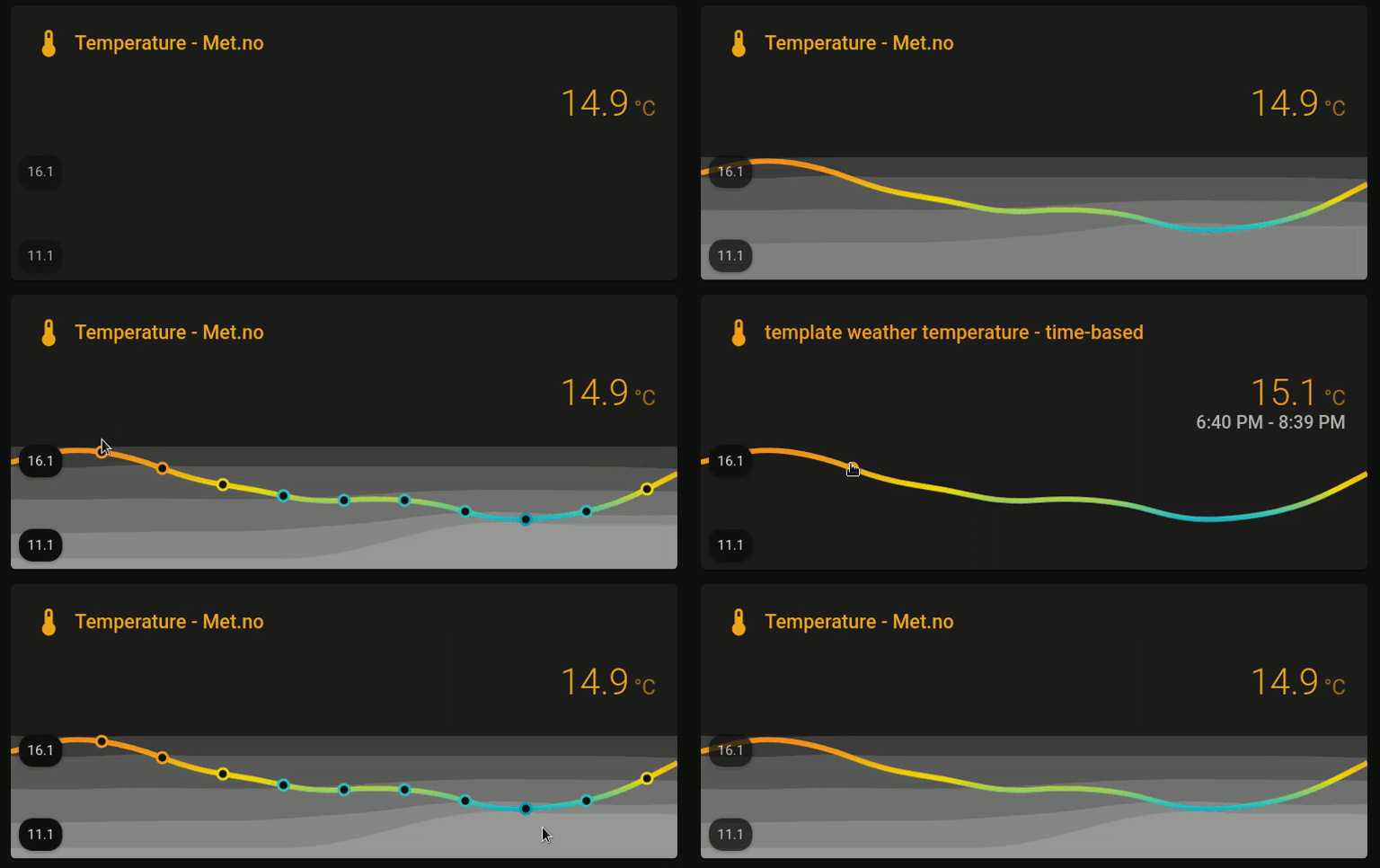
At the very least, the current analytical tools can be used to improve the quality of the information in your HASS dashboard. For example, instead of simply displaying the current temperature, the use of analytical tools allow us to set dynamic color thresholds based on the mean and deviations from it (± one standard deviation, then min-max) over the last 24hrs:
But there’s much more that can be done and accomplished moving forward. If you find these ideas interesting and want to get started on their implementation in your own personal HASS, then read on. As in my previous guides and tutorials, I tried to unpack and digest as much of the content as possible, the goal being to make it accessible to experts as well as novices. Check the Changelog for updates and if you ever get stuck on something or just want to share a few ideas and opinions, feel free to get in touch with me.
From this point forward, the article was divided into two main parts:
(Optional.) Prerequisites: A brief overview of the HASS core installation, configuration files, and database. At the end of this section, there is a few statistics resources for users who want to refresh their stats knowledge. Advanced users might want to skip this section altogether. However, at the very least, I suggest to glance over each topic to make sure we are all on the same page.
Implementation: This is the main part of the article. I started describing in detail the issues pertaining to how data are sampled and stored in the HASS DB. Afterwards, I reviewed three of the current Utility integrations that I find most useful and finally, at the end, I mentioned two JavaScript modules that are useful in visualizing analytical metrics within the HASS dashboard. (If you came here just to learn how to build a dynamic threshold graph card, feel free to head straight to the section called Visualizing analytical data.)
The implementation of analytical tools in HASS has the following basic requirements:
Those four topics are described separately next.
Structurally, HASS can be divided into three main layers: (a) core; (b) supervisor; and (c) operating system (OS). The folks at the HASS wiki were kind enough to put together a plethora of installation methods for all sorts of OSes and environments (bare-metal vs. virtual). For this guide, however, only the most basic layer of the HASS system is needed, namely the HASS core, which is available in any installation method.
Instead of using an existing HASS instance, I strongly recommend to create a containerized (Docker) HASS instance for testing purposes. This will be much safer than playing with an existing HASS instance and its database.
To create a HASS Docker container, follow the instructions in the official documentation:
Of note, after deploying the HASS container, use a host’s text editor (e.g., nano, vi, vim, pluma) to edit the configuration.yaml file and related configuration files. Whenever you create a new .yaml file, make sure that the HASS user will have permission to read it at the very least, or you will run into issues. Finally, in the HASS webUI, your HASS user must be able to access the Developer Tools > Services tab to check the state of each entity and their attributes. The default admin user should have access to such a resource.
The configuration files in HASS use a human-readable data serialization language called YAML (YAML Ain’t Markup Language). In this guide, we will use YAML to edit and create configuration files for HASS that will customize database settings and new entities to collect data and help with their visualization.
If you are new to YAML, take a few minutes right now to familiarize yourself with it. The HASS wiki has a straight to the point explanation that I invite everyone to read:
To highlight a few important points about the configuration files and the YAML syntax:
# to add comments;"" (double quotation marks) for escaping special characters in sequences (e.g., "Hey! What's up?") and '' (single quotation marks) when escaping is not necessary (e.g., 'Nothing much.');!include for splitting up your configuration.yaml. For instance, instead of adding all your sensor: and binary_sensor: to the configuration.yaml file itself, create sensors.yaml and binary_sensors.yaml files in the config/ directory and then use !include to add them automatically to your configuration.yaml:
# Sensors
sensor: !include sensors.yaml
binary_sensor: !include binary_sensors.yaml
!secret and a secrets.yaml for managing passwords. (See more in the HASS wiki called Storing secrets.) This is particularly useful if you plan on sharing your configurations.Finally, after making any changes to any YAML file (and saving them), it is necessary to reload the configuration.yaml file. If your installation method does not allow for selective reloading, then go ahead and reload the entire HASS. However, before reloading any configuration file, use the hass --script check_config script to make sure your configuration.yaml file is okay, as follows:
From within the HASS webUI, navigate to Configuration > Server Controls > Configuration validation.
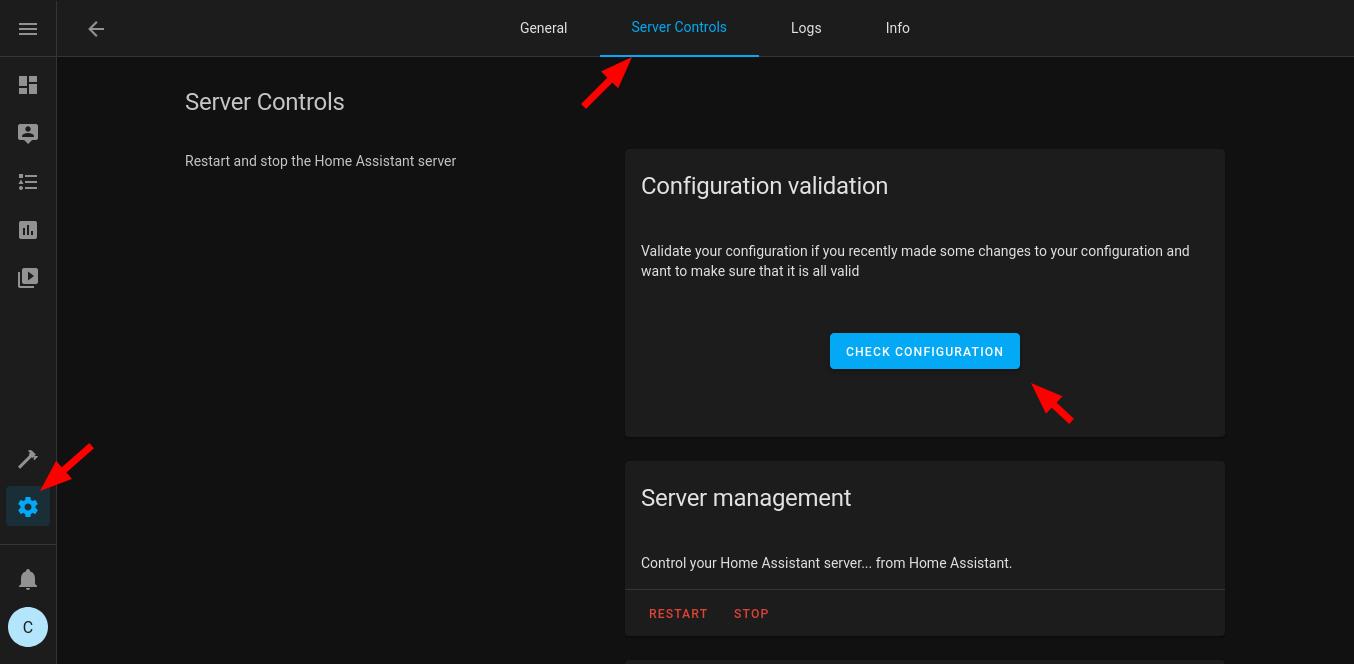
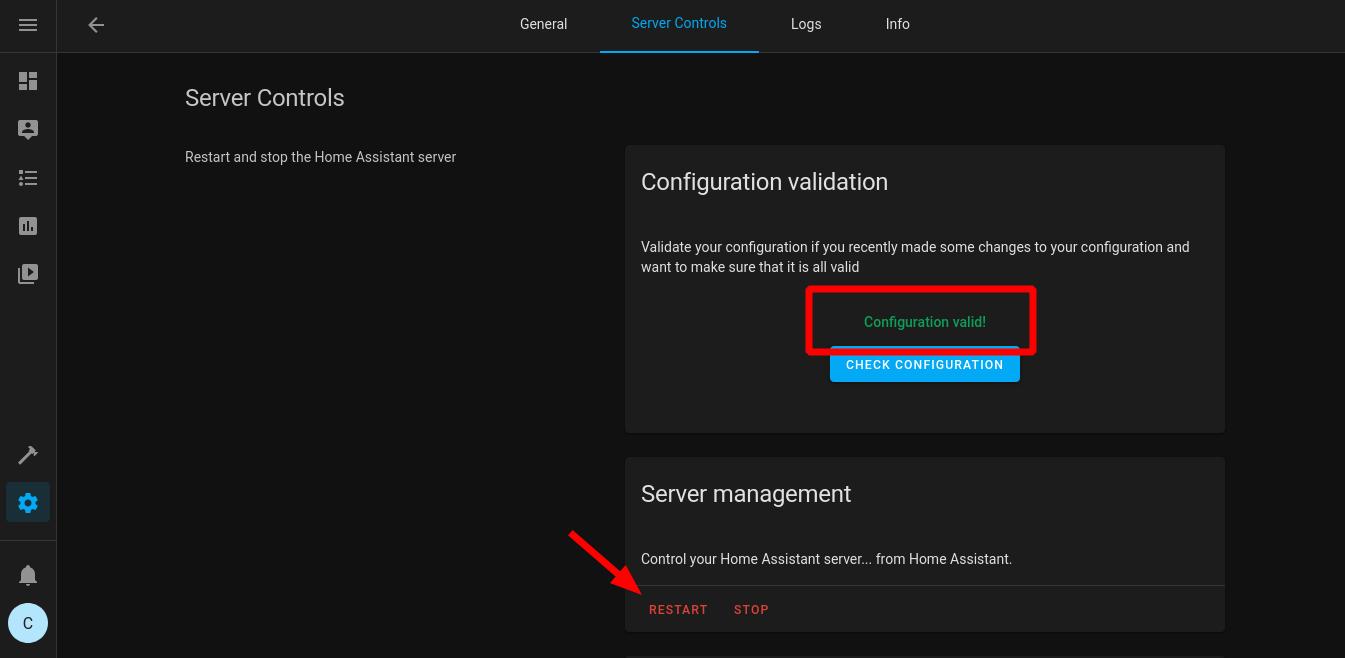
Alternatively, if running the HASS Docker container, use docker exec homeassistant python -m homeassistant --script check_config --config /config to run the check_config script from your host machine. (This assumes that your HASS container is called homeassistant. If this is not the case, change it accordingly.)
Always keep an eye on the home-assistant.log file for errors. This will greatly help you troubleshooting most issues on your own (e.g., incorrect references or operations in templates).
HASS uses a relational database (DB) management system (RDBMS) based on the SQL engine and by default, it creates a SQLite DB in config/home-assistant_v2.db to track events and parameters over time. If you want to learn more about and dive into the HASS DB, including how to create your own SQL backend, take a look at the two following resources:
Fortunately, most users won’t need to learn RDBMSes and SQL to take advantage of analytical tools in HASS because the default SQLite DB is usually enough. However, there are a few aspects about the default settings that can affect the way the data are analyzed. Those aspects are described in more detail next.
In the configuration.yaml file, the default SQLite DB is created along with many of the other default settings by the following configuration variable:
default_config:
To change the default DB settings, it is necessary to add a recorder: configuration variable to the configuration.yaml file, as follows:
default_config:
# Customized DB settings
recorder:
The documentation of the specific recorder: variables can be found at the HASS wiki:
In brief, by default, the HASS DB keeps historical data up to 10 days (purge_keep_days: 10), running an automatic purge of the database every night to prevent the DB from increasing in size indefinitely (auto_purge: true). Therefore, if you want to keep data from one or more entities for longer than 10 days, then you must edit the DB default settings. Personally, I prefer to keep data for two weeks instead (14 days), so I usually change my recorder: configuration to the following in the configuration.yaml file:
default_config:
# Customized DB settings
recorder:
  purge_keep_days: 14
The include and exclude filter parameters are particularly useful whenever working with non-default settings, as they help you specify which entities should be tracked. Check the HASS wiki Configure Filter for examples.
In addition, as mentioned before, the default DB is stored in your config/ directory and also by default, changes are committed to the DB every 1 sec (commit_interval: 1). This matters because if you are collecting data over a time window lower than 1 sec, then you might want to change the commit interval to 0 (zero, or as soon as possible) instead. At this point, it is also important to consider where the DB is being physically stored (SD card, eMMC, HDD, or SSD), owing to disk I/O and wear and tear considerations. (More advanced aspects come into play if HASS is not the only application committing to the DB but I trust that if this is your case, then you probably know how to customize the HASS DB accordingly.)
For advanced users who want to browse and manually add/edit entries from the default (SQLite) home-assistant_v2.db, it is possible to use the SQLite Database Browser. Just keep in mind that the default HASS DB might have permissions (ownership and group membership) that are incompatible with your current host user and therefore, you might be unable even to read the DB without first editing the permissions–in Linux, appending sudo to sqlitebrowser should give you access no matter what though.
In addition to the SQL browser method of editing the HASS DB, HASS allow users to run a service call from within the webUI to manually run a purge task. This is particularly useful to run once you are done making changes to a newly created template entity and want to clean any previous (and possibly erroneous) records from the DB. To remove all the data from a list of entities, do the following:
service: recorder.purge_entities
target:
  entity_id:
    - sensor.my_template_entity_01
    - sensor.my_template_entity_02
in which sensor.my_template_entity* are the target template entities you want to purge;
Of course, there are other recorder services available in the Developer Tools > Services tab. Feel free to explore them.
Release 2021.8.0 has introduced a new feature for sensors called long-term statistics. In brief, sensor data (e.g., the state value and the sensor attributes) are stored on the states table of the HASS DB. Now, however, sensors that opt-in for long-term statistics have three summary statistics (mean, min, and max) stored on a new table of the HASS DB, called statistics. The statistics data are unaffected by the recorder configuration in the configuration.yaml file and therefore, it allows users to keep summary statistics for longer than the recorder configuration allows to keep data in the states table.
The summary statistics are stored on an hourly basis. That is, if a sensor has stored five data points between 2PM and 3PM, then for each summary statistic, there will be a single data point for the 2-3PM time window that summarize the five data points in the states table. Therefore, making use of such a feature only makes sense if your sensor stores more than a single data point per hour.
Currently, there are two types of long-term statistics that are stored on the statistics table of the HASS DB, all of which must include the state_class: measurement property and thus must refer to present time measurement (e.g., current temperature, current humidity):
Metered entities: Apply to any sensor that has cumulative values until a reset point, such as energy consumption meters. All such sensors must include the last_reset property, which specifies a datetime in which the values reset.
Value entities: Apply to any non-cumulative sensor that belongs to a supported device class. Naturally, all such sensors must include the device_class property.
Many integrations are currently configured to store summary statistics on the statistics table of the HASS DB, so you might not need to manually configure anything at all. However, support for long-term statistics is still quite limited. As far as I can tell, the only other feature that makes use of the data in the statistics table is the new Statistics Card Graph, which is mentioned later on in the Visualizing analytical data section.
You don’t need to be a mathematician who specialized in statistics to make use of it. In this guide, we will only make reference to very introductory statistical knowledge, such as measures of central tendency (e.g., mean, median), variability (e.g., variance, standard deviation) and simple (univariate) linear regression (e.g., gradient/slope).

The goal in this guide is to present a starting point for more advanced usage of analytical tools in home automation systems. The possibilities are endless for knowledgeable users (e.g., application of Bayesian methods, dynamic mixed-effects modeling) and how far you will go along these paths is up to you.
If you want to refresh your stats knowledge or dig deeper into it, save some time and take a look at the following resources:
The main functionalities in HASS are extended by the configuration of new integrations. According to the HASS Glossary,
Integrations provide the core logic for the functionality in Home Assistant.
Therefore, the analytical tools covered in this guide are implemented by one or more of the 1800 integrations that are currently supported by a community of home automation enthusiasts. More specifically, most of the analytical tools are grouped under Utility integrations and in this guide, I will only cover the following three:
The current set of analytical integrations is fairly limited in what it can do. For the most part, the tools can be used to create summary statistics of the past states and measurements of integrated devices and sensors. Inference-wise, a lot can be done via templates but moving forward, there is a need for more advanced analytical integrations. For this reason, at the end of this guide, I added a section about Development for anyone interested in helping out. First, however, we need to talk about Data and Sampling.
Before delving into any analytical integration, there are at least three things that we need to do. First, we need to think about the nature of the data. For example, consider the default Sun (sun.sun) entity in HASS:
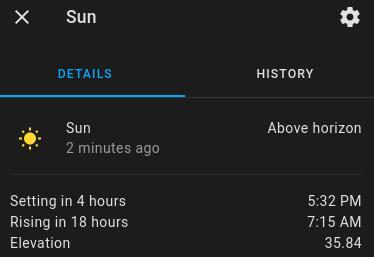
While the sun.sun state is a discrete variable (it’s either above_horizon or below_horizon), its elevation attribute is actually continuous (e.g., 35.84° between the sun and the horizon) and therefore, it doesn’t make sense to use the same tools to analyze both of them. Nonetheless, discrete variables can be transformed into continuous ones (e.g., the sun was above_horizon for 34.1% of the day), and similarly, continuous variables can be discretised (e.g., the elevation is either negative or positive or zero) in order to better answer our questions of interest.
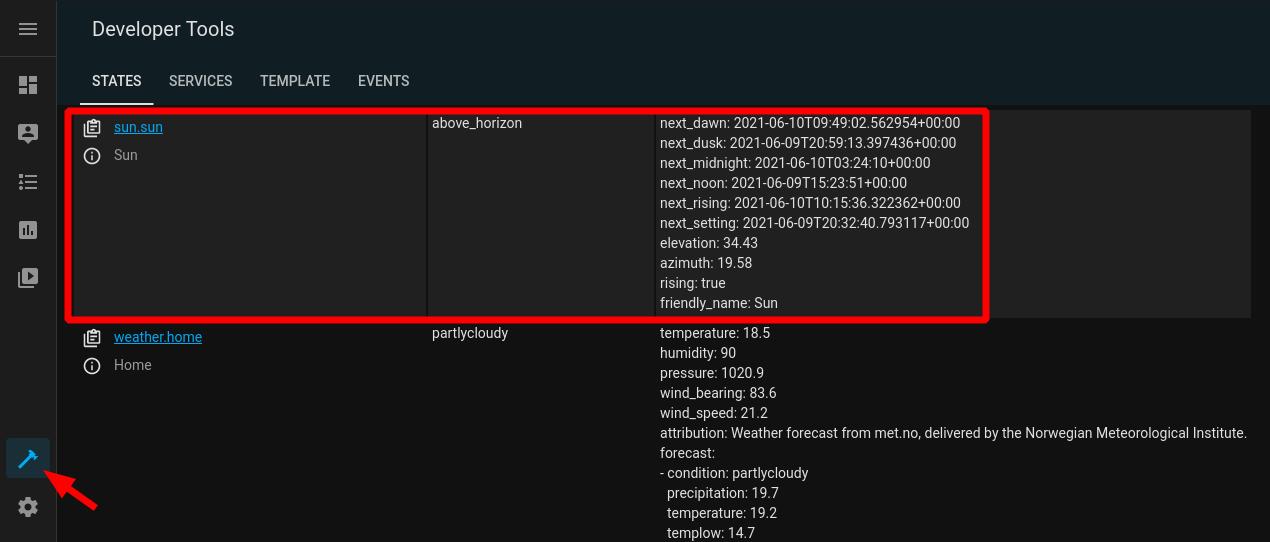
Second, we need to check whether HASS is keeping track of the data we need. There are multiple ways of doing that but by far, the easiest method is to navigate to Developer Tools > States and then make sure that the entities whose states and attributes we would like to keep track of are being listed there. (Alternatively, you can open the HASS DB with a SQL browser and look for the entity in the states Table.)
Third, we need to check how the data are being represented in the DB. As in the previous example, some variables might be an attribute of an existing entity in the HASS DB. If the recorder: settings for such entity are fine for the type of analysis you want to automate (e.g., purge every 10 days), then you are all set. However, notice that attributes cannot be displayed the same way as the states of an entity in the HASS webUI. In addition, you might want to pre-process the attributes (e.g., float and then round(2)) or perform transformations before running the analysis.
For all such reasons, I always create new entities for the variables that will be analyzed. This is accomplished with the template integration. Per the HASS wiki:
The template integration allows creating entities which derive their values from other data. This is done by specifying templates for properties of an entity, like the name or the state.
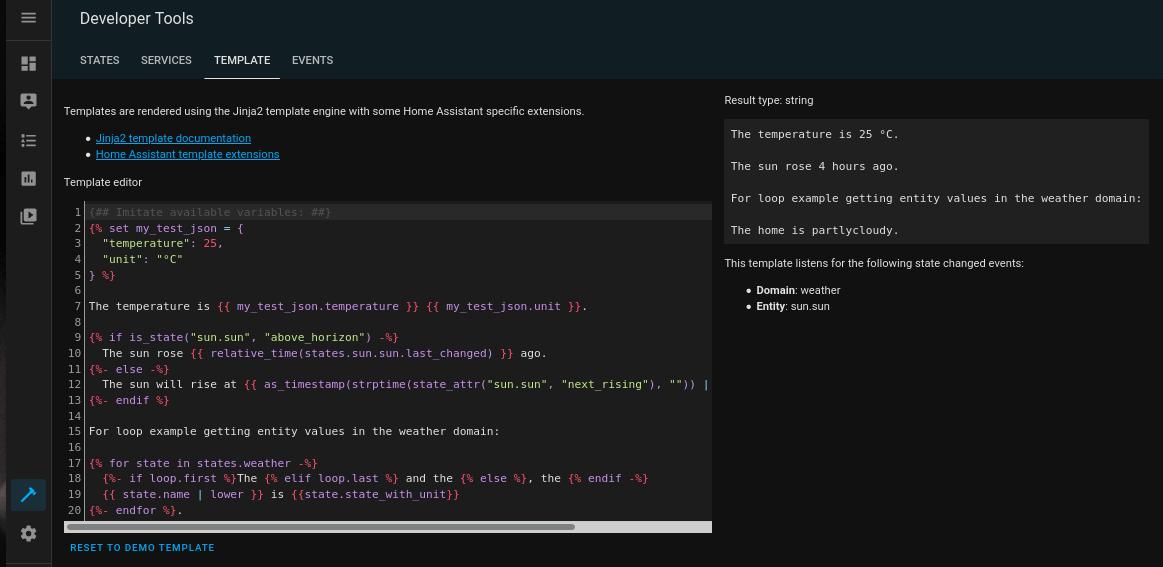
Building templates is fairly easy once you get the hang of the syntax. In short, templates follow the Jinja2 templating engine and are mainly used to perform mathematical operations (+, -, *, /) and logic tests (if __ , then __ ) but can also do loops (for i in states.sensor, __ ), for example. As a result, templates give users a scripting tool to go beyond the HASS built-in functionalities. To test and preview a customized template, use the Developer Tools > Template tab:
As an example, let’s create an entity to store and round to zero the sun.sun elevation attribute. First, in the configuration.yaml, append (add to the bottom) a reference to the templates.yaml configuration file:
# Templates
template: !include templates.yaml
Then, use a text editor to create an empty templates.yaml file and create a sensor template for the sun elevation, as follows:
# Sensor templates
- sensor:
    - name: "templatesunelevation"
      unit_of_measurement: "°"
      state: >
        {{ state_attr('sun.sun', 'elevation') | float | round(0) }}
Notice that in state:, we use state_attr() to retrieve the elevation attribute of the sun.sun entity. Then, we use float to force the output to a floating point number, which ensures that the output is interpreted as a number, and run round(0) on the numeric output to round the decimals to zero cases. The result should be an integer of the Sun elevation. (Alternatively, we could simply use int to convert the output to an integer, of course.)
I find the use of the folded style (>) very helpful in keeping the templates organized. Refer to the YAML - Scalars documentation for more information.
Check your configuration.yaml file for errors (Configuration > Server Controls > Configuration validation), and finally, restart your HASS. Afterwards, navigate to Developers Tools > States and if everything is correct, you should see a new sensor.template_sun_elevation entity:

By default, the values of this newly created entity will update as soon as the Sun elevation attribute changes. However, it is also possible to configure different triggers for template entities. This is particularly relevant for the next topic, namely data sampling.
Devices, sensors, and services measure and transmit data with a certain frequency, which I refer by the term measurement resolution. Such a resolution might be determined by a time-based rule (e.g., every 1 sec) or an event (HTTP request) or a combination of both. Regardless of the nature of the trigger, the higher the measurement resolution, the more frequent the observations are. For example, an ESP32 Development board connected to a BME280 environmental sensor might send a temperature measurement every 5 minutes to a MQTT broker. Therefore, for all intended purposes, the measurement resolution of such a temperature sensor is at best 5 minutes. Now, if a second ESP32 measures and send data every 1 minute instead, then the measurement resolution of the latter ESP32 is higher than the former (i.e., we can expect it to send temperature data more frequently).
As mentioned before, in HASS, template entities follow state-based updates by default–that is, they update as soon as the data of any of the referenced entities change. Let’s say that over a 20-min window, none of the referenced data changed. This means that the template entity also didn’t change and more importantly, in the DB, there will be a single data point over the 20-min window. However, let’s say that over the same 20-min window, one of the referenced data changed twice. This means that the template entity now changed twice and more importantly, in the DB, there will be three data points over the 20-min window. This a very efficient way of storing data but you can probably see how this might affect the usage of analytical tools, owing to an inconsistent number of data points over equal time-frames as well as the under-representation of data over time.
Fortunately, just like we specify triggers for automations, HASS offers the possibility to specify triggers for template entities. There’s a large variety of triggers that can be used here (e.g, webhook, mqtt) but for longitudinal analysis, the most useful one is the time pattern trigger, which is aptly called time_pattern. Time pattern triggers can be specified for hours (hours:), minutes (minutes:), and seconds (seconds:), and for each one, it’s possible to prefix the value with a / to match whenever the current value is divisible by the specified value (e.g., hours: "/2" will match every 2 hours) or use * to match any value (e.g., minutes: "*" to match every minute).
To create a time pattern trigger for one or more template entity sensor, simply add a list of time-based sensor: and binary_sensor: under a trigger: configuration in the templates.yaml configuration file, as follows:
# Time pattern trigger
- trigger:
    - platform: time_pattern
      # Update every 5 minutes
      minutes: "/5"
  # Sensor templates
  sensor:
    - name: "templatesunelevation-time-based"
      unit_of_measurement: "°"
      state: >
        {{ state_attr('sun.sun', 'elevation') | float | round(0) }}
      attributes:
        timestamp: >
          {{ as_timestamp(now()) }}
Of note, the timestamp: under attributes: forces HASS to create a new entry on the DB (update) whenever the template is triggered. This keeps the number of data points constant over time and each one of them will have a timestamp as attribute. (In the DB, you will also see that if the state remained unchanged, it maintains the correct last_changed date and updates the last_updated variable.)
Also, notice that it does not make sense to use a time_pattern trigger rule that has higher resolution than the device’s measurement resolution because then, there’s no chance for a new value to occur and the DB would just repeat the last transmitted measurement. Ideally, the time pattern should match the measurement resolution but to save space, you might want to set a lower time pattern resolution (as in 1:2, or 1:4, and so on).
Beware that depending on how triggers are configured and how many template entities are created, the HASS DB might end up using a lot of space and computations are bound to use ever more CPU (and possibly RAM) resources, owing to the number of entries in the DB. Be sure to monitor such resources after configuring your HASS instance; Otherwise, your HASS instance might experience serious problems.
Finally, there is the topic of statistical sampling (representativeness) when it comes to making generalizations from a couple of samples (e.g., environmental sensors in my bedroom and kitchen) to a population (temperature and humidity in my entire house). In this guide, however, we will not delve too far into statistical inferences, owing to limitations of the current set of analytical tools. Nonetheless, extended service outages, for example, might comprise summary statistics. For proper representation, it is fundamental that your HASS has been running and collecting data for as long as the monitored time period of any statistic. To put it in simple, a sensor that monitors weekly activity, for example, won’t make sense until your HASS instance has been running and collecting data over at least one week.
The Utility integrations offer users tools to parse and analyze data from recorded entities. There are more than 30 different such integrations and they sometimes have overlapping functionalities. For example, the gradient (ratio of change) over the last two data points can be computed by both the Trend integration and the Derivative. In what follows, I covered only three of the utility integrations that I find most comprehensive and useful, namely:
Trend is covered last because out of the set, it’s the only one that actually makes use of inferential tools via the Python package numpy. The others provide counting, other mathematical resources, and ways of summarize historical data. For each utility, I provided a brief description, usage examples to follow along, and reference to the documentation and source code.
The History Stats integration provides useful statistics for discrete variables over a user-specified time-range. More specifically, this integration can do one of three things depending on the chosen type of sensor:
type: time: calculate the amount of hours that an entity has spent on a given state;type: ratio: calculate the percentage of time that an entity has spent on a given state;type: count: count how many times an entity has changed to a given state.The use of this integration requires specification of at least two of the following time period variables:
start:: It indicates when the time period starts. Use time templating to specify the time;end:: It indicates when the time period ends. Use time templating to specify the time;duration:: It indicates how long the time period lasts. If start: is specified, then how long forwards; if end: is specified, then how long backwards. The syntax can be either the traditional HH:MM:SS format or as follows:
duration:
  days: 2
  hours: 4
  minutes: 15
  seconds: 30
history_stats are defined as a platform (- platform: history_stats) under sensor: in your configuration.yaml file. To keep things organized, go to the configuration.yaml and append a reference to sensors.yaml, as follows:
# Sensors
sensor: !include sensors.yaml
Then using a text editor, create a sensors.yaml file where we will configure the following three history_stats sensors to consume the data from the default weather.home entity:
sunny yesterday hours: Number of hours that the weather.home entity remained in the sunny state yesterday;cloudy today ratio: Percentage of time that the weather.home entity remained in the cloudy state today;rainy week count: Number of times that the weather.home entity changed to the rainy state over the last seven days.The Meteorologisk institutt (Met.no) is the current default meteorological information service used by HASS. This integration’s measurement resolution is 1 hour (via cloud polling) and it follows state-based updates (a new entry in the DB is only created if any of the values has changed).
To create those three history_stats sensor entities, append the following to sensors.yaml:
# History Stats
- platform: history_stats
  name: "sunnyyesterdayhours"
  entity_id: weather.home
  state: "sunny"
  type: time
  # end today at 00:00:00
  end: >
    {{ now().replace(hour=0, minute=0, second=0) }}
  # start 24h before the end time
  duration:
    hours: 24
- platform: history_stats
  name: "cloudytodayratio"
  entity_id: weather.home
  state: "cloudy"
  type: ratio
  # start today at 00:00:00
  start: >
    {{ now().replace(hour=0, minute=0, second=0) }}
  # end right now
  end: >
    {{ now() }}
- platform: history_stats
  name: "rainyweekcount"
  entity_id: weather.home
  state: "rainy"
  type: count
  # end right now
  end: >
    {{ now() }}
  # start 7 days before the end time
  duration:
    days: 7
Now check your configuration file and if everything looks good, restart HASS. Afterwards, check your log file for related errors and if it all looks good, then head to Developer Tools > States and you should now see the three new entities we just created:
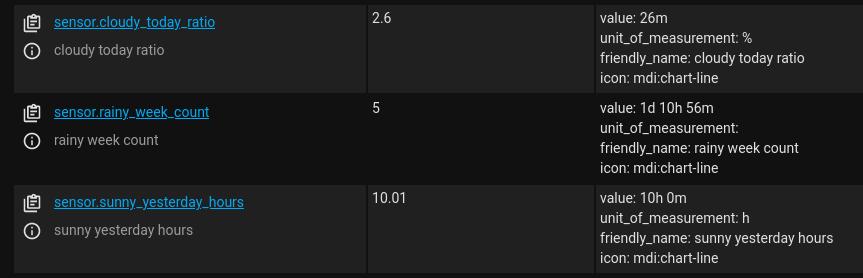
In the example above, it’s been cloudy for 2.6% of the time today, we had roughly 10 hours of sunny weather yesterday, and the weather changed to rainy 5 times over the week.
Because I have not been running HASS and collecting weather.home data over this week in a reliable way, the reported metrics can be quite misleading, as noted in the Sampling section. For a proper representation of the statistics over the configured time-range, make sure to keep your HASS instance running (and in this case, check that the cloud polling has been working without extended service outages) for at least as long as the configured time-range.
The Statistics integration is by far the most useful integration for describing the past values from other entities. In brief, it consumes the data from another entity and returns the traditional descriptive measures of central tendency (mean and median) and variability (quantiles, variance, standard_deviation, min_value, max_value), as well as a few other descriptive measures.
Similarly to the History Stats integration, the Statistics integration has two time period variables:
sampling_size: The maximum number of data points to be used within the max_age interval in descending order (oldest to newest). By default, it is 20;max_age: The maximum age of the oldest data point. This variable is equivalent to duration: in the History Stats when end: {{ now() }} and similarly, its time syntax can be defined in the traditional HH:MM:SS format or the following:
max_age:
  days: 3
  hours: 6
  minutes: 10
  seconds: 45
That is, max_age specifies an interval relative to now() in which the Statistics integration will collect a maximum number of data points equal to the sampling_size (e.g., 20) in descending order. If max_age is not specified, then it spans until the last value in the HASS DB for the given entity_id.
To illustrate how the specification of time works in this integration, let’s suppose we create a template sensor that triggers every 5 min and forces an update (DB entry), such as the sensor.template_sun_elevation_time_based from the Sampling section, and we leave it running for exactly 7 days from now. Therefore, the HASS DB collects 12 data points per hour for this template sensor, 288 data points per day, and 2016 data points per week. Now, because the sampling_size works in descending order, by default, it will compute statistics for the 20 oldest data points, which will range from exactly 7 days old to 6 days, 22 hours, and 20 minutes old (or simply from oldest until 100 minutes afterwards). However, if we also specified the max_age to 3 days ago, as follows:
max_age:
  days: 3
then the time-range would instead span from exactly 3 days old to 2 days, 22 hours, 20 minutes old. Finally, because there will be 288 data points per day, if we set sampling_size: 288 in the last example, then the time-range would instead span from exactly 3 days old to 2 days old.
While proper configuration of the sampling_size and max_age allow for the specification of a variety of different time-ranges, it does require clear understanding of the entity’s measurement resolution and how it is updated in the DB because otherwise, the computed statistics are bound to misrepresent the desired time-ranges. I feel the History Stats integration is more flexible and precise in its definition of the time-range by using the more intuitive start:, end:, and duration: time variables. For example, the time templating used in the History Stats integration allows for the specification of any hour of any day (e.g., start yesterday at 00:00:00 and end today at 00:00:00), whereas such level of precision is not possible with the Statistics integration alone.
As before, statistics are defined as a platform (- platform: statistics) under sensor: in your configuration.yaml file. In this example, we will configure two statistics sensors to consume the data from the sensor.template_sun_elevation_time_based entity:
sun elevation one hour ago: Descriptive measures for the sensor.template_sun_elevation_time_based over the last one hour;
sun elevation one day ago: Descriptive measures for the sensor.template_sun_elevation_time_based over the last one day.
To create those two statistics sensor entities, append the following to the sensors.yaml:
# Statistics
- platform: statistics
  name: "sunelevationonehourago"
  entity_id: sensor.template_sun_elevation_time_based
  # measurement resolution is 5/min
  sampling_size: 12
  max_age:
    hours: 1
- platform: statistics
  name: "sunelevationonedayago"
  entity_id: sensor.template_sun_elevation_time_based
  # measurement resolution is 5/min
  sampling_size: 288
  max_age:
    days: 1
Now check your configuration file and if everything looks good, restart HASS. Afterwards, check your log file for related errors and if it all looks good, then head to Developer Tools > States and you should now see the two new entities we just created:
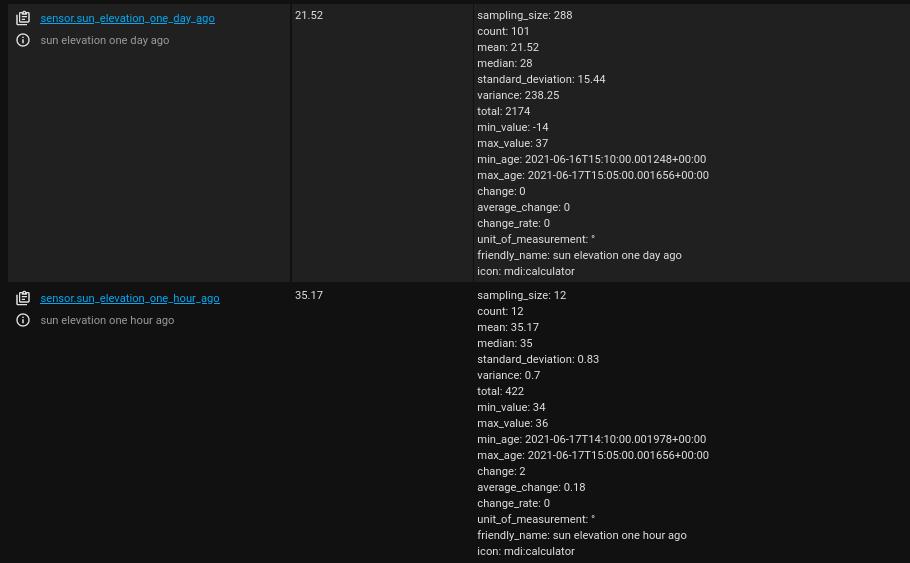
Notice that in sensor.sun_elevation_one_day_ago, the number of actual data points (count: 101) is lower than expected for this time-range (sampling_size: 288). This happened because my HASS instance has not been collecting the elevation attribute data from the sun.sun entity in a reliable fashion over the last day. However, in sensor.sun_elevation_one_hour_ago, the number of actual data points (count: 12) is indeed equal to the expected (sampling_size: 12). (Also, inspection of the min_age and max_age is very useful in making sure that the time-rage is the expected one.)
In addition, any statistics sensor entity shows the mean as both state and attribute. Other descriptive statistics for each statistics sensor entity are shown only as attribute. In the example, the Sun has increased in elevation from 34° to 36° over the last hour (min_value: 34, max_value: 36, change: 2), with an average of 35.2° above the horizon (mean: 35.17).
Now, weather data are much less predictable and subject to multiple sources of variability over time than the sun.sun metrics. As mentioned before, however, many of the default weather metrics (e.g., temperature, humidity, pressure) are provided as attributes of a state-based, cloud polling entity–namely, the weather.home entity that by default uses data from the Met.no integration. This poses multiple challenges to the analysis of the weather.home data over time but just as before, we can fix it by creating time-pattern, template sensors for each relevant attribute. To do so, append the following to the templates.yaml configuration file:
- trigger:
    - platform: time_pattern
      # Update every 1 hour
      hours: "/1"
  # Hourly sensor templates
  sensor:
    - name: "templateweathertemperature-time-based"
      unit_of_measurement: "C"
      state: >
        {{ state_attr('weather.home', 'temperature') | float | round(1) }}
      attributes:
        timestamp: >
          {{ as_timestamp(now()) }}
    - name: "templateweatherhumidity-time-based"
      unit_of_measurement: "%"
      state: >
        {{ state_attr('weather.home', 'humidity') | int }}
      attributes:
        timestamp: >
          {{ as_timestamp(now()) }}
    - name: "templateweatherpressure-time-based"
      unit_of_measurement: "hPa"
      state: >
        {{ state_attr('weather.home', 'pressure') | float | round(1) }}
      attributes:
        timestamp: >
          {{ as_timestamp(now()) }}
The time_pattern trigger is every 1 hour because the measurement resolution for the Met.no integration is 1 hour. Obviously, if this is different for your weather integration, then set it to a different trigger value to match the measurement resolution.
Check your config and restart your HASS. Now wait for it to collect enough data points to allow meaningful analysis (at least 2 hours).
Afterwards, we will create the following three statistics sensors for the new entities which will provide descriptive metrics for each of them over a time period of one day:
weather temperature one day ago: Descriptive measures for the sensor.template_weather_temperature_time_based over the last one day;
weather humidity one day ago: Descriptive measures for the sensor.template_weather_humidity_time_based over the last one day;
weather pressure one day ago: Descriptive measures for the sensor.template_weather_pressure_time_based over the last one day;
To create those three statistics sensor entities, append the following to the sensors.yaml:
- platform: statistics
  name: "weathertemperatureonedayago"
  entity_id: sensor.template_weather_temperature_time_based
  # measurement resolution is 1/hour
  sampling_size: 24
  max_age:
    days: 1
- platform: statistics
  name: "weatherhumidityonedayago"
  entity_id: sensor.template_weather_humidity_time_based
  # measurement resolution is 1/hour
  sampling_size: 24
  max_age:
    days: 1
- platform: statistics
  name: "weatherpressureonedayago"
  entity_id: sensor.template_weather_pressure_time_based
  # measurement resolution is 1/hour
  sampling_size: 24
  max_age:
    days: 1
Once again, check your configuration file and then restart your HASS. Check your log file and wait at least one hour. Remember that such sensors will only update when the monitored entities also update, which in our case is every 1 hour. Afterwards, head to Developer Tools > States and you should now see the three new entities we just created:

This examples shows that over the last 24h, the temperature ranged from 9.7°C to 13.8°C, with a mean of 11.3°C and standard deviation of ±1.2°C.
statistics core pkg: https://docs.python.org/3/library/statistics.htmlThe Trend integration is the only one that depends on an external Python package, namely the numpy package, and it does exactly what you’d expect from its name: it provides a trend coefficient for the data set spanning a user-specified time period. More specifically, this integration fits a linear function to the data points of an entity–via NumPy’s np.polyfit() method–and outputs the slope of the function, which is called by gradient. As such, it is a very useful integration for any scenario in which we need to know whether the data are increasing or decreasing over time.
The specification of time in this integration is very similar to the Statistics integration, except that (a) sampling_size is now called max_samples, (b) max_age is now called sample_duration, and (c) the latter is specified in seconds instead of using a duration syntax. Specifically, the time period is specified by the following two time variables:
max_samples: The maximum number of data points. By default, it uses the last two data points (max_samples: 2);sample_duration: The duration (in seconds) of the oldest data point. By default, it is unconstrained (sample_duration: 0).Contrary to the previous two utilities, a trend sensor is defined as a platform (- platform: trend) under binary_sensor: in your configuration.yaml file. For this reason, first, let’s include a reference to a binary_sensors.yaml in the configuration.yaml file, as follows:
# Binary sensors
binary_sensor: !include binary_sensors.yaml
Then using a text editor, create a binary_sensors.yaml file where we will configure the following four trend binary sensors to consume the data from the temperature, humidity, and pressure time-based template sensors, as well as the Sun elevation:
trend weather temperature six hours: Gradient of the sensor.template_weather_temperature_time_based template sensor over the last six hours;trend weather humidity six hours: Gradient of the sensor.template_weather_humidity_time_based template sensor over the last six hours;trend weather pressure twelve hours: Gradient of the sensor.template_weather_pressure_time_based template sensor over the last twelve hours;trend sun elevation twenty minutes: Gradient of the sensor.template_sun_elevation_time_based template sensor over the last twenty minutes;To create those trend entities, append the following to the binary_sensors.yaml file:
# Trend
- platform: trend
  sensors:
    trend_weather_temperature_six_hours:
      entity_id: sensor.template_weather_temperature_time_based
      # resolution is 1/h
      max_samples: 6
      # 6 hours in seconds
      sample_duration: 21600
    trend_weather_humidity_six_hours:
      entity_id: sensor.template_weather_humidity_time_based
      # resolution is 1/h
      max_samples: 6
      # 6 hours in seconds
      sample_duration: 21600
    trend_weather_pressure_twelve_hours:
      entity_id: sensor.template_weather_pressure_time_based
      # resolution is 1/h
      max_samples: 12
      # 12 hours in seconds
      sample_duration: 43200
    trend_sun_elevation_twenty_minutes:
      entity_id: sensor.template_sun_elevation_time_based
      # resolution is 1 every 5 minutes
      max_samples: 4
      # 20 minutes in seconds
      sample_duration: 1200
Check your configuration file and if everything looks good, restart HASS. Afterwards, check your log file for related errors and if it all looks good, then head to Developer Tools > States and you should now see the new trend entities we just created:
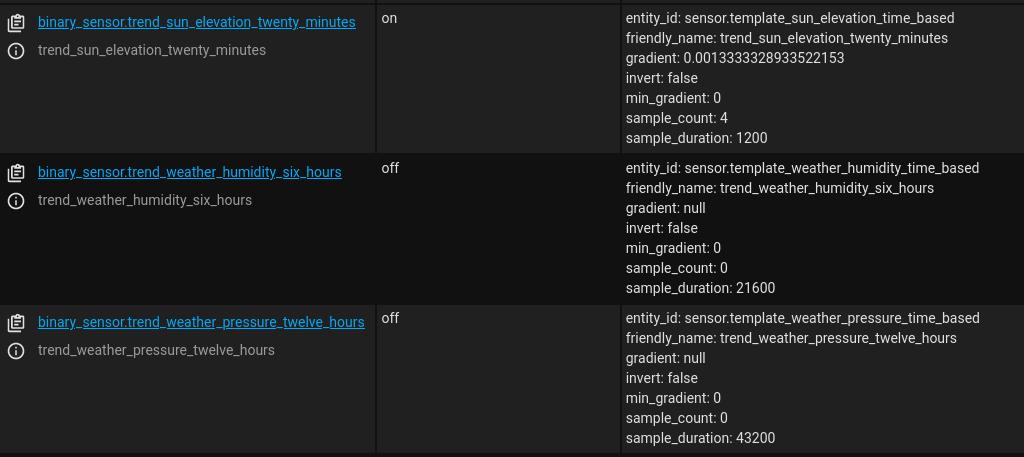
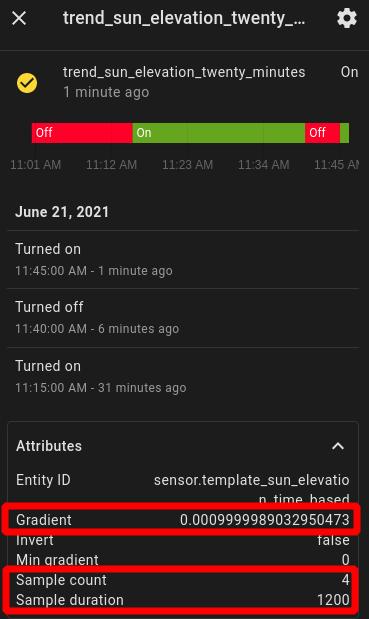
Two noteworthy observations need to be made at this point. First, notice that this integration does not analyze the data from previously stored entity data but actually stores its own data. Therefore, it’s necessary to keep it running to collect data from all monitored entities before drawing any meaningful conclusions from it. Second, the slope of the linear function that was fit over the data points (gradient) is reported as an attribute and because it uses seconds as time unit, the coefficient refers to the ratio of change per second. Therefore, to make it easier working with gradient, I usually create a slave entity to output the gradient as its state instead. This is accomplished with template sensors. More specifically, let’s append the following Trend helper entities under our default (state-based) Sensor Templates in the templates.yaml file:
    # Trend helper entities
    - name: "templatetrendsunelevationtwentyminutes"
      unit_of_measurement: "°/h"
      # if statement makes sure the gradient is valid
      # change the scale from sec to hour
      state: >
        {% if state_attr('binary_sensor.trend_sun_elevation_twenty_minutes', 'gradient') is number %}
           {{ (state_attr('binary_sensor.trend_sun_elevation_twenty_minutes', 'gradient') * 3600) | round(1) }}
        {% endif %}
    - name: "templatetrendweathertemperaturesixhours"
      unit_of_measurement: "C/h"
      state: >
        {% if state_attr('binary_sensor.trend_weather_temperature_six_hours', 'gradient') is number %}
           {{ (state_attr('binary_sensor.trend_weather_temperature_six_hours', 'gradient') * 3600) | round(2) }}
        {% endif %}
    - name: "templatetrendweatherhumiditysixhours"
      unit_of_measurement: "%/h"
      state: >
        {% if state_attr('binary_sensor.trend_weather_humidity_six_hours', 'gradient') is number %}
           {{ (state_attr('binary_sensor.trend_weather_humidity_six_hours', 'gradient') * 3600) | round(2) }}
        {% endif %}
    - name: "templatetrendweatherpressuretwelvehours"
      unit_of_measurement: "hPa/h"
      state: >
        {% if state_attr('binary_sensor.trend_weather_pressure_twelve_hours', 'gradient') is number %}
           {{ (state_attr('binary_sensor.trend_weather_pressure_twelve_hours', 'gradient') * 3600) | round(0) }}
        {% endif %}
The if statement is used to validate (is number) the appropriate variables in the unit conversion and rounding operations. Otherwise, the template sensor might attempt to perform a mathematical operation on something other than a number, such as when the gradient attribute is not yet defined, which would result in an error.
Now reload your configuration and afterwards, HASS will create new sensor.template_trend_* entities that should contain the converted gradient as their state.
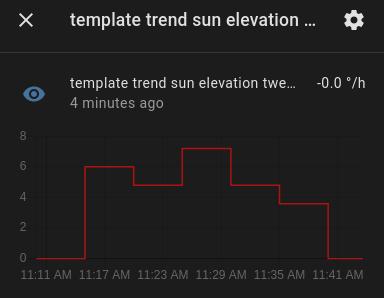
numpy pkg: https://numpy.org/doc/stable/reference/generated/numpy.polyfit.htmlThere are many different ways of using and visualizing the analytical data reported with the utilities described in this guide. Using the default configuration, for example, one might be inclined to display the mean or gradient using a History Graph Card.
In this section, however, we will learn about two dashboard resources that I think are better alternatives to the History Graph Card, namely the Mini Graph Card and the Lovelace Card Templater. More specifically, we will use the Mini Graph Card within the Lovelace Card Templater to build the following Dashboard card previewed in the Introduction:
And here’s how it has changed a few hours later:
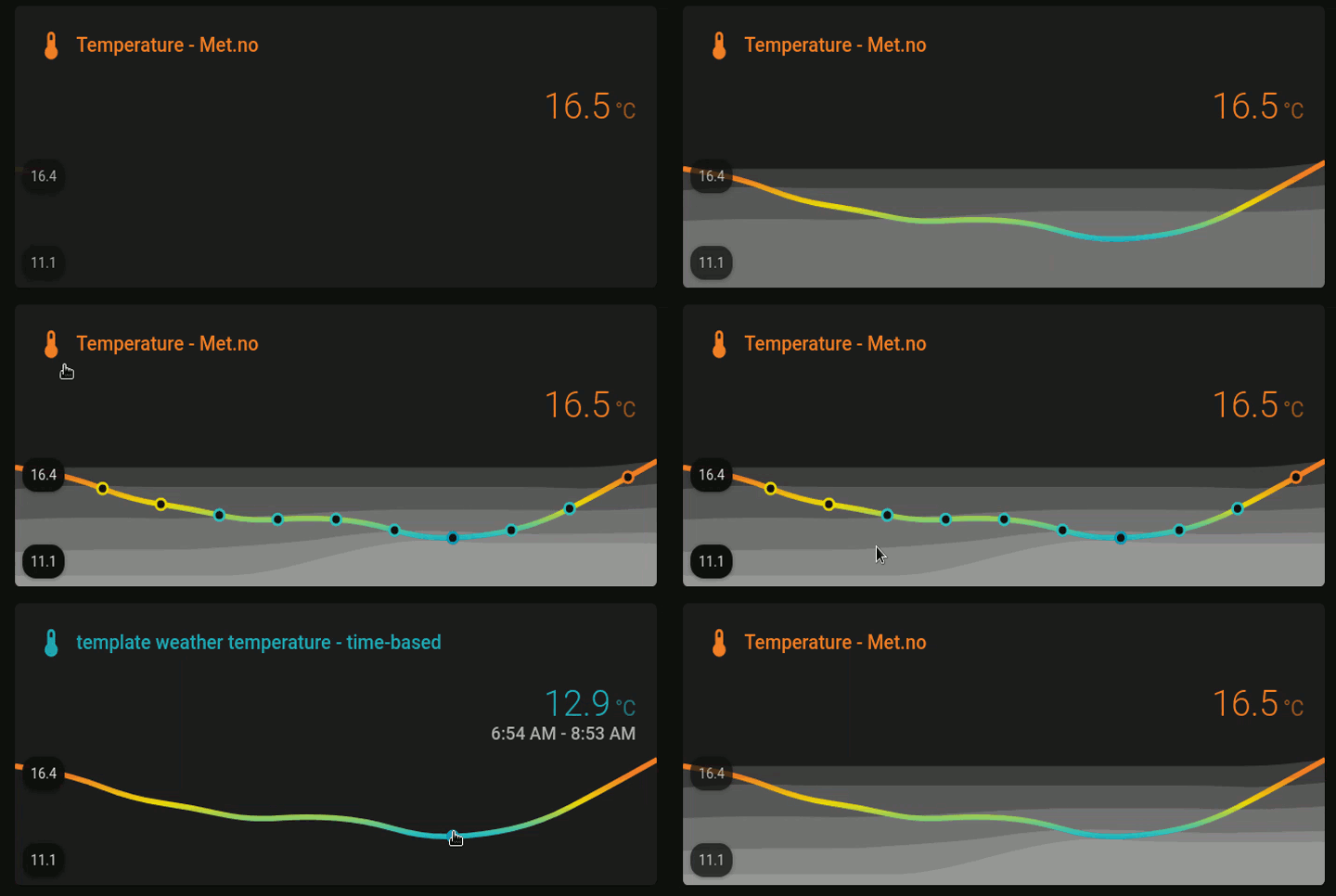
This card displays six temperature (Met.no) metrics over a 24h time-range:
The main (colored) line shows the current temperature, in which the colors are selected by the following ever changing (dynamic) thresholds:
| very high | high | low | very low |
|---|---|---|---|
| max to (mean + stdev) | (mean + stdev) to mean | mean to (mean - stdev) | (mean - stdev) to min |
And the corresponding colors were selected from the following palette (hex color code shown above the color label):

The graph therefore provides a visually appealing way of assessing the current temperature relative to its 24hrs distribution, which is much more convenient than inspecting a table of values over time. Next, I will describe how to create the graph step-by-step.
First, make sure you have an entity for each of the six metrics described before. All such metrics can be obtained from the Statistics integration, which will consume the data from a temperature sensor (e.g., weather.home via Met.no) and by using custom template sensors. More specifically, make sure your configuration.yaml file has an !include for both sensors.yaml and templates.yaml, as follows:
# Sensors
sensor: !include sensors.yaml
# Templates
template: !include templates.yaml
Then using a text editor, add the following to templates.yaml to create a time_pattern triggered entity that extracts and stores the temperature attribute from weather.home:
# Time pattern trigger
- trigger:
    - platform: time_pattern
      # Update every 1 hour
      hours: "/1"
  # Hourly sensor templates
  sensor:
    - name: "templateweathertemperature"
      unit_of_measurement: "C"
      state: >
        {% if state_attr('weather.home', 'temperature') is number %}
          {{ state_attr('weather.home', 'temperature') }}
        {% endif %}
      attributes:
        # Force an update with a timestamp change to ensure proper representation of state values over time
        timestamp: >
          {{ as_timestamp(now()) }}
In your sensors.yaml file, append the following to create a Statistics sensor for the temperature over the last 24hrs:
# Statistics
- platform: statistics
  name: "weathertemperatureoneday"
  entity_id: sensor.template_weather_temperature
  # measurement resolution is 1/hour
  sampling_size: 24
  max_age:
    days: 1
Now go back to templates.yaml and add a few helper entities to extract the attributes from the sensor.weather_temperature_one_day Statistics sensor, as follows:
# Sensor Templates
- sensor:
    # Statistics helper entities
    - name: "templateweathertemperatureonedaymeanplusstdev"
      unit_of_measurement: "C"
      state: >
        {% if state_attr('sensor.weather_temperature_one_day', 'mean') is number and state_attr('sensor.weather_temperature_one_day', 'standard_deviation') is number %}
           {{ (state_attr('sensor.weather_temperature_one_day', 'mean') + state_attr('sensor.weather_temperature_one_day', 'standard_deviation')) | round(1) }}
        {% endif %}
    - name: "templateweathertemperatureonedaymeanminusstdev"
      unit_of_measurement: "C"
      state: >
        {% if state_attr('sensor.weather_temperature_one_day', 'mean') is number and state_attr('sensor.weather_temperature_one_day', 'standard_deviation') is number %}
           {{ (state_attr('sensor.weather_temperature_one_day', 'mean') - state_attr('sensor.weather_temperature_one_day', 'standard_deviation')) | round(1) }}
        {% endif %}
    - name: "templateweathertemperatureonedaymax"
      unit_of_measurement: "C"
      state: >
        {% if state_attr('sensor.weather_temperature_one_day', 'max_value') is number %}
           {{ state_attr('sensor.weather_temperature_one_day', 'max_value') | round(1) }}
        {% endif %}
    - name: "templateweathertemperatureonedaymin"
      unit_of_measurement: "C"
      state: >
        {% if state_attr('sensor.weather_temperature_one_day', 'min_value') is number %}
           {{ state_attr('sensor.weather_temperature_one_day', 'min_value') | round(1) }}
        {% endif %}
As before, the if statements ensure the variables are valid (is number) before performing mathematical operations with them.
Finally, check your configuration and restart your HASS. Now wait at least one day because your new entities need to collect data before showing anything meaningful. But in the meantime, go ahead and install the two JavaScripts to your dashboard:
Personally, I prefer to install such resources manually, instead of using the Community Store. To do so:
.js scripts to your HASS config/www/ directory;/local/MODULE_NAME.js, in which MODULE_NAME will be the name of the JavaScript module (e.g., for the Mini Graph Card, that would be /local/mini-graph-card-bundle.js). HASS should automatically detect that the Resource Type is a JavaScript Module but if doesn’t, then select it;If an entire day has already passed, then you should be able to configure a proper graph card using the JavaScript modules you added to the HASS dashboard, as follows:
type: custom:card-templater
card:
  type: custom:mini-graph-card
  name: Temperature - Met.no
  hours_to_show: 24
  animate: true
  align_state: right
  align_icon: left
  align_header: left
  font_size_header: 12
  font_size: 80
  decimals: 1
  line_width: 4
  entities:
    - entity: sensor.template_weather_temperature
      show_fill: false
      state_adaptive_color: true
      unit: °C
    - entity: sensor.template_weather_temperature_one_day_max
      show_line: false
      show_points: false
      color: white
    - entity: sensor.template_weather_temperature_one_day_mean_plus_stdev
      show_line: false
      show_points: false
      color: white
    - entity: sensor.weather_temperature_one_day
      show_line: false
      show_points: false
      color: white
    - entity: sensor.template_weather_temperature_one_day_mean_minus_stdev
      show_line: false
      show_points: false
      color: white
    - entity: sensor.template_weather_temperature_one_day_min
      show_line: false
      show_points: false
      color: white
  color_thresholds:
    - value_template: '{{states("sensor.template_weather_temperature_one_day_min")}}'
      color: '#0799BA'
    - value_template: '{{states("sensor.template_weather_temperature_one_day_mean_minus_stdev")}}'
      color: '#30BFBF'
    - value_template: '{{states("sensor.weather_temperature_one_day")}}'
      color: '#ECD711'
    - value_template: '{{states("sensor.template_weather_temperature_one_day_mean_plus_stdev")}}'
      color: '#F17D28'
  show:
    labels: true
    legend: false
    name_adaptive_color: true
    icon_adaptive_color: true
entities:
  - sensor.weather_temperature_one_day
  - sensor.template_weather_temperature_one_day_mean_plus_stdev
  - sensor.template_weather_temperature_one_day_mean_minus_stdev
  - sensor.template_weather_temperature_one_day_max
  - sensor.template_weather_temperature_one_day_min
That is it! You should now be able to see a graph similar to the following one:
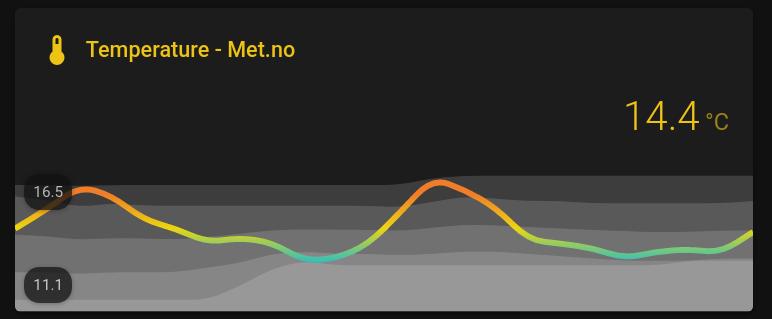
If the values are not showing up correctly, check Developer Tools > States to make sure the entities are there and the states are displaying the correct values. If you want to reset the entity data, go to Developer Tools > Services, select recorder.purge_entities, select the entities you want to reset in Targets (e.g., sensor.weather_temperature_one_day), and press call service to purge their data.
Of course, many other options are available using the Mini Graph Card and the Lovelace Card Templater in combination with the other card options (e.g., Entities Card, Gauge Card). Feel free to explore them (and let me know about it, too).
In this guide, we’ve seen how the current set of analytical tools can greatly improve the way we describe past and current states. (The following was changed on August 14th, 2021, in connection with the addition of quantiles to the Statistics integration.) However, the lack of a flexible and standardized specification of the time variables make the current analytical tools very narrow in scope. Compare, for example, how the History Stats and the Statistics integration deal with the specification of a time period.
In addition, statistics is not just about summarizing the past; it is also a tool for making data-driven inferences about the future. This is a topic that I find largely unexplored in home automation systems and would allow for the creation of what I call inferential automations. Inferential automations determine actions based on abnormal states and measurements, for example, or reliable tendencies over a user-specified period of time:
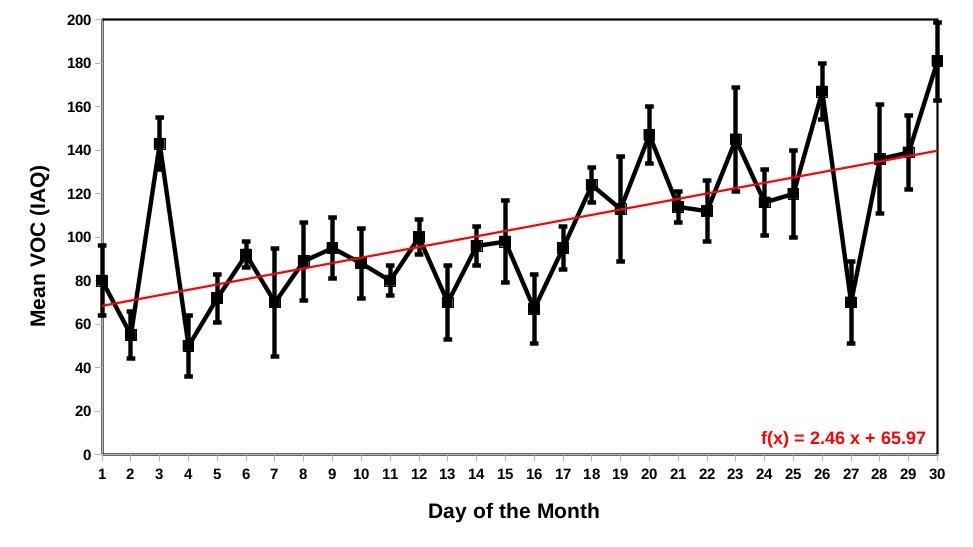
Sadly, none of the integrations currently enables the use of inferential automations. The closest we have to such a thing is via the use of the Trend integration but even then, we lack the output of fit metrics for proper inference, such as the residuals of the least-square fit.
Of course, there’s a lot that can be done via templating but moving forward, there’s a need for advanced analytical integrations if we want to create inferential automations. As I pointed out before, HASS integrations are written in the Python programming language, which means we can take advantage of the various analytical packages that are already available in Python, such as:
For anyone who might want to help out, the folks at the HASS wiki were very kind to write a super detailed guide about developing new integrations:
Reach out if you are thinking about development.
This marks the end of this guide. My intention was to highlight a few of the currently available Utility integrations because they are rarely used but are fairly easy to implement and incredibly useful. There are a few gotchas to how data are sampled and stored in HASS, as well as how a few of the reviewed integrations work, which I hope were made verbatim in this guide and will help you decide what is best for your own use-case.
Moving forward, there is a clear trajectory for implementing what I called inferential automations. This begins with improving existing Utility integrations and ends with porting advanced analytical Python packages to the HASS environment. The culmination of this path is the largely unexplored concept of automating the future using data-driven inferences in home automation systems.

Beim Eingießen löst sich der Deckel von der Kanne. Er fällt in die Teetasse und zerteilt das kostbare Porzellan in zwei Scherben. Die Überschwemmung ist schnell beseitigt – aber was tun mit der kaputten Tasse? Die Reaktion ist ein Test, wie tief die Wegwerfgesellschaft verinnerlicht wurde. Es gibt makellosen Ersatz, also kommen die Scherben in den Müll! Aber auf der anderen Seite verlocken zwei passende Bruchstücke zu dem Versuch, sie mit geeigneten Mitteln wieder zu verbinden.
Wer sich auf den Weg zu solchen Lösungen macht, betritt eine Welt, die älter und zukunftsträchtiger ist als die Konsumgesellschaft: Die Welt der Reparatur. Wenn er sich auf sie einlässt, entdeckt er auch neue Freuden und ganz nebenbei ein Thema, das uns seit dem Krieg in der Ukraine endlich die Sorgen macht, die es schon lange verdient: Rohstoffe sind knapp, auch wenn sie angesichts der überfüllten Regale unserer Supermärkte unerschöpflich wirken.
Die seelische Haltung des Reparateurs passt gut zu meinem Brotberuf, dem des Psychotherapeuten. Ich arbeite viel mit Paaren und Familien. Dort begegne ich einem Impuls, der aus der Konsumwelt in die Gefühlsbeziehungen hinübergreift: Was nicht so funktioniert, wie ich es mir vorstelle, was gar kaputt auf mich wirkt, das werfe ich weg. Nur dass es in diesem Fall leider kein Regal gibt, aus dem ich mir die gute Neuware holen kann, wenn ich den defekten Partner entsorgt habe. Den primitiven Impuls, sich vom Unvollkommenen zu trennen, sollte im reifen Erleben die Einsicht hemmen, dass wir den Verlust oft nicht ersetzen können. Wir sollten also versuchen, die Störung zu verstehen, nach ihren Ursachen zu forschen und den Mangel zu beheben.
Wer sich dem Gedanken öffnet, Kaputtes zu reparieren, muss sich auf eine Weise für Struktur, Material und Innenleben von Dingen interessieren, die zwar fordernder, aber auch inspirierender ist als die Suche nach dem perfekten Ersatz. Diese Einstellung ist es auch, die uns weiterhilft, wenn beispielsweise Kinder so störrisch auf unsere Erziehungsversuche reagieren wie ein Gerät, dessen Bedienungsanleitung wir ignorieren.
Es gibt in der Psychologie die Unterscheidung zwischen Regression und Progression. Regression ist die Rückkehr zu möglichst einfachen und bequemen Haltungen, wie sie sich etwa in dem Jugendwort chillen oder in dem etwas makabren die Seele baumeln lassen finden. Progression hingegen ist die aktive Einstellung des Menschen, der sich für die Lösung eines Problems engagiert. Wer der Regression gehorcht, bleibt im gemachten Bett; wer sich für die Progression entscheidet, steht auf und sucht nach Antworten. Die Konsumgesellschaft hat eine aberwitzige Tendenz, mit höchstem progressivem Aufwand maximal regressiv eingestellte Konsumenten zu produzieren. Dass auf diesem Weg auch Abhängigkeiten und selbst neue Formen von Verzweiflung entstehen, wird erst einmal nicht ins Kalkül gezogen. Es ist natürlich bequemer, Motorräder mit einem Knopfdruck zu starten und Texte mit einem Schreibprogramm zu verfassen. Aber wenn die Batterie leer ist, sehnt sich der Fahrer nach der guten alten Tretkurbel – und wenn die Textverarbeitung durch Fehlbedienung oder Absturz seine Arbeit löscht, kann die Arbeit von Wochen einfach verschwinden.
Wenn wir Unlust verspüren, erhält unser Verstand den Auftrag, dem abzuhelfen. Er geht in der Regel ökonomisch vor, das heißt, er bevorzugt gebahnte Wege, auf denen das Ziel schneller und bequemer erreicht wird. Anderseits ist zu viel Bequemlichkeit nicht gut, sie macht uns träge, lässt unsere Fähigkeiten verkümmern, sperrt uns von neuen Erfahrungen ab. Aus diesem Grund gibt es auch eine Neigung, den gebahnten, bequemen Weg zu verlassen, etwas Neues auszuprobieren, einen Weg zu gehen, den noch niemand betreten hat.
Die typische Maschine der Konsumgesellschaft ist hermetisch. Sie öffnet sich nur dem Spezialisten, dem Käufer wird gesagt: du verstehst sowieso nichts, lass dich von der Automatik verwöhnen. In der Folge werden die Ingenieure und Programmierer immer schlauer – und die Konsumenten immer dümmer, weil ihnen die Geräte Lernmöglichkeiten rauben, die durch eine reparaturoffene Konstruktion angeboten würden.
Als Kind habe ich noch das dörfliche Handwerk miterlebt, den Schmied zum Beispiel, bei dem mein Großvater seinen Pflug reparieren ließ, den Sattler, der mir aus unverwüstlichem Schweinsleder meinen ersten Schulranzen nähte. Solche Handwerker waren immer auch Lehrmeister für den Reparaturinteressierten, man konnte ihnen über die Schulter schauen und sehen, wie Sachen gemacht werden. Der Schuster, der mir ein Paar von ihm gefertigter Schuhe verkauft, wird mit Verständnis reagieren, wenn ich sie ihm mit durchgelaufener Sohle bringe.
Das Fahrrad ist ein gutes Beispiel dafür, wie es den Strategen der Konsumgesellschaft gelingt, eine geniale Idee zu maximaler Dummheit weiter zu entwickeln – etwa Schaltungen, die per Funk die Gänge wechseln und natürlich Batterien brauchen. Professionelle Mechaniker werfen bei einer Panne die in den meisten Fällen bis auf eine winzige Fehlstelle intakte Luftkammer weg und ersetzen sie durch eine neue. Wo Zeit Geld ist und der Stundenlohn hoch, ist es teurer, das Löchlein zu flicken als den kompletten Schlauch samt Ventil zu erneuern. Diese Verschwendung wird sogar begründet: Man wisse doch nie, ob es nur eine oder etwa gar mehrere undichte Stellen gäbe. Außerdem werde Gummi im Alter porös, also weg damit.
Ich lernte das Radfahren 1949 mit dem Rad meiner Mutter, das ebenso alt war wie sie; ich bin sicher, dass die Schläuche unter den Decken so alt waren wie das ganze Rad. Ein gepflegter Schlauch hält länger als der Mantel, der ihn umgibt. Gummi leidet vor allem unter dem Sonnenlicht. Porös werden die Decken oder Mäntel an dem klassischen Dunlop-Reifen, das lässt sich nach einigen Jahren unschwer erkennen. Schläuchen sieht man ihr Alter nicht an, so lange sie nicht schlecht behandelt worden sind.
Das Flicken hat seine eigene Poesie, vor allem dann, wenn es um einen dieser tückischen Luftverluste geht, die sich erst nach Tagen bemerkbar machen und oft dazu führen, dass zum ersten ein zweiter Schaden kommt, wenn der Reifen an ein Hindernis stößt und das Luftpolster zu schlaff ist, den Stoß aufzufangen.
Kein Fahrradschlauch sollte „entsorgt“ werden ohne das gehörige Ritual der Taufe. Zu diesem gehört, dass das Luftpolster nicht hastig an der Stelle eines erkannten Defekts unter der Decke hervorgegraben und geflickt wird. Ich sollte mir die Zeit nehmen, die Decke abzunehmen, den Schlauch noch einmal aufzupumpen und ihn einmal durch eine große, mit Wasser gefüllte Schüssel zu ziehen.
Ein nicht mehr unter seine Decke gezwängter, von der alten, nach Gummi stinkenden Luft befreiter und frisch aufgepumpter Schlauch individualisiert sich, er nimmt Formen an, die er sich in seiner Zwangsjacke niemals zugetraut hätte, bläht sich links und rechts von der Taille, die durch die verstärkte Textur um das Ventil geschaffen wird. In dem Wasserbad enthüllt er dann alle Geheimnisse. Feinste Luftblasen perlen aus einem sonst niemals sichtbaren Loch, das jetzt mit Kugelschreiber oder Filzstift markiert wird.
Auch das Ventil wird geprüft. Bei der Scavenger-Variante lässt sich sogar etwas bessern, wenn sich ganz langsam eine dicke Blase bildet und aufsteigt: ich schraube es einen Tick fester zu. Am reparaturfreudigsten waren die alten Dunlop-Ventile mit dem Schläuchlein, das freilich nur widerwillig dem Druck der Luftpumpe nachgab und mehr Kraft erforderte als die staubanfälligen Patentventile, die es dem Radler nicht verzeihen, wenn er die Ventilkappe verliert.
Das gründliche Flicken mit Aufrauhen, Salben mit der Gummilösung, Aufdrücken des passenden (manchmal passend geschnittenen) Flickens und erneuter Prüfung im Wasserbad gibt während der nötigen Pausen auch Gelegenheit, die Decke zu prüfen und vor allem deren Innenseite abzutasten, ob nicht ein besonders tückischer Dorn oder Metallsplitter verborgen im Gummi steckt und erst unter Druck gerade so weit hervorspringt, dass er den Schlauch zum zweiten Mal punktiert.
Auf solchen Wegen können wir einem Fahrradschlauch ein zweites und drittes Leben besorgen, statt ihn beim ersten Defekt zu entsorgen. Dieses Wort kann einen wirklich besorgt machen, es enthält einen Appell an Gedankenlosigkeit, der das Ex und Hopp spiegelt. Wir entsorgen den Schlauch ja nicht, sondern wir verleugnen die Sorgen, die uns dieses Stück Verschwendung machen sollte.
Wir haben kurzfristig ein Problem mit dem sparsamsten Aufwand an Intelligenz und Handfertigkeit „entsorgt“, aber langfristig sowohl unsere persönliche Tauglichkeit für eine lebenswerte Zukunft wie die Rohstoffreserven geschmälert. Um ein Winziges, schon gut, aber genau das ist ja ein Teil des Problems: nichts tut uns weh, niemand kritisiert uns, wir sind glänzend gerechtfertigt – und machen doch die Welt ein bisschen mehr kaputt als es eigentlich sein müsste. Wir vergeuden Ressourcen, weil wir uns etwas vorlügen: Dass unsere handwerkliche Intelligenz geschont werden muss, während Material und Energie so wenig wert sind, dass wir sie verschwenden dürfen.
In Wahrheit ist es umgekehrt: wir haben unterbeschäftigte und untergeschickte Hände im Überfluss, aber die Rohstoffreserven werden knapp. Ist es denn wirklich erfreulicher, wenn die Familie den Abend vor Bildschirmen verbringt, wenn die Alternative wäre, dass Eltern und Kinder an einem Fahrrad schrauben? Womöglich das für solche Fürsorge dankbare Rad des Großvaters und nicht das für Laienhände schon recht unzugängliche E-Bike der Mutter.
Was ich reparieren konnte, habe ich auf eine neue Weise verstehen, aber auch lieben gelernt, wenn ich es mit dem typischen Konsumgegenstand vergleiche. Das setzt ein Umdenken voraus, denn ein perfektionistischer Zug, den Freud mit einer allzu erfolgreichen Sauberkeitserziehung verbinden würde, prägt das Alltagsverhalten vieler Europäer. Sie verbinden reparierte Dinge mit Armut und Unvollkommenheit. Die Hausfrau schämt sich, wenn Gäste kommen und die kunstgerecht mit Hilfe eines Zweikomponenten-Klebers reparierte Tasse auf dem Tisch steht. Es sei denn, sie ist stolz auf eine Tasse, die doch persönlicher ist und mehr mit dem Geschick ihrer Hände verbunden als der Rest des Service.
Hier können wir von den Japanern lernen. Sie haben seit langem gegen die laute, prunkvolle, perfektionistische Ästhetik einer dominanten Kultur Wabi und Sabi als Suche nach Schönheit im Unvollkommenen entdeckt. Ursprünglich bedeutete Wabi Armut, Rückzug in Einsamkeit und ein bescheidenes Leben in der Natur; Sabi verwelkt, gealtert. Die Begriffe wurden aber schon seit dem 14. Jahrhundert positiver besetzt und wie einer verwendet.

Eine der Bedeutungen von Sabi ist „Rost“ – der Europäer greift zur Drahtbürste und zum Rostumwandler; der von Sabi inspirierte Japaner lässt den Rost, wo er keinen Schaden anrichtet, und nennt ihn womöglich auch noch die „Blume der Zeit“. Die Kunst der Reparatur ist in Japan zu einer in keiner anderen Kultur auffindbaren Vollkommenheit gediehen. Ein Beleg dafür ist Kintsugi (wörtlich: „Goldverbindung“). Zerbrochene Schalen werden mit dem Harz des ostasiatischen Lackbaums (Rhus vernicifera) nicht nur geklebt, sondern das herausquellende Material wird mit Goldstaub bepudert.
Dieses Urushi-Harz wird seit der Jungsteinzeit gebraucht. Es diente anfangs dazu, Feuersteinspitzen in Pfeilschäften zu befestigen. Eine mit dieser Technik geflickte Schale ist ein Kunstwerke eigener Art. Goldene Adern zeichnen die Umrisse der Scherben nach, die sich in ein gebrauchsfähiges Gefäß zurückverwandelt haben. Heute gibt es gebrauchsfertige Kintsugi-Sets und viele Anleitungen im Internet, das nicht nur Werbebüttel des Konsums ist, sondern auch einen Schatz an Reparatur-Informationen bietet.
Wer sich für altes Gerät interessiert, wird Reparaturen begegnen, die so sorgfältig ausgeführt sind, dass sie den Gebrauchswert des Ganzen nicht gefährden. Sie machen ein Ding menschlicher. Selbst eines, das aus Maschinen geboren wurde, trägt nun die Spuren von Handarbeit. Mit ihrer Hilfe hat es dem Schicksal getrotzt, das alles Vergängliche irgendwann ereilt.
Dieser Artikel ist im September 2022 in der „Süddeutschen Zeitung“ erschienen.
Links zum Thema

Wolfgang Schmidbauer –
arbeitet als Autor und Psychotherapeut in München. 2020 erschien im Oekom-Verlag „Die Kunst der Reparatur“. Mehr auf wolfgang-schmidbauer.de

Der Klimablog bemüht sich, auf sozialen Netzwerken alle Fragen zu beantworten und auf Leserreaktionen einzutreten. Denn Dialog, Diskurs, Austausch und Debatten bringen uns alle weiter. So funktioniert auch Demokratie. Meinungen müssen gebildet werden, und dafür muss man auch reflektieren und sich auch hinterfragen lassen können – besonders als Medium. Diese Interaktion bringt den Klimablog weiter und davon profitiert wiederum ihr, werte Leser! Doch in letzter Zeit auffällig ist eine einzelne Reaktion, die ungewöhnlich gehäuft als Kommentar auftritt. Sie läuft immer gleich ab. Es geht dabei um die Wahrnehmung von Generationen und dem Generationenkonflikt. Es ist an der Zeit, die Sache genauer zu beleuchten. Gibt es in Sachen Klima einen Generationenkonflikt? Darf es einen geben? Oder ist er sogar notwendig?
Beim Thema Klima kommt man – ob berichtend oder selber als Meinung äußernd – zwangsweise an den Punkt, unterschiedliche Wahrnehmungen und Herangehensweisen der Generationen zu benennen. Doch wenn das hier geschieht, kommt eigentlich immer mindestens eine Reaktion als Kommentar, in welchem sich ein Leser beschwert, man könne und dürfe nicht in Generationen sprechen, denn das würde der Klimabewegung nur schaden. Gleich erklärend hinterher folgt dann der eigentliche Kern. Nämlich, dass die- oder derjenige sich beschwert, nicht mit in den Topf einer Generation geworfen werden zu wollen. Das wird auch immer damit begründet, man sei schließlich anders, als seine Altersgenossen der Generation Wirtschaftsboom. Meist folgt eine Aufzählung dafür und fast immer die Erwähnung, man hätte damals schon gegen AKW’s demonstriert und würde schon immer Müll trennen usw. Der Abschluss findet sich dann meistens darin, dass die Jugend ja dankbar sein soll, da ohne sie die Umwelt heute in einem noch viel schlimmeren Zustand wäre. Aber irgendwie bleibt da auch der Geschmack, dass sich diese Betroffenen eigentlich nur lieber mit der aktiven Jugend als mit den passiven Boomern identifizieren würden. Doch welcher Generation man angehört, kann man sich zumindest als wissenschaftliche Definition nicht aussuchen. Klimaschutz geht aber unabhängig vom Alter. Wie wichtig ist also die Altersfrage?

Nun könnte man dazu Stellung beziehen. Das geschieht vom Klimablog aus mit sachlichen Argumenten. Klar könnte man auch persönlich antworten. Ich zum Beispiel finde, dass ich mich nicht noch bedanken muss, einen nicht noch kaputteren Planeten als jetzt schon übernehmen zu dürfen. Andererseits will ich aber auch unbedingt wertschätzen, dass ohne diese kleine Gruppe der frühen Umweltschützer tatsächlich die Lage noch viel schlimmer wäre. Und zur Jugend gehöre ich auch nicht mehr. Hier kommt man auf keinen grünen Zweig, wenn man auf die Debatte eintritt. Dabei geht es vor allem um Ego und persönliches Empfinden. Der Klimablog betrachtet aber Dinge lieber auf einer generelleren und gesellschaftlichen Ebene und nicht nur aus einem einzelnen Blickwinkel. Denn natürlich kann man sich in diese Minderheit der frühen Umweltaktivisten hineinversetzen und spürt, wie unglaublich frustrierend es sein muss, denn heutigen Kindern so hilflos zusehen zu müssen.
Um diesem Komplex der Generationenfrage gerecht zu werden, braucht es Kontext. Und den sucht und liefert der Klimablog als seine eigentliche Mission. Mit Vertretern der ökologischen Bewegung ist dankbarer Weise ein fruchtbarer Schlagabtausch bzw. eine Debatte eigentlich immer möglich. Aber unter den Kommentare befinden sich auch solche, die sich wirklich nur am Begriff “Boomer” stören. Ja, dieser ist emotional und auch negativ aufgeladen. Warum das so ist, kann jeder selber googeln, das würde den Rahmen hier sprengen. Aber das Klima ist sicher nicht schuld. Der Begriff ist ursprünglich eine wissenschaftliche und neutrale Bezeichnung für eine scharf eingegrenzte Alterskohorte. Und diese Begriff in genau diesem ursprünglichen Sinne zu verwenden, ist nicht falsch. Wer in diesem Zeitfenster geboren wurde, der gehört nun mal definitionsgemäß dazu. Genau wie “Jugend” eben auch alle jungen Menschen einschließt. Das ist nicht verallgemeinernd und undifferenziert, das wird es erst, wenn man daraus einseitige Vorwürfe formuliert. “Ihr seid alle am Klima schuld”, ist so einer. Was aber aus der Sicht eines 15-Jährigen verständlicherweise gar nicht so daneben wäre. Wenn die Generationenforschung den einzelnen Altersgruppen gewisse Merkmale zuordnet, die auf die große Mehrheit zutrifft – auch wenn natürlich Ausnahmen immer auch diese Regel bestätigen – dann ist das korrekt. Unterschiedliche Bedürfnisse der Altersgruppen zu erkennen und adressieren, ist sogar ganz zentral für eine demokratische Gesellschaft. Gerade die Coronakrise hat dies deutlich aufgezeigt. Und bei der Klimakrise geht es um dasselbe, diese Unterschiede sind wichtig, damit es eben kein unfaires Ungleichgewicht entsteht. Doch beim Klima und seinen Folgen tritt genau ein solches auf.
Wichtig ist, dass die deutsche Definition von der internationalen stark abweicht. Denn z.B. in den USA zählen die 1946 bis 1964 Geborenen zu den “Babyboomern”. Je nach Land setzte der Boom sogar noch während dem Weltkrieg ein. In Deutschland fehlten wegen des Krieges schlicht die Männer dazu. Darum begann hier der Boom später, nämlich erst ab ca. 1955 und dauerte auch etwas länger bis 1969. Während also im Rest der Welt deutlich ältere Menschen gemeint sind beim Begriff “Boomer”, beschreibt er in Deutschland heute auch noch deutlich jüngere Mitbürger. Keine empirische Belegung gibt es dafür, dass “Boomer” wahrscheinlich mehr Menschen als nur den physischen Babyboom umgangssprachlich mit einschließt. Denn oft meint man dabei auch die, welche im Umfeld – also auch die noch folgenden Jahre – des aus dem Babyboom hervorgegangenen Wirtschaftsboomes aufgewachsen sind. Denn von diesem profitierten sehr viel mehr und wurden als Generationen grundlegend durch diesen geprägt. Es war die Zeit des uferlosen Aufschwunges. Bis weit in die Siebziger hinein kam es zu einer Explosion von Entwicklung, Infrastruktur und technologischen Errungenschaften. Atomkraftwerke, Autobahnen, Plattenbauten, U-Bahnen, die Großchemie als Branche, das Automobil oder Jetflugzeuge gehörten dazu. Und all das nährend und überhaupt ermöglichend: Erdöl. Es war und ist bis heute das Menschheitszeitalter der fossilen Brennstoffe. Die Ursache für die heutige Klimakatastrophe.
Viele Boomer sind mit einem unglaublichen Fortschrittsglauben groß geworden. Sie haben als erste in einem so großen Maße Gesellschaftsklassen kollektiv überwinden können. Viele kamen im Boom zu Wohlstand, mehr als jemals zuvor. Von Wohneigentum über Vollbeschäftigung (und damit guten Renten), moderne Annehmlichkeiten von Kühlschränken über Plastik bis hin zu Autos. All das wurde zur Selbstverständlichkeit. Heute leiten viele davon quasi Grundrechte ab. Ein Grundrecht auf Automobilität, ein Recht auf ein definiertes Maß an Wohlstand oder Konsum. Und was diesem Standard widerspricht, ist erstmal unvorstellbar und wird ablehnend bewertet. Zum Beispiel alles, was mit Verzicht zu tun hat. Dass die Jugend minimalistischen Konzept, teils auch notgedrungen, Vorzüge abgewinnt, wird nicht unbedingt verstanden. Denn Konsum ist ein zentrales, verbindendes Element der Boomer. Der Nachkriegskapitalismus funktionierte nur mit diesem. So lernte eine ganze Generation sich vor allem über “haben” und nicht “sein” zu definieren. Es war das Zeitalter der Statussymbole – Urlaub, Auto, Haus, Küchenmaschinen – und damit auch der Shoppingmalls. Noch während sich das alles entfaltete, geschah aber schon das Unglück. Die Pille.

Der Pillenknick ist in jeder Statistik extrem deutlich als steil nach unten stechende Kurve zu erkennen. Familienplanung und Geburtenkontrolle sind gerade in der Klimasache nichts Schlechtes, Stichwort Überbevölkerung. Aber so drastisch wie er geschah, so viele Jahrzehnte später erst sollte er extreme Wirkungen in der Gesellschaft entfalten. Nämlich jetzt. Fachkräftemangel oder die nicht mehr gedeckte Rente sind Beispiele. Plötzlich fehlt Arbeitskraft, die all den Wohlstand ermöglicht. Und das Kapital. “Geht halt arbeiten” ist nicht mehr Antwort auf alles. Auch wenn das zum Beispiel Politiker wie jüngst die Berliner Bürgermeisterin Franziska Giffey von der SPD gerade im Kontext der Klimaproteste weiter gebetsmühlenartig wiederholen.
Darum liegt viel eher beim Kapital das wirkliche Potenzial, denn es ist extrem ungleich verteilt. An der Geburtenrate kann kaum viel verändert werden, aber an der Verteilung von Geld schon. Denn der Pillenknick hat auch Folgen bei der Chancengleichheit. Viel Boomer (hier als reine Definition) kleben jetzt auf den Sesseln fest und eine ganze Nachfolgegeneration verbringen einen guten Teil ihrer Karriere damit, zu warten. Ab 1980 Geborene haben laut Studien massiv schlechtere Voraussetzungen als noch ihre Boomer-Eltern. Sie haben es viel schwerer an Eigenheim zu gelangen, heute ist es sogar weitgehend unmöglich geworden. Die Rente ist nicht mehr sicher, das reale Einstiegsgehalt ist gegenüber den Neunzigern um 20 % gesunken, sie mussten viel mehr Zeit in Bildung investieren, was das Alterssparen wiederum arg verkürzt. Letzteres war in der Zeit der Minuszinsen sogar fast unmöglich geworden. Es wird nicht mehr Anfang zwanzig geheiratet, Mitte zwanzig sind nicht mehr die Kinder da und man lebt auch nicht in den späten Zwanzigern bereits im eigenen Haus. Sondern man dümpelt von unbezahlten Praktika in schlecht bezahlte Volontariate, Stagaire, Assistenzpositionen und danach in befristete Zeitverträge. Für diese Generation ist das Wunder nie wirklich Realität gewesen – außer, sie haben geerbt. Lust auf Familie macht das alles auch nicht. Das sind die Millennials. Ihnen gemein ist auch, dass sie bei ihren Eltern noch bewusst mitbekommen haben, wie gut es diese hatten. Sie verstehen, dass die Bahn nicht immer schlecht, kaputte Brücken nicht immer kaputt, Schulen marode, Krankenhäuser zerspart oder das Klima überhitzt waren. Aber sie begreifen, von wem sie das alles übernehmen. Sie werden sich schlimmstenfalls dann dafür bedanken, wenn sie die nächste politische Führungsgenration sind. So wie man sich bettet, so wird man liegen.
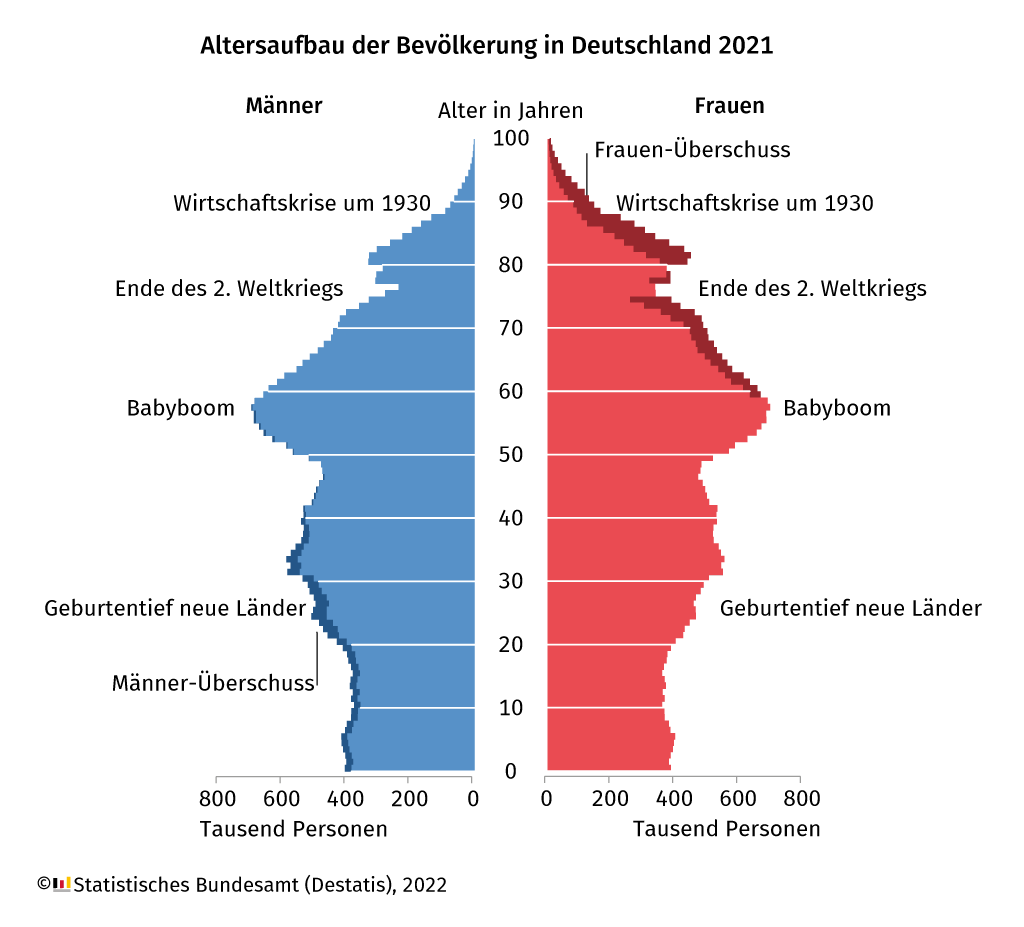
Der Konflikt beim Klima entsteht aber gerade nicht zwischen Boomern und Millennials, sondern interessanterweise sind es eher die ganz Jungen der Gen Z, die aufstehen. Sie haben sich noch nicht im Schatten der Boomer zwangsweise arrangieren müssen. Und sie wurden auch noch kaum durch kapitalistische Angebote korrumpiert. Sprich, sie fahren noch keine gehobeneren Mittelklassewagen. In den anfangs angesprochenen Kommentaren werden an dieser Stelle übrigens gerne Handys und Easyjet als Gegenwehr zitiert. Die Jungen gehen auf die Straße, weil sie ihre Zukunft durch die Klimakatastrophe akut bedroht sehen. Doch warum? Die Berliner Polizei rät den Klimaaktivisten aktuell im Zuge der Klebeaktionen “mit rechtsstaatlichen Mitteln, um politische Mehrheiten zu werben”, anstatt sich festzukleben. Und genau das ist ein Problem. Selbst wenn alle zusammen geschlossen wählen würden, hätte sie keine Chance gegen die absolute Mehrheit der Anzahl Boomer, welche ihnen dabei gegenüber stehen. Konkret laut Forsa-Umfrage würden Stand Ende 2022 42 % der Erstwähler die Grünen wählen. Das nützt aber nichts, wenn trotzdem noch Jahrzehnte die Älteren in der zweitältesten Gesellschaft der Welt den Ton angeben. Und zwar wortwörtlich. 52 % der Bundestagsabgeordneten gehören der Generation Babyboom an, welche aber nur 23 % der Bevölkerung ausmacht. Noch mehr vertreten die Generationen des Wirtschaftsbooms. Wie sollen Jungen da die geforderten politischen Mehrheiten erreichen? Zumal ihnen in ihrem Alter die finanziellen Mittel fehlen, sie generell keine Lobby haben oder sie noch keine Macht über Positionen oder Lebenserfahrung ausüben können? Mal ganz davon abgesehen, dass die Zeit nicht dafür reichen würde. Denn das Klima wartet nicht.
Tatsächlich sehen viele Ältere das Klima als Sache der Jüngeren an. Gönnerhaft belächeln sie, jede Generation habe ihre Themen und müsse sich daran abarbeiten. Aber das Klima ist nicht mit einem AKW, der eher moralischen 68er-Bewegung oder sonst irgendeinem sekundären Thema der Jugend vergleichbar. Es ist das alles verbindende, ultimativ existenzbedrohende und alle Generationen betreffende Thema. Das ist ein ganz anders Kaliber als Selbstfindung einer mehr oder weniger politischen Jugend. Das hier ist ein planetarer Notfall! Nach jahrzehntelangem Transparente halten und mahnen, verschärft sich der Ton jetzt. Und genau das framen konservative Politiker nun als “Radikalisierung”. Und diese wurden vor allem von Boomern gewählt. Ab dem Alter von 60 Jahren aufwärts entschieden sich 49 % an der letzten Bundestagswahl für FDP, CDU/CSU oder AfD. Und nur 9,5 für die Grünen. Aber genau wie bei der protestierenden Jugend kann man fragen, warum tun die das?
Ein guter Teil aus Gewohnheit. Ein anderer Teil, weil er davon profitiert. Die fütternde oder gar überschüttende Hand beißt man nicht. Ein Teil, weil es schlicht nicht mehr genug bis zum eigenen Tod interessiert. Und ein Teil aus Ideologie, weil sie grün nichts zutrauen (wollen). Aber DieGrünen als Partei kann man nicht absolut mit Klima gleichsetzten, sie sind nur ein kleiner Teil davon. Da kommt zu tragen, was Habeck kürzlich im ZDF sagte, dass die deutsche Politik im Vergleich zur USA oder anderen Ländern noch gar nicht aufgebrochen ist. Den Konservativen fehlt schlicht jedes Narrativ oder gar Konzept zur Klimarettung und oft sogar überhaupt ein Verständnis für das Klimaproblem. Deswegen wurden die Wind- und Solarindustrie aktiv vernichtet. Deswegen sind wir so von fossilem Gas abhängig geworden. Geiz war in den Krisen der Nullerjahre und der Zeit danach geil. Aber weit über das gesunde Maß hinaus. Der neoliberale Kapitalismus war nicht die Antwort auf die Finanzkrise, sondern deren Ursache. Und man kann nicht heilen, womit das Problem entstand. Und genau hier liegt das Grundproblem. Wenn man das Wort Kapitalismus in den Mund nimmt, fällt schon der ideologische Hammer. Aber tatsächlich müssen wir in der Klimafrage eben ganz grundsätzlich unser Lebenssystem hinterfragen. Und hier im Westen ist dieses eben auf die Pfeiler des Kapitalismus gebaut. Innerhalb dieses Systems haben fossile Konzerne eine absolute Übermacht. Und zwar so extrem, dass es schon längst nicht mehr demokratisch ist. 600 Erdöllobbyisten waren alleine an der Weltklimakonferenz, 15 % mehr als im Vorjahr. Die aktuelle Energiekrise zeigt dieses Ungleichgewicht. Wir sind politisch, finanziell, wirtschaftlich und persönlich im Erdöl gefangen. Und jetzt, wo sich eine zumindest technologische Befreiung abzeichnet, tut die fossile Übermacht alles, um ihren Einfluss zu retten. Dagegen sollten wir ankämpfen. Und das gelingt den Jungen alleine nicht, dafür müssen sie zwangsweise wegen ihrer zahlenmäßigen Unterlegenheit an die Älteren appellieren. Sie können aber nicht jedes Mal eine Liste vorlesen, wer alles aus welchen Gründen der angesprochenen Generation jetzt doch von ihrer Ansprache ausgenommen sei, weil er individuell doch genug Müll getrennt habe oder schon Elektroauto gefahren sei. Und eigentlich war sowieso beides nicht genug.
Dass diese Ansagen alle Boomer treffen, ist nicht mal so illegitim. Denn nein, Hilde und Heinz, ihr unterstützt die Jugend nicht mit Mülltrennen und Biojoghurt kaufen. Auch euer damals ausgefochtener AKW-Kampf (den der Klimablog übrigens mit der bisher umfangreichsten Beitrags-Trilogie hier gewürdigt hat) nützt gerade gar nichts. Ihr müsst leider auch bzw. wieder auf die Straße! Ja, einige von euch sind schon da, aber eine verschwindend kleine Minderheit, und die Jungen sind wie erwähnt sowieso selber schon eine. Zwar ist eine Mehrheit der Bevölkerung bereits für Klimaschutz – aber sie fordert ihn aus Bequemlichkeit und Furcht vor eigenen Einschnitten nicht ein. Eine Ampel kommt mit Klimazielen, die weit unter dem Pariser Abkommen liegen, einfach davon. Und selbst diese eigenen Ziele hält sie nicht ein. Die Union hat sich vorher sogar 16 Jahre lang gar nicht gekümmert, sondern einen klimafreundlichen Umbau der Industrie aktiv verhindert. Und das war der eigentliche Maskendeal des Jahrhunderts – welcher uns jetzt das Genick zu brechen droht. Dazu sitzt nun die FDP fortsetzend für die CDU weiter auf der Schuldenbremse. Superreiche werden nicht zur Kasse gebeten, obwohl einige von ihnen sogar darum betteln. Man schont Großkonzerne und wirft den Ölmultis Tankrabatte hinterher, welche dieses Jahr so hohe Gewinne schreiben wie noch nie in der gesamten Geschichte zuvor. Das ist so, weil eine sehr kleine Gruppe von mächtigen Entscheidern gegen die Interessen der gesamten restlichen Menschheit entscheidet. Wir können nicht von heute auf morgen den Kapitalismus abschaffen – ein Umbau geht hier nur langfristig, zum Beispiel mit einer Umverteilung von Macht, Stichwort Grundeinkommen. Die wenigen Jahre, die uns noch bleiben, müssen wir aber realistisch mit den Mitteln, die wir jetzt haben, bestreiten. Und das geht sehr wohl!
Überall wo der Markt nicht leistet, tat es schon bisher die Solidarität. Beispiele sind der Straßenbau – würden diese da gebaut, wo es sich lohnt, hätten wir viel weniger davon. Oder Wohnbaugenossenschaften, Arme sind kein oder kaum ein Geschäft. Oder öffentlicher Nahverkehr, der bringt gesellschaftlich viel, rechnet sich aber nicht selber. Dabei begann dessen Geschichte gerade besonders kapitalistisch. Von London über New York, Paris, Madrid bis Berlin gab es in den Anfängen private Aktiengesellschaften, welche die U-Bahnen bauten – oft gar für jede Linie eine separate. Sie wurden später alle verstaatlicht. In dieser Krise, in der Klimakatastrophe müssen wir uns gegen den neoliberalen Ausverkauf der letzten 30 Jahre zur Wehr setzten. Alles Überlebensnotwendige zumindest muss reguliert werden oder ganz in gemeinschaftliche Hände. Ein Beispiel: In London wurde die Straßenmaut gerade auf die ganze Stadt ausgedehnt – die Einnahmen werden zweckgebunden in den Nahverkehr investiert und damit an die ärmere Bevölkerung zurück verteilt – klimafreundlich! Aber all diese notwendigen Veränderungen kann die Jugend nicht alleine leisten, sie hat keine Mehrheiten und wird in nützlicher Frist auch keine gewinnen. Sie kann nicht einfach warten bis in 40 Jahren genug Boomer gestorben sein werden und es dann selber besser machen. Dann ist es für das Klima zu spät. Viele Boomer werden zudem selber zu Lebzeiten noch gewaltige Nachteile, sei es direkt durch den Klimawandel oder den dadurch erodierenden Wohlstand, erfahren. Es lohnt sich also auch persönlich, jetzt aktiv für Veränderung einzutreten. Weniger Kapitalismus ist nicht nur für das Klima gut, es wird nicht ohne ihn gehen, aber nur mit entschieden weniger davon. Man denke nur an die Pflege. Und das ist eure Aufgabe, liebe Erwachsene, ob Boomer oder nicht. Und nicht die von verzweifelt streikenden Schulkindern. Wer mit eigener Nachhaltigkeit argumentiert und sich deswegen von der Verantwortung ausnehmen lassen möchte, der ist auf die BP-Masche mit dem Fußabdruck hereingefallen, welche das Klimaproblem auf das absichtlich damit überforderte Individuum herunterbrach.

Alle müssen handeln. Egal, wie lange sie schon gearbeitet haben. Dieses “Erstmal leisten, bevor ihr demokratische Rechte wahrnehmen dürft!” ist bigott und das Gegenteil von demokratisch. Die Millennials müssen als Sandwichgeneration auch was davon tragen. Aber bedeutend weniger als eben ihre Eltern. Sie werden, wie jetzt die Boomer, trotzdem mitgehangen und mitgefangen sein. Generationenkonflikte sind wichtig und gut und gerade jetzt so wie vielleicht noch nie. Sich entrüstet abwenden ist einfach, wirklich hin stehen und nicht nur nachhaltiger shoppen, sondern politisch umdenken und fordern, das braucht Mut, das ist die Tat. Euer Leben war nur ein Fehler, wenn ihr jetzt nichts geändert haben werdet. Nur besser konsumieren reicht nicht. Klimakleber verurteilen ist einfach. Doch was sich wirklich nicht gehört, sind Politiker, die sich über internationale Verträge, das Bundesverfassungsgericht und die Rechte auf Unversehrtheit künftiger Generationen hinwegsetzen. Wer jetzt Gefängnisstrafen für Klimaaktivsten legitimiert, der versteht die Gefahr für die Demokratie und damit auch für die Fähigkeit, den Klimawandel zu bekämpfen nicht. Und der muss die eben genannten Politiker eigentlich auch einsperren wollen. Die neoliberale Selbstverantwortung führt nur zu persönlicher Überforderung und als Folge zu Paralyse – dem Ziel der fossilen Lobby. Und dafür instrumentalisieren die Jungen nun eben die Boomer. Denn nur Boomer können Boomer stoppen. Dafür müssen diese wütend werden und sich selber hinterfragen. Das ist nicht schön, aber effektiv.
Vor allem Solidarität, über Generationen hinweg, ein Kampf Gut gegen Böse und nicht alt gegen jung, kann was bewirken. Jedoch Fehler eingestehen, aus dem Auto aussteigen und mit weniger leben lernen, das muss man schon von sich fordern lassen. Egal, wie sehr man sich auf den versprochenen Lebensabend in Saus und Braus gefreut hat. Es muss jetzt halt auch mit Tempolimit gehen. Man kann auch auf dem Fahrrad sausen, im Zug brausen (weiter als man denkt) und das Alter auch ohne Kreuzfahrt genießen. Kritik annehmen ist nicht einfach, aber der einzige Weg zur Korrektur. Kleben wir uns alle besser zusammen, als weiter ans Erdöl. “Boomer” ist kein Angriff, sondern eine appellierende Einladung, die eigenen Positionen und vor allem Verantwortung nochmal zu überdenken. Und wenn man das wirklich tut, führt irgendwie kein Weg an ultraradikalem Klimaschutz vorbei, auch wenn es etwas kostet. Immer mehr Richter sehen das übrigens genauso, denn in der anderen Waagschale liegt der sonst unausweichliche Klimakollaps der Kipppunkte. Ein Anspruch auf Ausnahme, nur weil man sich eine Solardach leisten konnte, besteht nicht.