In March, we published a blog called “YubiKeys, passkeys and the future of modern authentication” which took a look at the evolution of authentication from when we first introduced the YubiKey back in 2008, to where the industry is heading with the adoption and adaptation of WebAuthn/FIDO authentication.
In recent months, there have been several news cycles about “passkeys.” This has caused some excitement, as well as some confusion, about what we as an industry and as a driver of authentication standards are doing to move beyond passwords.
Since then, we have received questions from our customers and partners for additional clarity around passkeys, which we highlight in this webinar and below in this post.
We are delighted that the FIDO Alliance and W3C WebAuthn standards we worked hard to create and enhance are being embraced deeply by device, operating system, and browser vendors and will be offered as a built-in authentication feature for everyone. The security tradeoffs they will be making in their implementations will allow consumer friendly, lower assurance use and recovery options that are far better than passwords alone, and are reasonable for non-critical services. Users who want to use high assurance, hardware-bound (non-copyable) credentials, like those in YubiKeys, can do so via the same WebAuthn functionality adopted by websites, and services can choose to require high assurance, verifiably hardware bound credentials for enterprise, sensitive, or high risk users, or for all users of a service. It all works with the same standards!
With that, let’s jump in to help answer the most popular questions we have heard, from Yubico’s perspective. This FAQ will continue to evolve and be updated.* Keep checking back for the latest answers around any passkey questions you may have.
What is a passkey?
Passkeys are like passwords, but better. They’re better because they aren’t created insecurely by humans, and because they use public key cryptography to create much more secure experiences.
But passkeys aren’t a new thing. It’s just a new name starting to be used for WebAuthn/FIDO2 credentials that enable fully passwordless experiences. These types of credentials are also called discoverable credentials, or sometimes resident credentials.
We like the new term and will use it, because it helps people understand they’re a password replacement with a simple term. “Passkey” is much more understandable by most people than “discoverable WebAuthn/FIDO credential.”
The first public mention of the term passkey to a wide audience was last year by Apple at a WWDC2021 talk where they introduced a “Passkeys in iCloud Keychain” technology preview to developers.
Passkeys refer only to WebAuthn/FIDO credentials, and not to the many other keys and protocols, such as PIV, OTP, or OpenPGP Card, available in the YubiKey 5 Series.
Is ‘passkey’ the new name for FIDO and WebAuthn credentials?
Passkey is a term that the industry is rallying around for FIDO credentials that can fully replace, rather than only augment, passwords. These are called resident or discoverable credentials in the specs. We think “passkey” is a better term than “discoverable webauthn/fido credential,” because it evokes its ability to replace passwords in an accessible way.
Passkeys in YubiKeys have been supported since discoverable credentials were added in the WebAuthn/FIDO standards around 2018. However, it’s important to note that passkeys in YubiKeys are not copyable, meaning the passkey is bound to the YubiKey.
See below question: “How are passkeys different from YubiKeys?” for additional information.
Why is the term passkey in the news a lot recently?
Some Platform/OS vendors started shipping support for fully passwordless experiences using external authenticators like YubiKeys, and also using the security focused hardware built into their devices such as TPMs, as early as 2019.
Work is still ongoing on different platforms and browser combinations to complete robust passwordless experiences with both internal and external authenticators. Platform vendors have started publicly signaling their intent to complete that work, and have reaffirmed their ongoing commitment to standards bodies such as the W3C and FIDO.
Expect to see a lot more about passkeys from platform vendors such as Apple, Google, and Microsoft, as well as from external authenticator vendors such as Yubico, in the news once the implementations ship and evolve over the next year or so.
At the highest level, there are two new things coming in order to increase service and consumer adoption of WebAuthn/FIDO:
Android and iOS phones that have passkeys on them can be used, mainly via bluetooth and the internet, to log into other devices such as laptops.
This is exciting, and has always been part of Yubico’s vision for the protocols we’ve worked to create and proliferate.
Yubico helped create the original bluetooth FIDO transport and even built a proof of concept bluetooth YubiKey. That helped us collectively learn how unreliable some bluetooth implementations and features can be in the wild. This new “phone as security key” functionality uses what was learned from that protocol, and uses internet connectivity to mostly avoid bluetooth except for proving proximity. (If you’re feeling curious, the protocol is called caBLEv2, and is soon to be renamed to the “hybrid” transport because it supports multiple proximity options and multiple reliable transport options)
Platform FIDO credentials will soon by default be automatically copied to other devices logged into the same platform provider’s password manager service, in the same way that passwords are today.
This was done to help ease recovery from the loss of a device, but comes with security tradeoffs. Those tradeoffs may be OK for consumers in some environments, but are unlikely to meet the needs of enterprises with security or compliance needs.
How these new things work are still in beta and subject to change, but you can expect to see a lot more about them as implementations near completion. You can also read more in our previous blog post on this topic.
We’ll make sure to continue to publish and update our take on these features as they ship, and will also provide detailed developer guidance to help navigate the protocol and code changes that will be needed to take full advantage of the flexibility afforded by these changes, while ensuring appropriate security for the applications that depend on them.
How are passkeys different from YubiKeys?
They’re the same, and they’re different.
They’re the same because YubiKeys have had the ability to create these passwordless enabled FIDO2 credentials (passkeys) since the YubiKey 5 Series became available in mid-2018. Currently, YubiKeys can store a maximum of 25 passkeys. We are evaluating increasing this in the future because of the likely increase in fully passwordless experiences across the web that require them.
They’re different because Platform created passkeys will be copyable by default using the credentials for the underlying cloud account (plus maybe an additional password manager sync passphrase), whereas passkeys in YubiKeys are bound to the YubiKey’s physical hardware where they can’t be copied.
We like the term passkey and plan to use it. Because many things are being talked about at the same time, we will try to use terminology consistently to make the differences or similarities clear depending on the situation. This is still a work in progress across the industry, and we will adapt as things change.
Here are a couple of examples that may help for now:
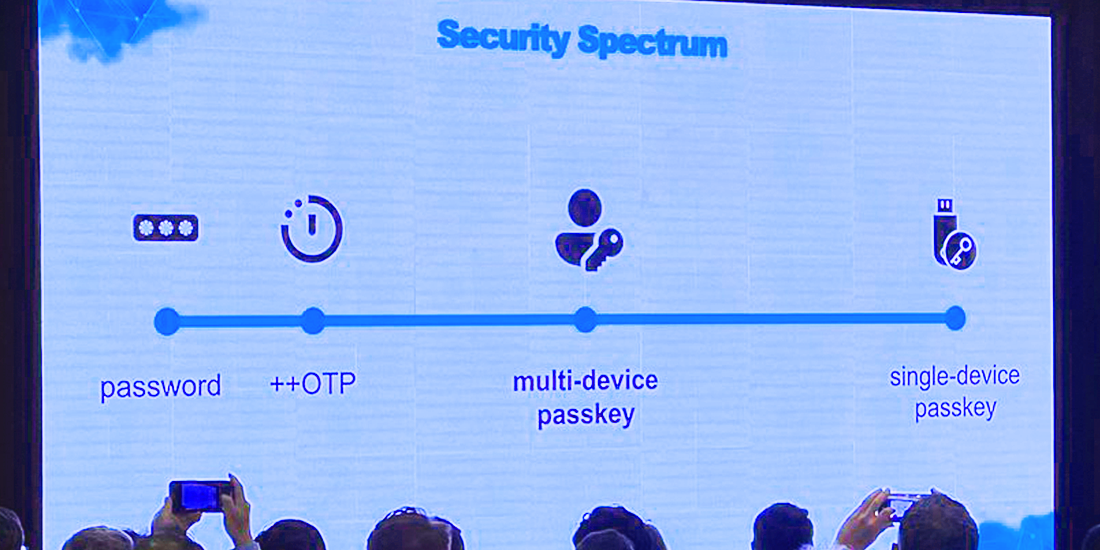
Copyable passkeys are often called “multi-device,” “syncable,” “backup enabled,” “shareable,” or similar terms. Some of these terms are easily confused with the WebAuthn/FIDO concept of an authentication device’s “attachment” which can have the values “platform” or “cross-platform.” We prefer to use “copyable” because it clearly describes what can be done with the credential, but does not imply any goodness or badness and does not use overloaded or confusing terms. Non-copyable passkeys are sometimes called “single-device passkeys.”
We prefer to use “hardware bound” because it describes the location of the credential clearly without implying the credential can only be used with one device, as opposed to from the one authenticator to which it is bound with any device/platform.
What are the security tradeoffs between copyable and hardware bound passkeys?
Hardware bound passkeys, such as the ones that are on YubiKeys, are the gold standard for modern, phishing-resistant authentication and security. They are very easy to reason about and build systems around: no device, no access. However, for consumers registering credentials to many sites, managing multiple authenticators so you have an up to date backup can present challenges.
Copyable passkeys can make it easier to recover in the event of a lost device if the user can obtain another device that works with the cloud syncing service they used, and can recover their account. Using that copyable credential proves that there was access to a device which was logged into the user’s cloud account. This can be a useful additional signal, but does not provide the same level of security as a hardware bound passkey.
We’ll expand more on this in future content for different audiences as implementations ship.
We hope that a consumer focused push about passkeys will entice more services to enable support for WebAuthn/FIDO.
Copyable passkeys offer roughly the same security as “Sign-in with Google/Apple,” plus an additional key sync password.
Today, banks, enterprises, and those wanting or needing high security do not rely solely on the security of cloud accounts provided by Sign-in with Google/Apple via federated login protocols like SAML, OpenID Connect, or OAuth. Even if copyable passkeys are used to provide that association instead, the security provided will still be insufficient for high security needs.
The multitude of high security use cases faced by many organizations need more protocols than just FIDO. These organizations need the security guarantees and cryptographic attestations provided by hardware backed credentials to know their systems are safe, and to be able to prove it.
Attestation is also the only way to achieve high confidence that a given credential is hardware bound.
Services should continue to request, store, and use attestation information to make risk decisions based on the type of credential that is used. Our detailed guidance on attestation is provided in more detail on our developer site.
More use of WebAuthn/FIDO hopefully means that eventually fewer people will use, and fewer services will have to deal with creating and securing dangerous username and password-based systems.
We are happy that the standards we co-created and have worked on improving for years are seeing even wider adoption, and are hopeful that these motions will continue to reduce harm and advance our mission to make the internet safer for all.
———
We know that there are already more questions to answer, and invite you to view our webinar: “Passkeys and the future of modern authentication: Q&A with Yubico’s CTO.” During the webinar, we dive even deeper into the topic to help bring clarity, eliminate confusion and answer any specific questions that you may have.
A lot has happened in the world of authentication and security since we first introduced the YubiKey back in 2008. In this blog, we’ll review where we are in the world of open authentication standards, discuss the addition of the ‘passkey’ term, and share what the future holds for modern WebAuthn/FIDO authentication.
Creating a global standard
To bring advanced security to every person and every site, Yubico created Universal Second Factor (U2F) with Google in 2012, and moved it to the FIDO Alliance in 2013 to deliver a global standard that makes the internet safer for all. This standard brought the security of public/private key cryptography in hardware to the masses, and showed it requires little more than a USB device and port, or NFC for mobile, and a website to support it.
We continued to innovate and work with our peers in standards bodies to expand U2F into FIDO2/CTAP2 and W3C WebAuthn. These evolutionary standards support all existing U2F devices, and additionally add the option to support device PIN, biometrics, and authentication technology built into devices like phones and computers, and locally discoverable credentials to enable experiences without usernames or passwords at all.
Where are we now?
Through this work on standards and with platforms, we achieved universal support on all major desktop and mobile platforms – plus or minus a few corner cases that are currently being addressed – to create a solution that delivers phishing-resistant authentication everywhere: WebAuthn/FIDO.
Alternative multi-factor authentication (MFA) solutions like SMS, mobile push notifications, and one-time passwords (OTP) have exploitable technical flaws, or make it trivial for “man-in-the-middle” phishing attacks to trick people. This is exactly what attackers are doing today as MFA mechanisms beyond usernames and passwords become more prevalent.
We’ve spent years working with the FIDO Alliance, the World Wide Web Consortium (W3C), and platform vendors to further enhance the experiences that are possible with WebAuthn/FIDO and we’re excited about what the future has in store. We will highlight three of these innovations and additions today:
Terminology changes
There are some terms that are changing, and these will hopefully be easier to understand for users and developers alike.
Security Keys
The phrase “Security Key” has already become the standard way to describe an external FIDO-enabled hardware device, such as a YubiKey, that contains WebAuthn/FIDO credentials. However, “WebAuthn/FIDO credential” doesn’t exactly roll off the tongue, and is almost impenetrable for non-experts.
Passkeys
“Passwords” is already a universally understood term. Because these WebAuthn/FIDO credentials can replace passwords, the industry has introduced the term “passkeys,” which was publicly referenced last year in Apple’s ‘passkeys in iCloud Keychain’ presentation and in a recent WIRED article. For the remainder of this post, we’ll use passkeys to refer to any WebAuthn/FIDO credentials, regardless of if they’re on a Security Key, bound to your device’s hardware, or even just stored in files on your device which are copied around by a cloud provider.
As this naming has begun to proliferate, we have received many inquiries from our customers and partners on defining passkeys, how these work as additional authentication options, and what expanding WebAuthn/FIDO authentication options may look like, and we cover this evolving story below.
Bluetooth improvements, and phones as Security Keys
Yubico built a prototype bluetooth authenticator and worked with others to create the first FIDO bluetooth transport. Our ultimate decision was not to ship a production bluetooth YubiKey, and that was based on what we learned during this effort:
Bluetooth pairing has bad security and usability properties
Batteries must be charged regularly and carefully to maintain their capacity, or be replaceable, which compromises a device’s robustness and requires replacements to be available exactly at the moment of need
The bluetooth protocol and hardware implementations are complex, and must be kept up to date to address vulnerabilities that are discovered
The state of bluetooth hardware, drivers, and OS support is inconsistent, and is unreliable
Our conclusion was that the only devices that make sense to use as bluetooth Security Keys are phones. Phones in particular seem suitable because they:
almost all have cameras that can be used to ease bluetooth pairing
are mostly charged carefully and regularly by their owners
already have mechanisms to update their software and firmware regularly
are likely to be with the owner much of the time
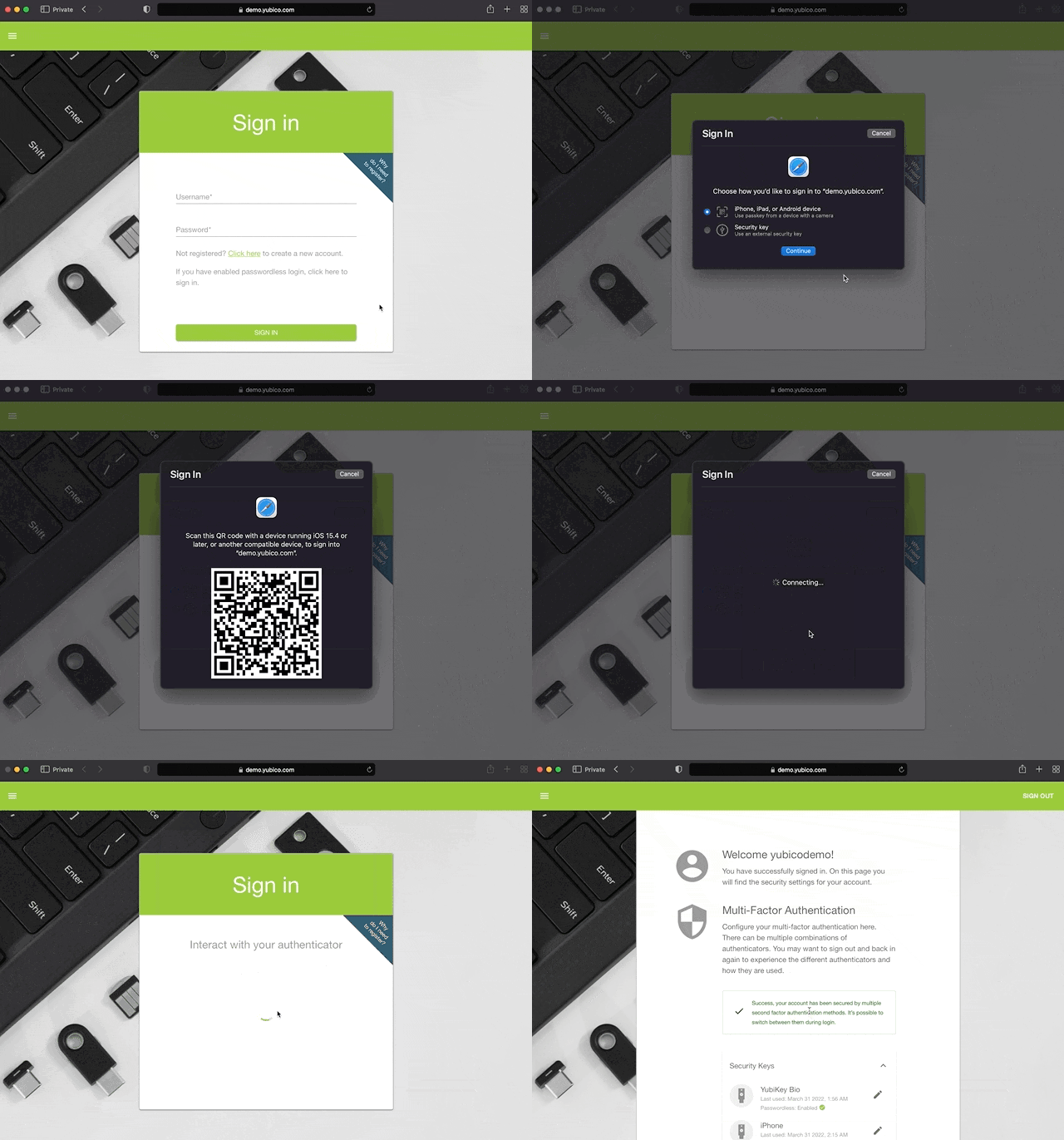
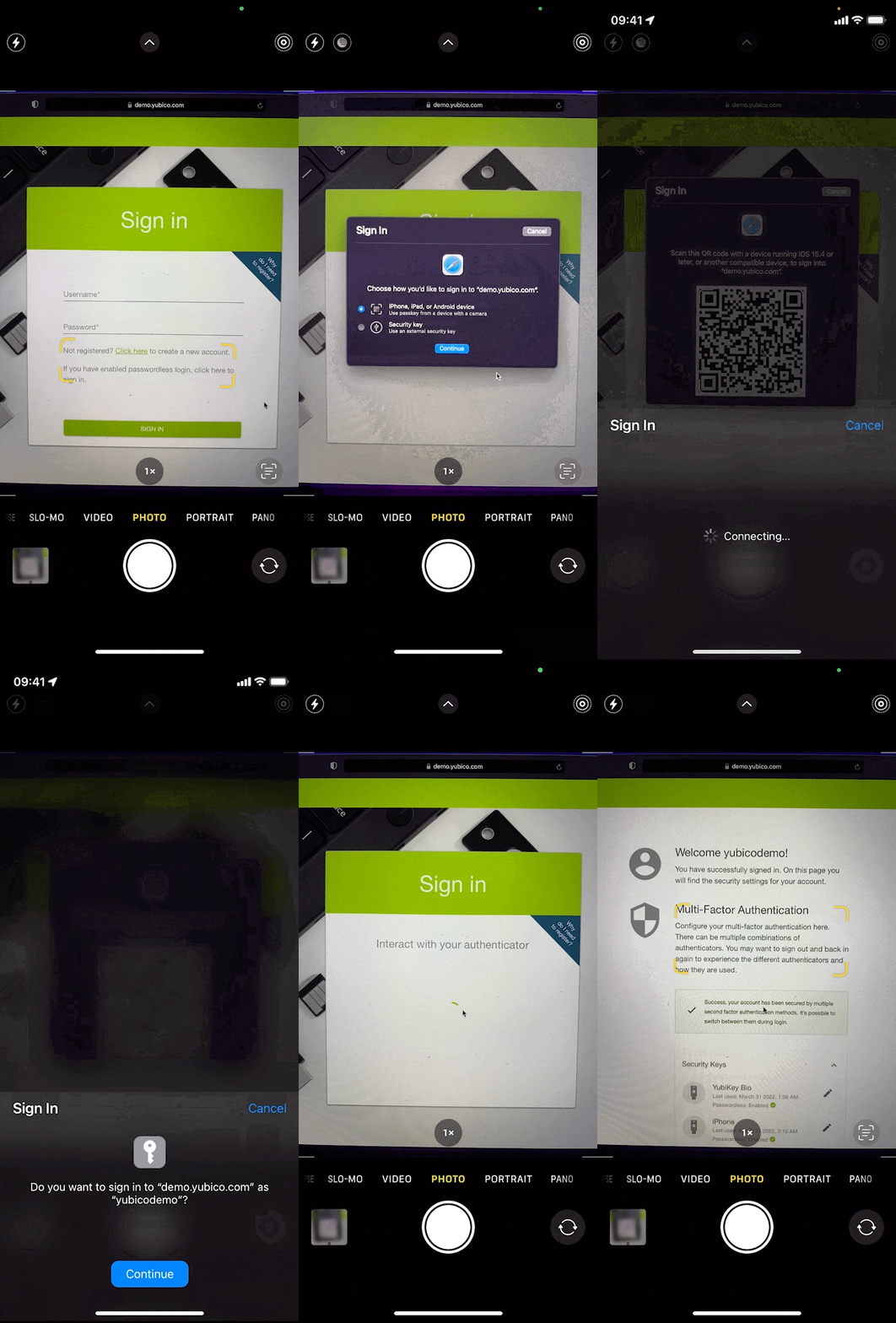
Phones as authenticators was part of our original vision, and we have been working towards this for a long time. How do we enable biometrics built into phones to be used to authenticate on other devices the same way we enabled them to be used for logging in on the same device with FIDO2? After many years of work in the standards bodies and by the platforms, we think this is almost ready. Camera-assisted bluetooth pairing is now being enabled by major browsers and OSs, the platform bluetooth quirks have been mostly fixed or worked around from years of testing, upgrades, and bug fixes, and the bluetooth+network transport is now well tested.
Here’s what this looks like today on macOS/iOS when enabled (subject to change):
This is exciting, but phones are fragile, expensive, replaced often, and are sometimes prohibited by policy or law from being used. That means the most challenging part of using Security Keys – re-registering them everywhere when they’re lost, or transitioning to a new one – are much more frequent for phones.
Because of this, we recommend a phone be configured as one of several authenticators added to your accounts.
Copyable, multi-device passkeys
To date, credentials created by Security Keys and Platform Authenticators have been single-device, i.e. bound to the hardware they are created on. These are single-device passkeys. They have good security properties and are easy to understand and build trustworthy systems around: no device, no access.
What if we added a credential that can be copied by not binding them to the hardware they were created on? These copyable “multi-device passkeys” are in beta on platforms today.
Copyable credentials can help solve some of the challenges exacerbated by using phones as Security Keys by enabling more seamless device transition and device loss/destruction recovery. However, this comes at the cost of reduced security.
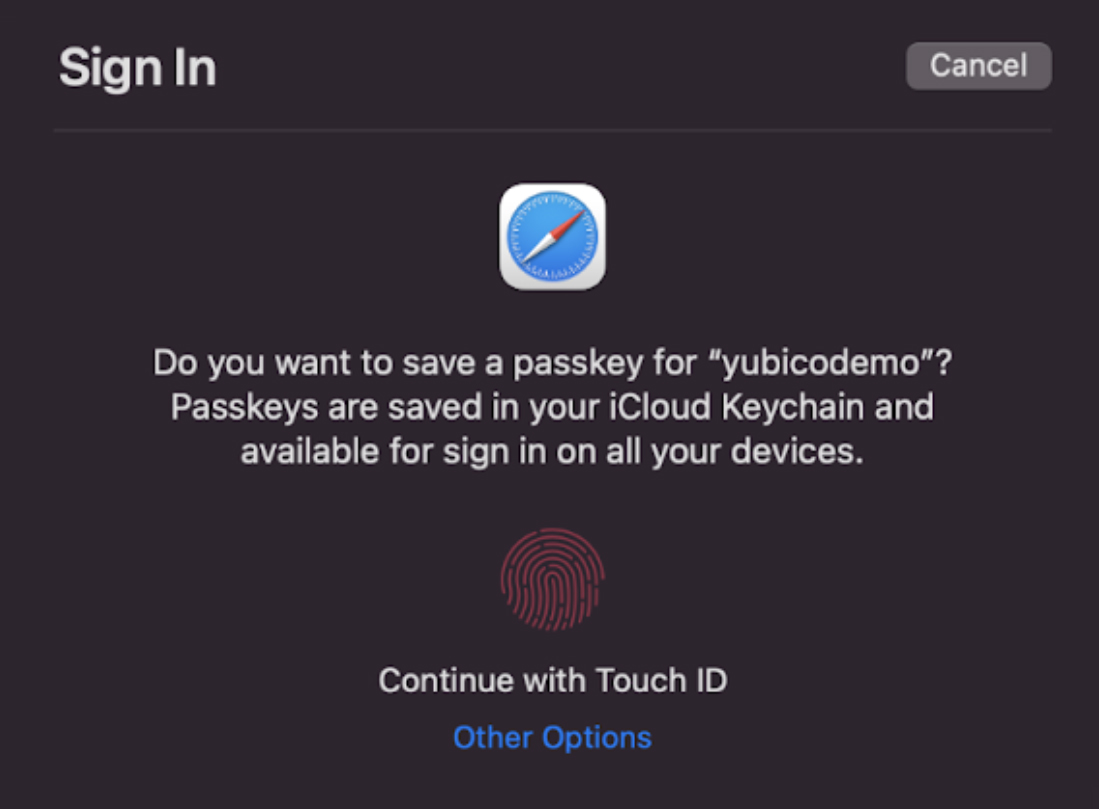
Platforms will accomplish this by using the built-in password manager to copy multi-device passkeys to other devices with the same platform password manager and cloud account:
That means unless phishing resistant authentication is used to protect the account that syncs passkeys, people can still be tricked. Fortunately, phishing this type of sync mechanism must target robust account systems run by platform vendors, and can often optionally be configured in a way that people might notice something is unusual. Unfortunately, people are used to computers being unusual, and very few of these account systems can be configured to use phishing resistant authentication. We hope this situation improves in the future with more providers offering systems that allow only phishing-resistant authentication, like Google’s Advanced Protection Program.
Ultimately, for those who would otherwise use only a password, multi-device passkeys are easy to use, and are a step in the right direction that can reduce overall harm caused by using passwords alone. Because attackers already copy and misuse server or user credentials, websites can also choose to assign different levels of trust to copyable credentials versus those that are hardware bound, as appropriate to their needs.
More authentication options for different needs
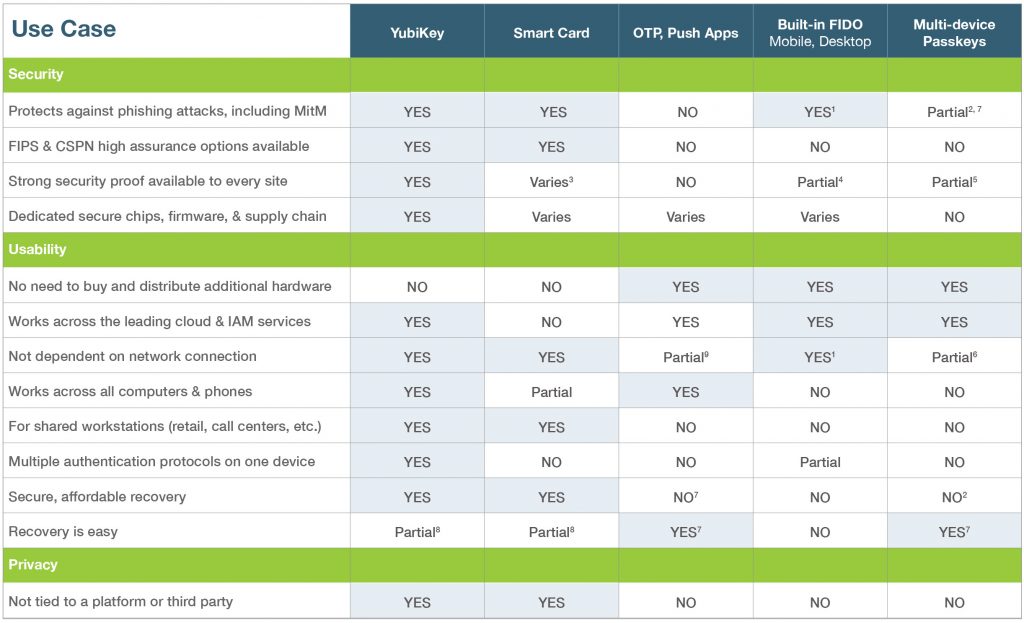
We know that not everyone can use the most advanced security in all scenarios, because the world is full of complex technology, and evolving threats. Here’s our take on the tradeoffs as of today:
The YubiKey was created to make stronger authentication available and easy to use for all. That’s why it can act as a WebAuthn/FIDO authenticator, a Smart Card, an OTP device, and much more, all in one device. It’s a robust, affordable “key to many locks” that stays with you as your technology and threats change.
We hope these additional options will help more sites adopt WebAuthn/FIDO. That will benefit everyone regardless of if they’re using copyable, multi-device passkeys, or stronger solutions like YubiKeys, where passkeys are bound to the YubiKey hardware.
More options and more widespread support ultimately allows consumers or enterprises to choose which authentication methods best suit their needs. If you’d like to talk to our sales and solutions teams about what a solution involving YubiKeys might look like for your specific needs, please let us know.
Overall, we’re excited to see the standards we’ve collectively crafted reach so many, and continue to protect against modern threats. Now go turn on MFA everywhere you can!
Footnotes:
1 For logins from the same device. On some phones, early support is available to log in on other devices that support bluetooth, but it also requires an active internet connection from both devices in some current implementations.
2 On the sites where they are used, but the methods for copying them to other devices can be subject to phishing. See 7.
3 Some smartcards, like the OpenPGP Card and PIV implementations in YubiKeys, support attestation. However, smartcard attestation is mostly limited to enterprise use cases and not available to all sites.
4 Support for attestation varies, and some cover a wide range of implementations with varying security properties.
5 If attested, it’s unclear what can be attested about copyable data such as multi-device passkeys.
6 A network connection, a shared password manager implementation, and cloud account are required to sync credentials. See also 1 about using phones with other devices.
7 Systems that allow credentials to be copied can be phished unless YubiKeys or other phishing resistant technologies are the only way to access the copying mechanism.
8 Multiple registered YubiKeys allow easy and secure self recovery. It’s easier to do this with SSO or social login than with many sites.
9 Push apps need network connectivity. OTP apps require validation to be available on the system or app being accessed; typically this means an online network connection to an OTP validation service like YubiCloud, or sacrificing security by copying the shared OTP secret to more places.