Article note: #WTH?!
Offener Brief: VW muss Kinder-Tracking stoppen!
 Offener Brief an VW, Uvec, AfD und Co: „VW muss Kinder-Tracking stoppen!“ Schutzranzen
Das Video ist schon etwas älter, die Technik, mit der hier in einem indischen Restaurant das ausgerollte Brot zum Ofen gelangt, deshalb aber nicht weniger beeindruckend.
(Direktlink, via BoingBoing)

When I was a teenager I remember reading a science-fiction story which predicted that by the 21st century, information would be piped directly into the brain. In this story, a character encountered that most archaic object, an old-fashioned book, and felt appalled that people in the 20th century had been forced to endure so much physical discomfort, holding books and turning their pages manually — or trying to prevent the pages from turning if there was a breeze.
Well, here we are in 2006, and yet another science-fiction prediction has failed to pan out. While we’re waiting for wetware implants, we’ll just have to make do with a stopgap solution: A plastic thumb aid.

-- KK
[This is a Cool Tools Favorite from 2006]
The Thumb Thing ($3+)
Available from Amazon
Während eines 8-stündigen Einsatzes mit 40 Beamten wurde insgesamt 12 Gramm Cannabis sichergestellt. „Die Maßnahmen werden fortgesetzt“.

(via Ismail Küpeli)
Devices running Linux are affected by Spectre and Meltdown vulnerabilities as much as their Windows counterparts.
Development teams work on updated kernels for the various distributions, and users need to update browsers and other software to protect data against potential attacks.
We talked about identifying whether your Windows PC or web browser is vulnerable already. A recently published script does the same for Linux systems. You may use it to check whether your Linux distribution is vulnerable.
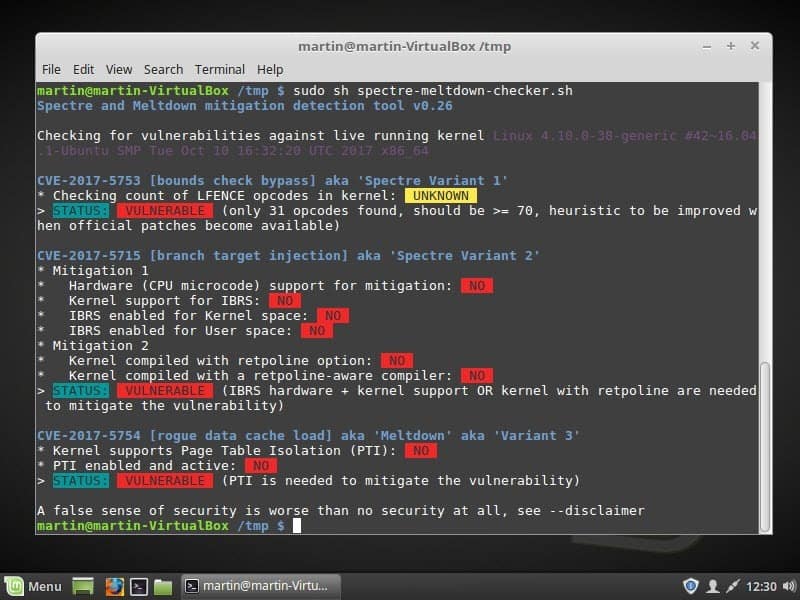
You run the script if you want to know whether a Linux distribution is vulnerable to Spectre variant 1 and 2, or Meltdown attacks.
Check it out on the official GitHub project page. You find the source there so that you may analyze it before you run it on a system.
You may run the script without parameters to check the running kernel or use options to check a kernel that is not used.
A simple shell script to tell if your Linux installation is vulnerable against the 3 “speculative execution” CVEs that were made public early 2018.
Without options, it’ll inspect you currently running kernel. You can also specify a kernel image on the command line, if you’d like to inspect a kernel you’re not running.
Here is how it works:
The script checks each variant individually and lists its finding. If you get “status: vulnerable,” the system is vulnerable to the variant. The checks for Spectre variant 2 and Meltdown reveal additional information.
A system that is vulnerable needs a kernel update to protect against potential attacks exploiting these vulnerabilities.
How you get the kernel update depends on the Linux distribution. You select Menu > Administration > Update Manager in Linux Mint to check for available updates. The kernel is not available yet, however.
Once you run the update, rerun the script to verify that the system is no longer vulnerable.
The Spectre & Meltdown Checker supports the scanning of offline kernels as well. Use the parameter −−kernel vmlinux_file for that and if available −−config kernel_config and −−map kernel_map_file as well
Ghacks needs you. You can find out how to support us here or support the site directly by becoming a Patreon. Thank you for being a Ghacks reader.
The post Check Linux for Spectre or Meltdown vulnerability appeared first on gHacks Technology News.