Article note: *schnellmalmitgemacht*
(Symbolbild) Public Domain Laura Aziz—

Menschen können im Laufe ihrer Arbeit auf Informationen über Handlungen stoßen, die „eine Bedrohung oder Schaden für das öffentliche Interesse darstellen“. So begründet die Europäische Kommission ihren Aufruf an EU-Bürger und Interessenvertreter, ihre Meinung zur Verbesserung des Whistleblower-Schutzes mitzuteilen.

Die entsprechende Umfrage bleibt noch bis zum 29. Mai diesen Jahres geöffnet. Die Fragen behandeln unter anderem Immunität gegenüber Strafverfolgung, aber auch Schutz für Whistleblower am Arbeitsplatz.

Article note: *habenwill!*

This ring houses two rotating “counter” rings, each with digits 0-9. The counter rings are held apart by a spring, and kept in position by the form of the outer housing. As you rotate the counters, they glide smoothly into place with a satisfying “click.” One position in the ring circumference has a contrasting color (the base color of the metal) which can be used to identify a selected two-digit number.

The ring is made of surgical stainless, with PVD coating. They come in multiple colors and sizes, and cost about $25. I’ve had this ring for a few months now, and have had a lot of fun handing it to friends and asking them what they think it is for, and where they think I bought it. So far, no one has guessed right on both counts. In fact, no one has guessed its raison d’être, which is for game-players to keep track of points, particularly in Magic the Gathering.

I figured the cool dragon etched into the inside of the ring might give this gamer-function away, but so far, nope. I actually bought the ring at a knitting shop. The only friend who guessed this was a knitter, to whom its functionality for knitting was obvious: keeping track of the line of a pattern you are working on. I generally don’t use this ring for counting, but I think it could be “handy” as a low-tech analog tracking device…miles walked, ounces of water consumed… It could also work well as a people counter for someone working the door of a small space.

I mostly use it to fidget while on the phone, or during meetings. It is great for that, discreet, and a good alternative to doodling if you like some minor motor activity to accompany your active listening. Or you could count buzzwords, the number of times people use “literally” to mean “figuratively”, hesitation “ums” (a favorite pastime of students in lecture halls), etc. Other versions of this ring are also tempting purchases, including the Futhark Runes Ring (great for the gamer or linguaphile on your list) and the Alignment Ring, in case your friends haven’t already guessed.

-- Laura Welcher

Clicking Counter Ring ($25)

International Amazon link

Available from Amazon

Article note: Mal schön das PPA umstellen …!
The KDE Connect Indicator (fork) PPA maintainer is not available any more, and I was asked to create a new PPA. 

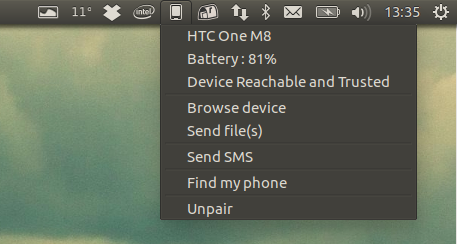
KDE Connect Indicator

Since I'm a KDE Connect Indicator user myself, I couldn't say no, so I created a new KDE Connect Indicator PPA, which provides packages for Ubuntu 17.04, 16.10 and 16.04 / Linux Mint 18.x.

I didn't upload packages for Ubuntu 14.04 / Linux Mint 17.x because I couldn't build the latest KDE Connect for this Ubuntu version due to newer dependencies, and Ubuntu 14.04 has a pretty old KDE Connect version.

The KDE Connect Indicator (fork) developer is also looking for someone that can create and maintain Flatpack and Snap packages. If you can help, see THIS bug report.

In case you're not familiar with KDE Connect Indicator, this is an indicator / tray for KDE Connect. Using KDE Connect, you can mirror Android notifications on the desktop, easily send and receive files from an Android device to your desktop (and the other way around), control desktop media players from Android, share the clipboard between your Android device and desktop, and more.

Check out our KDE Connect Indicator fork article for more information.


Install KDE Connect Indicator fork in Ubuntu or Linux Mint via new PPA


As a reminder, KDE Connect depends on quite a few KDE packages. You may want to save the KDE package list that's installed to make it easier to remove in the future, in case you want to remove them ("apt autoremove" won't remove all of them, at least in Ubuntu).

To add the new KDE Connect Indicator fork PPA and install the app in Ubuntu 17.04, 16.10 or 16.04 / Linux Mint 18.x, use the following commands:
sudo add-apt-repository ppa:webupd8team/indicator-kdeconnect
sudo apt update
sudo apt install indicator-kdeconnect

You can also download the latest KDE Connect Indicator deb from GitHub, but you won't receive updates through your system's update manager. For Ubuntu 16.04 and 16.10 / Linux Mint 18, you'll also need a newer KDE Connect version for the indicator to work. KDE Connect 1.0.3 is available for Ubuntu 16.04 / Linux Mint 18 and Ubuntu 16.10 in the PPA.

If you encounter bugs, report them @ GitHub.